Easily switch browsers to Opera
Opera can be your new browser, with all of your bookmarks, passwords and autofill data, in just a couple of clicks.
See more
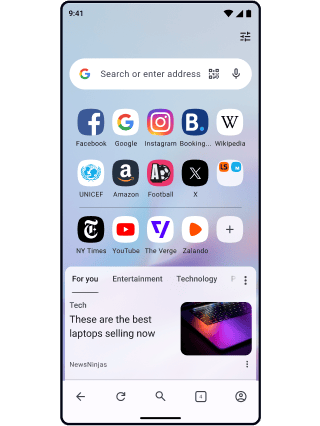

How to change internet browsers to Opera from Chrome, Firefox, or Edge
When you switch internet browsers to Opera, you will automatically be prompted to import whatever data you want from your old web browser. If you are already using Opera, you can import everything by following the steps below. Lose nothing, gain everything when you switch internet browsers.

Click the Opera logo
Launch Opera, click the Opera logo in the top-left corner and click Settings (Preferences on Mac).
Import your data
Under Synchronization, click Import bookmarks and settings. You can choose which data to import, as well as which browser to get it from.
Set your default browser
While in Settings, select Make Opera my default browser. Learn more about configuring Opera.
Why Opera
Here’s some great reasons to switch web browsers to Opera from Chrome, Firefox, or Edge. Meet your perfect online companion.
Speed
Opera’s Speed Dial, Ad Blocker, Instant Search, currency/time-zone/unit Converters and more allow you to browse the web faster than ever before.
Flow
Flow connects your computer and phone or tablet to share links, notes, pictures, videos and other files.
Variety
Opera offers multiple browsers customized to your needs and devices. Computer, mobile, gaming, beta and more.
Integrated
With useful features built right in, there’s no need to download and set up extensions or add-ons, making browsing with Opera not only fast, but seamless.
No ads
The built-in Ad Blocker not only removes distractions and speeds up loading, but also includes cryptocurrency mining protection. No add-on required.
Privacy
Opera integrates a free, complete and unlimited VPN service, allowing you to focus on the content that matters without privacy or security concerns.
Customization
Easily customize your web browser to meet your needs, find thousands of extensions in the Opera add-ons store, and use Chrome extensions as well.
Synchronization
Download the Opera web browser for the operating systems on each of your devices. Then synchronize your Opera browsers and switch devices easily.

Millions of people worldwide choose Opera browsers
Tab Islands
Save space, keep organized, and switch contexts easily with Tab Islands.
Workspaces
Organize tab groups in separate customizable workspaces.
Split Screen
Split your screen between two tabs.
Tab Emojis
Make your tabs stand out more with emojis, and identify them easily.
X
Explore and tweet conveniently with a better view on desktop.
Pinboards
Save and collect web content easily, share it visually.
Use Instagram in Opera’s sidebar while you browse.
Search in Tabs
Work and browse more efficiently with many open tabs.
Ad Blocker
Browse with less distractions and load websites faster.
Lucid Mode
Enhance online videos and images in one click.
Facebook Messenger
Use Messenger on desktop in Opera Browser.
Personal News
A customizable and convenient newsfeed on your start page.
Snapshot
Easily capture, edit and share your snapshots from webpages.
Flow
Instantly send files, links and notes between your devices.
Video Popout
Pop out online videos so they float on top of webpages as you browse.
Opera Bookmarks
Easily manage, customize and keep your favorite places online.
Free VPN
Browse comfortably with enhanced privacy and security, for free.
TikTok
Browse, watch and upload TikTok videos on desktop in Opera Browser.
Opera Sync
Synchronize the Opera browsers on any of your devices.
Easy Files
Attach files in one click without digging through folders.
Battery Saver
An easy way to noticeably extend your laptop’s battery life.
Unit Converter
Automatically convert time-zones, currencies and units of measurement.
Music Player
A world of music and podcasts at your fingertips.
Opera AI
Chat and create for free with built-in AI in Opera.
VPN Pro
Browse privately anywhere with VPN Pro.
Chat in WhatsApp on desktop in your Opera Browser.
Telegram
Chat in Telegram on desktop in Opera Browser.
01
You deserve a better browser
Opera's free VPN, Ad Blocker, and Flow file sharing. Just a few of the must-have features built into Opera for faster, smoother and distraction-free browsing designed to improve your online experience.