Tab Islands
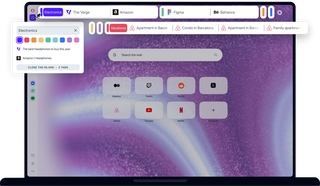
Benefits of Tab Islands
Got lots of tabs? Save space, keep organized, and switch contexts easily with Tab Islands.
Automatic
New tabs automatically start a tab island at the top of the Opera browser. You can also click the + button to instantly start a fresh tab group.
Organized
Every island features a customizable name and distinct color tag. Click the handle to collapse the group, saving space so you can focus better.
Efficient
Tabs can be easily dragged and dropped between islands. To select and manage multiple tabs at once, simply press Shift+click.
Intuitive
Separate islands help you switch browsing contexts in just one click. It makes finding the exact tab you need in Opera fast and simple.
All browsers should be this easy
Tab Islands is such a simple and intuitive way to group tabs and keep your browsing organized, you’ll never again be overwhelmed by tabs.
Tab Islands arranges your tabs into groups by browsing session, so that related tabs are naturally grouped by context. Shop, research, work, relax - switch between tab groups in one click and stay focused.

A major space and time saver
Instead of displaying 30+ separate tabs, Tab Islands shows them as a few tab groups, visually connected and color-coded for easy reference.
Hover over the island handle to add a custom name or pick a distinct color. Then, simply click the colored handle to collapse the island and enjoy the clean space it creates.
Chaos organized
Just like Opera’s Workspaces feature, Tab Islands lets you keep tabs organized without effort, keeping your sidebar and top bar clean.
Need to tweak your setup? Drag and drop tabs effortlessly between islands. You can also right-click for context-menu options or use Shift+click to manage multiple tabs at once.