Ad Blocker
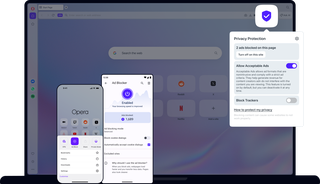
Benefits of Ad Blocker
Built on powerful uBlock-compatible technology, Opera’s Ad Blocker removes interruptions at the source for a faster, cleaner browsing experience across desktop and mobile.
Clean
Browse a cleaner web without popups, video interruptions, or disruptive layout-shifting overlays that break your focus.
Efficient
Speed up page loading by blocking background scripts and requests that consume data and drain battery.
Private
Protect your browsing by blocking trackers natively, no need for third-party extensions that may process your data.
Flexible
Control Ad Blocker with simple toggles, set site exceptions, and allow non-intrusive ads to support creators.
Load pages much faster
On both mobile and desktop, Opera Ad Blocker detects and blocks intrusive ads when you first request a webpage. This all happens under the hood, so all you see is how much faster webpages load.
Tests show that Opera loads content-rich pages up to 90% faster with ad blocking enabled. It's also noticeably faster than using ad-blocking extensions.

Stop video interruptions
The Ad Blocker engine is optimized to block video ads effectively on modern websites. It helps prevent video ad requests from loading, reducing interruptions before playback begins.
Whether it’s pre-roll or mid-roll ads, the upgraded filtering is designed to catch more of what gets in the way of viewing.
No add-ons required
Opera’s Ad Blocker is fully integrated into the browser on mobile and desktop. There is nothing to install, download, or configure.
The upgraded engine uses advanced filtering designed to keep up with modern websites and evolving ad formats, while staying simple to use.
You can also allow ads on any site you choose with a single click.
Free Ad Blocker for mobile and desktop
Opera AI
Vertical Tabs
Google Services
Free VPN
Music Player
Easy Files
AI Image Generator
Browser AI
Split Screen
Snapshot
Tab Islands
Tab Emojis
Workspaces
Search in Tabs
VPN Pro
Spotify
Translate in Opera
Spotify Billions Club
Integrated messengers
Slack in Opera
Discord in Opera
Bluesky in Opera
Facebook Messenger
Telegram Messenger
Integrated Social Media
X
YouTube
Opera Sync
Opera Bookmarks
Video Popout
Lucid Mode
Volume Booster
Unit Converter
Personal News
Battery Saver
Flow
Pinboards
Opera Cashback
Opera Themes
Deezer
Opera VPNs
Block annoying ads
Blocking ads and popups makes your browser faster, cleaner, safer, and more private. With Opera mobile and desktop browsers, you can use the free Ad Blocker immediately to block YouTube ads, video ads, popup ads, without downloading any extensions.
To enable the feature on desktop, click the shield icon next to your address bar and toggle on Block ads. The feature can also be enabled or disabled from the Easy Setup menu or directly in your Settings.
In the mobile Opera browsers, Ad Blocker can be toggled on or off in Settings. Opera Ad Blocker makes the web faster, safer, and easier to browse. You can start blocking ads with one click when you download Opera.
Allow ads for individual pages
Some websites try to block adblock programs by requiring you to disable them before accessing their site. You don't need to completely disable your ad blocker however. With Opera's free built-in Ad Blocker for mobile and desktop, you can simply unblock ads for that site while still blocking annoying ads everywhere else.
On desktop, just click the shield icon to the right of your address bar and select Turn off for this site - this will add the site's address to the list of exceptions and allow ads. On mobile, go to Ad blocking in Settings and add the site to Excluded sites.
You can block annoying ads while still allowing ads on the sites you choose. When the Opera Ad Blocker feature is on, you can also add or remove sites from the list of exceptions in Settings (Alt+P). Under Privacy protection, select Manage exceptions. Add an internet address by clicking Add, and remove web sites through the three-dot menu to the right of each site. With these management options you have complete control over when you block ads and when you allow them.
Start using Ad Blocker
Tired of annoying ads and slow browsing? The Ad Blocker in Opera mobile and desktop browsers will speed things up on the web and make sure ads don’t distract you from what matters. Try the first major browser to integrate Opera’s Ad Blocker, no need for add-ons.