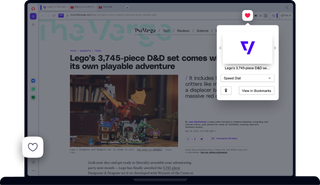
Benefits of Opera Bookmarks
Opera takes bookmarks ten steps further, allowing you to access, organize, and customize them for ease-of-use.
Visual
Opera Bookmarks can be displayed as thumbnails on your start page - making it quick and easy to get where you want to go.
Personalized
Customize your bookmark images with page previews, a solid color and title, or logo - and rename them too of course.
Adjustable
Drag and drop bookmarks where you want on your start page, even onto each other to create a contextual folder and save space.
Organized
Compartmentalize and edit your bookmarks in the Bookmark panel on your sidebar. Keep them separate in your bookmark bar or on your start page.
Bookmark manager with page previews
Opera for computers offers visual bookmarks, which you don't get in other browsers. Your favorite sites appear in a gallery with customizable page thumbnails. Depending on how many sites you've bookmarked, you can switch between large thumbnails, small thumbnails and a list view in the bookmark manager.

Organize and manage bookmarks with ease
When you add a bookmark, you can pick a thumbnail that makes it easier to spot the page you need. You can place your Opera bookmarks in folders and subfolders and see the structure in a classic tree view. Also, you can add the most important bookmarks to the bookmarks bar for even quicker access.
Different devices, same browser bookmarks
Computers, phones, tablets - your favorite sites will always be at hand, no matter what you’re browsing on. Just create an Opera account to sync bookmarks across multiple devices.