Offering robust backup, disk imaging, and cloning, the tool supports secure, easily recovered back-ups on local, network, and USB drives, catering to both personal and commercial needs. The subscription model provides varied rate plans for home, workstation, and server uses, ensuring comprehensive data protection.
Comment summary: Macrium Reflect receives praise for its robust backup and imaging features, intuitive UI, and reliability with both free and paid versions. Users value features like incremental backups, scheduling, and cloning, although some limitations exist in the free version compared to alternatives like AOMEI. Criticisms include difficulty navigating the GUI, performance issues on older hardware, lack of free differential backups, and unreliable cloud backups. Concerns over the free edition being phased out have prompted users to explore alternatives.
Top Positive Comment
maxrempel
★★★★★
•
4
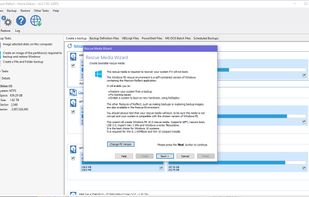
Macrium Reflect free worked perfectly - I was able to backup and restore (!) my windows and programs. The data was on a separate logical drive (D:). For the backup, I used a 1TB USB drive and another 16Gb USB drive for booting. The backup file was compressed and took only 18Gb (this is a fresh windows with a few programs installed). Installation of Macrium takes 45 min, making a bootable USB is 5 min. Creating a backup copy -5 min and restore process takes 10 min. Figuring things out maybe another 30 min. The hardest part was to try and learn about many other backup programs - there are many flavors and most are dominated by totalitarian system engineers which demand that you learn their alphabet soup and then take a sequence of random bets hoping that the process would work successfully. Macrium also offers cryptic choices but with youtube videos from fans is not that difficult.
Like they offer a choice of differential and increment backups (sounds the same!) and a few more but no choice of simple single backup. I have to still figure out what is the difference.
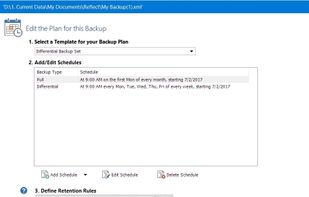
Ok. Figured it out: Normal backup is called full backup.
Differential - what is new compared to full.
Incremental - what is new compared to the previous backup, in many increments. Sounds somewhat less reliable, but for Windows and programs, I just need a full, since all my data is in the cloud (Drive plus Dropbox).
Top Negative Comment
jamesnw
★★★★★
•
4
Not reliable backing up to my home cloud drive. Works sometimes, and not others. No notifications on failure (you'll find out the hard way), and the logs are useless; just saying "cannot write" - which I assume means it just gives up without even re-trying. I have no peace of mind with this thing, so uninstalled.
You can still download old versions of Macrium Reflect Free, and they will work (though you likely want to block any network connections with a firewall to avoid auto update issues). I like this program because it gives me quick popup notifications. BiniSoft Windows Firewall Control icon BiniSoft Windows Firewall Control
Sean
★★★★★
•
0
Bummer about the free edition being ended. I switched to rescuezilla. A free, open source, super easy to use program. Super easy to create or restore from a system image.
It's a portable build of linux you write to a flash drive and boot into. So you also have a file explorer, Firefox etc. Just a great program
PirateKing42
★★★★★
•
Edited
0
Fast and fuss-free.
It allows the user to create disk images (and to clone disks and partitions) while performing other tasks on the desktop. The active drive can be imaged/cloned while it is in use.
Restoring an image requires the drive to be inactive so it is necessary to boot from another drive, CD-ROM, or a thumb drive.
I'm able to image or recover my moderate (50 GB) Windows 10 installation in around 5 minutes.
Review from a new or low-activity account — shown here, but not counted in the app rating.
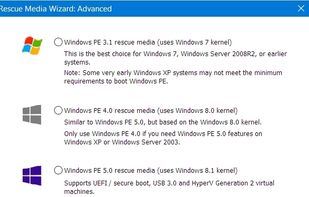
Macrium Reflect 8.x (including 8.0.7783 which is still free 32bit and 64bit) supports bare‐metal restores if its WinPE/WinRE rescue usb is made. I'm testing it against Veeam free. Macrium free will not do incremental backups, but it will still do differentials. You can safely delete old differentials manually as you choose without it affecting the final one.
tuva-hayabi
★★★★★
•
1
I used it (in 2022, free version) to create backups, which worked very well. I did not try the cloning feature, I must confess.
Unfortunately, available only for Windows, not for GNU/Linux.
A list with 15 apps by kalashnikov without a description.
By Chase HQ·15 apps·Updated
Official Links
Social Networks
What is Macrium Reflect?
Protect your data, upgrade your hard disk or try new operating systems in the safe knowledge that everything is securely saved in an easily recovered backup file. Macrium Reflect supports backup to local, network and USB drives.
Macrium Reflect changed to a subscription model with the release of Macrium Reflect X in October 2024. The annual rates are US49ドル.99 for the Home version, US65ドル.00 for the Workstation version, and US275ドル.00 for the Server version.
Macrium Reflect information
Developed by
GB flagParamount Software UK Ltd
Licensing
Proprietary and Commercial product.
Pricing
Subscription ranging between 4ドル and 23ドル per month.




Comments and Reviews
Macrium Reflect free worked perfectly - I was able to backup and restore (!) my windows and programs. The data was on a separate logical drive (D:). For the backup, I used a 1TB USB drive and another 16Gb USB drive for booting. The backup file was compressed and took only 18Gb (this is a fresh windows with a few programs installed). Installation of Macrium takes 45 min, making a bootable USB is 5 min. Creating a backup copy -5 min and restore process takes 10 min. Figuring things out maybe another 30 min. The hardest part was to try and learn about many other backup programs - there are many flavors and most are dominated by totalitarian system engineers which demand that you learn their alphabet soup and then take a sequence of random bets hoping that the process would work successfully. Macrium also offers cryptic choices but with youtube videos from fans is not that difficult. Like they offer a choice of differential and increment backups (sounds the same!) and a few more but no choice of simple single backup. I have to still figure out what is the difference. Ok. Figured it out: Normal backup is called full backup. Differential - what is new compared to full. Incremental - what is new compared to the previous backup, in many increments. Sounds somewhat less reliable, but for Windows and programs, I just need a full, since all my data is in the cloud (Drive plus Dropbox).
Not reliable backing up to my home cloud drive. Works sometimes, and not others. No notifications on failure (you'll find out the hard way), and the logs are useless; just saying "cannot write" - which I assume means it just gives up without even re-trying. I have no peace of mind with this thing, so uninstalled.
It can be confusing to find the error msg.. I just experienced it, but later I saw the msg after hovering over the tray icon.
Subscription only
You can still download old versions of Macrium Reflect Free, and they will work (though you likely want to block any network connections with a firewall to avoid auto update issues). I like this program because it gives me quick popup notifications. BiniSoft Windows Firewall Control icon BiniSoft Windows Firewall Control
Bummer about the free edition being ended. I switched to rescuezilla. A free, open source, super easy to use program. Super easy to create or restore from a system image.
It's a portable build of linux you write to a flash drive and boot into. So you also have a file explorer, Firefox etc. Just a great program
Fast and fuss-free.
It allows the user to create disk images (and to clone disks and partitions) while performing other tasks on the desktop. The active drive can be imaged/cloned while it is in use.
Restoring an image requires the drive to be inactive so it is necessary to boot from another drive, CD-ROM, or a thumb drive.
I'm able to image or recover my moderate (50 GB) Windows 10 installation in around 5 minutes.
Macrium Reflect 8.x (including 8.0.7783 which is still free 32bit and 64bit) supports bare‐metal restores if its WinPE/WinRE rescue usb is made. I'm testing it against Veeam free. Macrium free will not do incremental backups, but it will still do differentials. You can safely delete old differentials manually as you choose without it affecting the final one.
I used it (in 2022, free version) to create backups, which worked very well. I did not try the cloning feature, I must confess. Unfortunately, available only for Windows, not for GNU/Linux.