Comment summary: Thunderbird is praised as a reliable, customizable, and open-source email client with strong support for multiple accounts and add-ons. Users appreciate its recent UI improvements and its ability to manage emails across platforms effectively. However, a few users report challenges with initial setup, synchronization issues with Outlook, and occasional performance problems. Thunderbird remains a well-regarded choice, particularly for those prioritizing privacy and cross-platform functionality.
Top Positive Comment
3psilon
★★★★★
•
17
I have tried several email clients including Outlook, Em Client, Claws Mail, Zimbra Desktop, Mailbird... and went back to Thunderbird every single time.
Thunderbird is simply still the most customizable email client out there that delivers a solid, stable performance for the unbeatable price of free.
Supports an unlimited number of mailboxes, calendards, has full-text email search, can show you an unified inbox, you can easily compose HTML messages, read RSS feeds, use extensions etc. It's really a Swiss army knife.
The only real alternative is Claws Mail if you rather prefer a fast, lightweight client.
If you only use 1-2 mailboxes (or don't mind paying) and use Windows, Em Client is a decent alternative, too, with a steady release period.
Good to know: Thunderbird is not an abandoned project, it's maintained by the community and bugfixes, minor feature updates are being released periodically.
Top Negative Comment
Fabrice D
★★★★★
•
11
Thunderbird has always been my favourite email client. But update after updates, Thunderbird gets worse and worse.
On each update, disabled extensions increase, and lot of them are no more updated, or, when they are updated, doesn't work as they should.
Some features asked for years by many users are still not made (like mail summary in list, as you can see in Apple Mail, and most of other email clients).
Can't use maildir (beta / unsafe) instead of mbox.
I'm really fed up fighting with Thunderbird on each update with features like "dark mode" I don't really need or could wait for (as they disabled themes support which was useful for "dark mode" or "accessibility").
Looks like Mozilla is trying to kill Thunderbird !
VladTheDescalerGreylizard Webdesign
★★★★★
•
0
Greylizard Webdesign
I used to swear by Thunderbird but for some reason it uses about 280mb memory for no reason. I switched to eM Client as it uses about 100mb and actually does a more slick job.
Review from a new or low-activity account — shown here, but not counted in the app rating.
Philipp HaiderVP Creativ e.U.
★★★★★
•
0
VP Creativ e.U.
Has always gotten better over the last years. Now that its also available on phones we also switched there to thunderbird and we dont regrett it at all.
New with this type program, so I don't have anything to compare with yet. On an average, it has a pleasant "tactile" sense in choosing.. fluid and fast. Left me mildly painfully aware of my email clutter.. it brings in email one-at-a-time, so it can take a while to set up. The one thing that raised a flag is that though the search/filter is very fast, it brought in something that seemed totally unrelated,.. so if you are filtering many emails, you will want to scroll thru to make sure that everything is what you wanted in case you want to delete. The styling, font appearance, and structure, somehow feel a little awkward, but again, I'm new with it. I notice that gmail seems particularly slow in transferring in emails during setup (compared to yahoo, etc).. about 23-25 emails every 10 minutes. So it's probably a good idea clear up gmails before starting in.
Diatomee
★★★★★
•
0
My everyday email program, manages emails from different providers, a CalDAV-synchronized calendar and even an RSS-feed.
DL300
★★★★★
•
1
Way, way, WAY too bloated, with an appalling, cluttered, messy, ugly interface.
Everything with this app is a chore, and the user is given WAY too many options and settings on every screen - 99% of which are safe to totally ignore for 99% of users.
For many the Internet is Google: Search, mail, videos, web browser, cloud services, mobile OS, etc. – Google is the major player in all these fields. But Google uses all data it gathers across its services to post targeted ads, and to massively profit from the data many share so freely with the Internet giant. Your personal data can also be subpoenaed by lawyers, including for civil cases like divorce. Google answered over 200,000 such data requests in 2020 alone.
More and more people are also realizing the risk of relying on one company for so many personal services. So, the time has come to stop this unlimited data mining and to take back our right to privacy. Here's a quick guide as to how you can use the Internet without sharing all your data with Google.
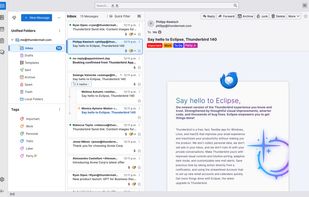
Thunderbird is a free, open source, cross-platform e-mail, news and instant messaging client. The project strategy is modeled after Mozilla Firefox icon Mozilla Firefox.
It supports POP (storing mail locally on your hard drive so that it can be accessed without an internet connection), and IMAP. It features excellent email filtering and management capabilities.
Thunderbird has strong support for using multiple accounts and identities, including automated signature features.
Chat functionality is built in, so you can enjoy real-time conversations with your contacts right from your favorite messaging application across multiple supported networks. Thunderbird makes it easy to search through both past conversations and received emails.
Thunderbird can also function as an RSS/Atom feed reader, and has a large selection of add-ons that extend it with calendar support, PGP support, integration with online services, and much more.
Thunderbird for Android is known as K-9 Mail icon K-9 Mail








Comments and Reviews
I have tried several email clients including Outlook, Em Client, Claws Mail, Zimbra Desktop, Mailbird... and went back to Thunderbird every single time.
Thunderbird is simply still the most customizable email client out there that delivers a solid, stable performance for the unbeatable price of free.
Supports an unlimited number of mailboxes, calendards, has full-text email search, can show you an unified inbox, you can easily compose HTML messages, read RSS feeds, use extensions etc. It's really a Swiss army knife.
The only real alternative is Claws Mail if you rather prefer a fast, lightweight client.
If you only use 1-2 mailboxes (or don't mind paying) and use Windows, Em Client is a decent alternative, too, with a steady release period.
Good to know: Thunderbird is not an abandoned project, it's maintained by the community and bugfixes, minor feature updates are being released periodically.
Thunderbird has always been my favourite email client. But update after updates, Thunderbird gets worse and worse.
On each update, disabled extensions increase, and lot of them are no more updated, or, when they are updated, doesn't work as they should.
Some features asked for years by many users are still not made (like mail summary in list, as you can see in Apple Mail, and most of other email clients). Can't use maildir (beta / unsafe) instead of mbox.
I'm really fed up fighting with Thunderbird on each update with features like "dark mode" I don't really need or could wait for (as they disabled themes support which was useful for "dark mode" or "accessibility").
Looks like Mozilla is trying to kill Thunderbird !
I used to swear by Thunderbird but for some reason it uses about 280mb memory for no reason. I switched to eM Client as it uses about 100mb and actually does a more slick job.
Has always gotten better over the last years. Now that its also available on phones we also switched there to thunderbird and we dont regrett it at all.
New with this type program, so I don't have anything to compare with yet. On an average, it has a pleasant "tactile" sense in choosing.. fluid and fast. Left me mildly painfully aware of my email clutter.. it brings in email one-at-a-time, so it can take a while to set up. The one thing that raised a flag is that though the search/filter is very fast, it brought in something that seemed totally unrelated,.. so if you are filtering many emails, you will want to scroll thru to make sure that everything is what you wanted in case you want to delete. The styling, font appearance, and structure, somehow feel a little awkward, but again, I'm new with it. I notice that gmail seems particularly slow in transferring in emails during setup (compared to yahoo, etc).. about 23-25 emails every 10 minutes. So it's probably a good idea clear up gmails before starting in.
My everyday email program, manages emails from different providers, a CalDAV-synchronized calendar and even an RSS-feed.
Way, way, WAY too bloated, with an appalling, cluttered, messy, ugly interface. Everything with this app is a chore, and the user is given WAY too many options and settings on every screen - 99% of which are safe to totally ignore for 99% of users.