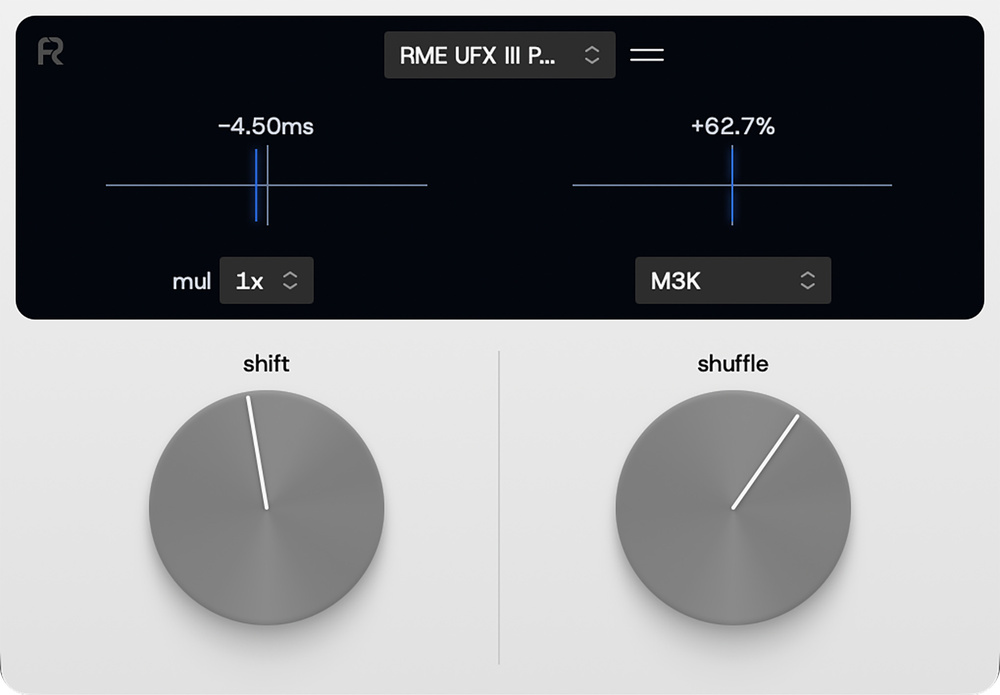
Rapid Flow’s Omniclock promises to fix sync and add groove for external instruments.
MIDI Clock has long been the proverbial pain in the backside. Your DAW says one thing, your drum machine plays a handful of milliseconds behind it, and the gap is enough to spoil a good groove. Rapid Flow’s Omniclock is a software solution to this very problem: a VST3/AU/AAX plug‐in that handles MIDI Clock generation instead of your DAW. It boasts sub‐millisecond clock shift and a set of groove presets. It costs 49ドル at launch (69ドル thereafter), runs natively on Apple Silicon and Windows, and, bless them, needs no iLok.
Easy Does It
As the manual insists, Omniclock is a clock plug‐in, not a MIDI plug‐in. It doesn’t process notes, doesn’t affect audio, and won’t shuffle your software instruments. It is purely for clocking external instruments. You drop one instance on any track type in your DAW, select any MIDI output port that your operating system exposes (5‐pin DIN via an interface, USB direct to hardware, or a virtual port), and it will send clock directly to that port, bypassing your DAW altogether. Each piece of sync’ed gear gets its own instance, with its own shift and shuffle values stored in the session so that every sync’ed machine is aligned with your host project.
The user interface couldn’t be simpler. The Shift control moves the clock pulse earlier or later in 0.25ms increments over a ±64ms range. A 2x or 4x multiplier widens that to ±128ms or ±256ms at the cost of coarser steps. Unfortunately, the correct Shift value is tied to your audio buffer size, so changing the buffer size requires recalibration. The Shuffle parameter adds swing to the clock from a small selection of groove templates made from groove legends like the Akai MPC60 and MPC3000, and E‐mu SP‐1200. Each setting shapes the swing differently, and a ‘curve’ sub‐menu tunes the response. The manual is a little hazy on exactly how this works, but my guess is that the curve is a device‐compensation mapping between the swing amount you ask for and the timing offsets that Omniclock actually sends, because different bits of hardware respond to clock variations differently.
Clockwork
The real question, though, is whether Omniclock is more accurate than what you already have. I ran a timing test against a favourite drum machine, comparing my DAW’s clock (Bitwig Studio) to Omniclock, and, for good measure, the Innerclock Systems GridLock II (the gold standard in MIDI Clock generation). I generated a simple 16th hi‐hat pattern on the drum machine, recorded the audio output whilst clocked from the various sources, and analysed the recordings for timing accuracy and jitter. The tests covered both 5‐pin DIN and USB interfaces. The results were interesting.
Over 5‐pin DIN, Omniclock is excellent: sub‐microsecond beat‐to‐beat jitter, dead‐on tempo. Excellent. This proves that Omniclock’s clock generation is solid. Over USB, however, Omniclock was the loosest source in the test, with a continuous ±1.3ms deviation on more than half of the beats measured. Curiously, Bitwig clocking over the same USB connection didn’t show the same deviations, so the problem — at least in my limited tests — appears specific to the Omniclock‐USB combination. A different set of tests might yield different results (this wasn’t meant to be exhaustive), but it does show that not everything is within Omniclock’s control.
More telling, though, is that Bitwig’s internal clock was already within microseconds of the GridLock II’s near‐perfect results. For raw accuracy, Omniclock isn’t necessarily giving you anything your DAW can’t already deliver. DAWs will vary, but don’t assume that Omniclock automatically beats what’s in the box.
The groove profiles do sound different from each other. There is real timing variation. As a quick‐access ‘feel’ knob, it does its job. The myth that classic machines like the Akai MPC3000 carried some unique swing sauce needs putting to bed, however. The MPC’s appeal was its rock‐solid internal clock and consistent audio delivery; the swing offset itself was just a number — a fact Roger Linn himself (designer of the early MPCs) has confirmed. Omniclock can apply a similar number, but it can’t give your gear the MPC3000’s absolute clocking under the hood, and not every piece of equipment will respond to swung clock in the same way.
What you’re really paying for is convenience: clock shift and shuffle, recallable per device, accessible without leaving the DAW.
Conclusion
What you’re really paying for with Omniclock, then, is convenience: clock shift and shuffle, recallable per device, accessible without leaving the DAW. If you regularly fight to line up drum machines or sequencers, that workflow might be worth the asking price on its own. Just don’t expect it to outdo your DAW’s own clock in terms of accuracy. Treat it as the convenience plug‐in it is, and you’ll get your money’s worth.
Pros
- Clock shift and shuffle are instantly accessible from inside the DAW.
- 0.25ms shift resolution makes it easy to align external sequencers.
- No iLok required.
Cons
- Not categorically more accurate than your DAW’s own clock.
- Your MIDI interface may still add its own internal jitter.
- Shuffle profiles add character but won’t reproduce the timing rigour of legendary hardware.
Summary
A convenient MIDI clock‐shift and groove plug‐in. The shift is precise, the shuffle profiles are likeable enough, and the workflow is excellent. For many people, Omniclock will be a godsend, but it isn’t necessarily the answer to all MIDI clocking problems.