McDSP continue to find new ways to harness their configurable analogue plug‐in co‐processor.
The last few years have seen a number of attempts to integrate analogue processing into a software‐based recording and mixing environment. I’ve been impressed by Freqport’s FreqInOut FO‐1 and the Access Analog online subscription system, but McDSP’s Analog Processing Box remains the most elegant all‐in‐one solution I know of. To the user, an APB processor is no different from any other plug‐in. Behind the scenes, though, audio is being routed over Thunderbolt to and from an array of analogue components within the APB hardware, and digital control signals from the plug‐in tell it how this audio should be manipulated. APB plug‐ins thus offer true analogue processing that can be automated, recalled and controlled within your DAW sessions.
Seven years after its launch, the cohort of plug‐ins available for the APB system continues to grow. All are free to owners of an eight‐channel APB8 or 16‐channel APB16, and the focus is on dynamics and saturation, which are the main processor types where McDSP believe that analogue processing still has something unique to offer. The latest guest at the APB party is a monster plug‐in called DC‐2, which its makers aptly describe as a dual compressor.
Choose Your Path
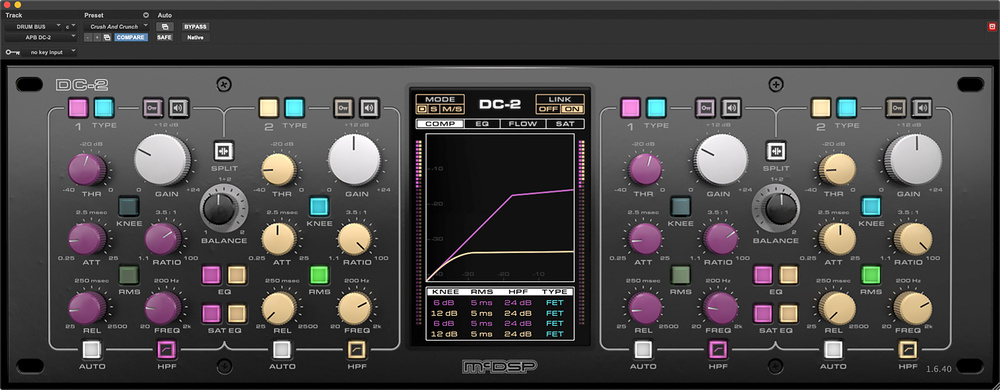
Each mono instance of DC‐2 uses two channels of APB processing, although in common with some of the other APB plug‐ins, you’ll see a stereo interface even when you load it on a single channel. Unlike the existing MC‐3, it’s not a multiband device. Instead, it presents two fully featured, full‐range compressors, which can be operated either in series or in parallel. Each path also has two two‐band equalisers, one a conventional design and the other controlling the tone of the saturation that takes place when the output is driven hard.
One of the distinctive features of APB technology is the use of analogue circuitry to emulate analogue circuitry. There are, for example, APB plug‐ins that recreate the sound of tape and valve saturation, even though the APB hardware contains neither tape nor valves. That theme continues in DC‐2, where each compressor can take on the characteristics of an optical, VCA or FET design. Regardless of which you choose, you still get full control over threshold, ratio and attack and release times, plus the option to switch between peak and a choice of 11 different RMS detector circuits. There’s also an auto release setting, an enormously configurable side‐chain high‐pass filter, and a choice of hard or soft knee, with several different flavours of the latter available.
Detailed compression settings such as the RMS detection type, high‐pass filter slope and softness of the soft knee are adjusted in what McDSP call the centre section. This is also where the EQ and the output saturation are configured. Its four tabs provide helpful visual feedback, including representations of the compression and EQ curves.
Checks & Balances
Like many people, I suspect, my first thought on hearing about DC‐2 was "Great! Now I can do that thing of putting an LA‐2A and an 1176 in series on vocals." And you probably can set up the two compressor stages to sound like an LA‐2A and an 1176, but DC‐2 is a much deeper and more open‐ended processor than that. Some playing around with the controls is necessary to fully understand the implementation, especially in regard to the Balance knob. In Split (parallel) mode, this does what you’d expect, adjusting the relative levels of two entirely separate signal paths. But it’s also fully operational in series mode, which you might not expect. The manual states, slightly cryptically, that in this mode it controls the "blend of processing from Comp 1 and Comp 2". In practice, this seems to mean that if you turn it all the way to the left, in effect to solo Comp 1, the settings on Comp 2 make no difference; turn it all the way to the right, though, and settings from Comp 1 still affect the behaviour of Comp 2 even though they’re not heard directly.
Another thing that takes a little getting used to is the output saturation. When I first experimented with this, I thought I was hearing things — or, rather, not hearing them. There’s a choice of saturation modes which runs from Soft A and B through to Stun and Ouch, but even in the last of these, I wasn’t detecting any obvious distortion, and moving the nodes on the saturation EQ curve around didn’t seem to make any difference to the tone. It turns out that saturation happens only when you crank the make‐up gain: rather than getting louder, after a point, the sound starts to grow hair. And if you have saturation EQ enabled, the colour of that hair is indeed controllable. The conventional EQ, meanwhile, can be switched pre‐ or post‐compression, and provides two bands that can be switched between parametric or shelving modes.
You can easily set up a scenario where two compressors with very different characteristics are ordered in series, creating a hybrid dynamics processor to suit a source such as vocals with complex dynamic behaviour.
If this makes it sound like DC‐2 is an unusually versatile dynamics plug‐in, that’s undoubtedly true. As previously noted, you can easily set up a scenario where two compressors with very different characteristics are ordered in series, creating a hybrid dynamics processor to suit a source such as vocals with complex dynamic behaviour. The saturation circuit makes it easy to add a pinch of colour focused wherever in the midrange helps that source to cut through. But you can easily take things further. For example, you can tilt the Balance control to the left so that the bulk of the output is coming from the gentle settings on Comp 1, then dial in extreme settings on Comp 2 to overlay a thin layer of heavily brutalised sound.
Alternatively, Split mode offers an easy way to achieve what is sometimes described as "multi‐bus" compression. Feed individual sources, groups or even the entire mix into it and use the Balance control to blend together two different styles of dynamics processing, complete with different EQ and saturation settings. I particularly liked this approach on a drum submix, where you can set up an aggressive FET‐style sound with fast time constants and some upper‐mid push, and offset it with a slower, squishier, darker timbre from the second compressor.
Whatever approach you take, DC‐2 is another plug‐in that really showcases the strengths of the APB platform. It’s a sonic chameleon, but whatever colour the leaf it’s resting on, it remains supremely classy. Most of all, it brings home with fresh force something that struck me when I first reviewed the APB16 back in 2019: real analogue compression and saturation, at least as implemented here, seems to deliver levels of subjective loudness before clipping that are very hard to achieve using conventional digital plug‐ins. DC‐2 is a much deeper plug‐in than most of the other APB compressors, and consequently presents a bit more of a learning curve, but it shares the same ‘in your face’ quality. Both its sound and its immense versatility mark it out as being a really valuable tool for mixing and mastering engineers alike.
Summary
DC‐2 is perhaps the most sophisticated plug‐in yet created for McDSP’s Analog Processing Box platform. Once you’ve mastered its relatively large control set, the possibilities are truly endless.