author screen — payable author screen — payable
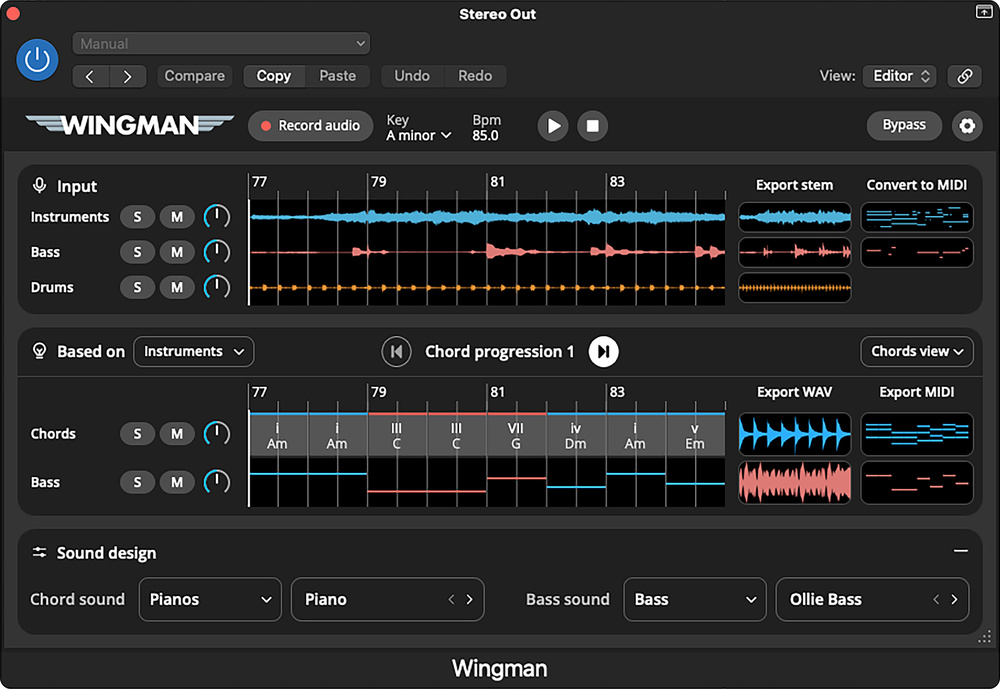
Wingman is a practical compositional aid that runs as a DAW plug‐in. It can suggest chord sequences to fit an existing melody, and can handle stem‐splitting to separate vocals, drums, bass, and instruments from a full mix. It then converts the instrument, vocal and bass stems into MIDI. Machine learning is used for the stem splitting, but the chord‐generation and bass‐part‐generation elements are algorithmic, based on established musical principles. In the first version, up to 16 bars can be worked on at a time, but Mixedinkey say this limit will be removed in an imminent update. Wingman supports macOS (12 and above) and Windows hosts; I tested the AU version in Logic Pro X and encountered no problems with installing or in operation.
A Record button starts the DAW from its current position and begins the ‘listening’ process, analysing the audio from the track, bus or mix on which Wingman is inserted. The source track(s) can be audio or MIDI. The stem‐splitting process begins automatically, and Wingman also works out the key of the incoming material. Once split, the individual stems can be muted or soloed, and there’s a separate level control for each stem and any generated chord and bass parts. At the top of the screen, the input waveforms are shown after splitting, with boxes on the right showing the exported stem as audio and MIDI — these audio or MIDI parts can be dragged directly into your project.
The lower part of the screen displays the generated chord and bass parts, each with solo and mute buttons. These can again be dragged into your project, as MIDI or as audio using Wingman’s own sound sources; there’s a useful range of piano, pluck, guitar, bass or pad sounds. The display view for the chords and bass parts can be set to show chord names, notes or audio waveforms. Arrow keys allow the user to explore alternate chord sequences, with multiple variations. The number of variations depends on the source material, but in most cases I found around 10 alternatives for each melody I processed. At the very bottom are some options for choosing Wingman’s own sounds to play the bass or chord parts, if you want to use those.
I noticed on my M1 Mac Mini that the CPU load can be quite heavy during the audio‐capture process, presumably because the stem splitting is being calculated at the same time, but once that’s done the CPU load is light. Wingman gets full marks for workflow and ease of use, then, but how effective is it?
Although it creates only four parts, the stem splitting works very effectively, and the pitch‐to‐MIDI engine does an impressive job too, even on complex polyphonic sources. For many users, that alone should be worth the price of admission. The chord generation produces fairly simplistic results, presented as block chords, and usually with just one or two chords per bar and simple chord structures such as majors, minors and sevenths, with the occasional minor seventh. The software doesn’t attempt to try different inversions or to implement note‐leading for the bass lines, but it does give you a very practical starting point for your own editing tweaks. Similarly, the generated bass part tends to be of the one‐note‐per‐bar variety, but again provides a good starting point.
Sing a melody, play a guitar line or improvise a keyboard melody part, and Wingman will offer up both a choice of supporting chord parts and a bass part.
I’ve found Wingman very helpful for coming up with ideas based on anything from a simple melody to a complex mix. Sing a melody, play a guitar line or improvise a keyboard melody part, and Wingman will offer up a choice of supporting chord parts and a bass part. Extract a vocal or other melody using the stem splits and try it against some of the alternative chord progressions, or use the MIDI file to turn vocals into an instrument part. When it comes to generating backing parts, Wingman doesn’t pretend to be a complete musical arranger, but provides you with a solid set of basics, and its ability to offer alternative chordal backing options, audio‐to‐MIDI conversion and stem splitting in an affordable package with a straightforward drag‐and‐drop export facility makes it a very attractive and surprisingly useful tool. Paul White
Information
99ドル (discounted to 49ドル when going to press).
99ドル (about 130ドル). Discounted to 49ドル (65ドル) when going to press.