Google Services in the sidebar
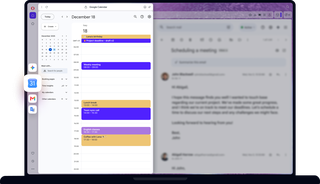
Benefits of Google Services in Opera
Gmail, Calendar, Google Translate, and Gemini right at your fingertips.
Ready
Access Gmail, Calendar, Gemini, and Google Translate directly from your sidebar. No setup or extensions required.
Seamless
Chat with Gemini while watching online videos, or draft emails while referencing a page. No tab switching.
Simple
Reclaim your tab bar. Keep essential Google tools out of your main window for a clutter-free workspace.
Adaptable
Pin the popout panel for modular multitasking or drag the edge to resize. Easily adjust the interface to your workflow.
Translate on the fly
Click Google Translate in Opera’s sidebar to open the panel. Copy/paste and translate without losing your place.
Chat with friends abroad, browse foreign pages, and follow global news without any interruptions.

Master your inbox
Reply to messages, verify login codes, and clear spam without leaving your current page.
Just pin the Gmail panel and drag to resize. Draft emails while working alongside documents, spreadsheets, or websites.
Schedule on the spot
Book flights, set meetings, or check dates as soon as the idea hits. Keep Google Calendar open while browsing.
Planning is faster, simpler, and more accurate with your calendar at your fingertips. Cross-reference events, compare dates, and manage your week effortlessly.
Brainstorm with AI
Turn ideas into action. Summarize long threads, break down articles, or tackle tricky problems with instant guidance from Gemini.
Draft emails, plan projects, debug code, or craft witty replies. Get smart suggestions as you go, without losing your momentum.
Tailor your setup
Enable only the features you actually use. Toggle on specific Google Services, adjust the panel’s width, or pin it to keep it visible.
A clean browser is an efficient browser. Hide Google tools when you don't need them, or expand the panel for better readability.