Posted by fchandler on March 2, 2013 at 7:46pm
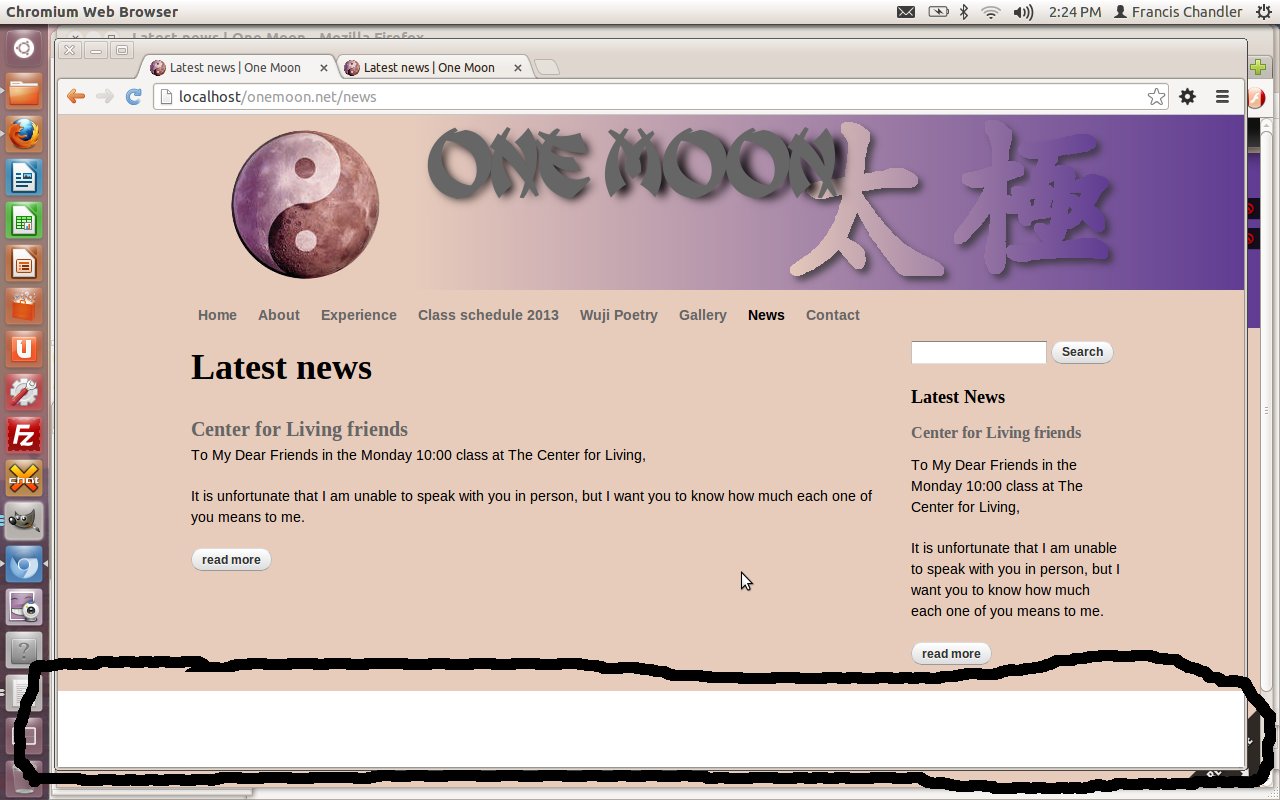
could someone shed some light on this? I want a background color on the entire background. However, I get a block of white at the bottom of the screen. I can add padding to get rid of it, but is that what I am supposed to be doing?
#page {
background: #E7CBBB;
padding: 0px 0px 400px 0px;
}
see the attached image.
When looking at it in Firebug or Chrome inspect, I can't select the area.
D7 Omega subtheme. Live site if you want to poke at it is http://www.onemoon.net
| Attachment | Size |
|---|---|
| bottomgap.jpg | 134.61 KB |
Categories: #omega #theme
Comments
Maybe set background color for the body?
Hard to say for sure without seeing the DOM on the version you're working on, but if the page div has a defined background color but the body doesn't, you can get a white gap on the bottom when the div ends on a shorter page.
Thanks
As it turns out, applying the property to both body and page worked. Body only got the bottom of the page, but then page didn't have the background.
Apply the style to body, and
Apply the style to body, and then do:
page {
background: none;
}
That works also
That also works. What would be the advantage of one over the other?
Efficient styling
Frank,
Generally you want to avoid duplicate styling. The main advantage of CSS is the cascading aspect to it. Pedantically, I would have done something like this:
(Presuming there's no html/body theme styles with a background-color spec)
HTML {background-color: #E7CBBB;
}
#page {background-color: none;
}
"Background" is shorthand for a number of display properties you can set. It's not wrong to use it, but I believe it's easier to read and maintain in the long haul if you are specific in your application of these properties.
This is an excellent use for Chrome's Inspector or Firefox's firebug. With both enabled, you simply click in the area of the screen you want to better understand. You will see what area of the DOM the browser is displaying. This is what jkwilson was referring to.
Here's an excellent overview from Mozilla on the matter:
http://www.youtube.com/watch?v=VcuQ2Bn5bTA
Kyle
Beginners mind
Point taken on the shorthand for the property. Specificity will reduce future confusion, especially if someone takes over editing my css files. (I do add comments in my files for future reference for what I am attempting to control).
I do use Firebug and Inspector, but just did not think to apply the style to the html or body tags, despite the fact that, when selecting or hovering over those tags in Firebug and Inspector, the entire screen was highlighted (testing my own skills of observation and failing). This is also my first Omega sub-theme and I'm still trying to get my head around all of the possibilities.
I always try to approach things with the beginners mind, but maybe that is not always such a good thing, because past experience is the teacher to let you know not to put your hand on the hot stove eye. Ha Ha.
I guess the best explanation
I guess the best explanation is that you are styling the correct element. As you want to put a background on the entire page, the body element is where it belongs. What you are doing with #page is just undoing the template styling. Make sense?
yes
Yes and, if the design required, would allow styling the #page div seperately. Thanks for the explanation, and it would likely be the middle of next week (or later) before I realized the possibility.