Logitech Quickcam E2500 not supported
| Affects | Status | Importance | Assigned to | Milestone | |
|---|---|---|---|---|---|
| linux (Ubuntu) |
Fix Released
|
Medium
|
Manoj Iyer | ||
| Jaunty |
Fix Released
|
Medium
|
Manoj Iyer | ||
Bug Description
I recent bought the Logitech Quickcam E2500, which is budget webcam. It is not supported under Ubuntu 8.10 (AMD64). The fix is trivial, and the risk is essentially zero. So I propose that the patch is applied as an update.
The patch is already applied upstream:
http://<email address hidden>
lsusb says:
Bus 001 Device 004: ID 046d:089d Logitech, Inc.
and uname -a:
Linux mythtv 2.6.27-11-generic #1 SMP Fri Feb 6 15:47:26 GMT 2009 x86_64 GNU/Linux
(this is my modified version, with the patch)
There is a related bug, but it is concerned with the old (V4L1 ?) driver: https:/
CVE References
confirming. The camera is still not working in jaunty.
And I can confirm that the fix (adding "{USB_DEVICE(
Hi Guys,
Sorry for not seeing this earlier. I think this was most recently reassigned to the correct "linux (Ubuntu)" package in launchpad. I'm pasting the upstream git commit id below for the kernel team to reference. Unfortunately the kernel is currently frozen in preparation for the upcoming Jaunty release. However, this indeed seems to be a trivial patch with a pretty low (or rather no) risk of introducing any regression. I'll approve the Jaunty nomination and ping the kernel team to try to get this in as a stable release update post release. I the meantime as a workaround if you wanted to run one of the upstream kernel builds the Ubuntu kernel team has began producing, the more recent ones (eg 2.6.29 or 2.6.30-rc1) should contain the patch in question. https:/
ogasawara@
commit 88a40cfbf25d827
Author: Fabio Rossi <email address hidden>
Date: Fri Dec 26 14:41:48 2008 -0300
V4L/DVB (9999): gspca - zc3xx: Webcam 046d:089d added.
Signed-off-by: Fabio Rossi <email address hidden>
Signed-off-by: Jean-Francois Moine <email address hidden>
Signed-off-by: Mauro Carvalho Chehab <email address hidden>
confirmed. workaround works in latest Jaunty build.
Which kernel update will see the fix committed? My E2500 is still not working with the latest kernel as of 18 April 2009 on Jaunty.
Leann's post makes it clear that there will not be a fix until after release of Jaunty. The Kernel is in code freeze pending release. However, the work around posted works fine for me. It's not hard. simply go here:
http://
Download the Kernel image for your architecture and install it with the package installer that will open it automatically. Then Restart.
For me, the New Kernel fixed the camera, but it made some other things a little funky. So I edited grub so that the 2.6.29.1 kernel was the second boot option. When I want to use the Camera, I reboot and select that kernel. That should hold you over until the fix is in.
can you please test the kernel in http://
Sorry, I don't have an AMD 64. If you have a 86 based kernel I can test
that.
On Wed, Apr 22, 2009 at 2:05 PM, Manoj Iyer <email address hidden>wrote:
> can you please test the kernel in
> http://
>
> ** Changed in: linux (Ubuntu Jaunty)
> Status: Triaged => Incomplete
>
> --
> Logitech Quickcam E2500 not supported
> https:/
> You received this bug notification because you are a direct subscriber
> of the bug.
>
> Status in "linux" source package in Ubuntu: Incomplete
> Status in linux in Ubuntu Jaunty: Incomplete
>
> Bug description:
> I recent bought the Logitech Quickcam E2500, which is budget webcam. It is
> not supported under Ubuntu 8.10 (AMD64). The fix is trivial, and the risk is
> essentially zero. So I propose that the patch is applied as an update.
>
> The patch is already applied upstream:
> http://<email address hidden>
>
> lsusb says:
> Bus 001 Device 004: ID 046d:089d Logitech, Inc.
>
> and uname -a:
> Linux mythtv 2.6.27-11-generic #1 SMP Fri Feb 6 15:47:26 GMT 2009 x86_64
> GNU/Linux
> (this is my modified version, with the patch)
>
> There is a related bug, but it is concerned with the old (V4L1 ?) driver:
> https:/
>
Hi Manoj
Sorry, I had trouble compiling my own kernel - it is not easy with linux-source...
Anyway, the kernel from http://
I do get a lot of error message on the console like
libv4lconvert: Error decompressing JPEG: unknown huffman code: 0000ffff
(and similar numbers), so the support does not seem perfect yet. But it is much better than nothing.
ekiga crashes, whether I use the webcam or not, so I cannot test that.
submitted sru for jaunty.
The kernel from Manoj works for me. I can use the webcam in Skype.
the mainline kernel v2.6.29.1 works for me althought it messes up my wifi and video card
SRU JUSTIFICATION:
IMPACT: Logitech Quickcam E2500 not supported
FIX: patch added to recoginize USB webcam 046d:089d
TEST: The originator of the bug tested the kernel
http://
camera is detected but the image quality is poor in 640x480 but good for
320x240.
Accepted linux into jaunty-proposed, the package will build now and be available in a few hours. Please test and give feedback here. See https:/
confirmed that the new kernel package fixes this for me in Jaunty - no issues with hardware detection or video in Cheese after upgrading from the proposed repository.
$ dpkg -s linux-image-
Package: linux-image-
[snip]
Version: 2.6.28-11.42
i can also confirm that with the jaunty proposed update webcam works w/cheese. In order for the webcam to work with skype, i am using the fix from this forum:
removed: verification-needed
I just enabled Jaunty Proposed, and straight away the Quickcam E2500 works, albeit with a small green margin in the bottom of the frame.
Works with Skype straight out of the box, and the sound quality with Skype is far superior to the ratty old budget, budget, budget webcam I bought for NZ9ドル.01 in an online auction when the Logitech wouldn't work on Intrepid: the sound quality makes up for the green line.
Nice work, those responsible!
Regards,
Bruce.
This bug was fixed in the package linux - 2.6.28-13.44
---------------
linux (2.6.28-13.44) jaunty-proposed; urgency=low
[ Stefan Bader ]
* Revert "SAUCE: [jaunty] ALSA: Add retry for Intel8x0 clock measurement"
* Revert "SAUCE: [jaunty] ALSA: Fix clock and buffer calculations for
Intel8x0"
* Revert "SAUCE: [jaunty] ALSA: Fix buffer positions and checks"
linux (2.6.28-12.43) jaunty-proposed; urgency=low
[ Amit Kucheria ]
* Enable SYN_COOKIES for iop32x and versatile flavours
- LP: #361687
* SAUCE: Quirk for BT USB device on MacbookPro to be reset before use
- LP: #332443
[ Brad Figg ]
* [jaunty] Add missing mvsas (Marvel SAS 6440) module configuration.
- LP: #352336
[ Chuck Short ]
* SAUCE: [USB] Unusual Device support for Gold MP3 Player Energy
- LP: #125250
[ Daniel T Chen ]
* SAUCE: [jaunty] ALSA: Fix buffer positions and checks
- LP: #345627
* SAUCE: [jaunty] ALSA: Fix clock and buffer calculations for Intel8x0
- LP: #345627
* SAUCE: [jaunty] ALSA: Add retry for Intel8x0 clock measurement
- LP: #345627
[ Luke Yelavich ]
* disable CONFIG_
- LP: #331589
[ Makito SHIOKAWA ]
* [ARM] 5404/1: Fix condition in arm_elf_
READ_
- LP: #364358
[ Manoj Iyer ]
* SAUCE: Added quirk to fix key release for Samsung NC20
- LP: #360247
[ Oleg Nesterov ]
* posix timers: fix RLIMIT_CPU && fork()
- LP: #361508
[ Scott James Remnant ]
* [Config] Disable libusual and the ub driver
- LP: #364538
[ Stefan Bader ]
* Disable unwanted staging builds
- LP: #366144
* Remove prism2_usb driver from ubuntu and use the one from staging
- LP: #325366
* SAUCE: Make rtl8187se depend on WIRELESS_EXT
- LP: #366144
* Disable CONFIG_RTL8187SE for armel.versatile
- LP: #366144
[ Tejun Heo ]
* libata: handle SEMB signature better
- LP: #257790
[ Tim Gardner ]
* Set USB_SERIAL=m for i386/amd64
- LP: #345002
* SAUCE: Jaunty - aic79xx - set reset delay to 5 seconds, down from 15.
- LP: #79542
* SAUCE: (drop after 2.6.28) Wifi suspend/resume scan timeout fixes
- LP: #336055
* Sony laptop: Sony Vaio laptops do not enable wwan power by default.
- LP: #364678
[ Tyler Hicks ]
* SAUCE: (drop after 2.6.28) eCryptfs: Larger buffer for encrypted
symlink targets
- LP: #357345
[ Upstream Kernel Changes ]
* V4L/DVB (9999): gspca - zc3xx: Webcam 046d:089d added.
- LP: #326674
* V4L/DVB (10044): gspca - pac7311: Webcam 093a:2620 added.
- LP: #363195
* hwmon: (it87) Add support for the ITE IT8720F
- LP: #357766
* vgacon: Return the upper half of 512 character fonts
- LP: #355057
* drm/i915: add support for G41 chipset
- LP: #365958
-- Stefan Bader <email address hidden> 2009年5月25日 17:30:40 +0200
Problem still exists on the updated (with proposes) installation of Jaunty.
Messy video under skype (green chaotic pixels, mixed with red and black ones ;).
Works with mplayer, but stopped after few seconds.
root@mujo:
Linux mujo 2.6.28-13-generic #44-Ubuntu SMP Tue Jun 2 07:57:31 UTC 2009 i686 GNU/Linux
root@mujo:
- screenshot_skype.png Edit (91.6 KiB, image/png)
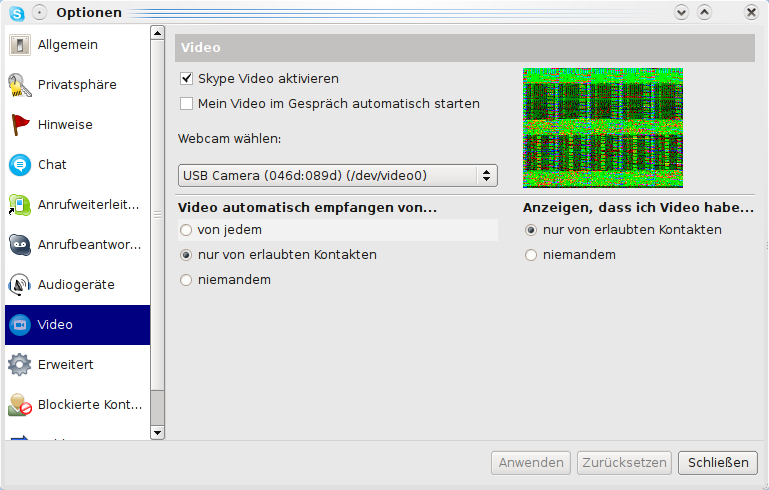
I can confirm the behaviour described by Rafal Zawadzki. Some more information from my side:
System: Dell Inspiron 1525 (one of their Ubuntu Linux Notebooks)
Installation: Kubuntu Jaunty with all current updates (no backports or proposed)
Skype
====
Camera is now recognized but shows merly green/black noise (see attachment; this happens after clicking on the 'test' button ). However the picture is not constant (framerate would be quite normal I think, around 30fps?). Often Skype just crashes after clcking on 'test'.
Kopete
=====
Camera is now recognized but shows only a black square (see attachment). Reading the kopete logs it looks like the camera is reporting that it can hardly produce any valid output-image formats, or does a kopete log always look like this?
/dev/video0
============
"cat /dev/video0" reveals that the camera is acutally producing output
Cheese
======
Camera actually WORKS here. Quality is unusuable with 640x480 but works OK with 320x240 (although worse than under Windows). However I cannot make any photos with cheese (it basically does not produce any file) nor any movies (when I click on record the video area shows only a black area and when I click on stop, cheese crashes)
Attachments
=============
dmesg.txt
log_kopete.txt
log_skype.txt
screenshot_
screenshot_
uname -a: Linux anna-laptop 2.6.28-13-generic #44-Ubuntu SMP Tue Jun 2 07:57:31 UTC 2009 i686 GNU/Linux
lsusb: Bus 005 Device 003: ID 046d:089d Logitech, Inc.
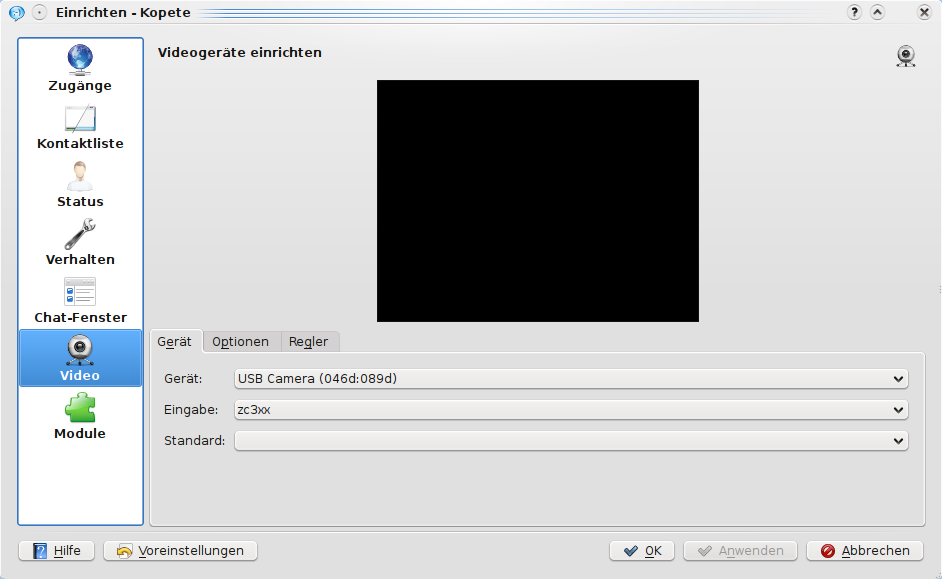
I also added the cheese logs (generated by starting cheese from the command line) which reveals some errors, that might be relevant.
Furthermore I just installed linux-image-
It seems more like v4l problem, can you try with export LD_PRELOAD=
Hi,
I have the same problem as sewert (same screenshot, same logs etc).
I can see that a fix has been released but I never seen it.
Thanks in advance for your answer
I have exactly the same problem as sewert and Solvik. Same screenshot and same logs.
Configuration:
Notebook: HP EliteBook 2530p
Ubuntu: 9.04 (latest updates until 30/01/2010)
Thank you in advance.
Kernel: Linux horat 2.6.28-17-generic #58-Ubuntu SMP Tue Dec 1 18:57:07 UTC 2009 i686 GNU/Linux
I found a temporal solution for it. If I execute
LD_PRELOAD=
it works as suggested by Manoj lyer.
I created a bash script to execute it and that is what I call from the Ubuntu Menu.
I can get the camera to work in cheese, however, after a few seconds, the captured image turns very dark. I tried some module parameters like autoexposure=0 , but that didn't seem to help.
I'm running a straight karmic, but custom kernel/drivers are compiling as I typie. I'm going to try to the linuxtv.org git repositories.
My goal is to use the cam as zonefinder source. Anyone else have any newer experiences with this beast ?
I have problem like Michael. Camera with latest gspca driver works fine until it randomly goes dark. is there any workaround? Thanks...
..Recognize_
---
There's a lot of information onl ouv ine but people continue to ask us whether they can trust onl ik ine dru pi gst gm ores. So we decided to monitor the quality of the dru qf gs offered at the most popular onl uxf ine pharmacies and according to the results �Can ksz adia jri nPha kh rmacy� is the most reliable dru exq gst rdy ore on the Web.
Cheap me vl dicat acv ions offered in �Can cr adia ijj nPha rg rmacy� are of extremely high quality. Large selection of me dbc dicat qo ions which are 100% gen usg eric! No other onl dp ine dru ik gstore offers such a level of service. Fast worldwide delivery, no damaged packages, no delays! Full confidentiality!
---
With us you will always get what you paid for. ... www.bifxpills.ru
---
Bug still exist on Lubuntu 12.04 LTS.
LinkedIn
------------
Bug,
I'd like to add you to my professional network on LinkedIn.
- Neil
Neil Horning
ICT officer at PBI Nepal
Nepal
Confirm that you know Neil Horning:
https:/
--
You are receiving Invitation to Connect emails. Click to unsubscribe:
http://
(c) 2012 LinkedIn Corporation. 2029 Stierlin Ct, Mountain View, CA 94043, USA.