A robust cross-platform application offering seamless screen recording and live-streaming capabilities across Mac, Windows, and Linux. It supports advanced features like H264 encoding, multiple scenes, customizable themes, and direct streaming to platforms like Twitch and YouTube.
Comment summary: OBS Studio is widely praised for being a powerful, free, and open-source software that excels in streaming and recording. Users appreciate its extensive features and reliability, but some find the setup complex, with a learning curve that can be challenging for beginners. It supports various platforms and is highly customizable, though it may require technical proficiency to utilize its full potential. Complaints exist about issues on certain systems and occasional feature limitations.
Top Positive Comment
thefirered
★★★★★
•
14
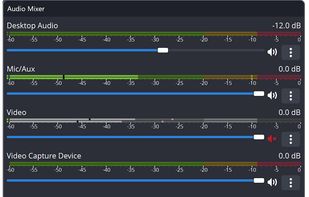
OBS Studio is probably my favourite software of all time. You may think that OBS would be used exclusively for gaming purposes... far from it! Yes, you can easily set it up for streaming content to YouTube, Twitch, and the like, but it's also a great screen recorder software for educational videos and a great podcast recorder! It allows for extensive audio input configuration and easy stereo-mix recordings (remember that?) for a podcast session.
The software performs incredibly well even in outdated computers. My almost-10-year-old laptop can pull some recordings at lower resolutions.
still has issues with HAGS which is essensitial for DLSS 4
DL300
★★★★★
•
0
Whoever "worked" on the UX for this application should be fired into the sun.
Coelacanth_to_Code
★★★★★
•
1
Been using this free software for many years now and I've never had any serious issues. No need to worry about advertisements. No need to worry about in-app purchases. No watermark that will blemish any of your recordings. Very clean and minimalist user-interface that works well for pretty much anyone. All they need to do is make the light theme better.
Diatomee
★★★★★
•
1
Perfect for Screen recordings and has an active community helping with any issues, and plugins available so you don't need extra programs for conversion
Lukas SchwarzIntranet Manager at TechSecure Germany
★★★★★
•
1
Intranet Manager at TechSecure Germany
OBS Studio is an incredible tool for recording and streaming! It's free, open-source, and packed with professional features. The flexibility to customize layouts and settings makes it suitable for beginners and pros alike. Highly recommend!
RemovedUser
★★★★★
•
1
OBS Studio
I’ve been using OBS for many years, both the official version and the Steam release, and I genuinely love it. While there are still features I might not fully grasp yet, it has been an absolute lifesaver for creating videos and streaming across various platforms.
My Favorite Things About This Program:
★ Multiple Scene Possibilities
★ User-Friendly Interface
★ Completely Free
★ Available as Downloadable Software and on Steam
★ Flexible Webcam Area Selection (Shift + CTRL + ALT + Mouse Selection)
★ Extensive Source Management
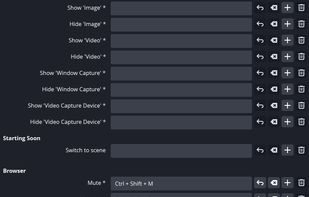
★ Customizable Docks
Things I Wish Were Added:
★ Multi-Streaming to Different Platforms Without Third-Party Plugins
★ Keeping Platforms Logged In When Switching
Honestly, there aren’t many downsides to this program. I’ve enjoyed using it over the years and actively promote it on my own website. It's definitely a streaming and recording tool that I would highly recommend to anyone!
Review from a new or low-activity account — shown here, but not counted in the app rating.
This is going to be a list of the free tools/software that can be used mostly in any field. it's based on websites recommendations, personal experience and YouTube videos. If there's any software that you like to be added here pls inform me so we can do it together. They won't be in the alphabetical order. Together we can do it. If you find any software in the list that's not free let me know
These are all the software I use on my windows machine. I am privacy freak. So, I mostly use open source software. Checkout "My Firefox setup" list for firefox extensions.
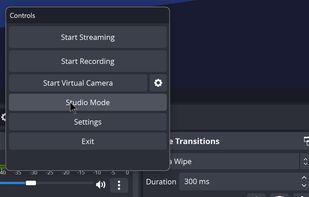
OBS Studio (also known as Open Broadcaster Software, or OBS) is a screen-casting and live-streaming software available across multiple platforms including macOS, Windows and Linux. Boasting features typically only found in commercial screen recording apps, OBS also provides one of the simplest workflows with an intuitive and easy-to-learn interface that makes recording and streaming a breeze. It's also totally free and open-source.
With its long standing history of continued updates and considering its ease of use and free cost, it's no wonder OBS is one of the most popular and highest recommended apps for screen-casting and live streaming.
NOTABLE FEATURES:
Cross-platform (available for Mac, Windows and Linux).
Encoding using H264 (x264) and AAC.
Support for Intel Quick Sync Video (QSV), AMF and NVENC.
Unlimited number of scenes and sources.
Live RTMP streaming to Twitch, YouTube, Mixer, DailyMotion, Smashcast and more.
File output to MP4, MKV or FLV.
GPU-based game capture for high performance game streaming.
DirectShow capture device support (webcams, capture cards, etc).
Windows 8 high speed monitor capture support.
Bilinear or lanczos3 resampling.
Light and dark themes to support various working conditions and preferences.





Comments and Reviews
OBS Studio is probably my favourite software of all time. You may think that OBS would be used exclusively for gaming purposes... far from it! Yes, you can easily set it up for streaming content to YouTube, Twitch, and the like, but it's also a great screen recorder software for educational videos and a great podcast recorder! It allows for extensive audio input configuration and easy stereo-mix recordings (remember that?) for a podcast session.
The software performs incredibly well even in outdated computers. My almost-10-year-old laptop can pull some recordings at lower resolutions.
still has issues with HAGS which is essensitial for DLSS 4
Whoever "worked" on the UX for this application should be fired into the sun.
Been using this free software for many years now and I've never had any serious issues. No need to worry about advertisements. No need to worry about in-app purchases. No watermark that will blemish any of your recordings. Very clean and minimalist user-interface that works well for pretty much anyone. All they need to do is make the light theme better.
Perfect for Screen recordings and has an active community helping with any issues, and plugins available so you don't need extra programs for conversion
OBS Studio is an incredible tool for recording and streaming! It's free, open-source, and packed with professional features. The flexibility to customize layouts and settings makes it suitable for beginners and pros alike. Highly recommend!
OBS Studio
I’ve been using OBS for many years, both the official version and the Steam release, and I genuinely love it. While there are still features I might not fully grasp yet, it has been an absolute lifesaver for creating videos and streaming across various platforms.
My Favorite Things About This Program:
★ Multiple Scene Possibilities ★ User-Friendly Interface ★ Completely Free ★ Available as Downloadable Software and on Steam ★ Flexible Webcam Area Selection (Shift + CTRL + ALT + Mouse Selection) ★ Extensive Source Management ★ Customizable Docks
Things I Wish Were Added:
★ Multi-Streaming to Different Platforms Without Third-Party Plugins ★ Keeping Platforms Logged In When Switching
Honestly, there aren’t many downsides to this program. I’ve enjoyed using it over the years and actively promote it on my own website. It's definitely a streaming and recording tool that I would highly recommend to anyone!