Free, open-source painting software designed by artists for artists. Offers customizable UI, 9 brush engines, color management, tablet support, non-destructive editing, and privacy features. Portable and available on major platforms, supporting seamless texture creation.
I am amazed and impressed by the sheer range of possibilities this program offers, even though the interface takes some getting used to. The only downside is that it doesn't support WebP, a format widely used in web development.
Comments and Reviews
Comment summary: Krita is praised for its powerful features in digital painting and compatibility with PSD files, making it a strong alternative to Photoshop, especially for artists. Users appreciate its open-source nature, versatile brush engines, and layer functions. However, criticisms include performance issues on Windows, lack of EPS support, and a cumbersome text tool. While some users find it more intuitive than GIMP, others note problems like slow startup and file corruption. Overall, Krita remains a favored tool for those seeking free, robust digital art software.
Top Positive Comment
lauraess1
★★★★★
•
19
My interest in Krita is in cartooning. so I looked mostly at comic related features. I've tried Krita several times and it has some great features such as tiling the image you're working on. The interface has improved as well, and the latest version actually works with my tablet (a straight forward Wacom) whereas previous versions didn't. The brush engine is quite good, but the text and vector tools are still works in progress, Text can be either artistic or a block, but I haven't found a way of putting text on a curvy line. Neither is there a way of easily combining two shapes as you can in Inkscape. The real gem in Krita, which seldom gets discussed, is its layer system. You can have paint (raster) and vector layers, file layers which are much like placed images in Photoshop, fill layers to add patterns, you can group layers, clone layers , and have filter layers as well. All of these can be masked as well, so you have a variety non-destructive of ways in which to manipulate your image. You can create animations which are similar to those made in Clip Studio Paint and Photoshop CS6 or later (no vector tweening that I can find). It also opens and saves to Photoshop (though it's unclear which version of PSD files that is) so you have an easy way to move documents from Photoshop "compatible" apps which also read/write PSD files (like Photoshop, Clip Studio Paint, Pain Tool SAI, et al) though text will be imported as bitmaps. I tried Krita on my dual boot Win7/Mint Linux PCs, and it runs a lot smoother under Linux. Under Win7 I found adjusting layers and other dockers a bit hit or miss. Also, clipping is handled differently than most Photoshop comparable programs.
The features in Krita are more geared toward the focus of commercial editors like Clip Studio Paint and Corel Painter, than Photoshop and GIMP, and I find it an interesting alternative in that context. The thing with Open source programs is that given a large enough community using an app, it will get developed. What's needed is a set of motivated developers (which Krita seems to have) and enough feedback about what needs improving. There's a new release coming this June/July and I shall be interested in seeing what's upgraded.
coth
Comment•
Replying to @lauraess1
It's still more oriented on painting rather than photo processing and editing.
lauraess1
Comment•
Very much so.
Top Negative Comment
malthejorgensen
★★★★★
•
-1
Krita can be run on OS X, but is very but hard to use and I had to give up using the application as it was taking me minutes to simply add some text to an image.
decuke
Comment•
Replying to @malthejorgensen
oh, im bad to hear that
the old krita text engine is totally shit and even developers agree to that
but krita is in a process of constant evolution, and one of the major focuses at this moment is to rework the text engine on krta
maybe you should try it again on 3.2 (i guess on july?)
decuke
Comment•
Replying to @malthejorgensen
im sad to hear*
malthejorgensen
Comment•
Maybe I will try version 3.2 when it comes out :)
HPS
★★★★★
•
0
I am amazed and impressed by the sheer range of possibilities this program offers, even though the interface takes some getting used to. The only downside is that it doesn't support WebP, a format widely used in web development.
Review from a new or low-activity account — shown here, but not counted in the app rating.
Pavlin Lazarov
★★★★★
•
0
Krita is by far my second favorite program after GIMP. Besides drawing, it also allows you to edit images, which is perfect for non-professionals like me who need basic and some advanced editing tools for everyday tasks.
Artaingus
★★★★★
•
0
I started to use Krita in 2013 or 2015 when it was still poorly optimized for me to work with. At first, I went back to Paint Tool Sai or Photoshop, but in 2016, I went back on it and I never gave it up again since. I made all my drawings using it, on Windows as well as on Linux, and in both case, it's become a really great software. And even if it's more illustration-oriented, I used it a few time for image-editing because I still find it's a better choice than Gimp for that.
Review from a new or low-activity account — shown here, but not counted in the app rating.
Chimbal
★★★★★
•
0
This is the only graphics editor for Linux that I know of that has proven to be truly useful for working with graphics, including on computers not connected to the Internet.
DZ-Aladan
★★★★★
•
0
In regards of the Android tablet version, while remaining very powerful, it's a 1:1 porting of the Desktop version.
The issue is, sadly, that makes the experience clunky for new users.
Sure, it gets better after getting used to it (like everything after all), but I think this software would enjoy a proper UI conceived for Android tablets.
That said, if you manage to overcome this, you'll have in your hands the option to carry your art around and (almost) seamlessly edit it from PC to tablet and vice-versa at zero costs.
WHAT IS F-DROID ?
F-Droid is an awesome app repository for FOSS (Free & Open Source Software) android apps. From productivity apps to games, f-droid has (almost) everything you need.
Hope you will discover useful FOSS apps to free your phone from Big Tech^^
REPOSITORIES :
This list includes apps from the official f-droid repo but also from IzzyOnDroid and some customs repositories which will be always linked so you can add them easily.
CATEGORIES :
F-Droid clients
Utilities
Social & Communication / 8 subcategories
Health / 7 subcategories
Customization / 3 subcategories
Gaming / 3 subcategories
Internet / 6 subcategories
Productivity / 15 subcategories
Privacy / 5 subcategories
Security / 4 subcategories
Media apps / 10 subcategories
If you care about privacy check :
Privacy focused OS for everyoneMy privacy and user friendly setup
For more FOSS Android apps check : Beautiful Open Source Apps for Android
DISCLAIMERS :
Adding custom repo might not be as secure as the official one so I'm not responsable if you encounter any problems with them ! I encourage you to do your own research about it !
Also while open source is great for privacy and security it is not perfect. So keep that in mind before downloading any apps.
Most apps that I've listed are privacy friendly but some might be not be perfectly private and secure. I again encourage you to do your own research about them.
I am not a privacy and security expert. I'm also don't consider myself as a developper so I do not have any technical knowledge and so I didn't look into any source code of any apps in this list !
English is not my mother tongue ^^'
This is going to be a list of the free tools/software that can be used mostly in any field. it's based on websites recommendations, personal experience and YouTube videos. If there's any software that you like to be added here pls inform me so we can do it together. They won't be in the alphabetical order. Together we can do it. If you find any software in the list that's not free let me know
Krita is a complete creative sketching and painting application with advanced, commercial quality features. It's open-source and available across all major desktop platforms. Krita is free on the official website and paid on Steam and Microsoft Store: the money will support Krita development.
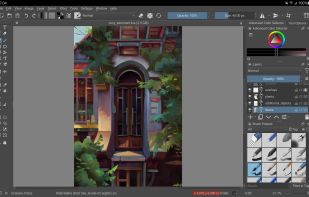
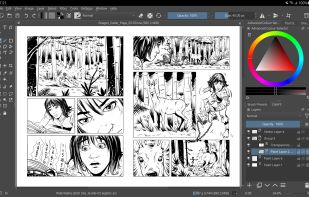
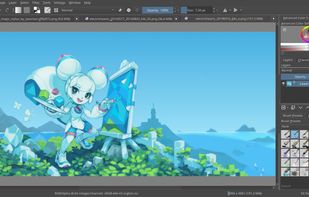
User Interface - An intuitive user interface that stays out of your way. The dockers and panels can be moved and customized for your specific workflow. Once you have your setup, you can save it as your own workspace. You can also create your own shortcuts for commonly used tools.
Pop-up Palette - Quickly pick your color and brush by right-clicking on the canvas.
Brush Stabilizers - Have a shaky hand? Add a stabilizer to your brush to smoothen it out.
Brush Engines - Customize your brushes with 9 unique brush engines.
Wrap-around mode - It is easy to create seamless textures and patterns now. Press the ‘W’ key while painting to toggle wrap-around mode.
Resource Manager - Import brush and texture packs from other artists to expand your tool set.
Layer Management - Krita comes with vector, filter, group, and file layers. Combine, order, and flatten layers to keep organized. Add drop shadows and other simple effects using visual styles.
Full Color Management - Krita supports full color management through LCMS for ICC and OpenColor IO for EXR, allowing you to incorporate Krita into your existing color management pipeline.




Comments and Reviews
My interest in Krita is in cartooning. so I looked mostly at comic related features. I've tried Krita several times and it has some great features such as tiling the image you're working on. The interface has improved as well, and the latest version actually works with my tablet (a straight forward Wacom) whereas previous versions didn't. The brush engine is quite good, but the text and vector tools are still works in progress, Text can be either artistic or a block, but I haven't found a way of putting text on a curvy line. Neither is there a way of easily combining two shapes as you can in Inkscape. The real gem in Krita, which seldom gets discussed, is its layer system. You can have paint (raster) and vector layers, file layers which are much like placed images in Photoshop, fill layers to add patterns, you can group layers, clone layers , and have filter layers as well. All of these can be masked as well, so you have a variety non-destructive of ways in which to manipulate your image. You can create animations which are similar to those made in Clip Studio Paint and Photoshop CS6 or later (no vector tweening that I can find). It also opens and saves to Photoshop (though it's unclear which version of PSD files that is) so you have an easy way to move documents from Photoshop "compatible" apps which also read/write PSD files (like Photoshop, Clip Studio Paint, Pain Tool SAI, et al) though text will be imported as bitmaps. I tried Krita on my dual boot Win7/Mint Linux PCs, and it runs a lot smoother under Linux. Under Win7 I found adjusting layers and other dockers a bit hit or miss. Also, clipping is handled differently than most Photoshop comparable programs.
The features in Krita are more geared toward the focus of commercial editors like Clip Studio Paint and Corel Painter, than Photoshop and GIMP, and I find it an interesting alternative in that context. The thing with Open source programs is that given a large enough community using an app, it will get developed. What's needed is a set of motivated developers (which Krita seems to have) and enough feedback about what needs improving. There's a new release coming this June/July and I shall be interested in seeing what's upgraded.
It's still more oriented on painting rather than photo processing and editing.
Very much so.
Krita can be run on OS X, but is very but hard to use and I had to give up using the application as it was taking me minutes to simply add some text to an image.
oh, im bad to hear that the old krita text engine is totally shit and even developers agree to that but krita is in a process of constant evolution, and one of the major focuses at this moment is to rework the text engine on krta maybe you should try it again on 3.2 (i guess on july?)
im sad to hear*
Maybe I will try version 3.2 when it comes out :)
I am amazed and impressed by the sheer range of possibilities this program offers, even though the interface takes some getting used to. The only downside is that it doesn't support WebP, a format widely used in web development.
Krita is by far my second favorite program after GIMP. Besides drawing, it also allows you to edit images, which is perfect for non-professionals like me who need basic and some advanced editing tools for everyday tasks.
I started to use Krita in 2013 or 2015 when it was still poorly optimized for me to work with. At first, I went back to Paint Tool Sai or Photoshop, but in 2016, I went back on it and I never gave it up again since. I made all my drawings using it, on Windows as well as on Linux, and in both case, it's become a really great software. And even if it's more illustration-oriented, I used it a few time for image-editing because I still find it's a better choice than Gimp for that.
This is the only graphics editor for Linux that I know of that has proven to be truly useful for working with graphics, including on computers not connected to the Internet.
In regards of the Android tablet version, while remaining very powerful, it's a 1:1 porting of the Desktop version.
The issue is, sadly, that makes the experience clunky for new users. Sure, it gets better after getting used to it (like everything after all), but I think this software would enjoy a proper UI conceived for Android tablets.
That said, if you manage to overcome this, you'll have in your hands the option to carry your art around and (almost) seamlessly edit it from PC to tablet and vice-versa at zero costs.