Free and open source password manager offering secure local storage of passwords in an encrypted database, strong AES and Twofish encryption, master key or key file access, portable version, plugin support, password generation, and optional two-factor authentication.
Comment summary: KeePass is highly praised for being a reliable, secure, and open-source password manager, with strong support for local storage and a wide range of plugins. Users appreciate its functionality and cross-platform availability, despite some challenges with browser integrations and version incompatibilities. However, a security flaw related to update checks and issues with syncing and stability on various platforms have been noted. Users generally recommend it for its privacy and control over sensitive data.
Windows users, increase your security: In KeePass go to Tools Options Security check "Enter master key on secure desktop". This helps to defeat keyloggers.
Use Keefox for integration with Firefox browser.
It finds the website fields correctly in 99% of instances, which is better than some commercial products like LastPass.
There are a couple of things to know to save you time when installing the plugin. In particular, if you've followed the instructions and it still doesn't open try this: Go go KeeFox Options KeePass tab check "Remember above settings (e.g. when using KeePass portable).Hopefully that should sort it out.
Yes, it can work with Chrome. For Chrome, you will need a different plugin, however: ChromeiPass. But, if you value your online security and privacy, I strongly urge you not to use Chrome. It's part of Google's broad suite of software that harvests your personal information. If you want a more privacy-oriented but Chrome-compatible browser, see Vivaldi or, better still, Iridium. For both of those the ChromeiPass plugin should also work.
Using Keepass + a browser plugin is less convenient than using a service that syncs your passwords, e.g. the excellent Bitwarden. People who accept the extra inconvenience of Keepass are generally doing it for the added security and privacy benefits. So why undermine your privacy by letting Google track everywhere you go online and everything you search for?
Top Negative Comment
Distortion
★★★★★
•
2
KeePass have MitM security flaw in update check. KeePass uses, in all versions up to the current 2.33, unencrypted HTTP requests to check for new software versions. An attacker can abuse this automatic update check – if enabled – to "release" a new version and redirect the user to a malicious download page.
https://bogner.sh/2016/03/mitm-attack-against-keepass-2s-update-check/
KeePass 2 developer Dominik Reichl has declined to patch a flaw in the password manager's update check as the "indirect costs" of the upgrade (which would encrypt web traffic) are too high -- namely, it'd lose ad revenue. Yes, the implication is that profit is more important than protecting users.
https://sourceforge.net/p/keepass/discussion/329220/thread/e430cc12/?limit=25#6b69
[Edited by Distortion, October 15]
igenn
Comment•
Replying to @Distortion
That's why users must verify the hashsums!
but most of them never do.
THEIR fault if they download something fake
at least he published it
(The checksum in a stupid form though, he says it is readable, good luck with it Dom, read it, i won't!)
Nyagu
Comment•
Replying to @Distortion
The developer has said that this issue was patched:
"In order to prevent a man in the middle from making KeePass display incorrect version information (even though this does not imply a successful attack, see above), the version information file is now digitally signed (using RSA-4096 and SHA-512). KeePass 2.34 and higher only accept such a digitally signed version information file. Furthermore, the version information file is now downloaded over HTTPS"
Reminds me of a bug report I made in 2017, about plugins being able to bypass the program's primary internet proxy settings; the reply was that "Plugins can basically do whatever they want. There is no way for KeePass to restrict them." Very alarming for an encryption/security program. Since then I have only used one or two very simple plugins, and blocked internet access to KeePass with a software firewall.
A password manager and generator that is very reliable and really easy to use. People who think such programs are unnecessary don't know what they're missing!
Peter S.
★★★★★
•
0
I keep only important passwords in it. Lastpass for less important passwords. And keep the master password on paper. I can remember it also. It has a very fast search. The search plus tags and other features make it a universal tool. People have already figured ways to use it besides passwords. It's portable and small. Can be used to share info between some parties.
davidmach14
★★★★★
•
0
As long time user I'm still satisfied. Open source, audited, useful...
manualsrepo
★★★★★
•
1
It's simple to use. I'll loved it
Review from a new or low-activity account — shown here, but not counted in the app rating.
After a fresh Windows installation, new users might get frustrated by the weakness of the default Microsoft apps. So, in this list I'm going to cover applications that will enhance the user experience for everyday tasks. And for that, I only picked programs that meet these criteria:
• Should be free (not commercial), safe and preferably open-source.
• Should be an offline native desktop app/client.
• Does not require advanced technical knowledge.
Thus, the list is tailored to non tech-savvy home users, however, a section for people who are into computer programming and IT will be also added, which includes basic and commonly-used development and coding tools.
This guide is designed for anyone looking to take greater control of their digital life by choosing open-source solutions developed and maintained within Europe. It highlights projects that promote transparency, reduce reliance on non-European tech ecosystems, and align with Europe’s strong commitment to privacy and data protection. The goal is to support digital autonomy in Europe while uplifting the local developers and communities who build trustworthy, user-centric software.
By EUFOSS9132·171 apps·Updated
Official Links
AppStores & Other Links
What is KeePass?
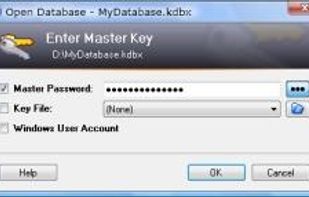
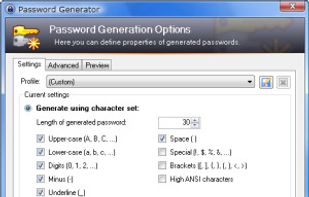
KeePass is a free open source password manager, which helps you to manage your passwords in a secure way. You can put all your passwords in one database, which is locked with one master key or a key file. So you only have to remember one single master password or select the key file to unlock the whole database. The databases are encrypted using the best and most secure encryption algorithms currently known (AES and Twofish).






Comments and Reviews
Windows users, increase your security: In KeePass go to Tools Options Security check "Enter master key on secure desktop". This helps to defeat keyloggers.
Use Keefox for integration with Firefox browser. It finds the website fields correctly in 99% of instances, which is better than some commercial products like LastPass.
There are a couple of things to know to save you time when installing the plugin. In particular, if you've followed the instructions and it still doesn't open try this: Go go KeeFox Options KeePass tab check "Remember above settings (e.g. when using KeePass portable).Hopefully that should sort it out.
Can it work with Chrome ?
Yes, it can work with Chrome. For Chrome, you will need a different plugin, however: ChromeiPass. But, if you value your online security and privacy, I strongly urge you not to use Chrome. It's part of Google's broad suite of software that harvests your personal information. If you want a more privacy-oriented but Chrome-compatible browser, see Vivaldi or, better still, Iridium. For both of those the ChromeiPass plugin should also work.
Using Keepass + a browser plugin is less convenient than using a service that syncs your passwords, e.g. the excellent Bitwarden. People who accept the extra inconvenience of Keepass are generally doing it for the added security and privacy benefits. So why undermine your privacy by letting Google track everywhere you go online and everything you search for?
KeePass have MitM security flaw in update check. KeePass uses, in all versions up to the current 2.33, unencrypted HTTP requests to check for new software versions. An attacker can abuse this automatic update check – if enabled – to "release" a new version and redirect the user to a malicious download page. https://bogner.sh/2016/03/mitm-attack-against-keepass-2s-update-check/
KeePass 2 developer Dominik Reichl has declined to patch a flaw in the password manager's update check as the "indirect costs" of the upgrade (which would encrypt web traffic) are too high -- namely, it'd lose ad revenue. Yes, the implication is that profit is more important than protecting users. https://sourceforge.net/p/keepass/discussion/329220/thread/e430cc12/?limit=25#6b69
[Edited by Distortion, October 15]
That's why users must verify the hashsums!
The developer has said that this issue was patched:
"In order to prevent a man in the middle from making KeePass display incorrect version information (even though this does not imply a successful attack, see above), the version information file is now digitally signed (using RSA-4096 and SHA-512). KeePass 2.34 and higher only accept such a digitally signed version information file. Furthermore, the version information file is now downloaded over HTTPS"
http://keepass.info/help/kb/sec_issues.html#updsig
Reminds me of a bug report I made in 2017, about plugins being able to bypass the program's primary internet proxy settings; the reply was that "Plugins can basically do whatever they want. There is no way for KeePass to restrict them." Very alarming for an encryption/security program. Since then I have only used one or two very simple plugins, and blocked internet access to KeePass with a software firewall.
https://sourceforge.net/p/keepass/feature-requests/2268/
It is a good app for keeping passwords safe.
A password manager and generator that is very reliable and really easy to use. People who think such programs are unnecessary don't know what they're missing!
I keep only important passwords in it. Lastpass for less important passwords. And keep the master password on paper. I can remember it also. It has a very fast search. The search plus tags and other features make it a universal tool. People have already figured ways to use it besides passwords. It's portable and small. Can be used to share info between some parties.
As long time user I'm still satisfied. Open source, audited, useful...
It's simple to use. I'll loved it