Showing posts with label USB 3 Gigabit. Show all posts

Monday, May 6, 2013

Short Review: Kanex DualRole portable Gigabit plus 3 port USB 3.0 hub

Here is an interesting little gadget for the road-warrior.

Kanex DualRole Gigabit Ethernet + 3-port USB 3.0 hub. Designed with Macbook users in mind, it is a small portable USB 3.0 hub with a VIA USB 3.0 controller and a fairly popular ASIX AX88179 USB 3.0 to Gigabit chipset. These are currently shipping for 50ドル on Amazon.


I've dealt with this type of hardware before in other hubs and USB 3.0 gigabit adapters. So the performance is pretty much standard fare if you ever used a VIA USB 3.0/ASIX gigabit adapter. What makes this device unique is the packaging and portability.


I previously toted a Thunderbolt Gigabit or another ASIX USB gigabit adapter along with several SSD drives in my backpack. I've been trying to slim my carry-on weight down so I've been investing in 64GB USB sticks to substitute for 2.5" SSD shuttle drives. Other four port USB 3.0 hubs I have tend to be bulky so this pretty much solves my problem. I figure this is something to have in the bag in the event I need it.

The hub has 3 ports instead on the usual four but I would often end up using the fourth port for Gigabit anyways. Since I already have four other ASIX gigabit dongles, this one was a plug-n-plug for me. If this is your first USB 3.0 Gigabit adapter, you will need to install thew pre-requisite ASIX 88179 drivers.

Overall, I really like it. I wish it had an aluminum finish instead of the mid-2000s iMac/White iBook white finish. The ports are fairly evenly space and you will be able to add some thick USB devices. Still, I wish the ports were a little further spread apart like some of the cheap 4 port Anker USB 3.0 hubs. For example, in the picture below, I could not add two Patriot XT sticks side by side. With different arrangements, I can still all use three ports.


There is no extra USB cable to plug in which is nice. The short cable folds in when not in use. I've read some complaints about the length of the short cable. If you are using this mobile as pictured above, it shouldn't be a problem. However, if you use this in a docked desk environments, I can see where people can complain. Below is a picture of how it dangles when connected to a Macbook on a desk stand like the mStand.


Next, it does not come with an aux power adapter. It does have a hole for an AC power adapter if you plan to power something that requires a little more juice like some 2.5" 7200 rpm drives. This is fine with me since I would only be using this as a mobile gadget.

Conclusion:

I think this is a fair price item. Most USB 3.0 four port hubs cost as little as 30ドル and a USB 3.0 gigabit adapter will run you 20ドル-30ドル on how aggressively you discount shop. The lack of a fourth port is made up with the Gigabit adapter. It uses the standard VIA and ASIX controller IC which works well with other products. I personally love the small footprint and short cable for portability reasons. However, I can see where people would prefer a longer cable in a docked desk environment.

The current competitors are SIIG and Startech. They cost a bit more (60ドル-90ドル) and are not as portable as the Kanex. They also use bulky longer USB cable which makes them more suited for a permanent docked desk environment. The SIIG and Startech USB3.0 combo Gigabit hub below. Another alternative are the DisplayLink PC USB 3.0 docking stations. They run 150ドル and up and provide USB 3.0 video which I don't need.




Friday, April 19, 2013

Thunderbolt Gigabit vs USB 3.0 Gigabit (AX88179)


So I got myself an Apple Thunderbolt Gigabit adapter for my Macbook. I also have four Rosewill USB 3.0 Gigabit adapters using the popular (AX88179 USB 3.0 Ethernet controller).
So how do they compare?

First of all, both retail for the same price at 29ドル. The Rosewill can be had for 22ドル on sale and as low as 17ドル on rare instances. There are other USB 3.0 gigabit adapters that sell for much, much more. However, the bottom line is they most likely use the same ASIX AX88179 chipset. You'll end up installing the ASIX drivers if you want to run them in OSX.
I've been using the ASIX based USB dongle for months. I have one dongle at each location and I even use it with my Linux based Thinkpad and various other computers. So, the USB 3.0 dongle will have more portability and wider use.

However, the USB 3.0 dongle isn't without problems. It disconnects on various occasions. When connected to a USB hub, it will disconnect if the USB bus is saturated with other devices. For example, large USB disk copies will disconnect the ethernet. This problem happens on other computers and different operating system so it is not unique to OSX.

Next, on Mac OSX, hot-plugging requires a work-around. If you plug the USB dongle after the machine boots or after you wake from sleep, the dongle does not work.
This problem doesn't exist on Windows/Linux. However, I found a work around by running a bash shell script that unloads and loads the OSX kext. This works pretty well but I can see where another user without the same level of technical acumen can get frustrated.

The Apple Thunderbolt differs from this particular dongle. First of all, it is short. I don't understand why manufactures who make USB Ethernet dongle feel the need to make long USB extension cable when you'll be plugging an Ethernet cable. Secondly, there are no drivers with OSX. It is plug-n-play. There is none of the hot-plug or sleep issues. It takes a second for the Thunderbolt adapter to be recognized and it simply works. Next, it has more configurability You can do advance tweaks like jumbo frames and changing your MTU. It used the PCI-E lane of Thunderbolt so it feels and acts like a real Ethernet card instead on an adapter.

Performance:
Both work pretty much the same in terms of speed. Using iperf, I was getting 111-115 MB/sec transfers on both. However, the Thunderbolt does not disconnect under heavy load.


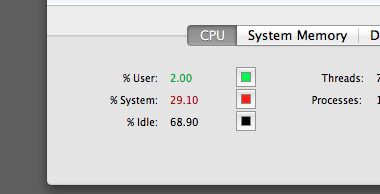
The USB 3.0 uses a little more resources in terms of CPU utilization: 30% vs 22% on the Thunderbolt.


(usb)


(thunderbolt)


Conclusion:
It is a toss-up. I personally think the USB 3.0 is a better buy. USB works with any computers whereas Thunderbolt is mostly an Apple-centric market. Furthermore, since Thunderbolt allows chaining, the Apple gigabit adapter needs to be at the end of the chain. Some macs only have one thunderbolt port so it is a very precious port. The USB dongle can be plugged into a USB hub so that isn't a big issue. However, I like the smaller foot-print of the Thunderbolt adapter and it will be something I throw into my backpack.


Wednesday, March 20, 2013

Cheap USB 3.0 Gigabit adapter for the new Macbook Pros

Need a USB 3.0 Gigabit adapter for your new Macbook Pro, Macbook Retina or new Macbook Air?
Especially, if you don't want to sacrifice that precious Thunderbolt port or rely on Apple's 10/100 ethernet USB dongle? Well, any pretty much any ASIX AX88179 Chipset USB 3.0 to Gigabit adapter will work. There are scores of them on Amazon, Ebay and NewEgg.

They come in different colors, different packaging from different manufactures. However, they all have pretty much the same guts. A while back, I reported having a DOA, bad experience with an Anker USB 3.0 Gigabit adapter. Today, I am reporting better luck with a NewEgg Rosewill adapter using the same ASIX AX88179 chipset.

I recently picked up a few for 17ドル on sale (regularly 28ドル) at Newegg.


The RNG-406U is a standard, sturdy dongle. In fact, it looks more attractive than the Anker that failed me prior.

After opening the box, I quickly loaded up the latest driver from ASIX's website and got my Gigabit speeds. I tested under Mountain Lion 10.8.2 and it works as advertised. I also have the white Apple USB 2 10/100 ethernet dongle and that thing is pretty slow. Under testing, the Rosewill Gigabit adapter was hitting 117 MB/sec using iperf so I am definitely hitting Gigabit's maximum theoretical limit (of 125 MB/sec). In fact, it was just as fast as the internal gigabit on my Macbook.


I even plugged it into my Thinkpad T420 running Ubuntu via a USB 3.0 expresscard and was able to make install the drivers easily. I can confirm it works pretty good under Unbutu 12.04 after installing the kernel drivers. So far, so good. A USB gigabit dongle that works on multiple platforms. I ended up buying three more to leave at different locations. I'm always developing server apps and usually need a few network ports for testing.

One big major issue. Of course, I wouldn't do you guys a service if I didn't acknowledge one glaring issue.

The main issue with this dongle (that I will show how to easily resolve) is the fact, you need to have it plugged in at boot.

If you unplug and replug later, it will not work again. If your machine is already booted or just recovered from sleep, the dongle will not work. The operating system will recognize the dongle but no connection. I usually never shut down or reboot my mac. If I am transporting from home and work, my machine usually just goes to deep sleep. Hence. this was an issue I wanted to resolve.

Now, under most circumstances a simple command line: sudo ifconfig enX down and ifconfig enX up cures all the problems. However, simply restarting the network interface does not work.

To solve this problem, simply unload and reload the kernel kext file (OSX driver). It is located in the plugin folder of the IONetworkingFamily inside System/Library Extensions.

To unload, type in the terminal :

 sudo kextunload /System/Library/Extensions/IONetworkingFamily.kext/Contents/PlugIns/AX88179_178A.kext 

Then to reload, type in the terminal:

 sudo kextload /System/Library/Extensions/IONetworkingFamily.kext/Contents/PlugIns/AX88179_178A.kext 

This will fix it. Simple isn't it? I just make a .bash script and leave it in my home directory and drag-n-drop it into the terminal to run. Voila, working dongle again.


There you have it. A cheap USB 3.0 Gigabit solution. I've even seen a few ASIX AX88179 dongles that are built in 4-5 port hubs. I may try that next.


Subscribe to: Comments (Atom)

AltStyle によって変換されたページ (->オリジナル) /