Showing posts with label Gigabit adapter. Show all posts

Monday, May 6, 2013

Short Review: Kanex DualRole portable Gigabit plus 3 port USB 3.0 hub

Here is an interesting little gadget for the road-warrior.

Kanex DualRole Gigabit Ethernet + 3-port USB 3.0 hub. Designed with Macbook users in mind, it is a small portable USB 3.0 hub with a VIA USB 3.0 controller and a fairly popular ASIX AX88179 USB 3.0 to Gigabit chipset. These are currently shipping for 50ドル on Amazon.


I've dealt with this type of hardware before in other hubs and USB 3.0 gigabit adapters. So the performance is pretty much standard fare if you ever used a VIA USB 3.0/ASIX gigabit adapter. What makes this device unique is the packaging and portability.


I previously toted a Thunderbolt Gigabit or another ASIX USB gigabit adapter along with several SSD drives in my backpack. I've been trying to slim my carry-on weight down so I've been investing in 64GB USB sticks to substitute for 2.5" SSD shuttle drives. Other four port USB 3.0 hubs I have tend to be bulky so this pretty much solves my problem. I figure this is something to have in the bag in the event I need it.

The hub has 3 ports instead on the usual four but I would often end up using the fourth port for Gigabit anyways. Since I already have four other ASIX gigabit dongles, this one was a plug-n-plug for me. If this is your first USB 3.0 Gigabit adapter, you will need to install thew pre-requisite ASIX 88179 drivers.

Overall, I really like it. I wish it had an aluminum finish instead of the mid-2000s iMac/White iBook white finish. The ports are fairly evenly space and you will be able to add some thick USB devices. Still, I wish the ports were a little further spread apart like some of the cheap 4 port Anker USB 3.0 hubs. For example, in the picture below, I could not add two Patriot XT sticks side by side. With different arrangements, I can still all use three ports.


There is no extra USB cable to plug in which is nice. The short cable folds in when not in use. I've read some complaints about the length of the short cable. If you are using this mobile as pictured above, it shouldn't be a problem. However, if you use this in a docked desk environments, I can see where people can complain. Below is a picture of how it dangles when connected to a Macbook on a desk stand like the mStand.


Next, it does not come with an aux power adapter. It does have a hole for an AC power adapter if you plan to power something that requires a little more juice like some 2.5" 7200 rpm drives. This is fine with me since I would only be using this as a mobile gadget.

Conclusion:

I think this is a fair price item. Most USB 3.0 four port hubs cost as little as 30ドル and a USB 3.0 gigabit adapter will run you 20ドル-30ドル on how aggressively you discount shop. The lack of a fourth port is made up with the Gigabit adapter. It uses the standard VIA and ASIX controller IC which works well with other products. I personally love the small footprint and short cable for portability reasons. However, I can see where people would prefer a longer cable in a docked desk environment.

The current competitors are SIIG and Startech. They cost a bit more (60ドル-90ドル) and are not as portable as the Kanex. They also use bulky longer USB cable which makes them more suited for a permanent docked desk environment. The SIIG and Startech USB3.0 combo Gigabit hub below. Another alternative are the DisplayLink PC USB 3.0 docking stations. They run 150ドル and up and provide USB 3.0 video which I don't need.




Friday, April 19, 2013

Thunderbolt Gigabit vs USB 3.0 Gigabit (AX88179)


So I got myself an Apple Thunderbolt Gigabit adapter for my Macbook. I also have four Rosewill USB 3.0 Gigabit adapters using the popular (AX88179 USB 3.0 Ethernet controller).
So how do they compare?

First of all, both retail for the same price at 29ドル. The Rosewill can be had for 22ドル on sale and as low as 17ドル on rare instances. There are other USB 3.0 gigabit adapters that sell for much, much more. However, the bottom line is they most likely use the same ASIX AX88179 chipset. You'll end up installing the ASIX drivers if you want to run them in OSX.
I've been using the ASIX based USB dongle for months. I have one dongle at each location and I even use it with my Linux based Thinkpad and various other computers. So, the USB 3.0 dongle will have more portability and wider use.

However, the USB 3.0 dongle isn't without problems. It disconnects on various occasions. When connected to a USB hub, it will disconnect if the USB bus is saturated with other devices. For example, large USB disk copies will disconnect the ethernet. This problem happens on other computers and different operating system so it is not unique to OSX.

Next, on Mac OSX, hot-plugging requires a work-around. If you plug the USB dongle after the machine boots or after you wake from sleep, the dongle does not work.
This problem doesn't exist on Windows/Linux. However, I found a work around by running a bash shell script that unloads and loads the OSX kext. This works pretty well but I can see where another user without the same level of technical acumen can get frustrated.

The Apple Thunderbolt differs from this particular dongle. First of all, it is short. I don't understand why manufactures who make USB Ethernet dongle feel the need to make long USB extension cable when you'll be plugging an Ethernet cable. Secondly, there are no drivers with OSX. It is plug-n-play. There is none of the hot-plug or sleep issues. It takes a second for the Thunderbolt adapter to be recognized and it simply works. Next, it has more configurability You can do advance tweaks like jumbo frames and changing your MTU. It used the PCI-E lane of Thunderbolt so it feels and acts like a real Ethernet card instead on an adapter.

Performance:
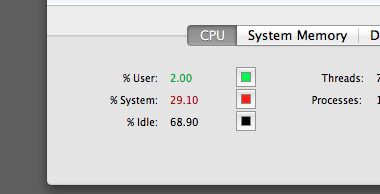
Both work pretty much the same in terms of speed. Using iperf, I was getting 111-115 MB/sec transfers on both. However, the Thunderbolt does not disconnect under heavy load.


The USB 3.0 uses a little more resources in terms of CPU utilization: 30% vs 22% on the Thunderbolt.


(usb)


(thunderbolt)


Conclusion:
It is a toss-up. I personally think the USB 3.0 is a better buy. USB works with any computers whereas Thunderbolt is mostly an Apple-centric market. Furthermore, since Thunderbolt allows chaining, the Apple gigabit adapter needs to be at the end of the chain. Some macs only have one thunderbolt port so it is a very precious port. The USB dongle can be plugged into a USB hub so that isn't a big issue. However, I like the smaller foot-print of the Thunderbolt adapter and it will be something I throw into my backpack.


Subscribe to: Comments (Atom)

AltStyle によって変換されたページ (->オリジナル) /