AudioSuite may be the oldest means of processing audio in Pro Tools, but it still has its uses! AudioSuite may be the oldest means of processing audio in Pro Tools, but it still has its uses!
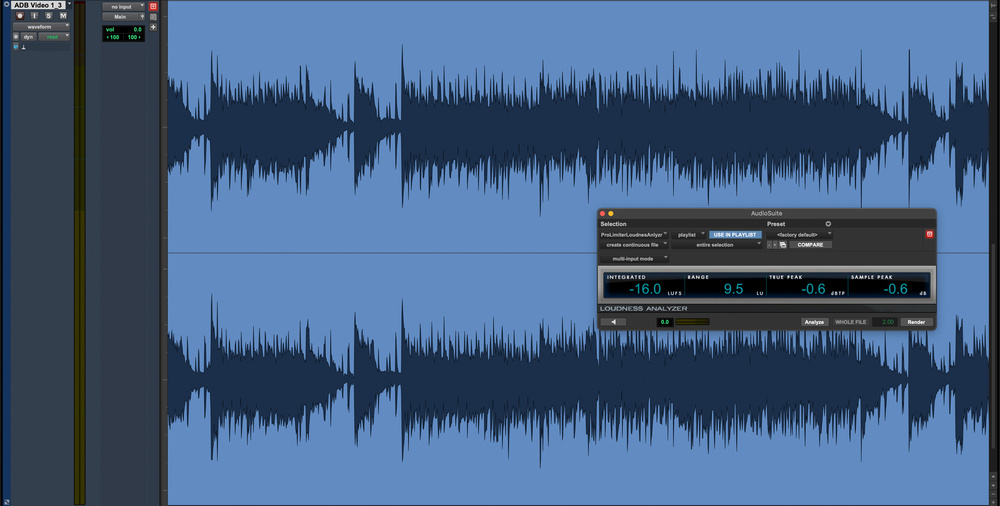
ARA or AAX? Real‐time or offline? We explore the many ways to process audio in Pro Tools.
When we talk about processing audio in a DAW, we usually mean inserting a real‐time plug‐in on a track, but Pro Tools offers other ways to modify audio signals. The results might be identical, yet the methods differ in terms of commitment, flexibility and context. Pro Tools supports four distinct approaches:
- AudioSuite
- Clip Effects
- ARA (Audio Random Access)
- Real‐time AAX plug‐ins
Each affects how reversible your decisions are and how the processing interacts with the material on your timeline. This article explores how these methods differ, why you might choose one over another, and the practical consequences of those choices within a production.
I think of these four processing options as points on a continuum, running from AudioSuite through Clip Effects and ARA to real‐time AAX. At the AudioSuite end, processing is fully offline and committed; at the AAX end, everything is live and easily adjustable. Each method solves different problems and is appropriate in different situations. Workflow issues often arise not from the tools themselves, but from choosing an approach that doesn’t match the task, so understanding where each sits on this spectrum is helpful.
How Suite It Is
AudioSuite is the least flexible of Pro Tools’ processing options, and also the oldest. Before real‐time plug‐ins existed, offline AudioSuite processing was the only way to process audio in Pro Tools. But even in 2026 it’s far from a legacy feature. It still offers workflow possibilities unavailable anywhere else.
Most AAX plug‐ins have an AudioSuite counterpart, and some processes, Reverse being the obvious example, can only exist offline. Because AudioSuite works on entire clips rather than on the playback stream, it’s ideal for tasks that rely on full‐clip analysis, such as normalising or loudness measurement. It’s also extremely efficient for batch operations, like getting a set of files to a consistent level before bringing them into a session.
AudioSuite renders its results to a new file, which can be an advantage or a disadvantage depending on the situation. If you know exactly what you want to do and don’t anticipate changing it, it’s ideal. If you’re applying a one‐off spot effect, say, AudioSuite is often quicker and cleaner than creating a dedicated track and instantiating a real‐time plug‐in for a single event.
Historically, the rendered nature of AudioSuite also eliminated processing overhead. Modern computers make this less critical than it once was, but the workflow remains valuable because it promotes clear decision‐making while still allowing straightforward reversion via playlists or prior saves.
AudioSuite isn’t outdated. It simply occupies a specific role. And before Clip Effects or ARA existed, there was a wide gap between fully offline AudioSuite and fully real‐time AAX. The next sections look at what now bridges that gap.
Clip Art
Clip Effects can be thought of as a real‐time interpretation of AudioSuite: utility processing applied at clip level, updated freely and without the commitment of rendering. They’ve been in Pro Tools for a decade, yet remain somewhat overlooked. Their companion feature, Clip Gain, has become central to most workflows, but Clip Effects never achieved the same level of adoption. I suspect this is because early expectations of an expanded processor range never materialised. What we have today is restricted to Avid Channel Strip’s filters, EQ and dynamics presented as clip‐based tools.
Like AudioSuite processing, Clip Effects are clip‐based. However, unlike AudioSuite, they operate in real time and so can be tweaked without the need to re‐render the results. Like AudioSuite processing, Clip Effects are clip‐based. However, unlike AudioSuite, they operate in real time and so can be tweaked without the need to re‐render the results.
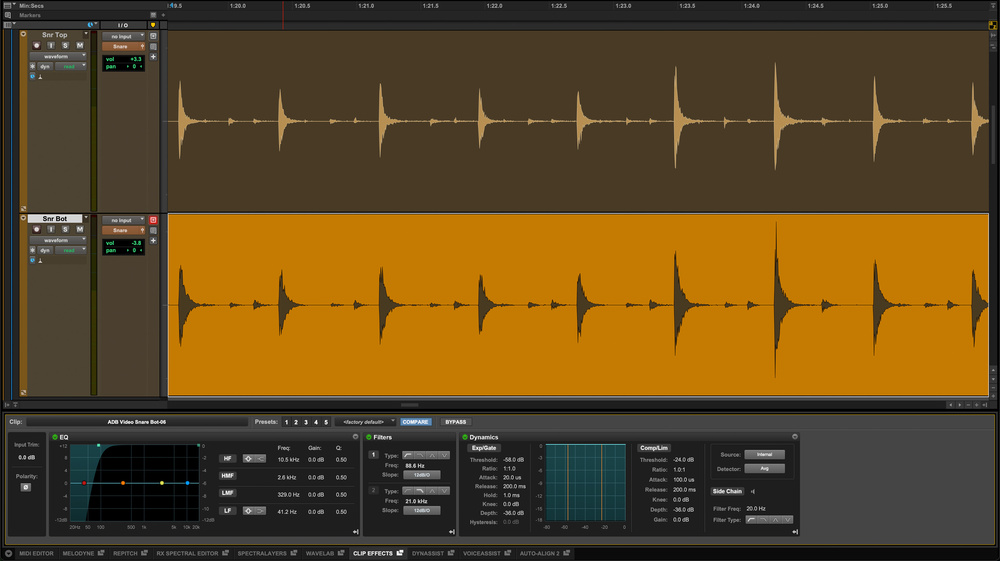
Despite that limited scope, Clip Effects are still useful. If you need to invert polarity on a specific clip or apply a quick high‐pass filter, this is the fastest and cleanest way to do it. For Studio and Ultimate users, these effects are fully editable, and useful control options are presented in the contextual menus available by right‐clicking a clip. The Clip Effect window has moved from the top of the Edit Window to the lower dock alongside the MIDI editor and ARA integrations. A small badge on the clip provides a visual cue that EQ or dynamics have been applied.
The dynamics section has always been hampered by the absence of real‐time metering, but the filters and EQ genuinely earn their keep. Clip Effects aren’t an alternative to more advanced processing, yet they’re invaluable for quick, targeted fixes.
ARA Farming
Pro Tools first gained ARA support toward the end of 2022, beginning with Melodyne. ARA was conceived to support processes that go far beyond conventional insert‐style processing — tasks such as tuning, spectral editing and phase alignment, which require access to an entire performance and, in some cases, multiple tracks at once.
Some processors, such as Melodyne and DynAssist (pictured) support ARA, which permits bidirectional communication between the plug‐in and a DAW’s timeline, allowing for real‐time control even when the processing needs to analyse a complete clip. Some processors, such as Melodyne and DynAssist (pictured) support ARA, which permits bidirectional communication between the plug‐in and a DAW’s timeline, allowing for real‐time control even when the processing needs to analyse a complete clip.
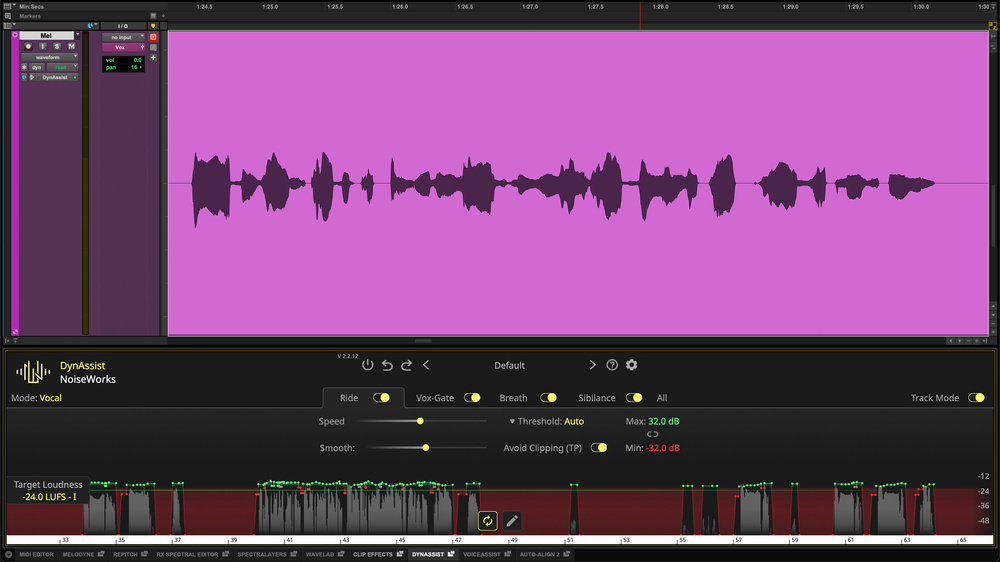
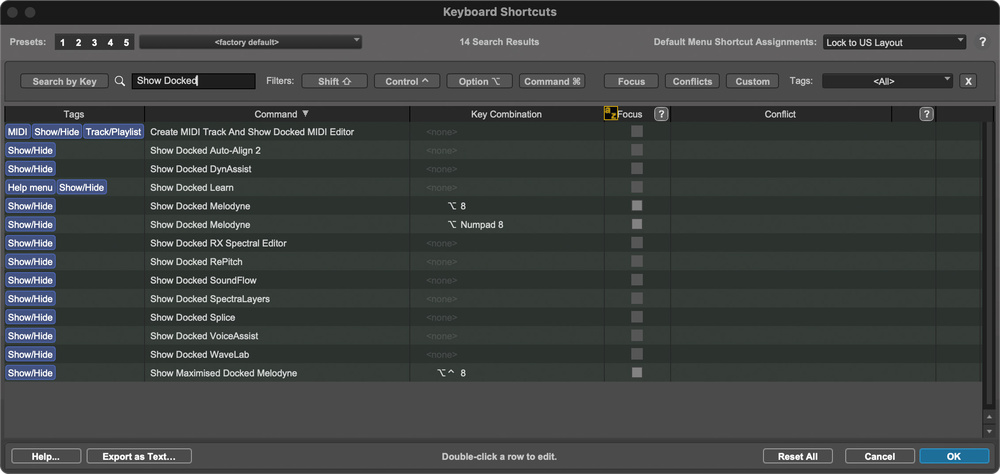
ARA (Audio Random Access) addresses this by enabling fast, two‐way communication between the DAW timeline and the plug‐in. More ARA‐compatible tools have arrived in Pro Tools over the last couple of years, and many now share the docked editor at the bottom of the Edit window. Edits made in the plug‐in are reflected on the timeline almost instantly, and timeline edits update the plug‐in with similar speed. All ARA windows can be detached, which is useful for intensive vocal or instrument editing on a second screen. On a single‐screen setup, custom shortcuts make opening and closing these windows far more manageable. Only Melodyne has a default toggle, but additional keystrokes are easy to create.
Pro Tools has a dedicated docked editor for ARA plug‐ins. By default only Melodyne has a dedicated keyboard shortcut to show or hide it, but you can create new shortcuts for other ARA processors. Pro Tools has a dedicated docked editor for ARA plug‐ins. By default only Melodyne has a dedicated keyboard shortcut to show or hide it, but you can create new shortcuts for other ARA processors.
ARA’s strengths lie in deep analysis and immediate responsiveness, but it does have one significant limitation: only one ARA process can be active on a track at a time. To use multiple ARA processes, you must commit the previous one. For experienced Pro Tools users, this mirrors familiar AudioSuite workflows involving alternate playlists and versioning. For newer users, many of whom rely almost exclusively on real‐time plug‐ins, ARA often provides the first practical introduction to these reversible, playlist‐based backup strategies.
Exit Strategy
Before looking at the final processing method, it’s worth addressing workflow and how to keep your decisions reversible. Commitment is important, but in 2026 there’s little justification for making changes that can’t be undone. Relying on the undo buffer isn’t a long‐term strategy. Undo is session‐dependent, doesn’t persist, and exists primarily to correct immediate mistakes.
Alongside saving whole sessions, playlists offer an ideal way to preserve previous states of individual tracks. For changes that live on the timeline — AudioSuite renders, Clip Effect adjustments or clip‐level edits — playlists offer a quick and efficient safety net. For changes that affect an entire track, duplicating the track and making the earlier version inactive is a clean alternative. Inactive tracks consume no system resources and can be hidden if they start to clutter the track list.
Whatever method you choose, the underlying principle is the same: commit when you’re ready, but always leave yourself a clear route back if a decision later proves to be the wrong one.
AAX To Grind
Real‐time AAX plug‐ins are by far the most common way to process audio in Pro Tools. Insert‐based processing offers minimal commitment, instant feedback and a familiar, straightforward workflow, which explains why it remains the default choice for most users. For conventional tasks, the kinds of processes that have analogue equivalents, real‐time plug‐ins are hard to beat.
Their limitations stem mainly from their real‐time nature. Offline processing once existed because computers couldn’t handle audio in real time; today the situation is almost reversed. Real‐time operation is comparatively slow, and for many tasks an offline process completes far more quickly. AAX plug‐ins respond to the audio passing through them at that moment. Lookahead dynamics processors can ‘anticipate’ audio to an extent, but they are still essentially bound to real‐time playback.
This is where the random‐access element of ARA, and the full‐clip analysis available in AudioSuite, offer clear advantages. Processes such as tuning or loudness analysis benefit from seeing the entire performance, not just the current moment. In my own work, for example, I rely on offline loudness measurement rather than real‐time meters for final readings.
Real‐time AAX plug‐ins remain the most flexible option, but they also have the least contextual awareness, which is one reason the other processing methods still earn their place in Pro Tools.
Each method has its own strengths, and understanding those differences is important when choosing the most appropriate option for the task at hand.
Conclusion
Having covered the full spectrum of processing types, the distinctions between them should now be clear. Each method has its own strengths, and understanding those differences is important when choosing the most appropriate option for the task at hand. In most cases you’ll have a straightforward choice between AAX and AudioSuite, as nearly all plug‐ins exist in both formats. That choice becomes far more specialised with ARA, and negligible with Clip Effects, which, useful though it is, remains narrow in scope.
There are a couple of calls to action here. Spend time exploring ARA. As the newest addition to Pro Tools’ processing landscape, it may still be unfamiliar to some users, but it offers capabilities that neither real‐time AAX nor AudioSuite can fully match. Secondly, it’s worth revisiting AudioSuite, which still has significant value. I’ve lost count of the number of users I’ve seen working through needlessly complicated real‐time workflows simply because they overlooked the AudioSuite alternative that would have suited the job far better.
Ultimately, being fluent across all four approaches offers efficiency. Real‐time AAX remains unmatched for flexibility, and committed processing is inevitably less adaptable, but when used appropriately, offline and clip‐based methods can deliver substantial workflow advantages. Knowing when to use each is the real skill, and it’s one well worth developing.