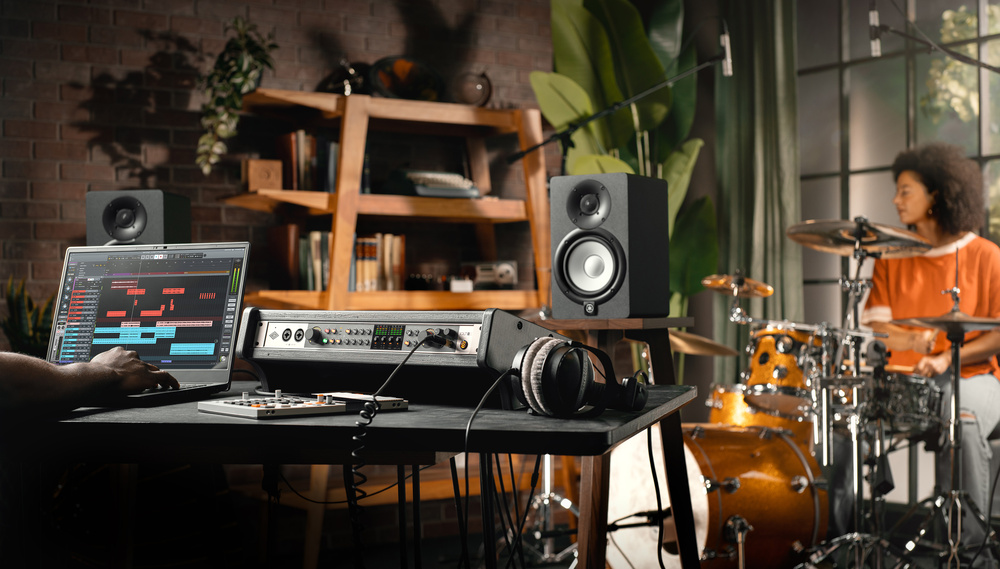
UA’s Volt range reaches its full potential with their rackmounting, multi‐channel USB interface, the Volt 876.
Universal Audio have built up an incredibly strong brand by marrying vintage and modern sensibilities. In part by cultivating relationships with other big names from the analogue world, they’ve generated a strong association with the golden age of tape‐based recording — yet, since the late ’90s, the products on which they’ve built this reputation have been digital. The UAD‐2 Powered Plug‐in platform, the Apollo range of Thunderbolt audio interfaces and the Sphere modelling mics all major on traditional values, but they realise those values through DSP. An all‐UA recording system can thus mimic the sonic qualities of tracking to tape, on vintage mics, through a classic console and outboard, but it does so within a modern computer‐based environment.
The cost of such a system is a tiny fraction of the gear it emulates, but even so, UA have historically positioned their plug‐ins and Apollo interfaces towards the premium end of the market. To cater for those whose budget won’t stretch that far, they more recently introduced the Standard Series modelling microphones and the Volt line of audio interfaces. The Standard mics offer basic modelling options through the Hemisphere plug‐in, while the Volt range dispense with the Apollos’ built‐in DSP, and connect via USB rather than Thunderbolt.
Until now, the Volt range has been comprised of small, bus‐powered, desktop models with small I/O counts, no digital I/O, and basic hardware input monitoring. If you wanted ADAT expansion, or low‐latency input mixing in UA’s Console software, you’d have to step up to the Apollo range. That’s all changed with the introduction of the Volt 876.
Volt Face
The new model boasts numerous features that, within UA’s product range, were previously found only in Apollos. It’s a mains‐powered, full‐width 1U device that comes with removable rubber feet and rack ears, and its rugged metal case is surprisingly deep and heavy. This is partly because it features a built‐in mains power supply, something that will have Apollo owners casting envious glances. On the analogue side, it sports eight mic/line inputs on combi XLR/jack sockets, with the first two located on the front panel. The front‐panel inputs offer a high‐impedance mode for tracking electric guitars. At the other end of the front panel you’ll find two independent headphone outputs, augmenting the eight line outputs on the rear panel.
Most of the Volt 876’s I/O is on the rear panel, with only the first two inputs and the headphone outputs at the front. Most of the Volt 876’s I/O is on the rear panel, with only the first two inputs and the headphone outputs at the front.

The 876 is the first Volt to feature digital I/O, and it’s pretty comprehensive. You get two sets of optical Toslink in and out sockets, for either stereo S/PDIF or up to 16 channels of ADAT Lightpipe I/O, plus word clock in and out. There’s also MIDI in and out on full‐sized DIN sockets, while connection to the host computer is made using a single Type‐C USB port.

The Volts cannot host UAD‐2 plug‐ins, and consequently do not implement Apollo features such as Unison modelling mic preamps, or low‐latency monitoring through plug‐ins in UAD Console. Instead, Volt preamps have a switchable Vintage mode, and on some models, a preset FET compressor based on UA’s classic 1176 design. Both features operate in the analogue domain, and both are available on all eight of the Volt 876’s analogue inputs.
However, with so many different settings available for each 876 channel, UA have moved away from the analogue, one‐button‐per‐function control paradigm of previous Volts. Instead, a set of eight illuminated buttons is used to select one or more inputs, whereupon a rotary controller and a further set of buttons are used to adjust preamp parameters for the selected inputs. In other words, although the preamps on the Volt 876 don’t support Unison, they are nevertheless fully recallable and under digital control. A 60dB gain range is available, calibrated in 1dB steps, and adjacent odd/even input pairs can be linked to maintain gain matching for stereo recording.
To the right of the input controls is a bank of eight five‐segment LED meters, and to the right of this, you’ll find the Volt 876’s ‘master section’ controls. A main encoder with LED halo governs the output level at the first pair of outputs, which are designated monitor outs. There’s also a separate mute button, but it’s the other three controls that help to differentiate the Volt 876 from comparable interfaces. The Dim/Talk button simultaneously dims the monitor outputs and engages the 876’s built‐in talkback. By default, this uses a small mic embedded in the front panel, which is also available as a recording source to your DAW. The 876 also implements a slightly more basic version of the Apollos’ speaker switching, whereby it’s possible to designate outputs 3+4 as being an alternate monitor output pair, and use the Alt button to toggle between these and the main monitor outs. And lastly, there’s a button labelled Direct, which lights up green when engaged.
Going Direct
The desktop Volts offer a very simple hardware‐based implementation of direct monitoring. That approach wouldn’t really cut the mustard on an interface that can potentially be handling more than 20 inputs, so UA have brought this into the digital world too, making the 876 the first Volt to be controllable from their familiar UAD Console app.
Within UAD Console, you’ll see a new mixer pane that presents all of the 876’s digitally controllable features. This means it’s possible to control all the abovementioned preamp parameters, and to set up monitor balances that draw on all the analogue and digital inputs, plus a stereo loopback channel. As well as having a fader, mute, solo and pan controls, each input channel also has sends to two dedicated Cue buses, meaning that in effect, you can create three different low‐latency cue mixes. These can be distributed between the 876’s main monitor outs and its two headphone outputs. However, DAW return channels don’t appear in the Console mixer at all, so if you want your previously recorded signals to appear both in the main mix and one or both of its Cue buses, you’ll need to arrange this within your DAW, or output to the loopback channel instead.
The Volt 876’s Direct button, in effect, is a remote control for the Console channel mute on whichever input(s) are selected using the front‐panel buttons. So if, for example, you have input 3 selected on the 876 and toggle the Direct button, you’ll see channel 3 in Console unmute itself, and you’ll hear input 3 at the monitor outs and in the Cue buses. If it’s routed to an unmuted, armed track in your DAW, you’ll hear it ‘indirectly’ too.
The idea of having dedicated Cue buses is inherited from the Apollo, where it’s designed to support more complex setups than can be created with the 876. With this interface it enables integration with LUNA (see box), but in other respects, a simpler architecture might be more intuitive — personally, I’d rather just have DAW returns appear in the Console mixer, and sends routed directly to outputs rather than buses. As it is, the limitations on routing seem a bit arbitrary. For example, each of the Cue buses can be mirrored to exactly one pair of physical outputs in addition to one or both of the headphone outs. Unsurprisingly, the Volt 876 doesn’t support surround monitor control, and has no built‐in DSP that could be used to host speaker correction profiles, as the Apollos can.
Making Gains
Having made the 876’s preamps digitally controllable, UA have taken the logical next step and implemented the Assistive Auto‐Gain algorithm that was introduced with the Apollo X Gen 2. It works in exactly the same way here, giving you choice over the duration of the auditioning period, the target peak signal level, the threshold level at which signal is held to be detected, and so on. As on the Apollos, Auto‐Gain can be applied to multiple inputs at once, and will maintain consistent gain levels for linked inputs. You may find you need to reduce the default listening threshold level for quiet signals such as speech, but in general it works well, and is every bit as effective with the Volt 876 as it is with the Apollo.
UA recommend running Auto‐Gain with the preset compressors switched off, then activating them afterwards if required. If you ignore their advice, Auto‐Gain in effect ‘hears’ the compressed signal when making its decisions, so the target level you select will influence the amount of compression that is applied. There are three compressor modes, named Fast, Guitar and Vocal. The main variable that changes when you switch between them is the release time; all have relatively fast (sub‐2ms) attack times, a fixed 6:1 ratio and 6dB make‐up gain, and a soft‐knee threshold configured such that the compressor starts to apply gain reduction when the input signal gets within 12dB of the clipping point of the A‐D converter, and doesn’t reach the full 6:1 until the threshold is exceeded by several dB. So if you’re like me and tend to leave a lot of headroom at recording, for example by setting the Auto‐Gain target to ‐12dBFS, the compressor won’t do much at all. To achieve noticeable amounts of gain reduction, you’ll need to set a higher Auto‐Gain target, or adjust the gain manually. As on the other Volts, there’s no visual indication of whether gain reduction is taking place, or how much, so you’ll need to be guided by ear. Typically, the compression is pretty transparent in Guitar and Vocal modes; Fast mode is more assertive, though still smooth except on sources with a lot of low‐frequency content.
More Volts
One of the features that differentiates the Apollo interfaces from the Volts — and indeed almost all USB interfaces — is scalability. If you want to increase the I/O count of an Apollo setup, you can simply daisy‐chain an additional unit over Thunderbolt. This generally is not possible with USB devices, and the Volt 876 is no exception. However, the Volt 876 can act as an ADAT expander as well as an interface, and UA have implemented some clever control features in this scenario. The inclusion of word clock in and out sockets is also a positive, especially in cases where you might want to connect multiple expanders to a single host.
When the 876 is used as an ADAT expander, Host mode allows it to be controlled from within UA’s Console, as shown in this screen capture — note that the same preamp controls appear at the top of the ADAT channels as on the first eight channels. When the 876 is used as an ADAT expander, Host mode allows it to be controlled from within UA’s Console, as shown in this screen capture — note that the same preamp controls appear at the top of the ADAT channels as on the first eight channels.
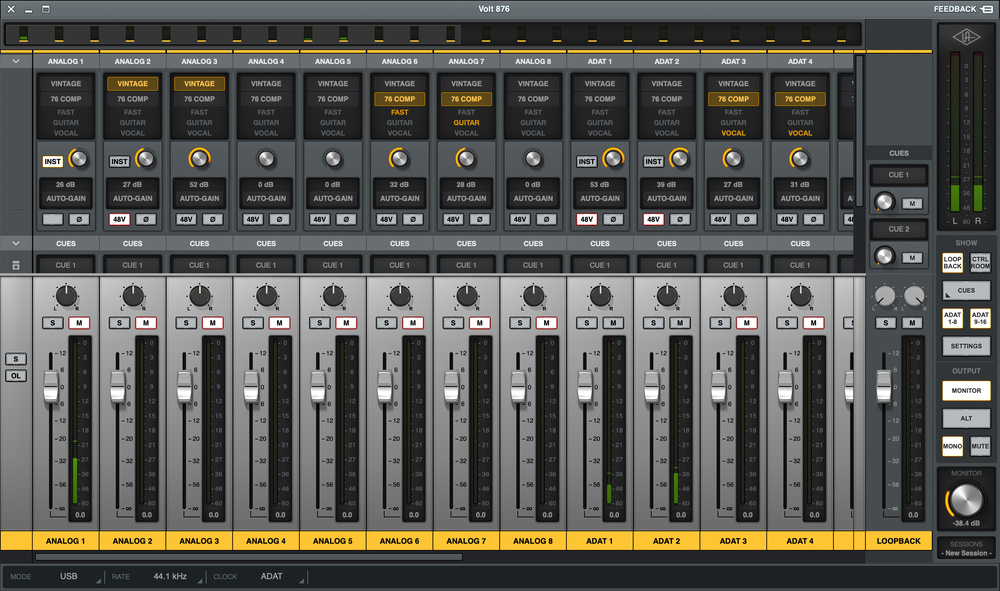
For expansion purposes, the 876 needs to be switched into standalone ADAT mode, whereupon it pipes up to eight channels of audio each way over Lightpipe. However, as long as you have a spare port, you can still hook up a USB cable from the 876 to your computer in addition to the optical cables that are tying it into your primary interface. The Host LED will then light on the expander, and you’ll be able to control its preamps from Console in exactly the same way as those of the main Volt. With a generic ADAT expander, the Console mixer just shows a fader and cue sends for each ADAT input channel. With an 876 in standalone ADAT + Host mode, it shows all the same controls as you’ll see for the first unit, and supports Auto‐Gain (the Direct button and additional unit’s monitor section, however, are inoperational). Better still, you can even use an 876 configured thus as an expander for an ADAT‐equipped Apollo. In this scenario, the 876’s input controls show up in a separate window, but this can be minimised and floated over the Apollo mixer window.
Expanding an 876 or Apollo system this way is not as powerful as cascading multiple Apollos, though, partly because there is no way to access the headphone sockets on the expander units. This seems a shame. On the face of it, I can’t see why an 876 used as an expander couldn’t at least mirror the first pair of return signals to the headphone outputs.
Bits & Pieces
Another advantage that Thunderbolt interfaces typically offer over USB models is better low‐latency performance. With the 876 on my Mac, the 32‐sample buffer size delivered a reported latency of just under 8ms at 44.1kHz; oddly, though, Oblique Audio’s RTL Utility confirmed that the true figure was lower, at just under 6ms. A 16‐sample buffer size is also available, so you should have no problem achieving decent real‐time monitoring. UA also say that low‐latency performance is better under the new macOS 26.
The term '32‐bit' is rapidly becoming familiar in audio interface marketing materials, and has the potential to cause serious confusion. In a few products, mostly targeted at location recording, it refers to a distinctive architecture where parallel A‐D converters are used to generate a 32‐bit floating‐point audio signal, rather than the more conventional 24‐bit fixed‐point signal. This has the fairly major advantage that the converters and the audio signal can handle the entire range of possible input signals regardless of gain setting, making the device effectively impossible to clip. By contrast, the Volt 876 is one of a growing number of modern audio interfaces that are touted as "32‐bit" simply because they use the latest generation of converter chips. In this context, the term refers only to the internal operation of the converters, so as far as the user is concerned, the Volt 876 can only ever handle 24‐ or 16‐bit audio, and is very much not immune to clipping.
However, these converters do mean that the 876 has significantly better audio specifications than the desktop Volt models. Dynamic range is 116dB on all analogue inputs and 119dB on the outputs, noise and distortion are impressively low, and unlike some affordable USB interfaces, the Volt 876 can both accept and put out a reasonably hot line level. Its outputs are aligned such that 0dBFS produces +20.2dBu, while the line inputs can handle up to +22dBu. Sensibly, although the line and mic inputs both pass through the preamp circuit, the sensitivity of the XLR inputs is greater, and at the lowest gain setting, the mic input can accept a maximum +12.5dBu. The headphone outputs, too, are noticeably more powerful than those on many interfaces, and all the analogue outputs are DC‐coupled, so can be used to generate control voltages for modular synths. In terms of the competition, there’s pretty much nothing in it between the Volt 876 and Focusrite’s Scarlett 18i20 on the specs front; neither can quite match PreSonus’s Quantum HD8, SSL’s 18 or Audient’s iD48, but both are more than good enough for any conceivable real‐world application.
High Voltage
So which interface should you buy? Thankfully, that question is getting easier to answer, because manufacturers are realising that their products need to have a unique selling proposition on top of the now‐standard eight mic/line inputs and ADAT expansion. The SSL 18, for example, features the ability to operate at ‘professional’ +24dBu line‐up levels, a pair of insert points, and SSL’s famed Listen Mic Compressor. The Quantum HD8 has dedicated re‐amp outputs, a colossal preamp gain range, and outstanding low‐latency performance. The iD48 provides switchable insert points on all eight analogue inputs, which can be used at mixdown and recording without re‐patching. What does the 876 offer to differentiate itself?
I’m pretty sure that there isn’t another audio interface on the planet that offers built‐in analogue compressors on all eight of its mic/line inputs.
The Volt 876’s ability to be remotely controlled in an ADAT expander configuration is unusual, but not entirely unique. A similar feature is available with the PreSonus Quantum HD8 and with Audient’s EVO range, though its implementation here is particularly slick and thorough. The 876’s Vintage preamp setting is likewise comparable to SSL’s 4K mode and Focusrite’s Air option, and features such as the built‐in talkback mic, alternate speaker switching and DC‐coupled outputs are also available elsewhere. However, I can’t think of another interface that combines all of these features in the way that the 876 does. And I’m pretty sure that there isn’t another audio interface on the planet that offers built‐in analogue compressors on all eight of its mic/line inputs. Admittedly these are preset‐only, offering limited flexibility and no metering, but it’s very hard to make them sound bad, other than by amplifying any noise on quiet signals.
Finally, another factor that might influence buying decisions is the supplied software bundle. Most interfaces now come with a decent selection of plug‐ins, but the 876’s UAD Producer Suite hits hard, with goodies like their LA‐2A, 1176 and Pultec Collection included.
As I mentioned at the outset, Universal Audio’s Apollo and UAD product lines are built on the idea of emulating classic analogue equipment in the digital domain. So it’s possibly a little ironic that if you want ‘real’ analogue compression in your audio interface, you can’t get this in an Apollo, but you can in the more affordable Volts. And whereas previous Volt models haven’t encroached on the Apollo line at all, the Volt 876 neatly bridges the gap between the two ranges. The Apollos still offer enough, both functionally and in terms of audio specifications, that you probably wouldn’t buy a Volt 876 as your primary interface in place of an Apollo x8p. But if you’re an existing Apollo owner looking to expand your rig, the 876 is a pretty tempting option, thanks to its close integration with UAD Console and LUNA. And if you’re starting from scratch, the Volt 876 is a classy, feature‐rich design that will do everything you need of a project‐studio audio interface and more.
Volt 876 & LUNA
If you’re an audio interface manufacturer, the advantages of offering your own DAW software are fairly obvious. Not only can you bundle this software to drive hardware sales, but you have complete control over integration between the two. Thus, although most DAW software will work well with third‐party hardware, it often steps up a level when used with an interface from the same manufacturer.
Universal Audio launched their ambitious LUNA recording software back in 2020, and initially it was closely tied to their Apollo hardware. Since then, UA have added support for generic Core Audio and ASIO interfaces, and have continuously expanded the feature set to the point where it’s now an impressively complete package. Best of all, it remains free to download and use, although there is now a Pro paid‐for tier that incorporates various LUNA Extensions such as the API Vision Console Channel Strip and Studer A800 Tape Recorder.
To coincide with the introduction of the Volt 876, UA have more or less simultaneously launched version 2.0 of LUNA. This brings some banner features that undoubtedly justify the integer upgrade, most notably the addition of ARA (Audio Random Access) support, allowing products such as Celemony’s Melodyne and NoiseWorks’ DynAssist to be used directly within the LUNA editing window. The other big step forward is the introduction, in the Pro version, of a comprehensive Hardware Insert system, which handles delay compensation and routing automatically, and allows hardware chains to be saved as presets. Elsewhere, LUNA’s automated instrument detection is much improved in version 2.0, and UA have also built in the means to control the Volt 876 from the LUNA channel strip or mixer.
The Volt 876 is smoothly integrated into LUNA. Here, I’ve launched Auto‐Gain on one of the inputs from a second 876 in ADAT + Host mode. The Volt 876 is smoothly integrated into LUNA. Here, I’ve launched Auto‐Gain on one of the inputs from a second 876 in ADAT + Host mode.
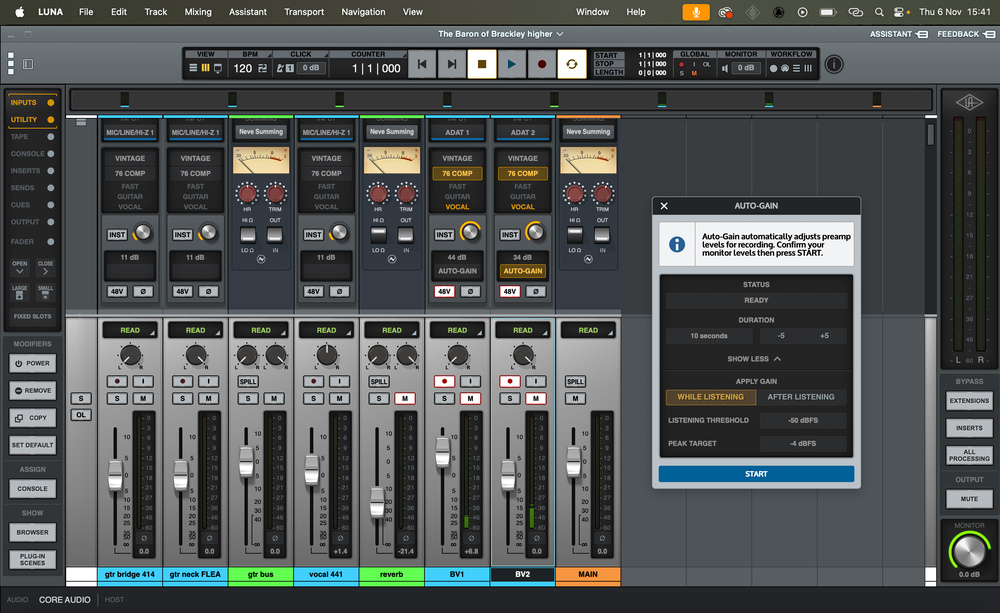
In essence, this populates the Preamps section of the channel strip with all the same controls you see in the Console mixer. You can adjust gain, change the compressor mode, toggle phantom power and polarity, select instrument mode for inputs 1/2, and so on. It’s also possible to run Auto‐Gain from LUNA, although this option only appears when a track is record‐armed or when input monitoring is active. Channels in the LUNA mixer are automatically populated with sends to Console’s two Cue buses, and you can have a further two Cue sends that go direct to 876 outputs.
What you don’t get with the Volt 876, though, is the Accelerated Realtime Monitor feature that is available to Apollo users. This, in effect, integrates the Console mixer into LUNA, allowing you to set up low‐latency cue mixes without tabbing back and forth between the two applications. I’m not sure if it would have been technically feasible to implement this with the Volt, but its absence does mean that you’ll either have to keep your buffer size low while recording, or keep Console open in the background. In the latter scenario, it would be nice to have the option for the 876’s Direct button to toggle track mutes in both applications at once, so that a single press would mute the Console channel and unmute the LUNA channel, or vice versa — although the switching logic involved might be too complex.
Pros
- Full digital control enables Auto‐Gain and seamless integration with UA’s Console and LUNA software.
- Preset FET compressors on all eight analogue inputs.
- Can be controlled from a computer even when configured as an ADAT expander.
- Decent specifications and nice loud headphone amps.
- Built‐in talkback and speaker switching.
Cons
- Routing within the internal mixer and UAD Console is less intuitive and less flexible than in some interfaces.
- Fixed threshold relative to 0dBFS means there’s a limit to how hard you can drive the compressors.
Summary
UA’s Volt range just got a whole lot more serious, with an expandable USB interface that can tackle challenging multitrack recording tasks.
Information
860ドル including VAT.
999ドル
When you purchase via links on our site, SOS may earn an affiliate commission. More info...
Sweetwater Affiliate logo 14pxWhen you purchase via links on our site, SOS may earn an affiliate commission. More info...
G4M logo