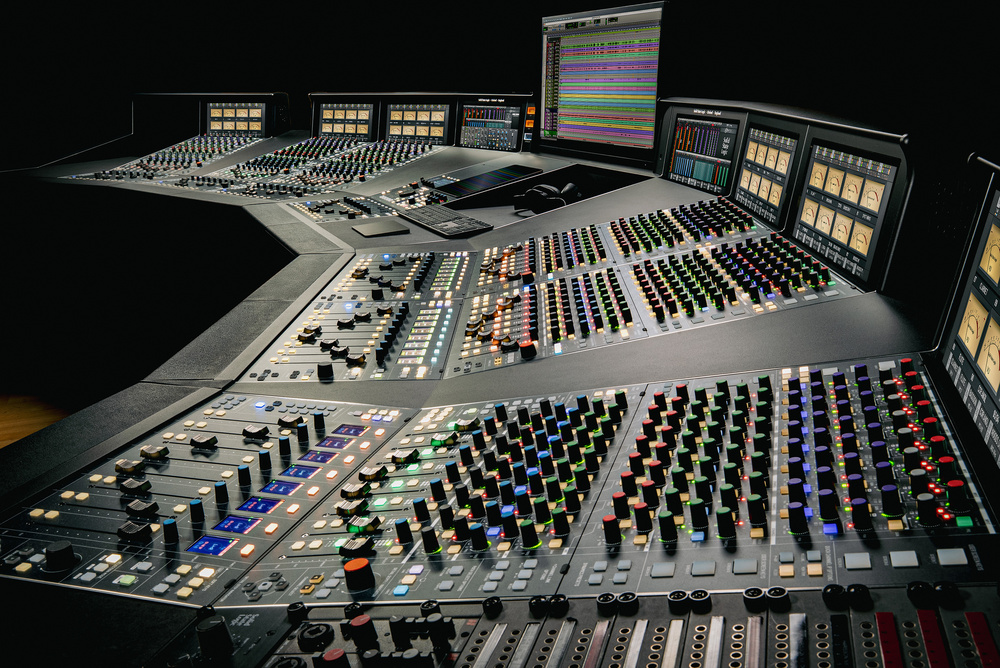
The legendary British console makers have a new flagship model for pro studios. Highly configurable. Mightily impressive. Is this the future of analogue?
SSL have a rich and storied history and, naturally, they draw on that in the design and promotion of products today. Notably, their 4000- and 9000-series consoles were particularly influential, and not just in terms of visual impact. The ‘4K’, as it’s often known, was the first commercially available large console to feature both dynamics processing on every channel and a total recall system. Of course, there was that famous ‘glue’ compressor on the mix bus too...
Two By Two
But there’s way more to SSL today than trading on past success. I’ve visited their Oxfordshire headquarters — where their big, professional mixers are still designed, developed and manufactured — a few times in recent years, and each time I’ve been struck not just by the product designers’ expertise, but also their passion and enthusiasm. They evidently feel that there remains much to be learned from studying their back catalogue, but in pretty much every conversation also display ambition, and a drive to innovate and advance.
New SSL consoles have been coming relatively thick and fast of late. Only a couple of months ago, we published my review of their Origin Evo (SOS June 2026: https://sosm.ag/ssl-origin-evo), an all-analogue affair about which I remain hugely enthusiastic — in a nutshell, a traditional SSL mixer, with better technical specs and some slick modern features. Notably, compared with the original Origin, it adds dynamics processing and a high-/low-pass filter section on every channel.
And it’s only a year since I reported on their groundbreaking Oracle (https://sosm.ag/ssl-oracle). A radical new design, this one put flesh on the bones of a ‘future analogue’ concept SSL have been working on behind the scenes for years. The signal path is again entirely analogue, but everything’s digitally controlled: the analogue electronics sit in stylish rack furniture, and the user interacts with a digital control surface that’s laid out much like a traditional mixer. So it facilitates many advantages of digital mixers (such as reassignable controls and accurate, near-instant total recall) while offering analogue-like reach-and-grab immediacy. The Oracle’s sound and facilities are astonishingly good, and it’s hugely more power-efficient than the consoles of yore.
But while it was clear as soon as I laid eyes on it that there was plenty to commend the Oracle, I recall one of my first questions to the product team being something like: "A lot of vintage SSL console owners use their channel compressors — had you considered including them?" Naturally, they had, but the absence of them in the Oracle was by design. Still, I inferred from some knowing looks that the Oracle wouldn’t be the ultimate destination on this journey. And if you have even a passing knowledge of classical literature, you’ll know the word ‘journey’ segues perfectly to the subject of this review... SSL’s latest behemoth flagship mixer, called the Odyssey, joins the ‘O Series’ alongside the Oracle, the Origin and the Origin Evo, all designed by Niall Feldman, SSL’s Director of Special Projects.
In some respects, the Odyssey is to the Oracle what the Origin Evo is to the Origin. As with the Oracle, there’s a largely digital control surface, and the analogue signal-path electronics are housed in multiple large rack units. As with the Origin Evo, each channel has a dynamics processor and low-pass filter that its sibling lacks. So the O Series comprises two all-analogue consoles and two digitally controlled analogue ones, and in each case there’s one offering channel dynamics and a full ‘bracket filter’.
I don’t anticipate more consoles being added to it any time soon, but of course the digital side of things — the firmware, the O-Control software (that supports both console models) and the DAW integration facilities — can be upgraded, and since I reviewed the Oracle there’ve already been significant updates to O-Control. And while we might not expect new consoles, I’d be surprised if SSL didn’t exploit the fruits of their O-Series R&D to deliver new outboard gear at some point.
Make It Large?
I often think of any generously proportioned mixer that offers good technical performance, an abundance of master-section and input channel facilities, and more than, say, 24 channels and eight subgroups, as ‘large-format’. However you define it, there’s no doubt that the Odyssey earns that moniker, but there are multiple possible sizes, configurations and customisation options.
The smallest available control surface has a centre section (for the stereo bus, subgroups, aux returns, monitor facilities and so on) plus 24 in-line channels, organised in three eight-channel bays. The largest gives you a whopping 96 in-line channels, each with a corresponding console channel strip. For any configuration, the console uses one rack of analogue electronics for the centre section, and another for every 24 in-line channels.
The control console can be specified with more control channel strips, added in eight-channel bays (so 32, 40, 48, 56, 64, 72, 80, 88 or 96), and obviously you can specify an Odyssey to resemble a traditional analogue console, with a control strip for each and every channel. But since each bay can be mapped to any group of eight analogue channels, there are other options. For instance, you could have a 24-channel control console as a front end for 96 analogue channels. The workflow would be more akin to that of a digital mixer, in terms of channel selection, but you’d still benefit from the abundance of controls on each channel strip. It’s also worth noting here that, even if you were to opt for the ‘full monty’ (96 channels, 96 control strips), you could still bring whatever channels you wanted ‘into focus’ on a bay near your seat between the monitors.
With the analogue and control-console channel counts decided, you have options in terms of the physical layout. The furniture in which the centre section sits is two bays wide (the same as 16 in-line channels), though the controls only occupy half that. The other half can be configured to meet your needs: you might place an eight-strip bay there, for example, or, as on the 48-channel review console, a desk surface to give you space for things like your computer keyboard, Stream Deck, paper copies of a score or lyrics and so forth.
Eight-channel bays can be placed to the left or right of the centre section, and you can place wedge-shaped desk sections between them. There’s perhaps little point in that for smaller configurations, but on a large Odyssey such as the main image shows, it brings more faders within reach of a chair with casters, and makes things easier to see. It also narrows the overall footprint, of course.
Screen Time
Every bay has a vertical screen above the channel strips and, collectively, these serve as the console’s meterbridge. As on the Oracle, you can specify per-bay bar meters or virtual moving-coil VUs — on the Odyssey these are selectable using a button on the bay. Both the Oracle and Odyssey now benefit from a new touch-responsive mode too: touching any channel-strip control brings up the relevant controls/parameters on screen; letting go reverts to the bar meters. (This mode only works with the bar meters, since they’re helpfully placed in-line with the control strip; the VUs are wider, so are laid out in rows). Other information is displayed on the screens with the meters, and in other views there’s direct control of things such as the module routing or various channel strip parameters; each bay has a Navigator wheel/encoder, for ‘scroll and control’ access to what’s displayed on screen.
As with the Oracle, the bay screens can display VU or bar meters (among other things), and the latter align neatly with the hardware channels. As with the Oracle, the bay screens can display VU or bar meters (among other things), and the latter align neatly with the hardware channels.
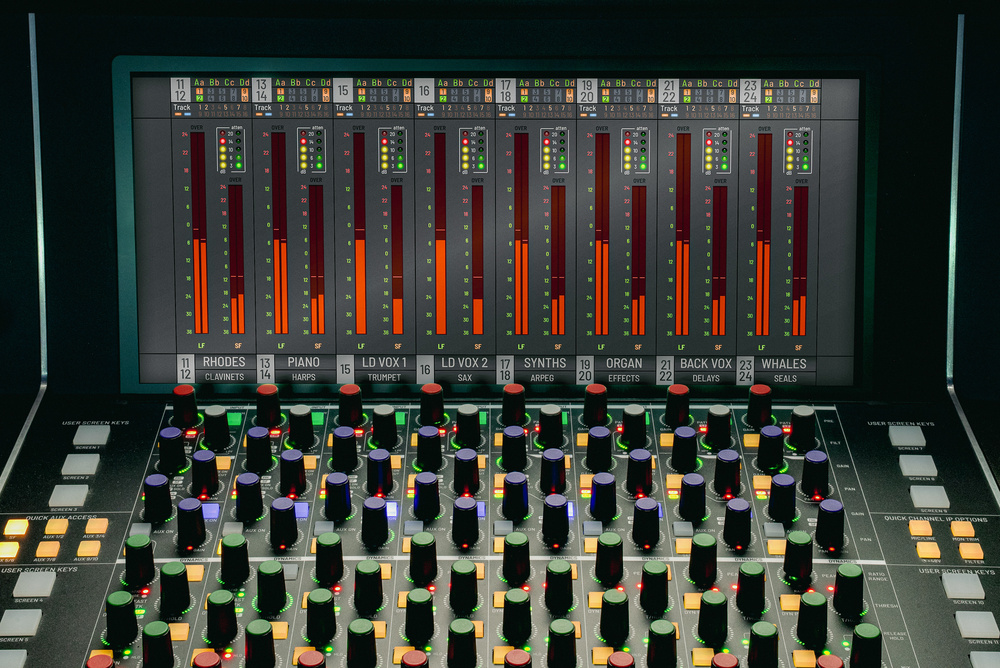
There is, of course, as standard, a similar display for the centre section, but in some configurations (including on the custom console at SSL’s HQ, shown in the main pic) you might have two. These screens sit at the same height as the meterbridge of SSL’s Duality console, and several users of that model asked if space might be made in the centre section to accommodate a computer screen. That wish is granted in the Odyssey. On smaller versions (eg. a straight line of 24 channels plus centre section), there’d be a screen above the centre section. On larger versions, you can opt for a ‘Pro Station’ configuration, with the screen set off to the side, at the top of one of the desk wedges. The demo console’s two centre-wedge screens allow some things to be kept in view on one while different operations are performed using the other. In fact, I get the sense that, if you ask and you have the budget, pretty much any configuration you could dream up would be possible.
Touchy Feely
Let’s linger for a moment on the physical experience of ‘driving’ this thing, since more than one reader enquired about that after reading my Oracle review. I can understand why, looking at pictures, since there are sections that bear a strong resemblance to SSL’s UF-8 DAW control surface, with which lots of people will be familiar. So let me be clear: while the UF-8 is built to a decent standard for its price, the control surfaces of both the Odyssey and the Oracle seem to me to be a cut above it. As you’d hope of any large mixing console aimed at professional studio use, the metalwork is solid and nicely finished, the labelling is good, and high-quality controls are used (ALPS faders, for instance).
Naturally, given the target audience, some will also wonder if it offers the same feel and experience as working on, say, a 4000-series console. I’m not well-placed to judge that: it’s years since I laid hands on one, and setting one up next to this behemoth would have been highly impractical! But I can say that the Odyssey has clearly been designed and engineered to support heavy daily use in a professional studio, over many years. I have no qualms about that whatsoever.
Channel Modules & Controls
Welcome as all the modularity and the digitally controlled analogue wizardry is, when you add those things together a reviewer’s job becomes trickier. The simple word ‘channel’, for example, might apply to an analogue channel housed in a rack, or to a strip of digital controls on the console surface that may be used to control any analogue channel. To keep explanations simple, assume below that unless I say otherwise, I’m discussing a mixer with an equal number of digital control strips and analogue channels, with each strip mapped to a corresponding analogue channel.
I’ll start with the in-line channels, before moving on to the centre section. As on the Oracle, these have two main inputs and two fader paths that run in parallel, each with its own direct out plus separate insert send and return. Usually, the main mic/line input would feed the short-fader path, and its output would be your ‘to tape/DAW’ signal. The return from your DAW would feed the line-level monitor input, routed to the long-fader path, and you’d use that to build your mix.
The EQ and filter modules can even act on the dynamics module’s side-chain, whichever path that’s sitting in...
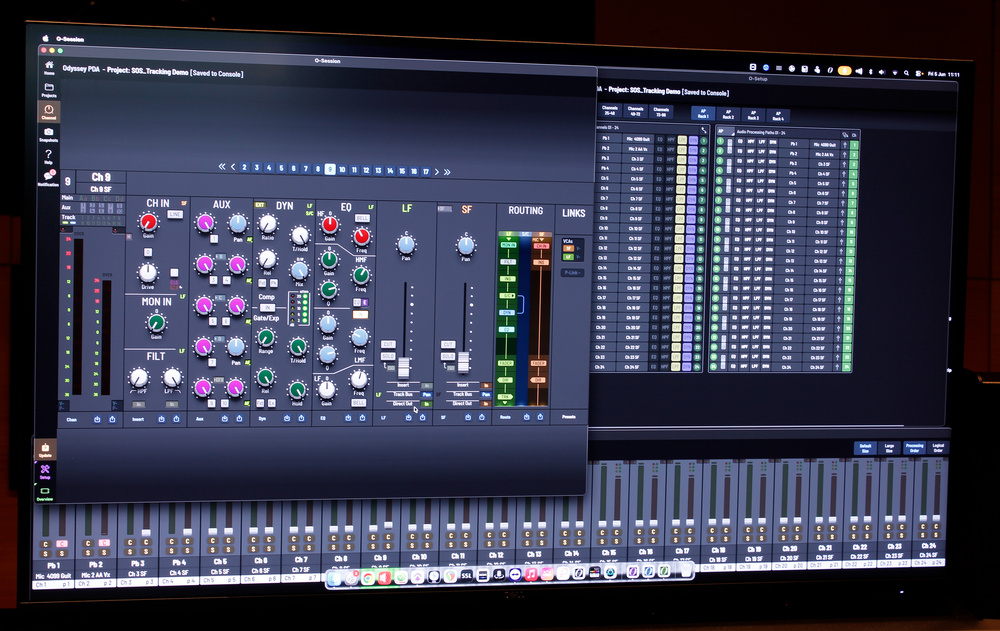
But the channel signal paths are supremely versatile. Not only can you put signals onto either path, and put various analogue processing modules into a different order, but you can deploy pretty much any of the modules to various points in either path. In the case of the EQ and filter modules, these can even act on the dynamics module’s side-chain, whichever path that’s sitting in. Incidentally, on the old 4000 series, you could place either the EQ or the filters in the dynamics side-chain; on the Odyssey, you can patch in either or both, for incredibly detailed control. On-screen routing diagrams at the top of the bay make it super easy to see how everything’s configured (an essential inclusion, since it allows you to retrace your steps and troubleshoot quickly). You can make these changes using hardware controls (either on the strip, or using dedicated controls for navigating/selecting what’s shown on screen), or you can use the powerful O-Control software. More on all that later, but first lets zoom out a little...
The channel processing modules and routing diagram, shown on both a channel-bay screen (above) and on the O-Control software (below). The channel processing modules and routing diagram, shown on both a channel-bay screen (above) and on the O-Control software (below).
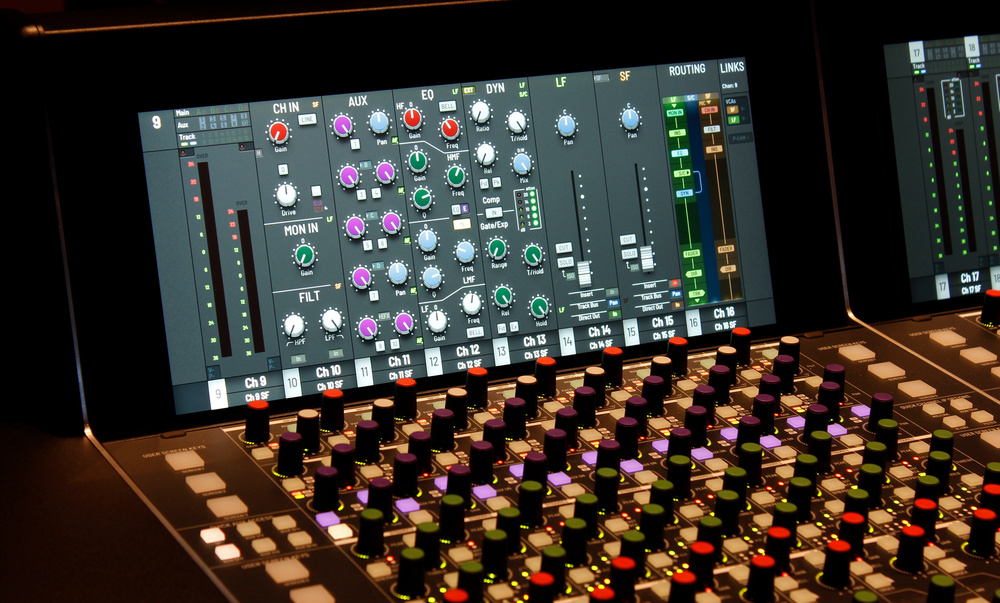
Each channel bay features eight control strips, for per-channel adjustment of the input gain, filters, aux sends, dynamics, EQ, and for both the small- and long-fader level and pan. The individual channel strips have fixed control layouts, of course, and this reflects the traditional in-line analogue signal path and workflow I alluded to above. On either side of the eight channels are vertical strips that host a number of buttons — these govern whole-bay settings (for example, that meter mode selector). At the top of each channel strip is the preamp, which is an iteration of the one used in SSL’s SuperAnalogue channels, the Duality and many other consoles, preamps and channel strips since. "If it ain’t broke..." as the saying goes! As well as clean gain (which some picked and strummed acoustic guitar recording tests confirmed sounds beautifully quiet and detailed), you have the option of dialling in more character (harmonic distortion) to taste, which is a simple but incredibly useful facility.
Next comes the new filter module, with both variable high- and low- pass filters. These share a single encoder, so it’s not quite one knob per function, but you have ample control. When it comes to routing, they are moved together as a pair, but are independent of the EQ section.
Beneath are purple-capped aux send controls. As with the Oracle, you can send to any of 10 aux busses, which can be configured as mono, or in stereo pairs. The Odyssey gives you more physical aux send encoders, though: four to the Oracle’s two. Each encoder can control one aux send at once on its channel, though a strip can be configured for stereo control and you can quick-link channels.
Arguably the headline new feature: the switchable feed-forward/feedback VCA dynamics module, an enhanced version of the one found on SSL’s 9000-series consoles. Arguably the headline new feature: the switchable feed-forward/feedback VCA dynamics module, an enhanced version of the one found on SSL’s 9000-series consoles.
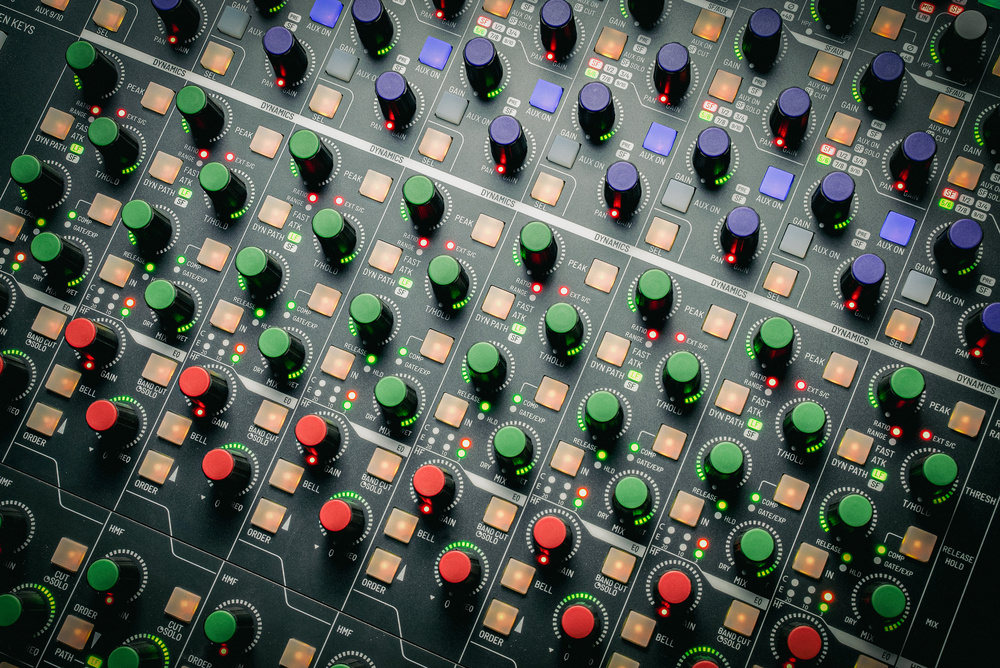
The dynamics module that follows features, as on the Origin Evo, a VCA compressor and a gate/expander — it’s a combination that’s so much more versatile than having a compressor alone, and a godsend on a general-purpose mixer like this. It’s based on the equivalent processor on the 9000-series console, but with significant improvements.
While the famous bus compressor has a feedback topology, the SSL channel dynamics have traditionally been feed-forward, and this is the case with the Odyssey. There’s a switchable peak-sensing mode, which allows the processor to react much faster than before, and which is particularly useful for limiting: it can react fast enough to clamp down on transients. It’s also worth highlighting that the 4000-series gate that inspired the Origin Evo’s example had only a release control, whereas in the 9000-series consoles — and here — there’s also a hold control.
This time, the compressor also benefits from a Mix (wet/dry blend) control (older SSL analogue consoles don’t have these), and the convenience of having parallel compression ‘on tap’ within the channel shouldn’t be underestimated. (Those fast reaction times could prove especially useful here.) As I mentioned above, it’s possible to insert the EQ and/or the filters into the dynamics side-chain. I was very mildly disappointed, given just how versatile the module routing is generally, to find that the dynamics sections’ dry and wet channels aren’t separately accessible, because I often like to shape the wet signal with EQ when I’m using parallel compression. But there are other ways to achieve that, including multing to another channel, or making use of both the long and short fader paths on the same channel.
The EQ section below this is, I think, exactly the same as on the Oracle, except that there are now EQ preset keys on each bay’s side-strips. These allow you to save/select up to six EQ presets, which are stored in O-Control. And that brings us down to the short and long fader sections, each with its own pan pot.
Digital Flexibility
Did I just write ‘pan pot’? Oops! Yet again, I feel the need to stress that these are assignable digital controls. By default, the long fader sets the output level for the long-fader signal path, the short fader for its namesake, and their respective encoders pan the signal left or right. But that’s just the default. You could in theory map these to anything, and SSL have implemented some useful presets that can be selected from the control surface or using O-Control. For example, it’s possible to control the mic/line preamp gains or the aux send levels using the fader sections. The ergonomics of the console are such that those parameters’ regular controls at the top of each channel are easily reachable, but leaning across that far for extended periods is never ideal, and being able to set the gains of many channels, or build multiple cue mixes, is definitely quicker and easier when they’re brought down to the front. Your back will thank you later!
There are all manner of such helpful workflow touches, most being directly accessible using buttons on the bay side‐strips. With these you can enjoy DAW-style quick-linking of channels, so that turning one encoder, pushing one button or moving one fader performs the same action on all linked channels. You can change which analogue channels a control bay acts on. You can flip between analogue- and DAW-control modes. You have a Shift key for finer control... and much more besides. It would take a manual to describe all of that, so I suggest you consult it if you want more detail on precisely what’s possible.
Centre Section Facilities
The centre section is much like that of the Oracle, and follows SSL’s usual structure, with 16 ‘track busses’, eight fader-controlled stereo group inputs (that can pick up those track busses) and four stereo mix busses. The stereo groups each have a switched insert and a direct out, as well as a pre-fader ‘image’ control to set the stereo width — handily this doubles as an M-S encoder, and there’s a switchable post-insert M-S decoder. The groups can be routed to any of the track, aux or mix busses, and can also access any of the 10 console aux busses.
The centre section screen, showing the analogue Bus+ processor’s parameters. The centre section screen, showing the analogue Bus+ processor’s parameters.
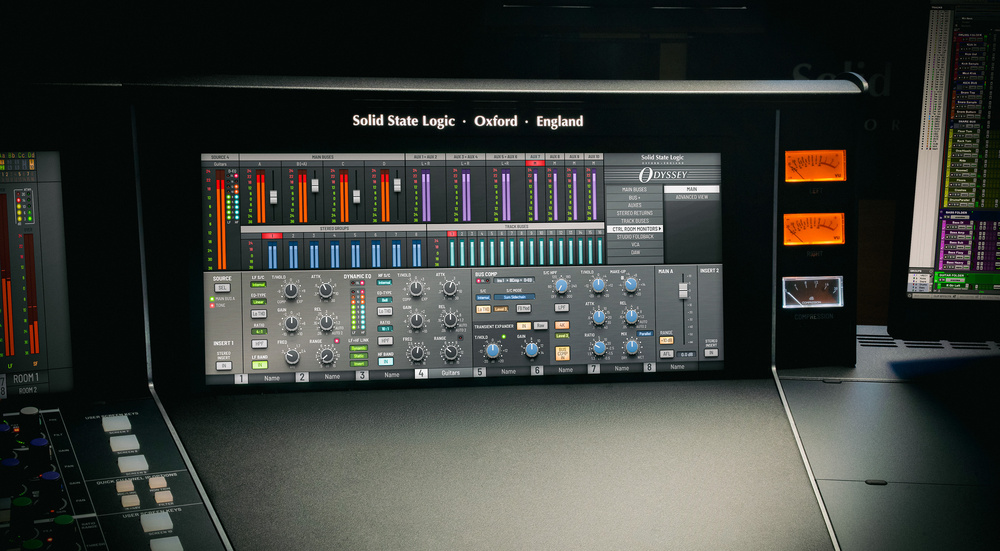
The four stereo mix busses (A, B, C and D) each have a switchable insert point and main level control, and busses B, C and D can be summed into bus A. But A has additional features, including pre- and post-main‐fader insert points and a version of SSL’s Bus+ stereo mix bus processor. For those who’ve not encountered it before, the Bus+ builds on SSL’s classic feedback-type VCA bus compressor with additional character options and side-chain features, as well as a powerful two-band dynamic EQ. In similar fashion to the analogue channel modules, the pre-fader processing and insert can be routed in any order. The post-fader insert, meanwhile, allows you to ride the levels into an external processor using the main mix fader. The idea is to facilitate the creation of stems and the main mix, simultaneously — a powerful feature when combined with precise total recall, since it should make the creation of multiple mix revisions over time quick and easy. But you can obviously use this versatile bus structure for whatever purpose you desire.
There are ample source and monitor selection facilities, including the ability to route processed signals to an external immersive audio system. There are ample source and monitor selection facilities, including the ability to route processed signals to an external immersive audio system.
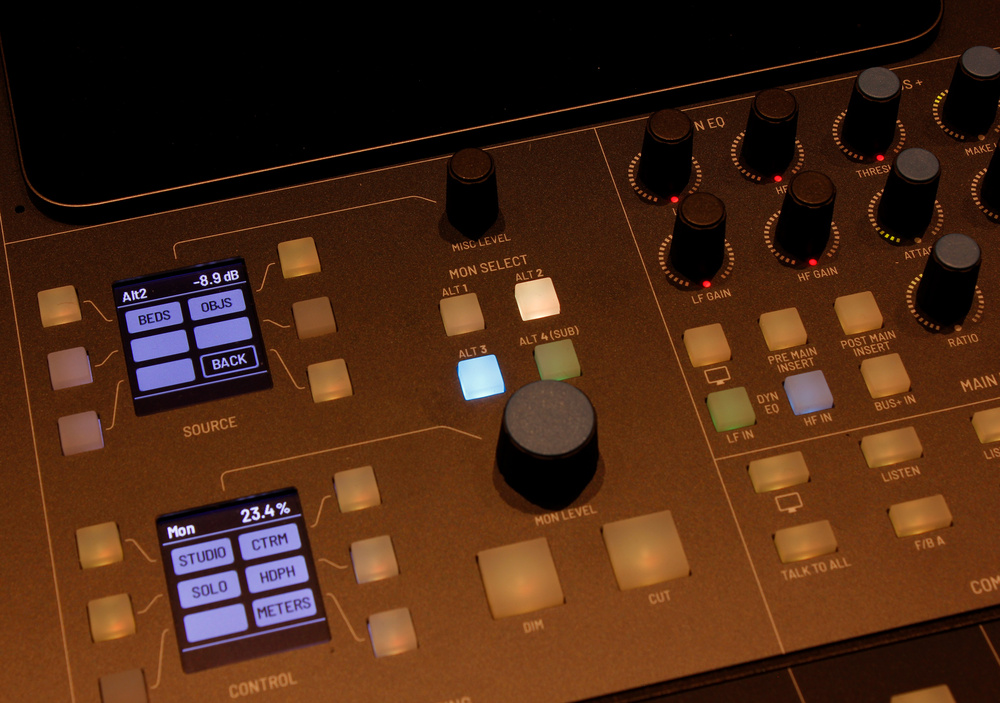
There are source-selection and monitor-control facilities, of course, including support for multiple stereo sets of speakers, three foldback feeds, and dual (paralleled) 6.35mm headphone outputs (easily accessible underneath the centre section surface). As well as the mix busses, you can monitor four external stereo inputs, including another under-console socket for connecting line-level sources — instruments, say, or a Bluetooth receiver for phone playback. As you’d expect, there are various after-fade, pre-fade and solo-in-place functions from channels, group inputs and all busses, and there’s talkback, with the ability to send this to different destinations.
As with the in-line channels, the centre section makes great use of the screen(s), including ‘detail’ views for all the centre-section processing and routing, and there are some thoughtful touches here. For example, the centre-section meters don’t disappear when the detail views are selected, but shrink to make way. With a two-screen centre-section setup, you can dedicate one to full-size metering. You get the idea... there’s everything here you’d expect on a big analogue SSL and more besides, with versatility borne by the thoughtful implementation of digital control.
There’s one less obvious monitoring feature worth highlighting: the user can assign control of monitoring to an external immersive monitoring system, such as Dolby Atmos. In that scenario, the Odyssey can deliver processed analogue signals to an immersive mix tool’s discrete ‘per channel path’ object feeds, and still provide monitoring control over the rendered mix. In other words, unlike their older consoles, this big, stereo SSL mixer won’t get in the way in studios who wish to cater for immersive projects. Instead, it can very much play a role in any modern production.
O-Control & DAW Control
Of course there’s a whole other dimension to the Odyssey! As with the Oracle, pretty much everything can be configured using SSL’s O-Control software, which has matured considerably since I reviewed the Oracle. Partly, that’s to facilitate this console’s new features, but it also delivers new functions for both consoles.
O-Control is actually a suite of three desktop apps. O-Setup manages console settings; O-Session caters for individual projects, presets and snapshots, and the console processing sections; and the jauntily named O-Verview gives an at-a-glance display of the console channel settings, including metering, large and small fader positions and cut/solo status. It’s worth noting that O-Control projects can be used with either console — the Oracle simply ignores any Odyssey-specific data, and keeps it in place when saving.
As a whole, it’s a hugely powerful facility that delivers many benefits. Notably, you needn’t be connected to a console to configure a session: you can set up your session remotely and, thanks to the instant total recall, be up and running pretty much on arrival. That could save both time and money, as well as freeing a producer to focus firmly on the music and people-skills side of the job.
The new features include the ability to view and remotely control the channel settings, as well as an enhanced snapshot facility. Previously, when you saved or recalled a snapshot it always included everything. Now, there’s a filter system that allows you to recall individual channels, even if you saved them all. There’s more to explore here but, again, there’d be little point in me detailing every possible option. They’re myriad, and my account would quickly become out of date as SSL continue development — they stated very clearly to me that they’re open to user feedback on development of O-Control, and that updates will be made available for both Oracle and Odyssey owners.
The other ‘software’ aspect to consider is the DAW at the heart of most modern studio sessions. The Odyssey has two strings to this bow. First, as I’ve alluded to in passing, the console doubles as a (nicer!) UF-8-style DAW controller. The faders can be switched, per bay, between controlling analogue channels and the DAW, so it’s possible to control both at once, using adjacent bays. The second string wasn’t quite ready when I checked out the Odyssey, but I’m assured it will be by the time you read this: a ‘dynamic automation’ system facilitated by dedicated DAW insert plug-ins (AAX, AU, VST3, on macOS and Windows). Each instance links the DAW channel to a console channel, so that your DAW session contains all the necessary console automation.
Verdict
OK, it’s time I drew this review to a close. Above, I’ve taken you through a vast amount of functionality, yet I haven’t even come close to covering it all. For one thing, you’ll note a distinct lack of specifications. The manual wasn’t quite complete at the time of writing, and for now I can only offer that the noise floor, which depends on the number of channels in use, is quoted as 90-100 dB, and that there’s +26dBu of headroom. It will be well worth reading the manual when it’s available, should you wish to flesh out that knowledge.
So what are my lasting impressions? I was already massively impressed by the Oracle, and remain so. But I have to say that the Odyssey hits a little different. Clearly it should do that, since this is the new flagship in SSL’s already impressive console range. But it’s not easy for designers to get such ambitious creations right, and in this case they very much have. The only ‘down side’, really, is the inherent learning curve: getting your bearings amongst the forest of controls and features will inevitably take a little time, and so too might gaining confidence in troubleshooting, purely because of the number of user-configurable settings. But when you invest in a product at this sort of professional price, you’re also very much buying into training and support, and the instant recall, O-Control and more granular preset/snapshot facilities will also help you along that path immensely.
It’s so configurable, in so many ways.
Essentially, then, the Odyssey delivers all the high-quality analogue goodness you could hope for from SSL, and it can still support a workflow familiar to anyone who’s used a big analogue console. But it is so much more than that. It’s so configurable, in so many ways. We live in an age where engineers may need to work on multiple projects in parallel, pause sessions to accommodate tours, react to revision requests or deliver remix stems at the drop of a hat, and where a studio might need to work in or out of the box, control DAW software and support immersive audio projects. SSL have ensured that you can do all of that, while still enjoying the benefits of a high-quality, large-format analogue mixer. They call it ‘future analogue’, and I can see why: I’ve no idea how many they’ll sell, but I doubt any studio that acquires one will regret it!
Total Precision: Control & Recall
The resolution of the control system was a point of criticism for some of the early generation of digitally controlled analogue mixers. It won’t be so for the Odyssey! Technically, the analogue circuits are controllable with a precision of, for example, 100ths of a decibel and individual Hertz. SSL opted to round the display numbers (eg. to the nearest 10th of a decibel) to ensure a smoother user experience, but the precision still applies behind the scenes; when you recall a preset or project, the settings are accurate to within fractions of a decibel. So yes, it’s digital control and you’re using endless rotary encoders, but the user experience is every bit as responsive and seamless as with analogue controls. You hear no ‘steps’ or ‘zipping’ artefacts, and you always feel that you’re directly controlling the EQ, dynamics or levels.
Quiet Mode? Big Fan!
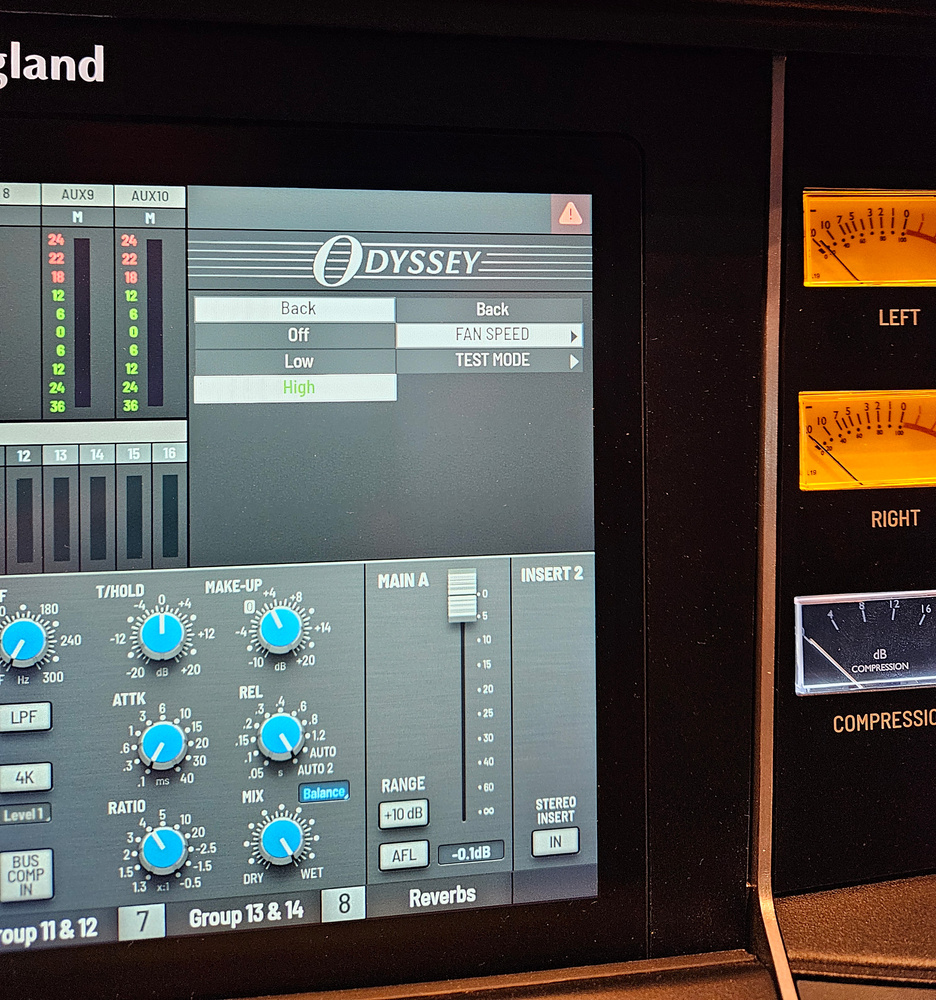
Larger consoles require more cooling, which can mean more noise — so SSL have helpfully upgraded the console’s fan-management system compared with the original Oracle. Larger consoles require more cooling, which can mean more noise — so SSL have helpfully upgraded the console’s fan-management system compared with the original Oracle.During the review tests, I heard a ‘whoosh’ that initially I imagined was the air con. It turned out to be the cooling fans of the several rack units housing the Odyssey’s analogue audio electronics. But fear not! First, these racks weren’t placed far from the console, and it’s perfectly possible to site them elsewhere (eg. a machine room) without compromising the control or the signal quality. Second, as with the Oracle, the designers invested many hours in airflow and cooling-system optimisation. As well as the ability to switch off individual channels and/or whole racks when working on smaller sessions that don’t require them, a user-selectable Quiet Mode reduces the noise significantly. It’s also possible to switch the fan off altogether should you need to.
Pros
- The culmination of years of research — and it shows!
- Modular configuration options.
- Up to 96 in-line channels, and 96 control strips.
- Dynamics processor on every channel.
- Significant updates to O-Control software.
- Immersive audio workflow support.
- Compatibility with SSL Oracle.
- DAW control plug-ins.
Cons
- This was never going to be inexpensive, was it?
Summary
A highly configurable large-format analogue console that benefits massively from a thoughtfully designed digital control system. The Odyssey delivers all the punch and clarity SSL are known for and supports traditional analogue workflows, while also accommodating the many other needs a high-end studio might have today. It’s SSL’s new flagship model, and it’s every bit as impressive as you’d hope.
Information
Prices start at 295,000ドル for a 24-channel control console with 24 in-line analogue channels.
Solid State Logic UK +44 (0)1865 842 300.
Prices start at 295,000ドル for a 24-channel control console with 24 in-line analogue channels.
Solid State Logic USA +1 212 315 1111.