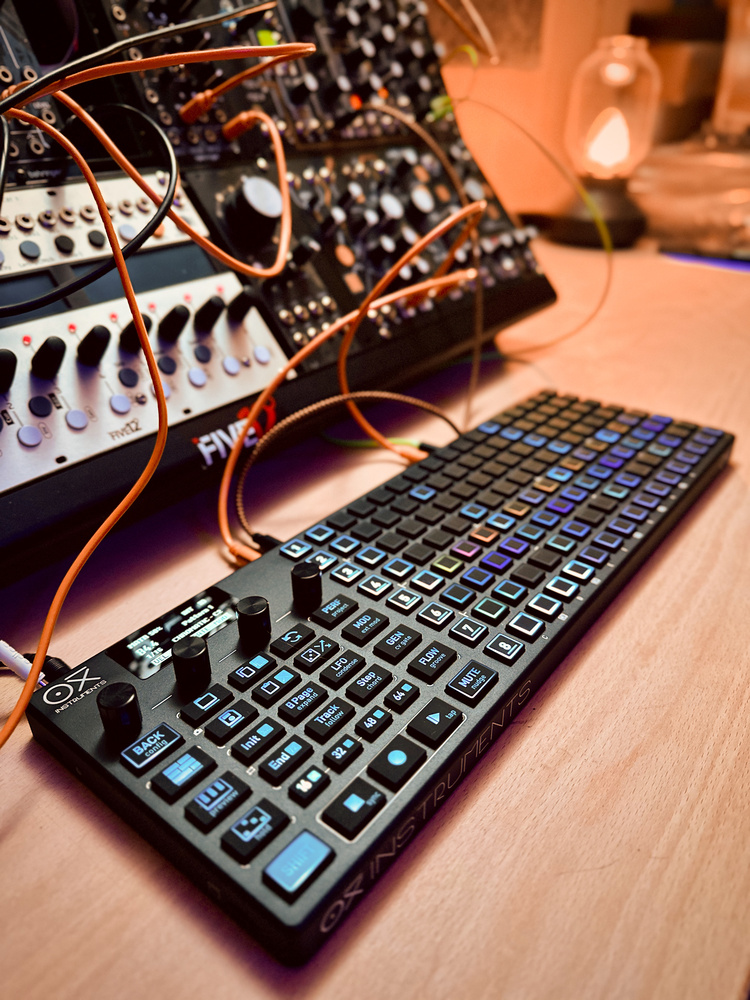
The OXI MkII is a sequencing powerhouse — could it be ‘the one true sequencer’ so many of us are looking for?
In the ongoing quest for the perfect sequencer, I’ve wanted to get my hands on an OXI One for a while. Now, as the MkII version ups its game with twice as many tracks and new dedicated performance features, could the OXI be ‘the One’?
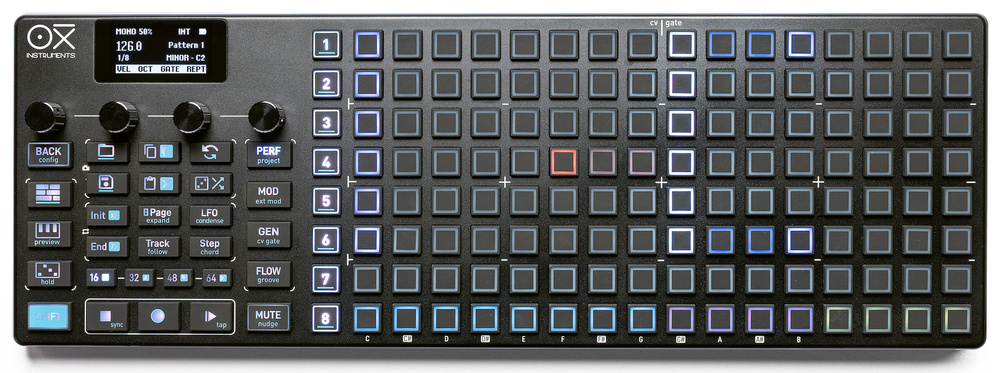
The OXI One MkII is a standalone desktop sequencer with flexible MIDI, USB, Bluetooth and CV/gate connectivity. It has eight top‐level tracks that can host various sequencer types, including polyphonic and multitrack variants. Patterns, arrangements and modulations are created and managed on an 8x16 pad grid taking up two thirds of the slim unit’s panel.
The build is solid and surprisingly heavy thanks to the metal chassis. Even so, it comes with a terrific carry case, which also has a pocket to stow cables and the optional OXI Split MIDI breakout box. The left third of the panel groups all the mode and operation buttons. Above these is an OLED display supported by four metal, indented encoders. The whole feel is rather luxurious. All essential legending is on the backlit buttons so dark or low‐lit conditions aren’t a problem.
On the left edge you have an SD card slot (new to the MkII) and a USB‐C port, which provides computer comms, USB hosting and charging for the internal battery. The battery is rated at a generous eight hours of use, and I regularly got more than that. Along the back there’s a single TRS MIDI I/O pair, clock in and out, a CV input (which is actually two inputs if you use a stereo splitter) and eight outputs each for CV and gate. A mini HDMI port labelled Pipe connects to the optional OXI Pipe Eurorack module, which brings most of the analogue connections conveniently into a rack.
To save you the trouble of turning this magazine upside down, the rear panel hosts eight 3.5mm gate outputs, eight 3.5mm CV outputs, a mini HDMI port for connecting to the optional Pipe Eurorack module, and a final section of 3.5mm ports for CV in, clock in, clock out and MIDI in/out. To save you the trouble of turning this magazine upside down, the rear panel hosts eight 3.5mm gate outputs, eight 3.5mm CV outputs, a mini HDMI port for connecting to the optional Pipe Eurorack module, and a final section of 3.5mm ports for CV in, clock in, clock out and MIDI in/out.

One II 101
The obvious place to start exploring was with a mono sequence. Diving into the main settings for Sequencer 1 revealed options for MIDI output (All, USB, TRS, Bluetooth) and channel, Program Change and Sequencer Mode. A separate, dedicated view for assigning analogue voice outputs turns the pad grid into a routing matrix, with the first eight pads on each row choosing CV outputs and the second picking gates.
Returning to the main view, you can start adding triggers/notes using the grid as a piano roll. Setting a scale other than Chromatic from the display will give you at least a full octave on the grid. The encoder labelled Octave adjusts the root, but tapping it toggles it into scroll mode so you can zip the grid’s display range up and down.
The other encoders are set to Velocity, Gate and Repeat and follow a standard convention on the OXI One: adjusting an encoder offsets the value for all notes, but tapping switches the grid into a bar chart mode where you can set the focused parameter for each trigger. You can also add triggers from these views, which is a fast and effective way to create dynamic sequences in Velocity mode. Flipping through the modes was the first of many times I encountered the one issue with the encoders, which is that they are not aligned with the four parameters on the display. You will repeatedly reach for the middle two encoders to control parameters 1 and 4 until your brain begins to lock in the required muscle memory.
If you don’t want to program a sequence manually, Gen mode provides a fully featured Euclidean sequencer, which can be saved and recalled in any patterns that use it. There’s also a Random pattern generator which creates patterns within specified parameters. On top of this, Random Perform lets you apply varying degrees of randomisation to different sequence parameters non‐destructively. The states of all these factors can be saved to pattern slots.
Talking of which, Save/Load operation was one of the areas where intuition broke down and I had to fall back on the manual. In fact I had to re‐look this up several times. Separate Save and Load buttons turn the main pads into a storage grid where you can park up to 16 patterns per track. An important point that bit me multiple times is that you must save before loading another pattern or you’ll lose your work in the previous one. The Load view can serve as a general launcher for playing all the patterns in your project, although as we’ll see later the Arranger gives you a way to organise your patterns more intentionally.
Notes can be tied beyond a single step simply by holding the first and last steps. Pattern length can be set by holding the Init or End buttons and tapping in the grid. While holding both buttons you can quickly set and change a loop zone within your pattern. Maximum pattern length is 128 steps, or eight pages. The page buttons double as nudge buttons (with Shift) to transpose or move your whole sequence. The Track button accesses playback options like direction and step division. Steps can be slowed right down to a bar each, handy for slow ambiences and chord progressions.
Polyphony, Chords, Drums
The One caters for polyphony with poly and chord sequencers. The poly mode takes advantage of the piano roll interface to easily program, record (with or without quantisation) or edit polyphonic performances, catering for up to seven notes per step. We didn’t touch on the keyboard mode yet, but it’s especially useful here, allowing you to play via the grid in either a piano layout or isomorphic fourths or fifths. Keyboard view has note repeat buttons at different divisions or you can use the arpeggiator. The arp can also be used for recording, or can arpeggiate sequenced chords on playback, and has a built‐in Euclidean rhythm generator.
The chord sequencer is simply brilliant, and became the starting point for most of my jams. It’s used with a special version of the keyboard layout which, in addition to the note grid, provides two columns of chord shapes, a column to choose inversions and voicing, and another column for spread. The top row is reserved as a bay where you can park chords that you like, building progressions for your song which you can then record or drop into the sequence.
Poly and chord modes work great with MIDI, but they can also utilise the CV and gate outputs. In the output assignment view you can add multiple CV/gate outputs to tracks for use as multiple voices or modulation outputs. When a poly or chord track has multiple outs set to pitch mode the OXI One will intelligently generate polyphonic output voicing to your modular.
Multi mode splits a track into eight sequencing lanes, ideal for drums. Keyboard view in multitrack provides eight zones of 16 velocities for real‐time play. Sub‐tracks can be easily muted, and you can set different start and end points per lane with the Init/End buttons. A dedicated drum pattern generator that reminded me of the Polyend Play can populate the first three tracks for you, nominally as kick, snare, hat. This lets you explore an X/Y pattern space while also setting density per track and degrees of ‘chaos’. This is generated in real time, and is in addition to any trigs you set manually and any Random Perform on the track.
Repeats, Mods & Accumulators
A major strength of the OXI One MkII is a focus on features that take simple patterns and coax them into doing more interesting things. From the main track view the Repeat function provides a simple retrigger or ratchet function. However, if you get into individual step editing you can do a lot more. As well as the number of repeats, you can set a range of time within which your set number of retrigs will fire. This means you can extend out past a single step length, and get dotted as well as triplet values. You can also set a positive or negative velocity ramp for the retrigs, creating build‐ups or pseudo echoes. The most fun is Acceleration: ramping the timing of repeats to give you those bouncing ball‐type nonlinear retrigs that are in vogue. A limitation is that retrigs don’t work on notes that are tied.
Each track has its own pair of LFOs for modulating sequence parameters (and external devices), plus access to the two CV inputs and 16 CC input sources. The LFOs have many shapes including noise, and can be assigned to just about any sequencer parameter. Octave and Note are go‐tos for reliably satisfying results, but probability, repeat characteristics, arpeggiator controls, Euclidean parameters, track speed and accumulators are just some of the other modulation destinations you can experiment with.
Accumulators are a personal sequencing favourite, ramping note values of selected steps by a set interval on each cycle of the pattern. This can be particularly effective on short patterns to create ever changing and captivating melodies.
Stochastic & Matriceal
But wait, there’s more. The esoterically betitled Stochastic and Matriceal modes offer fresh ways to wander out of sequencing cul‐de‐sacs. Stochastic is a generative mode using controlled randomness. The grid lays out the notes in your scale, and you choose which notes you’d like to feature in the sequence with relative probabilities. You then set octave and rhythmic ranges, and the probabilities of pitch and rhythm changes each cycle.
High random settings produce ever changing sequences with the notes you’ve chosen. Low settings yield slow evolution, while setting to zero locks the sequence. Modular fans will see parallels here with the ever‐popular Turing Machine. What’s awesome is you can capture states into the pattern slots, including frozen sequences, so you can return to melodies and patterns you like, unlike on a Turing Machine where once you’ve moved on there’s no going back.
Matriceal mode comprises four separate sequencers that decouple their main parameters to independent lanes. Each track gets a four‐column chunk of the grid, with the top 4x4 square used for patterns, much like step sequencing on an MPC or Maschine. The bottom section selects the different parameter layers: trigger, note, probability, glide, etc. Things get interesting when you push the layers out of step with each other, either by adjusting their loop lengths or messing with step lengths.
The pieces of the puzzle that make Matriceal really interesting to me are pulses and intervals, which capture some of the magic of the Intellijel Metropolix and RYK M‐185. The Pulse layer lets you extend individual triggers that land on a pulse step, either holding it for a longer count, or repeating it up to eight times. This bumps the overall sequence longer, putting layers out of phase and creating unpredictable variation. The Intervals layer provides an alternative to absolute note sequencing, adjusting the most recent note by a set amount like an accumulator. You can then rein everything in by adjusting the overall loop reset for the track, or let it run loose. Again, you can collect pleasing results in pattern slots.
The OXI One MkII measures 375 x 130 x 19mm and weighs just under 1kg. The OXI One MkII measures 375 x 130 x 19mm and weighs just under 1kg.
Harmony, Groove, Arrangement
With all these layers of sequencing power you need strategies for managing the bigger picture. This typically means organising patterns, setting up scenes, and possibly structuring a song. All of this is possible in OXI’s Arranger, but the star of the show for orchestrating all the elements is the harmonisation functionality. In the Scale setting for each track you can choose to harmonise with another track. I quickly standardised on the workflow that I fell into on Teenage Engineering’s OP‐XY: create chord progressions on track 1 using Chord mode and slow‐running patterns, then set other tracks to follow this track. With just a few simple patterns you can get pleasing and controllable results really quickly. It’s particularly nice how you can use this trick with the generative sequencers to impose order on chaos.
Rhythmically, you can get your sequences running in the pocket with two different groove engines. First there’s a standard Swing setting for each track. But the OXI One also implements groove templates, with 14 pre‐installed. You can even create grooves in the OXI app, or import from Ableton Live; it would be even cooler if you could extract templates on the device from unquantised sequences. The groove engine lets you apply varying amounts of dynamic and timing variation from the template, plus set an overall timing offset and even add some extra variation. In Matriceal mode, only the dynamics are applied (I’m not sure if this is by design) although regular Swing works.
The Arranger can be used as both a clip launcher and song sequencer. While you can use the Load view to launch all your patterns, the Arranger provides a blank canvas where you can organise patterns into Scenes. It was easier to do this in the MkI model, because with only four tracks you could view both your pattern pool and Arranger at the same time. Now there are several methods for populating the Arranger, either selecting from the screen slot‐by‐slot, appending a combination, or capturing a scene from what’s playing.
There’s no requirement to work in scenes; each row can run independently and you can choose how the song progresses by dialling in repeats per pattern and the basic follow actions. I found the easiest way to visualise things though was to use columns for whole sections, and set my chord track as the master track so everything else progresses at the same time. By default the Arranger actually stays off, and my guess is many people will use live triggering. If you want the song to play you have to remember to arm the Arranger every time, which could be annoying if it’s your preferred way to work.
Performance & Flow
Flexible and dynamic pattern triggering is a large component of performance and I really appreciate that you can turn quantisation off for launching, and we already mentioned Random Perform mode, but there’s more on offer. A global Performance mode lays out real‐time transposition, muting and fill functionality on the grid. Melodic tracks can be shifted from their base key. Multi and Matriceal modes get roller‐style pseudo fills and the multitrack sequencers also feature a step looper from one to four steps long.
The Flow button is a kind of super‐fill mode, activating variations that you have to set up in advance. Similarly to Elektron’s Fill mode, you can use the Probability parameter in notes in any sequence to set them to trigger (or mute) when Flow is held. Other parameters that include probability such as retriggers and accumulators can also be tied to the Flow state.
Finally, the OXI One MkII is a highly capable hub for performing with external hardware instruments. Each track has a bank of eight modulation lanes and encoders that send CCs and can also be routed to CV outputs. Likewise the LFOs can route out to externals. For MIDI devices, there are templates for many common instruments so the mods get mapped automatically, and the desktop companion app lets you loads more.
Conclusions
I had high hopes for the OXI One MkII. Design‐wise it’s beautiful and has a lovely feel, and a battery is always a winner. Support for MIDI, computers and analogue modular is perfect for me. Internal and external modulation of sequencer parameters, accumulators, real‐time performance control, looping and instant pattern launching tick a set of boxes that automatically promote it to the all‐time top five sequencer tier.
It’s super deep. If you think, ‘I wonder if it can do X’, the answer is usually yes.
But you really need to spend time with a sequencer to find out if you can get into the flow of how it works. It has to be fun. I’ll be honest, starting out I struggled to work out how to do some basic things and get fluent — I’m still occasionally hunting in multiple places for some things. It’s super deep. If you think, ‘I wonder if it can do X’, the answer is usually yes. I’m really glad that I stuck with it and pushed past some habitual ways of working, slowly finding new riches. For example, using the chord sequencer and harmonisation between tracks is amazing, it’s a cheat code for making things work together and it makes generative sequencing genuinely useful and usable. And I still feel like there’s more to discover.
In general I like encoders rather than a piano roll when mono sequencing, as you can see and set notes across a larger range without scrolling, but the OXI One layout works so well for poly sequences, drums, the experimental sequencers and for managing your sequences and arrangements. What pushed me over the line is that whenever you stumble upon cool results you can save them as points to recall — I enjoy being able to collect ideas and assemble them later more than relying on real‐time improvisation. Which is a long‐winded way of saying that yes, this is probably the closest device so far to the fabled one sequencer to rule them all.
Pros
- Deep and varied sequencing possibilities.
- Enough tracks now to orchestrate a full show or composition.
- The most usable implementations of generative and randomised sequencing.
- Powerful modulation in both directions.
Cons
- You’re going to want the MIDI Split box unless you’re Eurorack‐focused.
- Takes persistence to reach the fun/fluent stage.
Summary
The MkII upgrade turns the OXI One into a full sequencing battlestation, with a wealth of different modes to explore. Once you click with the workflow, it’s hard to imagine going back.