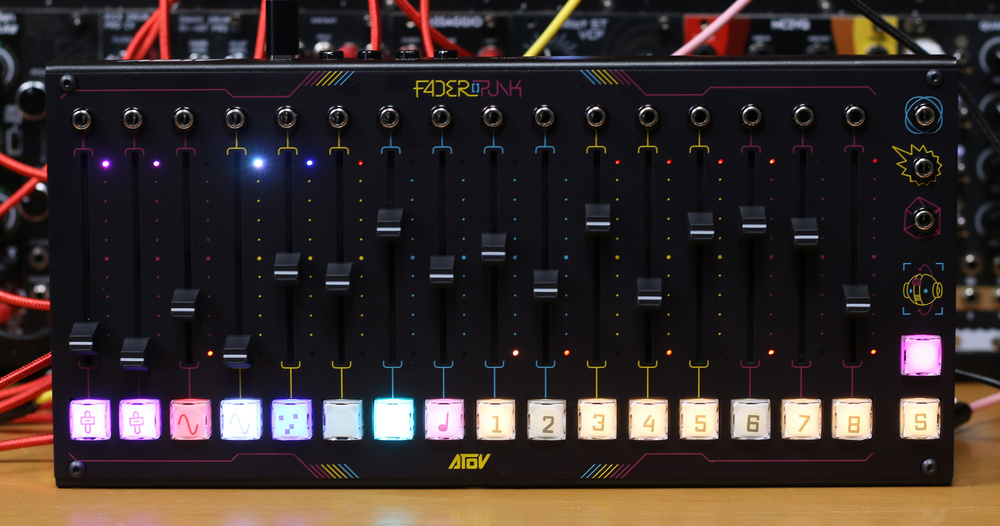
The Faderpunk is much more than just a control surface...
ATOV’s relationship with fader banks started in 2019 when they took on the open source 16n‐faderbank, devised by Sean Hellfritsch and Brian Crabtree. It was a simple idea of having a box of 16 faders that could output MIDI CC, CV and I2C controller data for controlling modular, synths and software. Following tweaks and suggestions from the Berlin Modular community, Arthur Gilbert created the AtoVproject and set about redesigning the faderbank into the ‘16n AtoVproject Rework’.
The beauty of the faderbank was that it pulled controls that were scattered across front panels, and brought them together in a unified, simple and accessible controller. However, it was very static and in an environment that loves modulation, the faderbank could only turn things up and turn things down. What if each of these faders could also generate modulation? What if they could be configured to be any number of modular or musical controllers? Those are the questions the newly named ATOV decided to tackle. The answer is the Faderpunk.
The Faderpunk follows the same idea as the original faderbank with its 16 faders, single per‐fader patch socket and the ability to control things over CV, MIDI and I2C. But then it builds in a whole ecosystem of modulation and controllability. Each fader or combination of faders can be configured as all sorts of useful things like an LFO, trigger generator, envelope, randomiser, quantiser, sequencer or, of course, just a controller. So it’s evolved from offering a central place of control into being a modulation hub, toolbox and creative companion. Let’s check it out.
Hardware
The Faderpunk is a 56HP Eurorack module set into a folded metal sheet of a box. It’s not particularly heavy but sits nicely on its rubber feet and resists movement when you play with the faders. On the front, there are 16 faders, 16 patch sockets at the top, and 16 satisfyingly mechanical backlit buttons at the bottom. The faders feel good; they are 60mm, have a bit of play, but there’s no scraping along the edges, and all give off very similar resistance. On the right, we have three extra patch sockets and two extra buttons.
With most of the I/O on the front panel things are pretty simple at the back of the unit, with just a USB‐C port and four 3.5mm sockets for MIDI Out (x2), MIDI in and I2C. Alongside these is the mysteriously labelled ‘PunkBus’, which looks very like a micro‐USB port. A hint at future plans, perhaps? With most of the I/O on the front panel things are pretty simple at the back of the unit, with just a USB‐C port and four 3.5mm sockets for MIDI Out (x2), MIDI in and I2C. Alongside these is the mysteriously labelled ‘PunkBus’, which looks very like a micro‐USB port. A hint at future plans, perhaps?
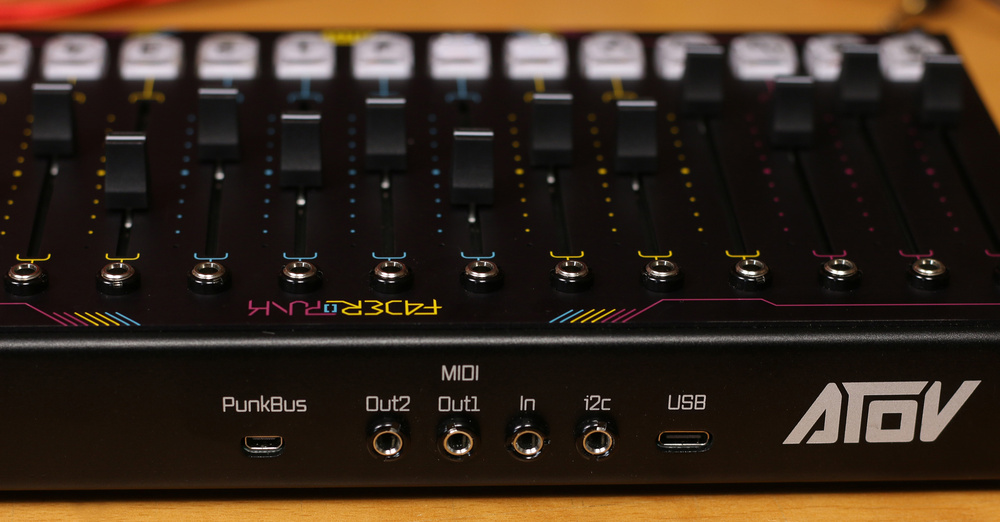
On the back, we find a USB‐C port for power and USB MIDI, four 3.5mm sockets for the two MIDI outputs, MIDI in and the I2C port, and a special port for future Faderport shenanigans. The MIDI ports are type‐agnostic, which is amazing news for people like me who have to attend anger‐management courses after trying to connect a mini‐jack MIDI port to something.
Plug it in and you are treated to a bedazzlement of dancing lights: all the switches light up in different colours and you have pinprick LEDs scattered about the place, making it feel very fun and alive. So let’s get it to do stuff.
Configurator
Initially, you’ll have no idea what’s going on, and you need to dig into the web browser‐based configurator to find out. Connecting was remarkably easy, and I’m on Windows, which can sometimes be a challenge. Plug in your Faderpunk via USB, go to faderpunk.io, click on ‘Connect Device’, it finds the Faderpunk, and you’re off.
The Configurator provides a colourful overview of the functions running on your Faderpunk. ATOV call these functions ‘apps’ and they cover a range of musical and modular happenings. So you could stick an LFO app on a fader, and then the fader controls the rate, which is reflected in the top/bottom pinprick LEDs, and the button controls the LFO shape, stepping through sine, triangle, ramp and square. Single‐channel apps include a clock divider,...
You are reading one of the locked Subscribers-only articles from our latest 5 issues.
You've read 30% of this article for FREE, so to continue reading...
- ✅ Log in - if you have a Digital Subscription you bought from SoundOnSound.com
- ⬇️ Buy & Download this Single Article in PDF format 0ドル.83 GBP1ドル.49 USD
For less than the price of a coffee, buy now and immediately download to your computer, tablet or mobile. - ⬇️ ⬇️ ⬇️ Buy & Download the FULL ISSUE PDF
Our 'full SOS magazine' for smartphone/tablet/computer. More info... - 📲 Buy a DIGITAL subscription (or 📖 📲 Print + Digital sub)
Instantly unlock ALL Premium web articles!We often release online-only content.
Visit our Shop Store.