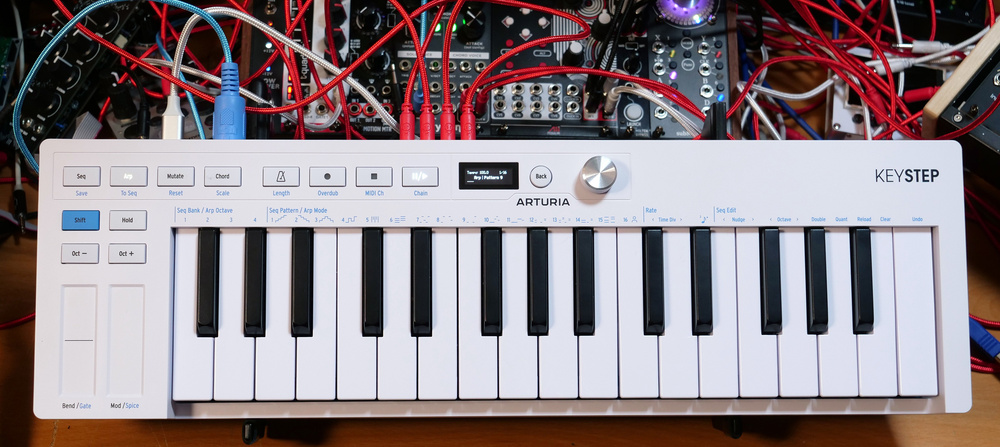
Arturia have reinvented the much‐loved KeyStep controller keyboard.
The KeyStep and its derivatives have become almost ubiquitous in the synth community. You see them everywhere at synthesizer shows and on YouTube videos and they’re clearly a perfect fit for anyone working with MIDI, software and hardware. And so, with a product so useful and successfully baked into our workflows, it takes quite a bit of gumption to attempt to improve it. This will be a story of losses and gains, and whether that’s a happy story depends on what you see as important in a multifunctional two‐and‐a‐half octave compact MIDI controller.
New Hardware
My first impressions are that it’s the same form factor of the original but with the knobs removed. It’s fairly light, made of relatively robust plastic, and shallow in depth. The plastic knobs and squishy buttons have been replaced with a row of hard plastic but nicely clickable buttons, a tiny OLED screen and a silver hi‐fi knob that stands a bit too proud. This feels like a regressive step back into screens and menus, which causes me to wince a little, but we will see what the interface offers before passing judgment. More pleasing are the little graphical clues printed along the top of the keys that hint at patterns and note structures.
At the back, we have a USB‐C port for power and connection next to a very welcome on/off switch, although we have lost the option for DC power. We then have full‐size MIDI in and out ports, 3.5mm sync in and out, a quarter‐inch sustain port and a bunch of 3.5mm CV outputs. We get an additional CV mod output to add to the original pitch, gate and mod jacks. Something I’ve always found curious about the KeyStep range is that Arturia talk about the compact depth enabling you to be closer to the thing you’re controlling, except you have all these ports getting in the way as their cables spew out the back. I would have liked to have seen these ports running along the front panel, or pushed to the sides to enable you to butt the KeyStep up against its hardware destination. I would also like to have seen the labels of the ports printed on the front panel, as they do with the KeyStep Pro, to save me writing them on with a Sharpie so that I don’t have to turn the keyboard on its edge every time I want to patch it in.
The back panel loses its DC power socket, but gains an on/off switch. The full‐size MIDI ports remain mercifully intact, and the CV section has gained an extra mod output. The back panel loses its DC power socket, but gains an on/off switch. The full‐size MIDI ports remain mercifully intact, and the CV section has gained an extra mod output.

One thing I am very grateful for is the removal of the micro‐switch sync options panel. I imagine we have the screen to thank for that. In fact, there’s quite a lot we can thank the screen for. I no longer have to connect to the MIDI Control Center in order to change any settings; it can all be done on the device itself. As we’ll see, the screen is really the key to all the depth that’s been brought to the MkII.
Arpeggiator
So, other than the interface, what’s new? Arturia have pulled the sequencer and arpeggiator into an interesting new relationship, added new arp patterns, extended the chord function and are introducing the Mutate button, which will reinvent your sequence. The keybed, on the other hand, remains the same half‐decent experience with slim keys, velocity and aftertouch.
Let’s start with the arpeggiator. On the original you could switch between all the usual arp modes on the turn of a knob. They were good and solid, and you could see at a glance which one you were on. With the KeyStep 37, they introduced a pattern mode as option 7, which is by far my favourite arp mode on any device I’ve ever encountered. In pattern mode, it just seems to generate a sequence of notes that sounds great. Whenever I want to try out some sounds or demo a synth I throw on arp mode 7, hit some keys, and it’s perfect. Arturia noticed how great it was, pulled it across to the KeyStep MkII, and expanded it into nine fascinating variations.
As there’s no knob, you select a mode by holding Shift and choose it from the 16 options spread across the keys. The little graphical clues are actually very helpful, and once you’ve tried them all out you know exactly what they are telling you. The first five are familiar ARP modes, number 6 is a chord mode, 7‐15 are pattern modes, and 16 is a user mode. The screen and labelling are inconsistent here, where the modes 7‐15 as written on the keys are called Patterns 1‐9 on the screen. It makes you struggle to see what mode you’re on and leaves you missing the original pattern knob all the more. In Pattern mode on the KeyStep 37, each time you press some keys you get a new, random and usually awesome pattern. On the KeyStep MkII, you now have nine patterns that follow their own distinct rhythm and character using ties and rests, but you get the same pattern every time. This would be disappointing if it weren’t for the new expectation‐beating Mutate button.
Hit the Mutate button and the pattern reforms into something funkier while staying within the rough structure of the selected pattern. Keep hitting it until you find something you really like. So, you now have nine rhythmic variations of the KeyStep 37 arp number 7 that can be constantly evolved. When you find something you like, you can save it or manipulate it by squirting it over to the sequencer.
Sequencer & Chords
The sequencer takes the KeyStep beyond the enhancements found in the KeyStep 37 and into some solidly useful territory. The stealing of arpeggiations is delightfully fruitful because in sequencer mode I can transpose it with a finger, overdub on extra notes or edit the sequence note by note on the little screen. Starting from scratch, you can pump in notes SH‐101‐style or set it looping and throw in some keys. The screen tracks the loop progression, giving you visual clues of tempo and timing. At the top of the keyboard is a very useful Undo button that will remove everything you did from the last time you pressed Record. You can nudge notes, change octaves, double the pattern length and quantise, all from the Shift key. It’s fast, fluid and entertaining. And in a confluent twist, if you save your sequence, which you can do in up to four banks of 16 slots, the rhythm and phrasing of that sequence will turn up as arp user mode 16.
But there’s more. You can record automation from the mod and pitch‐bend strips directly into your sequence. There’s no editing for it, but you do have that very handy Undo button and the ability to clear automation via a menu. Hidden beneath the touch strips are two secret weapons called Gate and Spice, which can add a lot of flavour to your sequences and arpeggiations. Gate changes the gate size of the notes, which is far more satisfying than selecting a single gate size percentage like you could on the original. Spice is a weird little function that appears to throw in gate changes, ratchets and general messing about depending on how hard you lean into it. Both of these can also be recorded as automation into the sequencer.
It can get quite busy and complex once you start building up your sequence. This is where those save slots come in handy so that none of that hard work is wasted. You can also chain patterns together and have your KeyStep play back a whole song. But if you are struggling to develop beyond a basic melody line then the Mutate button is ready and able to give you new ideas. It’s interesting how the Mutate function differs between arp and sequencer. With the arp it throws out a new idea in a similar rhythm, whereas with the sequencer it feels very much more derived from the notes and pattern you entered.
The Chord mode has acquired all sorts of depths with the help of the screen, similar to those in the KeyLab MkII. Along with holding the Chord button and recording the chord you are currently playing, you can also browse a bunch of chord presets, spread the voicing, add bass notes and turn it into a strum. The scales are also very welcome and you can set different ones for the keyboard and the pattern generation.
The original KeyStep was playful, very immediate, and great for playing your gear. The new one builds in the ability to craft and then save, mutate and save again, sequence, resequence, spice‐up and save again.
Conclusion
The new MkII makes some quite radical changes to the flow and intention of the KeyStep. The original was playful, very immediate, and great for playing your gear. The new one builds in the ability to craft and then save, mutate and save again, sequence, re‐sequence, spice up and save again. It becomes a place where you can write melody and build songs. Some of the immediacy is certainly lost. The three knobs of the original made it the easiest and most convenient player of modular and MIDI boxes on the market, whereas the MkII requires you to dig a little deeper. For shows and demos it adds a level of unhelpful complexity, but it has huge potential for the home user and creative spaces where a little bit more effort will be rewarded.
Pros
- Mutate button.
- Sequencer to arpeggiator and back again.
- New arpeggiator patterns.
- Deeper Chord features.
- Spice and Gate strips.
Cons
- Screen driven.
- No knobs.
- Inconsistent pattern naming.
Summary
The KeyStep MkII trades in its knob‐led immediacy for button‐led depth and expanded creativity.
Information
109ドル including VAT.
139ドル
When you purchase via links on our site, SOS may earn an affiliate commission. More info...
Sweetwater Affiliate logo 14pxWhen you purchase via links on our site, SOS may earn an affiliate commission. More info...
G4M logo