The ASCII table uses numbers to represent digits, letters, and common symbols from the English alphabet. ASCII stands for the American Standard Code for Information Interchange.
The word was first used by ANSI (American National Standards Institute) in 1973 to fill the need in this field. So what does the ASCII table look like and how can you use it?
What Is an ASCII Table and What Does It Contain?
ASCII is a character encoding system that facilitates basic computer communication. It provides a standard for text representation, allowing computers to recognize and interpret ASCII values universally.
Each letter, number, and symbol that ASCII can represent has a unique value. For example, if you examine the ASCII table below, you'll see that uppercase ASCII values start at 65, the capital letter A. Likewise, lowercase ASCII values start at 97, the lowercase letter a.
These values serve as numeric representations of characters, enabling easy conversion between numbers and text.
|
Character |
ASCII |
Character |
ASCII |
Character |
ASCII |
Character |
ASCII |
Character |
ASCII |
Character |
ASCII |
Character |
ASCII |
Character |
ASCII |
|---|---|---|---|---|---|---|---|---|---|---|---|---|---|---|---|
|
0 |
NUL |
16 |
DEL |
32 |
SP |
48 |
0 |
64 |
@ |
80 |
P |
96 |
` |
112 |
p |
|
1 |
SOH |
17 |
DC1 |
33 |
! |
49 |
1 |
65 |
A |
81 |
Q |
97 |
a |
113 |
q |
|
2 |
STX |
18 |
DC2 |
34 |
" |
50 |
2 |
66 |
B |
82 |
R |
98 |
b |
114 |
r |
|
3 |
ETX |
19 |
DC3 |
35 |
# |
51 |
3 |
67 |
C |
83 |
S |
99 |
c |
115 |
s |
|
4 |
EOT |
20 |
DC4 |
36 |
$ |
52 |
4 |
68 |
D |
84 |
T |
100 |
d |
116 |
t |
|
5 |
ENQ |
21 |
NAK |
37 |
% |
53 |
5 |
69 |
E |
85 |
U |
101 |
e |
117 |
u |
|
6 |
ACK |
22 |
SYN |
38 |
& |
54 |
6 |
70 |
F |
86 |
V |
102 |
f |
118 |
v |
|
7 |
BEL |
23 |
ETB |
39 |
' |
55 |
7 |
71 |
G |
87 |
W |
103 |
g |
119 |
w |
|
8 |
BS |
24 |
CAN |
40 |
( |
56 |
8 |
72 |
H |
88 |
X |
104 |
h |
120 |
x |
|
9 |
HT |
25 |
EM |
41 |
) |
57 |
9 |
73 |
I |
89 |
Y |
105 |
i |
121 |
y |
|
10 |
LF |
26 |
SUB |
42 |
* |
58 |
: |
74 |
J |
90 |
Z |
106 |
j |
122 |
z |
|
11 |
VT |
27 |
ESC |
43 |
+ |
59 |
; |
75 |
K |
91 |
[ |
107 |
k |
123 |
{ |
|
12 |
FF |
28 |
FS |
44 |
, |
60 |
< |
76 |
L |
92 |
\ |
108 |
l |
124 |
| |
|
13 |
CR |
29 |
GS |
45 |
- |
61 |
= |
77 |
M |
93 |
] |
109 |
m |
125 |
} |
|
14 |
SO |
30 |
RS |
46 |
. |
62 |
> |
78 |
N |
94 |
^ |
110 |
n |
126 |
~ |
|
15 |
SI |
31 |
US |
47 |
/ |
63 |
? |
79 |
O |
95 |
_ |
111 |
o |
127 |
DEL |
How to Create Your Own ASCII Table With Bash
There are so many values in the ASCII table that it can be difficult to memorize or take notes. For reference, you can see all ASCII values with a little coding in your programming language of choice, including a shell script.
In the ASCII table above, the value 65 corresponds to the letter A and the value 90 corresponds to the letter Z. Instead of working out all the values in between manually, you can iterate over those values and print their corresponding characters. Like most other languages, Bash shell scripts let you use a for loop to repeat one or more instructions a certain number of times.
Using this information, try to write a Bash program that prints all values starting from 33 to 126:
#!/bin/bash
echo "ASCII Table"
echo ""
for ((i=33; i<=126; i++))
do
 char=$(printf "\\x$(printf '%02x' $i)")
 printf "%-10d%-10s" $i "$char"
 if (((i+1) % 4 == 0))
 then
 printf "\n"
 fi
done
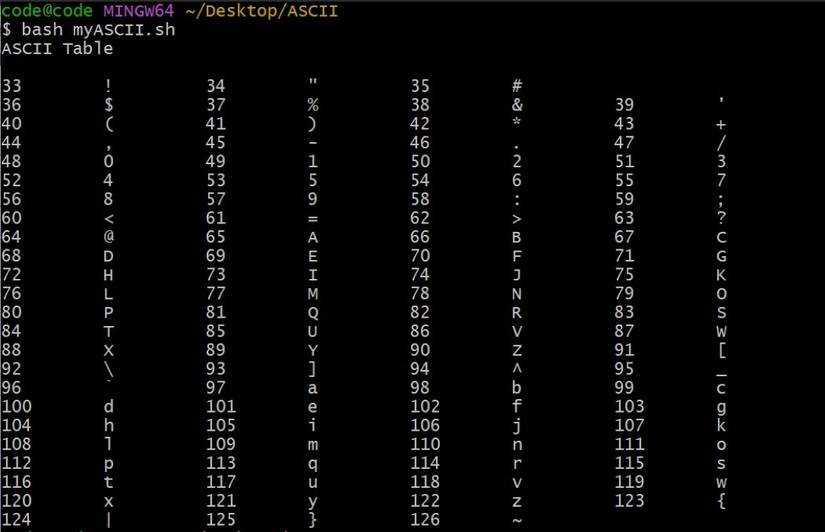
This Bash script assigns all values between 33 and 126 to a char variable and prints it to the screen. Save this Bash script in a file named myASCII.sh and run it with the following command and examine the result.
bash myASCII.sh
You should see a useful table showing ASCII characters alongside their decimal values:
How to Filter the ASCII Table
You can do more with a Bash script than just view ASCII values. You can inspect the ASCII value of individual characters and, in the following example, use these to filter text.
For example, let's try to delete the letter E in the keyword MAKEUSEOF using Bash with ASCII filtering. You can use the lookup table to confirm the ASCII value of "E": 69.
#!/bin/bash
original_text="MAKEUSEOF"
filtered_text=""
original_text_ascii=""
filtered_text_ascii=""
for ((i=0; i<${#original_text}; i++))
do
 char="${original_text:i:1}"
 char_ascii=$(printf "%d" "'$char'")
 if [[ "$(printf "%d" "'$char")" != "69" ]]
 then
 filtered_text+="$char"
 filtered_text_ascii+=" $char_ascii"
 fi
 original_text_ascii+=" $char_ascii"
done
echo "Original text: $original_text (ASCII: $original_text_ascii)"
echo "ASCII equivalent of the letter E: $(printf "%d" "'E'")"
echo "Filtered text: $filtered_text (ASCII: $filtered_text_ascii)"
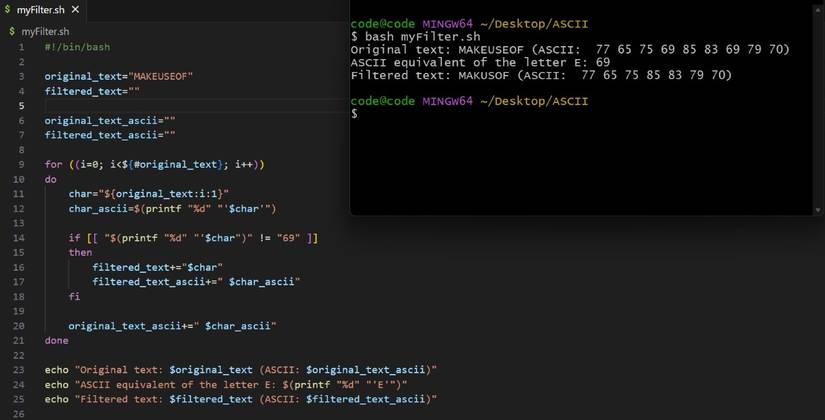
In this script, the input variable is the word MAKEUSEOF. The script uses a variable, filtered_text,to build the desired output which contains everything except the letter "E". The for loop iterates through each character in the input text.
To see the result, copy this code to a file named myFilter.sh and run bash myFilter.sh.
Converting Uppercase to Lowercase in Bash Using the ASCII Table
You can also convert uppercase letters to lowercase letters with Bash using the ASCII table. When you examine the 7-bit ASCII table, you will see that the difference between the upper and lowercase values of the same letters is always 32. Using this, the logic of a program that can convert an uppercase word into lowercase is straightforward.
For example, capital A has a value of 65, while small a has a value of 97. Taking advantage of this, you can write a code snippet like this:
#!/bin/bash
read -p "Enter a text: " input
converted_text=""
for ((i=0; i<${#input}; i++))
do
 char="${input:i:1}"
 char_ascii=$(printf "%d" "'$char'")
 if [[ $char_ascii -eq 32 ]]
 then
 echo "Invalid character: space"
 elif [[ $char_ascii -ge 65 && $char_ascii -le 90 ]]
 then
 char_ascii=$((char_ascii + 32))
 converted_text+=$(printf "\\$(printf '%03o' "$char_ascii")")
 elif [[ $char_ascii -ge 97 && $char_ascii -le 127 ]]
 then
 converted_text+="$char"
 else
 echo "Invalid character: $char"
 fi
done
echo "Converted text: $converted_text"
This program adds 32 to the ASCII value of each capital letter it reads to arrive at the corresponding lowercase letter. To try it for yourself, copy this code to a file called toLowercase.sh and run it with the bash toLowercase.sh command.

Will the ASCII Table Work for Me?
The ASCII table is a valuable tool for anyone working with text data or programming languages. It offers a standard representation of characters, numbers, and symbols that computers universally understand. Whether you're a programmer, a data analyst, or simply someone dealing with textual information, the ASCII table has many uses.
This opens up possibilities for tasks like data validation, text manipulation, and encoding/decoding operations. By referring to the ASCII table, you can quickly determine the ASCII value of a character or convert numeric values back to their textual representations. It serves as a foundation for communication and interoperability in various domains, making it an essential reference for text-related programming.