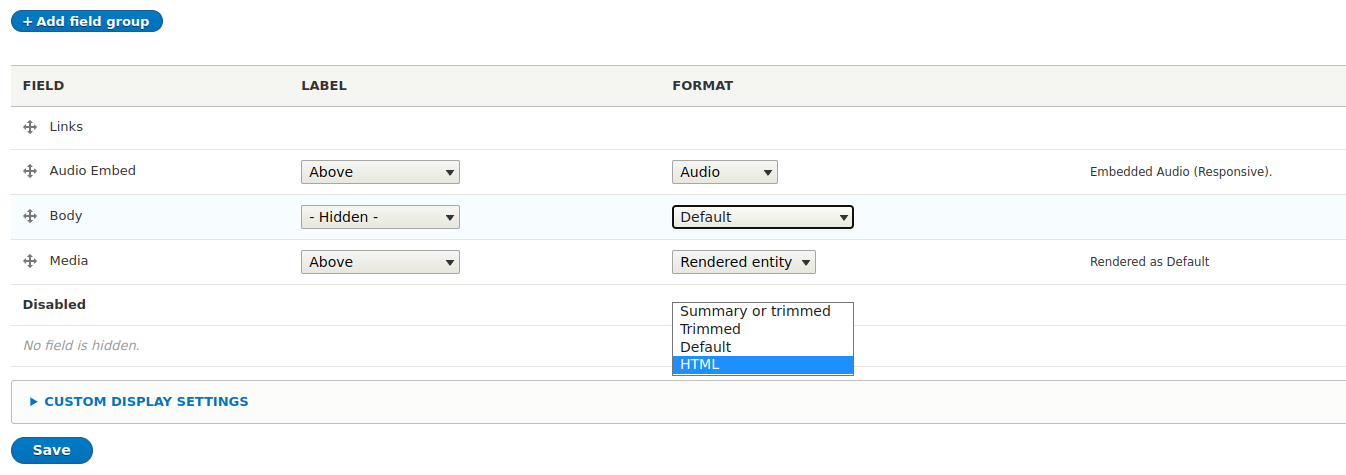
This is a very simple module that enables an HTML field format for text and string fields.
Useful for plain text fields that might have basic html and needs to be rendered as such.
Provides a simple solution for many different use cases.
By default, this module outputs the HTML code of the field unfiltered.
It is therefore the responsibility of the site operator to take appropriate
measures, e.g. against XSS. Access should be restricted to trusted roles.
Requirements
No special requirements at this time.
Install
It is recommended to install via composer. See below for commands:
composer require drupal/html_field_formatter
drush en html_field_formatter
Configuration
- Goto Structure -> Content Types and select a content type to change.
- Goto "Manage Display" page and change "Format" on desired field to "HTML".
- Configure any formatting settings as needed.
- Save changes.
- Now field should be formatted as HTML.
Supporting organizations:
Project information
- caution Maintenance fixes only
Considered feature-complete by its maintainers. - Project categories: Content display, Site structure
- chart icon850 sites report using this module
- Created by nerdstein on , updated
- shieldStable releases for this project are covered by the security advisory policy.
Look for the shield icon below.
Releases
3.0.0
Stable release covered by the Drupal Security Team
released 17 September 2025
Works with Drupal: ^10 || ^11
Release for D10/D11
Install:
Development version: 3.x-dev updated 17 Sep 2025 at 10:10 UTC
8.x-2.2
Stable release covered by the Drupal Security Team
released 10 August 2022
Works with Drupal: ^8 || ^9 || ^10
Install:
Development version: 8.x-2.x-dev updated 4 Jul 2022 at 21:49 UTC