This project is not covered by Drupal’s security advisory policy.
Path aliases are content. Content is not part of the application, so it is not saved and deployed as the code or the configuration components.
This module provides a way to set selected aliases as part of the configuration. With it, such aliases will be present in any environment.
Usage
Install and enable the module as usual. Then:
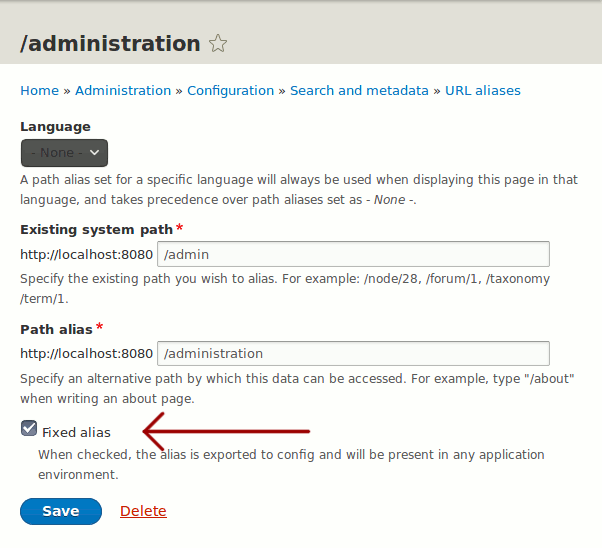
- Go to Configuration -> Search and metadata -> URL aliases
- Add or edit an alias
- Mark it as "Fixed alias" with the option added by this module
Fixed alias can only be added by users with the 'administer site configuration' permission. Non-site administrators but with permissions to administer URL aliases can not edit fixed aliases.
How it works
Fixed aliases are stored in configuration. When a new request for a missing fixed alias takes place, the alias is restored from the configuration.
Requirements
Just Drupal core.
Related modules
Recommended modules:
-
Default content
Exports any content entity within the website code. Any new installation will start with the default content.
-
Fixed block content
Provides fixed custom blocks that are exported to configuration and created on-demand.
Contact
Current maintainers:
- Manuel Adan (manuel.adan)
Project information
- Project categories: Import and export, Multilingual, Administration tools
- chart icon207 sites report using this module
- Created by manuel.adan on , updated
- shield alertThis project is not covered by the security advisory policy.
Use at your own risk! It may have publicly disclosed vulnerabilities.