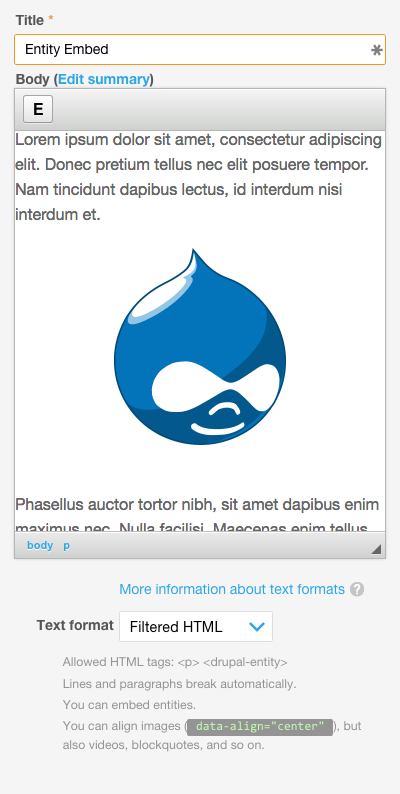
Entity Embed allows any entity to be embedded within a text area using a WYSIWYG editor.
Requirements
8.x-1.x
- Editor (included with Drupal core).
- Embed
7.x-3.x
Installation
- Entity Embed can be installed via the standard Drupal installation process.
Configuration
- Go to the Text formats and editors configuration page:
/admin/config/content/formats, and for each text format/editor combo where you want to embed entities, do the following:- Enable the Display embedded entities filter for the desired text formats on the Text Formats configuration page.
- Drag and drop the 'E' button into the Active toolbar.
- If the text format uses the Limit allowed HTML tags and correct faulty HTML filter, ensure the necessary tags and attributes were automatically added:
<drupal-entity data-entity-type data-entity-uuid data-view-mode data-entity-embed-display data-entity-embed-display-settings data-align data-caption data-embed-button data-langcode alt title>appears in the Allowed HTML tags setting. - If you're using both the Align images and Caption images filters make sure the Align images filter is run before the Caption images filter in the Filter processing order section. (Explanation: Due to the implementation details of the two filters it is important to execute them in the right sequence in order to obtain a sensible final markup. In practice this means that the alignment filter has to be run before the caption filter, otherwise the alignment class will appear inside the
<figure>tag (instead of appearing on it) the caption filter produces.)
Notice: If you were using the module in very early pre-alpha stages you might need to add data-entity-id to the list of allowed attributes. Similarly, if you have been using the module in pre-beta stages, you need to add the data-entity-embed-settings attribute.
The 7.x releases always require the data-entity-id attribute.
Resources
- Demo video by Chandan Singh the incredible GSOC 2014 student who helped drive this module forward.
Related Modules
- URL Embed: allows URLs to be embedded within a text area using a WYSIWYG editor.
- Entity Browser: When enabled, offers a more advanced embedded entity selection workflow.
- Media: When embedding file entities, allows files to be selected using the media browser.
Supporting organizations:
Project information
- Project categories: Content editing experience, Media
- Ecosystem: Embed, Editor
- chart icon70,522 sites report using this module
- Created by dave reid on , updated
- shieldStable releases for this project are covered by the security advisory policy.
Look for the shield icon below.
Releases
8.x-1.7
Stable release covered by the Drupal Security Team
released 2 February 2025
Works with Drupal: ^10.3 || ^11
Adds Drupal 11 compatibility.
Install:
Development version: 8.x-1.x-dev updated 25 Mar 2026 at 16:30 UTC
Development version: 2.0.x-dev updated 25 Mar 2026 at 16:28 UTC