This official feed from the Google Workspace team provides essential information about new features and improvements for Google Workspace customers.

rss_feed

What’s changing

Earlier this year, we launched an improved version of the OAuth consent screen to the Apps Script IDE and unpublished web apps and Google Workspace add-ons that allows users to specify which individual scopes they would like to authorize for that script. For example, if a script requests access to a user’s Google Sheets and Forms files, and the user only intends to use the script with Sheets files, they can decide to only allow access to their spreadsheets and not their forms.

This screenshot shows the new OAuth consent screen, which lets the user provide consent for a subset of the requested OAuth scopes.

We’re excited to announce that this more granular OAuth consent screen will be expanding to an additional Apps Script execution type. Soon, published web apps and Google Workspace add-ons powered by Apps Script will also present users with this more granular consent screen when requesting an OAuth grant. This will allow users to provide partial OAuth consent when authorizing new applications built on these platforms. A reminder that this also includes reconsenting to applications when OAuth grants expire.

Additional details

To prepare for the release of this new consent flow, we suggest that web apps and Google Workspace add-ons developers refer to the ScriptApp and AuthorizationInfo classes. These allow Apps Script developers to programmatically interact with the scopes granted for a script. This allows developers to put in such safeguards as short-circuiting a script execution if not all scopes are granted. For more information, refer to the developer documentation. To test these changes, please see the documentation on testing web apps and Google Workspace add-ons.

Getting Started

  • Admins: There is no admin control for this feature.
  • Developers and end users:
    • This new consent screen will only be used for new OAuth scope grants. Pre-existing scope grants will not be affected, so no action is required by users on scripts they’ve already authorized.

Rollout pace

Availability

  • Available to all Google Workspace customers and Workspace Individual subscribers

What’s changing

Egnyte’s enhanced Google Workspace integration is now generally available to all customers. With this update, users can now securely locate, open, edit, and manage their Google Workspace files in Egnyte’s web UI, mobile app, and desktop client.

This latest update delivers a faster, more intuitive, and more collaborative experience for users who rely on both Egnyte and Google Workspace in their daily workflows, including:

  • Dual file storage – Files are securely stored in both Egnyte and Google Drive, providing flexibility for users and IT teams while maintaining Egnyte’s data governance and access controls
  • Egnyte add-ons for Google Workspace – Share Egnyte files directly from Google Docs, Sheets, and Slides for faster, more integrated collaboration without switching between apps
  • Smart canvas and Gemini access – Leverage Google Workspace’s smart canvas capabilities and Gemini features within Egnyte’s updated integration for a more dynamic, interactive editing experience
  • Additional Improvements – Backend optimizations to enhance overall performance, usability, and reliability

Getting started

  • Admins:
    • The Egnyte Workspace add-on to control file sharing must be enabled by Workspace admins for their domains in the Google Workspace Marketplace Settings menu.
    • Egnyte admins must also enable the integration for their domains via “Egnyte Apps & Integration Settings” in the Egnyte Settings menu. Visit the Egnyte Help Center to learn more.
  • End users: There is no end user setting for this integration. Visit the Egnyte for Google Workspace Landing Page to learn more.

Rollout pace

This integration is available now. New users of the integration will see the upgraded experience by default. Existing users will be migrated to the new version in a phased manner but can contact Egnyte support to migrate sooner.

Availability

Available for Google Workspace:

  • Business Starter, Standard, and Plus
  • Enterprise Starter, Standard, and Plus
  • Essentials Starter, Enterprise Essentials, and Enterprise Essentials Plus
  • Education Fundamentals, Standard, and Plus
  • Nonprofits
  • Frontline Starter, Standard, Plus

Resources

What’s changing

The latest update for Workday Google Chat app update makes it easier to manage time off with a single, improved flow to request, view, or cancel time off, along with quick commands to check balances and company holidays.


Getting started

  • Workday Admins: Workday Admins must activate OAuth and create a new API client for the Google integration setup within Workday. The workday admin must make note of the following details during the API client setup, required for the next step:
    • Client ID
    • Secret ID
    • Workday REST API Endpoint
    • Workday Token Endpoint
    • Workday Authorization Endpoint
  • Workspace Admins: Admins need to allowlist the add-on to ensure end users have access. Visit the Help Center to learn how to manage Google Workspace Marketplace apps. Once allowed, the admin can either install the app to the domain, or install individually. After installation you will be asked to configure authorization in Workday (this requires the information above obtained during API client setup); This authorization will apply to all users of Workday within your domain.
  • End users: If enabled by your admin, install the add-on by going to the Google Workspace Marketplace listing. Visit the Help Center to learn more about using the Workday app in Google Chat.

Rollout pace

Availability

  • Available to all Google Workspace customers, Workspace Individual Subscribers, and users with personal Google accounts

Resources

The ability for developers to build Google Chat apps using the Workspace add-on framework is now generally available.

What’s changing

Previously available as part of the Google Workspace Developer Preview Program, we're excited to announce that the ability for developers to build Google Chat apps using the Workspace add-on framework is now generally available.

The Workspace add-ons framework makes it possible to build and maintain one app that works across multiple Workspace apps including Gmail, Calendar, Drive, and Chat. This reduces complexity and improves the experience for developers, system admins, and end-users.


In Chat, Workspace add-ons can provide helpful features, such as:
  • Previewing links from Chat messages and taking action without leaving the conversation.
  • Automating tasks across Google Workspace applications.
  • Receiving alerts or notifications from linked external services.
  • Combining external data from 3rd party apps and services with your data from Gmail, Chat, and Calendar.


Additional details

Lucid, developers of Lucidchart, Lucidspark, and Lucidscale, recently updated their existing Workspace Add-ons to now support Chat. These integrations with Google Chat enable link previews, quick search, and access management all within Chat.

See more details on the Lucidchart, Lucidspark, and Lucidscale integrations here.

Soon, other partners, including Asana, Confluence, Figma, HubSpot, Miro, Polly, ServiceNow, Trello, 1Password, and more will be releasing Chat apps built on the Workspace add-ons framework.

Upcoming ServiceNow integration with Chat


Upcoming Figma integration with Chat

Upcoming Miro integration with Chat

Getting started

Rollout pace

Availability

  • Chat apps are available to all Google Workspace customers, Workspace Individual Subscribers, and users with personal Google accounts
  • Developing Chat apps is available to all Google Workspace customers

Resources

Third-party add-ons Lucidchart and Lucidspark, already available across Google Docs and Meet, are now supported in Google Chat.

What’s changing

Lucidchart, an app that helps users collaborate on diagrams, such as flowcharts, wireframes, entity relationship diagrams, and more, and Lucidspark, a virtual whiteboard tool, are two third-party add-ons already available across Workspace apps, such as Docs and Meet. Today, we’re excited to announce support for both of these apps in Google Chat.

Lucidchart and Lucidspark’s integrations with Google Chat will enable users to:
  • Get an immediate preview of Lucidspark and Lucidchart links shared in Chat conversations.
  • Type “/lucidsearch” in Chat to find and share Lucid documents instantly.
  • Keep teams aligned by bringing visual context into conversations.
Searching for Lucid documents in Chat spaces

Additional details

Lucid built this Chat integration using the new capability to build Chat apps as Workspace add-ons.

Getting started

Rollout pace

Availability

  • Available to all Google Workspace customers, Workspace Individual Subscribers, and users with personal Google accounts

Resources

What’s changing

Starting today, Workspace add-ons and Chat app developers can add client-side input validation to Chat apps and add-ons.

Specifically, the card UI now supports required form field validation on the date-time picker, the multi select menu, the drop down menu and text input widgets via the Action API for add-ons and Chat apps. Additionally, text inputs now support input type and format validation with input length limits via the Validation API for add-ons and Chat apps.

As a result, developers can ensure data accuracy and improve their app's user experience by catching errors before information is submitted.


Example of the form validating if the user has populated all the required fields before submitting a form.


Example of the form validating the input type for text fields. The supported types are text, integers, decimals, email and emoji.

Example of the form limiting the allowed text input length to a specified length.


Getting started

Rollout pace

Availability

  • Available to all Google Workspace customers

Resources

What’s changing

We’re introducing and updating a variety of additional DevOps integrations, which will allow you to take action on common workflows directly in Google Chat:

  • Apps such as Google Cloud Build, Asana, GitHub, Jenkins and more, have been updated with new functionality:
    • Using Slash commands for quick actions such as creating a new Asana task or triggering a build in Jenkins or Google Cloud Build.
    • Ability to use Dialogs for important flows such as setting up the app, or entering detailed info such as creating a GitHub issue.
  • Operations and incident response professionals can use the new PagerDuty integration to take action on PagerDuty incidents from Chat. From Chat, you’ll be able to:
  • Receive notifications of PagerDuty incidents right from Google Chat.
  • Take action, including acknowledging and resolving incidents without leaving the conversation.


You can find these integrations and a complete list of other Google-developed Chat apps here.


Who’s impacted

Admins and end users


Why you’d use them

We hope these additional third-party integrations within Chat help you collaborate and get work done faster by eliminating the need to switch between various apps and browser tabs.


Additional details

We plan to introduce the ability to create dedicated spaces to collaborate with teammates on important incidents to resolve them quickly, with the right people. We will provide an update on the Workspace Updates blog when that functionality becomes available.


Getting started


Rollout pace


Availability

  • Available to Google Workspace customers, as well as legacy G Suite Basic and Business customers

Resources

Quick summary

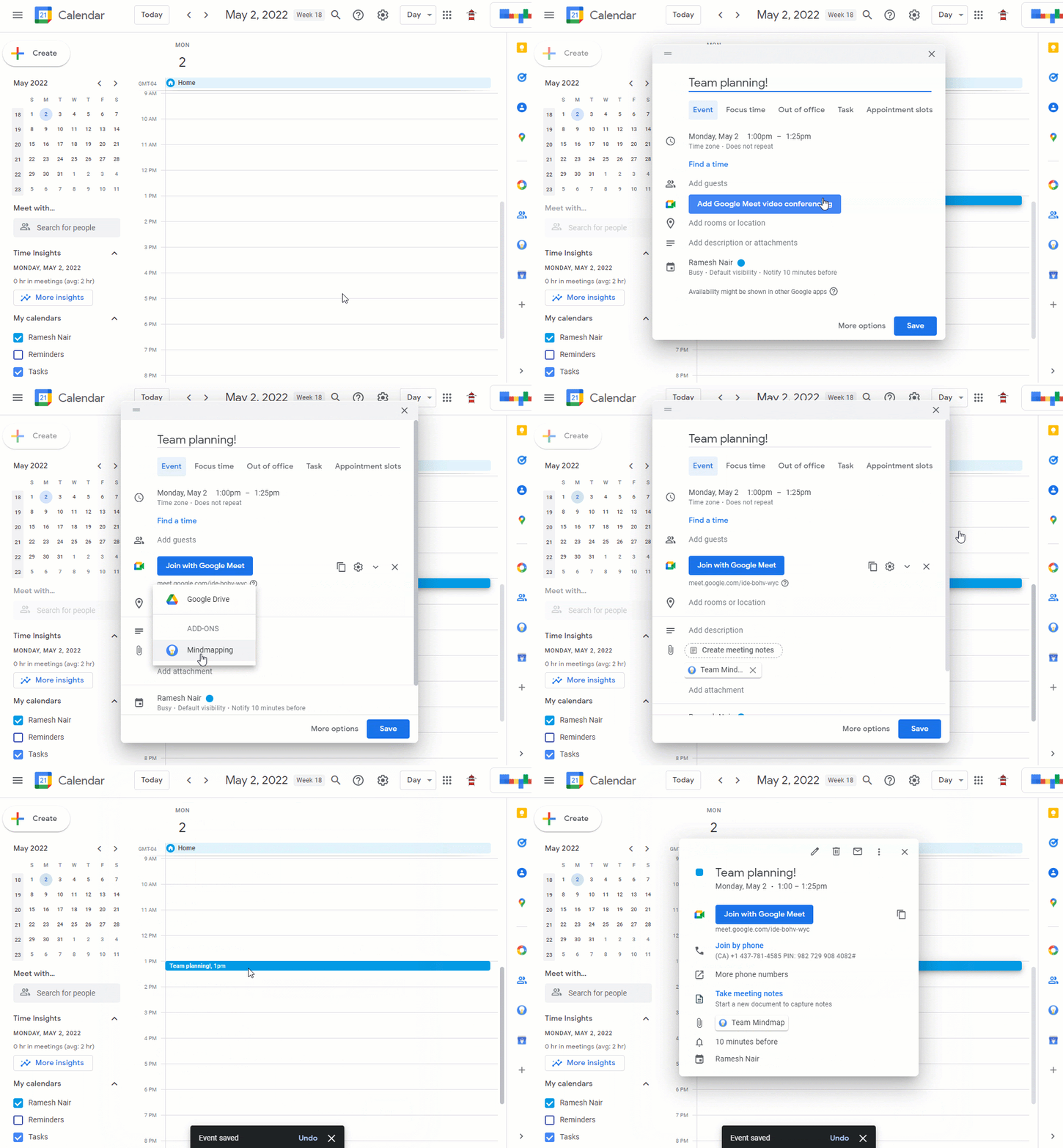
Google Workspace developers can now create Google Workspace add-ons that attach files to a Google Calendar event from any third-party service. This feature enables developers to create add-ons that support attachments from a wide range of sources beyond Google Drive, such as digital whiteboard, content creation, or file management tools.


Users who have the relevant add-ons installed will be able to attach files from these sources to a Calendar event, and attendees can view the event with the attachment on the web or on mobile.


Attach files from a third-party service to a Calendar event


After attaching files in Calendar on the web, users can view the event with the attachment on the web or on mobile.


Getting started


Rollout pace

  • This feature is available now for all developers and users.

Availability

  • Available to all Google Workspace customers, as well as legacy G Suite Basic and Business customers

Resources

New updates

Unless otherwise indicated, the features below are fully launched or in the process of rolling out (rollouts should take no more than 15 business days to complete), launching to both Rapid and Scheduled Release at the same time (if not, each stage of rollout should take no more than 15 business days to complete), and available to all Google Workspace and G Suite customers.


New Categories in Google Workspace Marketplace
Three manually curated categories have been added to the Google Workspace Marketplace: Business essentials, Work from everywhere, and Apps to discover. A left navigation menu will be included to show new categories.


Previous announcements


The announcements below were published on the Workspace Updates blog earlier this week. Please refer to the original blog posts for complete details.

Reminder: Google Meet support for IE11 ending August 17, 2021
Beginning August 17, 2021, you will no longer be able to use Google Meet on IE11. To avoid disruption, please switch to a supported browser before that date. | Learn more.


Easily switch between lists in Google Tasks on mobile
We have now updated the current Tasks Mobile user interface to display multiple lists at the same time in a tabbed UI. | Learn more.


Add up to 25 co-hosts per meeting and expanded safety features for Google Meet
We’re expanding meeting moderation controls in Google Meet with several highly requested features, including assigning co-hosts, new safety features, and more. | See the original announcement for more details and full availability. | Learn more.


For a recap of announcements in the past six months, check out What’s new in Google Workspace (recent releases).

New updates

Google Voice is now available in Belgium
Google Workspace customers based in Belgium can now sign up for Google Voice, and customers who have purchased Google Voice Premier can get phone numbers for their users in Belgium. With this launch, Voice is now available in these countries. | Learn more.


Easily view the number of Google Meet hardware devices in your organization in the Admin console
In the Admin console under Devices > Google Meet Hardware, admins will now see a simple count on the device list page of the number of devices that meet the criteria of the currently selected filters. | Learn more.


Previous announcements

The announcements below were published on the Workspace Updates blog earlier this week. Please refer to the original blog posts for complete details.


Replace your background with a video in Google Meet
In addition to replacing your Google Meet background with a static image, you can now replace your background with a video. | Learn more.


Option to replace your background in Google Meet is now available on Android
You can now blur or replace your background with an image in Google Meet on Android. This feature is already available on the web. | Learn more.


Find admin approved applications in the “Approved for you” section in the Google Workspace Marketplace


For a recap of announcements in the past six months, check out What’s new in Google Workspace (recent releases).

What’s changing

The new “Approved for You” section in the Google Workspace Marketplace allows users to quickly see and install applications that have been approved and allowlisted by their admins.


Who’s impacted

Admins and end users


Why it’s important

Admins can specify which third-party apps their users can install from the Google Workspace Marketplace. With the addition of the “Approved for you” section in the Marketplace, users can quickly find and install pre-approved apps for Gmail, Drive, Editors, Calendar, and more.


Getting started


Rollout pace


Availability

  • Available to Google Workspace Business Starter, Business Standard, Business Plus, Enterprise Standard, Enterprise Plus, Education Fundamentals, Education Plus, and Nonprofits, as well as G Suite Basic and Business customers
  • Not available to Google Workspace Essentials and Frontline customers

Resources

Compose actions in Gmail Add-ons make it easy to add links and attachments from apps like Box, Dropbox, Atlassian’s Jira, and Egnyte to any Gmail message—right as you’re drafting it. We’re launching Compose actions to G Suite customers today with those four partners (plus more on the way). See our post on the G Suite blog for more details.

Gmail Add-ons with compose actions can be installed from the G Suite Marketplace. Like all other Gmail Add-ons, G Suite admins can install them for their entire domain or add them to their whitelist.

Launch Details
Release track:
Launching to both Rapid Release and Scheduled Release

Editions:
Available to all G Suite editions

Rollout pace:
Full rollout (1–3 days for feature visibility)

Impact:
Admins and end users

Action:
Admin action suggested/FYI

More Information
G Suite blog: Never miss a beat—new integrations make it easy to insert content, trigger actions within Gmail
Help Center: Install Marketplace apps
Help Center: Control user installation of Marketplace apps

Launch release calendar
Launch detail categories
Get these product update alerts by email
Subscribe to the RSS feed of these updates

On August 1st, 2018, we’re planning to shut down all Gmail contextual gadgets. A Gmail contextual gadget is a gadget that is triggered by clues in Gmail, like the content of a subject line or an email message.

We recently launched Gmail Add-ons, which satisfy many of the same needs as Gmail contextual gadgets but also offer a better developer experience, cross-platform support, and more stability. We recommend that admins turn off their contextual gadgets and develop new or install existing Gmail Add-ons to serve their use cases. If Gmail contextual gadgets aren’t removed before August 1st, 2018, they’ll disappear automatically.

More Information
Developer Guide: Gmail Contextual Gadgets
Developer Guide: Gmail Add-ons
G Suite Marketplace: Gmail Add-ons


Launch release calendar
Launch detail categories
Get these product update alerts by email
Subscribe to the RSS feed of these updates

We recently launched Gmail Add-ons, which allow you to work with your favorite business apps—directly from Gmail. To make it super easy for users to access these helpful tools, we’ve now made it possible for G Suite admins to install Gmail Add-ons for their entire domains. To install an Add-on, click the Settings gear icon in Gmail and select “Get add-ons.” For additional info, see the Help Center.


In addition, we’re making it easier for developers to design Gmail Add-ons specifically for their organizations. In the coming weeks, developers in your domain will notice two changes:

  • They’ll be able to publish Gmail Add-ons to users in their own G Suite domains. In addition, they'll be able to publish to the general public, after requesting and receiving publication permission.
Stay tuned to the G Suite Developers Blog to learn more about these two developer capabilities and when they’ve launched.

These new features make it easier for users to take advantage of Gmail Add-ons and breeze through their email-related action items—without ever leaving Gmail.

Launch Details
Release track:
Launching to both Rapid Release and Scheduled Release

Editions:
Available to all G Suite editions

Rollout pace:
Extended rollout (potentially longer than 15 days for feature visibility)

Impact:
Admins and developers

Action:
Admin action suggested/FYI

More Information
G Suite Marketplace: Gmail Add-ons
Help Center: Install Marketplace apps


Launch release calendar
Launch detail categories
Get these product update alerts by email
Subscribe to the RSS feed of these updates

Earlier today, we announced the developer preview for Gmail Add-ons. Learn more about Gmail Add-ons in our blog post here: Bring the power of your apps into Gmail with Add-ons


For Administrators: Please note that the Developer Preview only allows the developer to test add-on development in their own Gmail accounts. End-user functionality is not planned until later this year.


More Information
G Suite Developer Blog

Launch release calendar
Launch detail categories
Get these product update alerts by email
Subscribe to the RSS feed of these updates

Useful Links

Join the official community for Google Workspace administrators

In the Google Cloud Community, discuss the latest features with Googlers and other Google Workspace admins like you. Learn tips and tricks that will make your work and life easier. Be the first to know what's happening with Google Workspace.

Learn about more Google Workspace launches

On the “What’s new in Google Workspace?” Help Center page, learn about new products and features launching in Google Workspace, including smaller changes that haven’t been announced on the Google Workspace Updates blog.

Learn about our customers

Discover how a diverse range of organizations, from small businesses and nimble startups to globally recognized Fortune 500 corporations, leverage the collaborative power of Google Workspace. Explore examples of how teams of are streamlining workflows and driving productivity by utilizing Google-Workspace.

Subscribe to Our Blog Updates

[フレーム]

AltStyle によって変換されたページ (->オリジナル) /