I have a code block angular 2 like that:
<div *ngFor="let elm of elms; let i = index" [attr.name]="name" text-center>
 {{elm }}
</div>
It works fine.
But when i want to dynamic set attribute name base on index like name-1="name" name-2="name"i dont know how to do it.
I tried [attr.name-{{i}}]="name"or [attr.name- + i]="name" but it does not work. Is there any way to do it?
Many thanks.
2 Answers 2
To start off thanks to OP for the question. I eventually learnt new things by solving this answer. Below explanation on how i achieved.
Important: One catch you cannot bind the dynamic attribute to your component scope. To achieve this you need to make each div as a dynamic component and compile it. Kinda hacky i guess.
Template:
<div #looped *ngFor="let elm of elms; let i = index;" text-center>
 {{elm }}
</div>
and in the component import implements AfterViewInit and ViewChildren decorator to get children elements and its changes on rendering:
import { Component, ViewChildren, QueryList, AfterViewInit } from '@angular/core';
component:
export class ExamplePage implements AfterViewInit {
 elms : Array<string> = ["d1", "d2", "d3"]
 @ViewChildren('looped') things: QueryList<any>;
 constructor() { }
 ngAfterViewInit() {
 this.things.forEach((t, index) => {
 let el : HTMLDivElement = t.nativeElement;
 el.setAttribute("name-" + index , "dynamicAttrString");
 })
 }
}
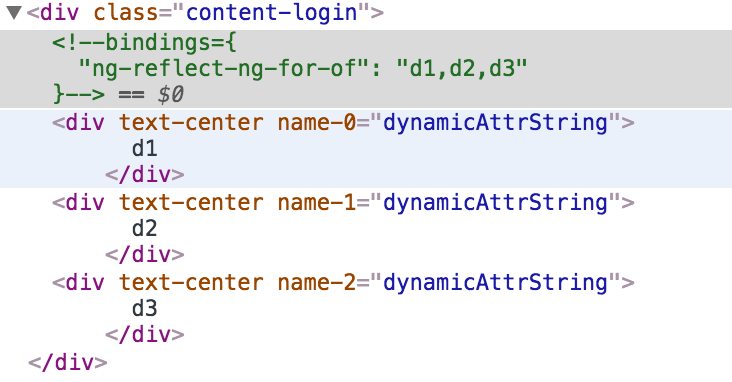
Output:
3 Comments
AfterViewInit? 2. If place code in ngAfterViewInit, it only work when the data is ready in start time. To apply code in anychange, i use ngAfterViewChecked instead. But there is a problem that ngAfterViewChecked fire so many time in one change and it will make my app slower. What i should to do? Thank youI don't know weather it is possible or not but I've alternate solution
<div *ngFor="let elm of elms; let i = index" [attr.name]="{id : index, data : name}">{{item}}</div>
then you'll get object as avalue with id and data keys, hope this helps.
<div name1="name"...?<div name-1="name"...<div name-2="name"...attribute directivefor this.