I wanted to write a code that prints out the whole html code from a website, so I could get information about a certain player. My Problem now is:
import java.io.BufferedReader;
import java.io.IOException;
import java.io.InputStream;
import java.io.InputStreamReader;
import java.net.URL;
import java.net.URLConnection;
public class DownloadPage {
public static void main(String[] args) throws IOException {
 URL url = new URL("http://apps.runescape.com/runemetrics/app/levels/player/Gragoyle");
 URLConnection con = url.openConnection();
 InputStream is =con.getInputStream();
 BufferedReader br = new BufferedReader(new InputStreamReader(is));
 String line = null;
 // read each line and write to System.out
 while ((line = br.readLine()) != null) {
 System.out.println(line);
 }
}
}
When i run this code it only prints the overview:
<html>
<head><title>302 Found</title></head>
<body bgcolor="white">
<center><h1>302 Found</h1></center>
<hr><center>nginx/1.8.0</center>
</body>
</html>
Id be very grateful if you could explain me how I can print the whole html code, and what I did wrong.
-
1Often servers check headers to know if the client is a bot or if it's a browser, that's likely why you are having this issue. Anyway, if you look at the source code of the provided link (Ctrl+U on Chrome), you'll find that the body is actually quite empty, the page gets filled by some script. Scripts run client-side, so just using an HTTPConnection like you do will not make you able to read useful data from that page.BackSlash– BackSlash2016年09月04日 11:16:20 +00:00Commented Sep 4, 2016 at 11:16
-
For me the body isnt empty at all, I can see all the information I need. How else could I get this information?Anon Ymous– Anon Ymous2016年09月04日 11:18:37 +00:00Commented Sep 4, 2016 at 11:18
-
1The body is not empty if you look at the webpage. I said, look at the source code: i.sstatic.net/z2JAk.png The body is empty, at first it seems a AngularJS app, so javascript fills the page when it's loaded.BackSlash– BackSlash2016年09月04日 11:22:51 +00:00Commented Sep 4, 2016 at 11:22
-
When I look at the elements from the website directly i get all the information I need: i.imgur.com/w6hQX5V.png How can i access this?Anon Ymous– Anon Ymous2016年09月04日 11:33:21 +00:00Commented Sep 4, 2016 at 11:33
-
That's because "elements" is not the page source. The Elements tab shows a tree containing what is currently displayed, so everything added by javascript is listed there. As I said, javascript is executed client side, so chrome executes it and lets you see the generated elements from the "Elements" tab. This is not gonna happen with java, it won't execute javascript unless you emulate a browser, so you'll get the source code (CTRL + U to see it).BackSlash– BackSlash2016年09月04日 11:35:30 +00:00Commented Sep 4, 2016 at 11:35
1 Answer 1
Three problems:
What you get from
http://apps.runescape.com/runemetrics/app/levels/player/Gragoyleis a redirection tohttps://apps.runescape.com/runemetrics/app/levels/player/Gragoyle. This redirection is used to force users to connect by HTTPS.If you try to get data from
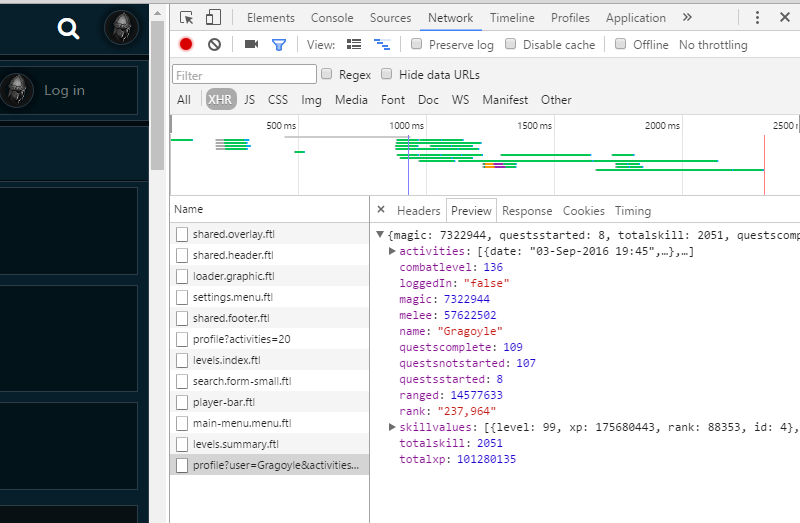
https://apps.runescape.com/runemetrics/app/levels/player/Gragoyleyou will get an SSL exeception. You can see more about it on: StackOverflow question. If you resolve this (fe. by accepting all certificates, not recommended in production) you will get HTML file, but it wouldn't be useful, because there is no player data on it.The data you actually want to get is retrieved by Javascript and AJAX calls. This is a great information for you, because you if you resolve problems with SSL you can get player data as JSON file, by calling fe.
https://apps.runescape.com/runemetrics/profile/profile?user=Gragoyle&activities=20
Then you can use any JSON parser fe. Gson to easily get values you want.
Note: To view JSON file in nice and readable form you can use this site or some plugin for your browser like JSONView for Chrome.