I recently designed a web application for a client. I used CSS for a layout of the application. I tested the layout on IE7, Mozilla 3.0.1, Google Chrome 2.0.xxx, Safari 3.1 and Opera 9.51.
They all displayed correctly without problems. After the delivery of the application my client noticed it had compatibility issues with IE6. The site was not displayed correctly.
How do i get to fix this problem? I don't have IE6 on my system to even try and fix it. Each time i try to downgrade my browser to IE6,IE will stop working. Is there a way i can get an environment that can simulate IE6 online.
Secondly, is making use of css frameworks going to solve the compatibility problem and even if i want to use a css framework, which one is better apart from blueprint css.
Thanks for your time.
-
And this is why we have contracts when doing work for people - I hope for your sake that the client paid extra for the IE6 compatibility work...ijw– ijw2009年09月02日 13:14:05 +00:00Commented Sep 2, 2009 at 13:14
8 Answers 8
I have a feeling you are running into a box model problem because you are rendering in Quirks Mode. IE7+ and all other browsers uses the W3C box model while IE6 uses the IE Box Model in quirks mode.
The IE box model (known as the traditional box model), includes the padding and border in the width/height of an element.
Under the IE box model, a box having a width of 100px, with 2px padding on each side, a 3px border, and 7px margin on each side, will have a visible width of 114px.
The W3C box model (which is the standard box model), excludes the padding and border from the width/height of an element.
Under the W3C box model, a box having a width of 100px, with 2px padding on each side, a 3px border, and 7px margin on each side, will have a visible width of 124px.
Box Models
(source: 456bereastreet.com)

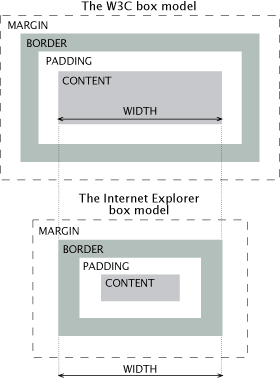
In order to make IE use the W3C box model (which is what every other browser uses), your page needs to be rendered in Strict mode. By default, IE renders in Quirks mode.
In order to trigger Strict mode in IE, you must specify a doctype. You can use any of the following doctypes:
HTML4 Strict:
<!DOCTYPE HTML PUBLIC "-//W3C//DTD HTML 4.01//EN"
 "http://www.w3.org/TR/html4/strict.dtd" >
XHTML 1.0 Strict:
<!DOCTYPE html PUBLIC "-//W3C//DTD XHTML 1.0 Strict//EN"
 "http://www.w3.org/TR/xhtml1/DTD/xhtml1-strict.dtd">
XHTML 1.0 Transitional:
<!DOCTYPE html PUBLIC "-//W3C//DTD XHTML 1.0 Transitional//EN"
 "http://www.w3.org/TR/xhtml1/DTD/xhtml1-transitional.dtd">
Your doctype must be the first thing to appear on your page. It is even before the <html> tag, on its own line. (Adding an <?xml> prolog will cause IE to go back in Quirks mode, so remove it if you have one).
More information about Quirks/Strict mode here:
Though adding a doctype to toggle Standards mode might not fix all your problems, you will at least take a HUGE step in the right direction.
1 Comment
IE6 is a known disaster in the way it handles CSS. Your best bet is to use a virtual machine or an old system that has IE6 on it and use that for testing. However, there are some decent tools out there that will emulate IE6 for the most part. My favourite is IETester. There's an online tool at browsershots.org that's not bad either, but I find it's not consistent sometimes.
Your best approach is to create a separate stylesheet that is for IE6 only, and leave the rest of your CSS in working condition. You can load an IE6 only stylesheet by using the following in your HTML <head>:
<!--[if IE 6]>
 <link rel="stylesheet" type="text/css" href="IE-6-SPECIFIC.css" />
<![endif]-->
Once that's loaded, you can start overriding your usual styles that are having problems in IE6.
2 Comments
First up, it would serve you well to download virtual pc and the IE compatibility testing VHDs from here http://www.microsoft.com/Downloads/details.aspx?FamilyID=21eabb90-958f-4b64-b5f1-73d0a413c8ef&displaylang=en, I have also used IEtester as mentioned by zombat, but prefer the VPC images.
You can then test your app against different flavours of IE.
For the sake of getting IE 6 to work, I often resort to a separate CSS sheet for it, and link this using conditional comments http://msdn.microsoft.com/en-us/library/ms537512(VS.85).aspx
Good Luck :)
Comments
IE 6 has a number of bugs in its CSS box model, causing sites that are correctly coded to break under that browser. It is possible using the box model hack and other workarounds to resolve these issues, so its a matter of getting IE 6. Here is a list of common fixes for IE 6 box model problems
- To Solve the IE 6 Problem - my favorite option is to install an IE emulator that lets you run multiple versions of internet explorere. This one is pretty good, although there are others. Another common way is to create a virtual machine running IE 6 or dual booting (both can be time consuming and a pain, but vertainly doable). I prefer to use an emulator when I can.
Comments
Create a stylesheet that is specific to fixing IE6 issues, and call it with a conditional statement (which only IE supports). Below is an example of what you should include in the head of your document:
<!--[lte IE 7]>
 <link rel="stylesheet" type="text/css" href="ie6.css" />
<![endif]-->
You might also want to consider "resetting" your CSS, which helps to start browsers off on a level playing field (i.e., getting rid of inconsistent margins and padding in IE). The one that I use can be found here, and Yahoo! offers a decent reset stylesheet as part of YUI 3.
As for being able to debug your own markup and style in IE6, these are the two options that I suggest: Xenocode's Browser Sandbox virtualizes browsers (IE6, IE7, IE8, FF2, FF3, Chrome, Opera 9, Safari 3, Safari 4) on your PC without having to install the actual application, and IETester, which is pretty buggy but let's you render your markup in IE6, IE7, and IE8 without having to install them.
Comments
If you have a Win2K license, grab VirtualBox, install Win2K on it with IE6, and test the page from there. That's how I do most of my testing without actually having to install IE6.
If it weren't something you were doing for a specific client, but the web at large, I'd recommend using the code from IE6 No More!
Comments
install IETeaster for testing in different version of IE browser. here you can find out where the problem is arising
Comments
I guess, Under the W3C box model, a box having a width of 100px, with 2px padding on each side, a 3px border, and 7px margin on each side, will have a visible width of 114px. not 124 as W3C excludes the padding and border from the width/height of an element.