Using the OpenCage geocoding API requires a
valid API key that you must pass with each HTTP request
as the value of the
key
parameter - one of two
required parameters.
It is NOT necessary to set any HTTP headers for authentication.
Read why not
in our FAQ.
Both the HTTP 1.1 and HTTP/2 protocols are supported.
All requests should use the HTTP
GET
method. Requests that use any other method will receive a response
with status
405 - Method not allowed.
Both
http
and
https
schemes are supported. We strongly recommend
https
as requests made using
http
are not encrypted.
https
requests must use TLS 1.2 or higher.
https
requests that use an older
(insecure) TLS will fail. If you are stuck with ancient software that does
not support TLS 1.2 or higher you should use
http,
and find a way to upgrade as soon as possible.
The
VERSION
component of the URL should be replaced with a version of the format
v + version number.
The current version is
v1.
Requests with an incorrect version number will receive a
400 - not a valid version
response.
The
FORMAT
component of the URL should be replaced with one of the following:
value
description
json
response returned as JSON
geojson
response returned as GeoJSON
xml
response returned as XML
google-v3-json
the OpenCage geocoding API supports a subset of the
Google v3 Geocoding API
and returns a JSON response that is compatible with Google's. Please
note, we provide this format as a convenience and do not
actively maintain it. It is not widely used, and will likely eventually be
discontinued.
We encourage you to use the
json
format. Please see
details of our Google compatibility.
API requests with any other format will receive a response with status
400 - not a valid format.
Request Parameters
Required Parameters
parameter
description
key
a 32 character long, alphanumeric string unique to your account.
Example usage:key=YOUR-API-KEY
If not provided the request will fail with status
401 missing API key.
You will find your API key
in the "Geocoding" tab of your account dashboard
By default accounts are limited to one active key.
Subscription customers can have multiple active API keys.
the query string to be geocoded. Either a latitude, longitude or
a placename/address.
Example usage:
reverse geocoding:
q=52.5432379+13.4142133
forward geocoding:
q=Berlin,+Germany
If not provided the request will fail with status
400 missing or bad query.
Must be
URL encoded.
Instead of, for example, non-ascii strings like
München
you should send us
M%C3%BCnchen.
Note that most
SDKs
will do the encoding for you, be careful to avoid
double encoding your query.
Must be at least two characters long.
Queries that are too short will fail with status
400 missing or bad query.
Queries that are too long will fail with status
400 query too long.
Queries that contain obvious erroneous data
will fail with status
400 missing or bad query.
Points to note when reverse geocoding
Query should be in latitude, longitude
order in decimal format.
Use period (.) as the decimal separator, not comma.
If impossible coordinates are supplied the API responds with
with status
400 invalid coordinates.
Reverse geocoding results contain the field
distance_from_q
which is the distance (in meters) to the coordinates in the request to the coordinates of the result.
This can be particularly useful when there are many
stores/restaurants/whatever at a single location (for example a multi-story
building).
Note: in some parts of the world it is common for buildings to have names
and not numbers. Or we may have only the name and not a house number.
In this case we will include the name even if
address_only=1
is set.
When set to 1 the various request parameters are added to
the response for ease of debugging.
Example usage:add_request=1
Note that the value of
key
will be obfuscated. The first six characters will be shown, the rest replaced with
*
so that the key is not mistakenly logged.
bounds
Used only for forward geocoding.
This value will restrict the possible results to a defined
bounding box.
Example usage:bounds=-0.563160,51.280430,0.278970,51.683979
The value of the
bounds
parameter should be specified as two coordinate points
forming the south-west and north-east corners of a bounding box
(min longitude, min latitude, max longitude, max latitude).
Values that are not valid coordinates are ignored.
Used only for forward geocoding. Restricts results to the specified
country/territory or countries.
Example usage:countrycode=de
The country code is a two letter code as defined by the
ISO 3166-1 Alpha 2
standard. E.g.
gb
for the United Kingdom,
fr
for France,
us
for United States.
Non-two letter country codes are ignored.
You can specify multiple country codes by supplying a comma separated
list. For example
countrycode=ca,us
would limit results to either the United States or Canada.
Please note, many territories have their own ISO 3116-1 codes, despite
being part of another country. An example is Puerto Rico which has ISO
code
PR,
despite being part of the United States,
US.
In the
components
portion of results we return both -
see details below.
Many parts of the world have complex or even disputed political
structures and/or share postal systems with another country, and thus
may be treated as a single or multiple country by some of the
geocoders we rely upon. It may make sense to specify multiple country
codes.
As an example, when searching for locations on the island of Aruba -
technically a constituent country of the
Kingdom of the Netherlands
-
we will do better if you specify
countrycode=aw,nl
rather than just
countrycode=aw.
An
IETF format language code
(such as
es
for Spanish or
pt-BR
for Brazilian Portuguese), or
native
in which case we will attempt to return the response in the local
language(s).
Example usage:language=de
If no language is explicitly specified, we will then look for an HTTP
Accept-Language
header like those sent by a browser and use highest quality language specified (please see
RFC 4647
for details). If the request did not specify a valid header, then
en
(English) will be assumed.
Please note, setting the
language
parameter does NOT mean results will only be returned in the specified
language. Instead it means we will attempt to favour results in that
language.
Used only for forward geocoding.
The maximum number of results we should return. Default is 10.
Maximum allowable value is 100.
Example usage:limit=1
Please note:
Reverse geocoding requests return
at most one single result.
Forward geocoding requests may return multiple results.
no_annotations
When set to 1 results will not contain
annotations.
Example usage:no_annotations=1
The only exception is if the optional
roadinfo
parameter is set (see below).
no_dedupe
When set to 1 results will not be deduplicated.
Example usage:no_dedupe=1
no_record
When set to 1 the query contents are not logged.
Example usage:no_record=1
Please use this parameter if you have concerns about privacy, and
want us to have no record of your query.
Learn more about
our approach to privacy.
pretty
When set to 1 results are 'pretty' printed for easier reading/debugging.
Example usage:pretty=1
proximity
Used only for forward geocoding.
Provides the geocoder with a hint to bias results in favour of those
closer to the specified location. Please note, this is just one
of many factors in the internal scoring we use for ranking results.
Example usage:proximity=52.5432379,13.4142133
The value is a point with latitude, longitude coordinates in decimal
format. Values that are not valid coordinates are ignored.
roadinfo
When set to 1 the behaviour of the geocoder is changed to attempt to
match the nearest road (as opposed to address).
Example usage:roadinfo=1
If possible we also fill additional information in the
roadinfo
annotation. Please see
details below.
Rate/Usage Limits
The OpenCage geocoding API uses rate limits to
ensure that the service stays available to all users.
Free trial usage limits
Free trial accounts have a hard limit of
2,500
requests per day
for testing purposes.
Our definition of "day" is based on
the UTC timezone.
Daily counts reset at 24:00 UTC.
See current UTC time.
Free trial accounts are limited to one request per second.
If you exceed that rate you may see a
429 - too many requests
response.
We offer a free TRIAL for testing, not a free tier for ongoing use.
If you are regularly depending on our service, you are not testing.
If you wish to use our geocoding API at higher volume or speed, or on
an ongoing basis, become a customer.
See pricing.
Paid usage limits
Paying customers can use our service at higher volumes and much faster
rate (requests per second).
We offer two different paid usage
models:
subscriptions
(monthly and annual) and
one-time plans.
Please see
our pricing page
for the exact details of the different tiers.
Hard versus soft limits
Free trial and one-time plan customers face hard limits. Subscription
customers do not.
Hitting the usage limits
If you send a request after you have reached your hard limit
you will receive a
402 - quota exceeded
response
Free trial accounts that continually request beyond the hard limit
(if you ignore the
402
response) will eventually be blocked and see a
403 - disabled
response. Please don't do that. Thanks.
If you exceed the request per second rate you may see a
429 - too many requests
response.
See below for
API keys
you can use to generate a
402
or
403
response for testing.
Seeing your real-time API use
Real-time usage information for accounts with hard limits
is returned by the API in both the
rate
element of the response and HTTP response headers.
Note:
Responses to subscription customers do
NOT
contain the
rate
section of the response or
X-Ratelimit
HTTP headers, because they do not face hard limits.
rate
key
HTTP Header
meaning
limit
X-RateLimit-Limit
total number of API requests your account is limited to
over given time period
(24 hours for free trials)
remaining
X-RateLimit-Remaining
number of API requests remaining until hard limit is reached
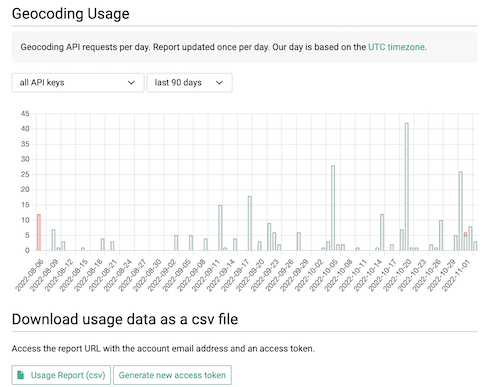
A graph of daily usage is shown in the "Geocoding API" tab of
your account dashboard.
There you will also find a link to a URL with a unique access token
where you can download your daily usage as a CSV file.
The
status
element of the API response contains the following:
key
value
code
a three digit code
message
a brief, human-readable explanation of the response code
The following response codes are possible:
code
meaning
check
message
in API response for specific details
200
OK (zero or more results will be returned)
400
Invalid request (bad request; a required parameter is missing; invalid coordinates; invalid version; invalid format)
401
Unable to authenticate - missing, invalid, or unknown API key
402
Valid request but quota exceeded (payment required)
403
Forbidden (API key disabled or IP address rejected)
404
Invalid API endpoint
405
Method not allowed (non-GET request)
408
Timeout; you can try again
410
Request too long
426
Upgrade required (unsupported TLS)
429
Too many requests (too quickly, rate limiting)
503
Internal server error
API keys for testing
For testing purposes you can use the following API keys:
key
response
6d0e711d72d74daeb2b0bfd2a5cdfdba
200 - OK
*
4372eff77b8343cebfc843eb4da4ddc4
402 - quota exceeded
2e10e5e828262eb243ec0b54681d699a
403 - disabled
6c79ee8e1ca44ad58ad1fc493ba9542f
403 - IP address rejected
d6d0f0065f4348a4bdfe4587ba02714b
429 - requesting too quickly
To generate a successful
API response with no results, send a request with
q=NOWHERE-INTERESTING.
We will reply with status
200
and 0 results.
* the
200 - OK
key will behave as if the
q
parameter of the request had been
51.952659,7.632473
regardless of what was actually specified (unless of course if
q=NOWHERE-INTERESTING
was specified, as explained above).
Response Format
The API response is formatted according to the
format
specified in the request.
All returned coordinates use
WGS 84
(sometimes also known as EPSG:4326) as reference coordinate system.
Reverse geocoding requests return
at most one single result.
Forward geocoding requests may return multiple results.
The response structure will vary slightly depending on:
Whether or not you are a subscription customer.
Because subscription customer do not face hard limits, their
responses do NOT contain the
rate
element.
Details.
The location requested and the information we have available for
that location.
Results may not have the
bounds
attribute. This happens when the only data we have available for the
location / address is a single latitude, longiitude point.
Reverse geocoding results contain the field
distance_from_q
which is the distance (in meters) to the coordinates in the request to the coordinates of the result.
The OpenCage geocoding API
will always attempt to find a match for as many parts
of a query as it can, but this isn't always possible.
Where a partial match is made, for example a
street name can be matched but not the specific house number,
we will still return a result.
The precision of a match is returned in the
confidence
field.
Please note,
confidence is
NOT
used for
ranking of the results.
It does not tell you which result is more "correct", nor what type of
thing the result is - for that please check
the components portion of the result.
The confidence score is a value based on the size of the
matched place. It is an integer value between
0
and
10
, where
0
means we are unable to determine a confidence (due to lack of a
bounding box).
1
indicates low precision, and
10
indicates high precision.
Confidence is
calculated by measuring the distance between the southwest
and northeast corners of each result's bounding box. Then an adjustment
may be made to reflect the ambiguity of the underlying geocoder.
Confidence is not the way to determine the type of place
that was matched, for that please use the
_type
field of the
components portion of the response.
The best way to think of our confidence score is as a measure of how
confident we are that center point coordinates returned for the result
precisely reflect the result.
For example, if you search for
Berlin, Germany
we know exactly where that is, but it has a confidence of only 2,
as Berlin is a very large city (
and Bundesland, but that's another story).
The coordinates we return are in the center of the bounding box, but it
would be valid to consider anywhere in that box to be "Berlin", hence the
relatively low confidence score.
Geocoding confidence scores and their meaning
confidence
meaning / distance
(in km)
10
< 0.25
9
< 0.5
0
8
< 1
.00
7
< 5
.00
6
< 7.5
0
5
< 10
.00
4
< 15
.00
3
< 20
.00
2
< 25
.00
1
> 25
.00
0
unable to determine a bounding box,
thus unable to determine a confidence
Ambiguous Results
Many places have the same or
similar names.
When forward geocoding we may find
multiple valid matches for a query.
In this case we return multiple
results ranked by relevance. See
how results are ranked.
Please see our detailed
guide to understanding geocoding accuracy
which outlines strategies to determine whether a result
from an ambiguous query is sufficiently correct to
warrant using or not.
Reverse geocoding requests return at most one result.
No Results
In cases where the geocoder cannot find any match
for a request, we will return a successful
status (a response code of
200),
but the number of results in the response will
be zero.
You can test this situation by sending a request with the query parameter set to
NOWHERE-INTERESTING
which will return a valid response with 0 results.
Formatted Placename
Each geocoding result has a
formatted
attribute which contains a version of the location address
in the local format.
The
formatted
string is created from the various values in the
components
section of the result.
See details.
This is the raw data we have to work with.
There are several
optional parameters
you can set to influence the content of the
formatted
string:
value
description
abbrv
We will attempt to shorten or abbreviate the
formatted
value.
See details.
address_only
We will attempt to exclude POI names from the
formatted
value.
See details.
language
Specify your preferred output language.
See details.
Background:
Across the world there are
many
different ways to format addresses
and place names.
For more on the need for, and challenge of, good formatting
please read our
guide to address formatting.
Address Components
We provide the individual pieces of the location hierarchy in the
components
portion of the result.
Common questions / misunderstandings
We are often asked if there is a definitive list of all possible
components
keys.
Unfortunately not -
read why not.
Please do not assume every location will always have a
city
value (or any of the other values). The world is a very diverse place,
different countries (or regions within countries) do things very
differently. Code defensively.
Details of specific key/values
key
description
continent
Possible values are:
Africa, Antarctica, Asia, Europe, Oceania, North America, South America
_type
We provide the key
_type
with the value set to what we believe the matched location to be.
Note:
In the rare case where, for whatever reason, we can't determine a
_type
we set the value
unknown.
Common possible values of
_type
include:
building, road, place, hamlet, village, neighbourhood, city, county,
postcode, partial_postcode, terminated_postcode, postal_city,
state_district, state, region, island, body_of_water, country,
continent, fictitious, unknown
Just because a result has a certain
_type
does NOT mean there is a key of that value in the
components
list. Various types get mapped together. As an example
town
gets mapped to
_type : city.
See
the list of mappings.
It is not a good idea to use the
_type
as a proxy for the geographic size of the result.
Different places can have the same
_type
(for example
village
or
city
or
postcode),
but vary in size. Instead use the
confidence
score, which is a measure of size.
_normalized_city
The definition of what is a
city
or
town
or other type of settlement can vary widely between and even within
countries.
To address this issue we try to provide the key
_normalized_city.
The value is set by looking through the values of
city, town, township, village, municipality, neighbourhood, suburb, city_district, ...
in descending order.
_category
We set a
_category
based on mapping the value of
_type.
See the list of
possible values.
road,
road_type
If the result is a road - ie if
_type
has value
road
- then if possible we also return a
road_type
key with values like those
generally used in OpenStreetMap.
If the road does not have a name we set the value to
unnamed road.
Read our blog post about
why a road may not have a name.
ISO 3166 codes,
country_code,
county_code,
state_code
When possible we set values for the following key/values:
country_code,
county_code,
ISO_3166-1_alpha-2,
ISO_3166-1_alpha-3,
ISO_3166-2,
state_code
Note:
country_code
is a lower-case two-letter code.
Examples:
de
for Germany,
mx
for Mexico.
For historical reasons many territories have their own ISO 3116-1
codes, despite being part of another country, and for this
reason the value of
country_code
can differ from the value of
ISO_3166-1_alpha-2.
Example: Puerto Rico (part of the United States) has an
ISO_3166-1_alpha-2
value of
PR,
and a
country_code
value of
us.
Some territories do not have official ISO 3166-1 codes.
In this case we set only
country_code.
Specifically, we set:
xc
for the
Sovereign Base Areas of Akrotiri and Dhekelia
xk
for Kosovo
The value for the key
ISO_3166-2
is a list as some countries (examples: France, Italy, Spain, and
the United Kingdom) have multiple ISO 3166-2 values for a
given location.
The codes are ordered from least to most specific.
Example: the coordinates
51.5244, -0.0997
have an
ISO_3166-2
value of
[ GB-ENG, GB-ISL ].
Note: many smaller countries do not have ISO 3166-2 codes,
as they do not have second-level administrative divisions.
In some countries commonly used state abbreviations differ from
ISO_3166-2
values.
This is especially the case when the ISO codes are numeric.
Example: Umbria is a region (state) in central Italy. It has an
ISO_3166-1_alpha-2
value of
IT-55,
but is commonly abbreviated as
UMB,
which is what we return as the value of
state_code.
Some countries, for example the Republic of Ireland and Norway, use
"county" as their second-level administrative division,
not state (or province, etc). In this case there will not be a
state
field.
We will attempt to set a
county_code
value, if such values are commonly used (they are in the
Republic of Ireland, they are not in Norway).
Occasionally we are asked if the API can return the exact polygon
(often called the geometry or boundary) for an area.
When possible we return a bounding box in the in the
bounds
portion of the result.
We use this bounding box to calculate the result's
confidence score.
But we do not return exact polygons, for a few reasons.
First of all, it is just not something many customers need.
Secondly, we aggregate many different geocoders,
and while some have some polygons in their underlying data, some do
not, or have only partial coverage.
Finally, polygons can be absolutely massive in terms of data size.
Returning such a large amount of data would present some meaningful
operational challenges for a high-volume API.
We recommend looking at
Boundaries-API
if you need administrative boundaries.
Permanent Identifiers
The API does NOT return a unique permanent identifier for
each result.
Nevertheless, depending on the location, in the
annotations
portion of the each result we may return various
commonly used codes or location reference schemes
that refer to different levels of granularity.
Annotations / Data Enrichment
By default each result contains an
annotations
section which supplies additional information about the result location.
Annotations can be turned off by setting the optional
no_annotations
parameter (with the exception of
roadinfo
and
UN/LOCODE,
please see below for details), and we recommend you do so if you don't
need this information as it means we can respond to your query a tiny bit more quickly.
Please note:
The annotations reflect information derived based on
the coordinates of the result.
These may differ from the coordinates of the request.
Reverse geocoding results include the field
distance_from_q
which is the distance (in meters) to the coordinates in the request to the coordinates of the result.
Some annotations are resource intensive, it isn't viable to have them on
by default for everyone, instead they are only available to paying
customers and need to be specifically enabled for the customer account.
These annotations are marked below.
Some annotations, for example
currency,
depend on the coordinates being in a country.
These annotations will not be supplied for results that do not lie
inside the boundaries of any country, for example in the middle of
an ocean.
The information in the annotations may come from different sources
of variable coverage. We do the best we can, but please don't assume
we will always be able to provide the same level of information
everywhere.
If the location is in the bounding box of India (as defined
by India Post,
see bounding box)
contains the DIGIPIN - a unique 10-character alphanumeric code
(12 chars when the two dashes are included)
based on the 4m x 4m grid that the location falls into.
Learn more about DIGPIN.
Example:
32C-849-5CJM
DMS
Contains the latitude and longitude of the center point of the result
in degree minute decimal second format.
contains the
Mercator projection
(EPSG:41001, sometimes also referred to as "Simple Mercator")
x
and
y
unit meter values of the center point of the result.
Example:
{ "x": 1493263.394, "y": 6865010.468 }
Note: use of Mercator projection on latitudes above/below +70/-70
degrees is strongly discouraged, due to the gross distortions of
the projection.
This annotation is applied
only for locations within EU member states, EFTA countries,
some EU candidate countries (those for whom NUTS regions have
been defined: AL, ME, MK, RS, TR), the former EU country of
Great Britain (GB), and the potential EU candidate of Kosovo (XK).
We do not (yet) support
newer EU candidate countries.
We may add these in the future.
We do not support Local Administrative Units (LAUs),
the level below NUTS 3.
We may add those in the future.
Our codes are based on the 2024 definitions, with
the exception of GB which continues to use the old definitions from
when GB was part of the EU.
If the optional
roadinfo
parameter was specified we will also attempt to set the following
values about the road:
Please bear in mind this is crowd-sourced data and not
official governmental data. See note below.
key
description
lanes
number of lanes
maxheight
either
default,
below default,
or a number representing the height in meters, for example:
3.5
maxspeed
(speed limit). An integer value like
30,
or
none
if there is no speed limit.
maxspeed:bus
speed limit for buses. An integer value like
30,
or
none
if there is no speed limit.
maxspeed:conditional
speed limit which depends on certain situations, such as
time of day, day of week, weather, time of year, or another particular condition.
Format is an integer value follwed by an @ sign and then the condition,
for example:
110 @ wet 130 @ (19:00-06:00) 30 @ (Mo-Fr 07:00-17:00) 100 @ winter 25 @ children_present
maxspeed:hgv
speed limit for heavy goods vehicles (hgv). An integer value like
30,
or
none
if there is no speed limit.
maxspeed:hgv:conditional
speed limit for heavy goods vehicles (hgv) which depends on certain situations, for example:
90 @ (weight>3.5)
maxspeed:variable
speed limit may be dynamic (e.g. variable-message signs / signals) under certain conditions.
Possible values are
yes,
border_control,
environment,
obstruction,
peak_traffic,
school_zone,
and
weather.
When the result is in a country the value of
name
will be of the form
Continent/City,
the format used by
tz database
on *nix-based systems, for example
Europe/Lisbon.
When the coordinates are not in a country (for example in an ocean)
the format will be an
offset to/from GMT, for example
GMT+2.
Learn more about timezones and how they are typically
represented on *nix based systems
over on Wikipedia.
Note:
This annotation is set for specific UN/LOCODE forward geocoding
queries (even if
no_annotations=1
is set), and as a general
annotation for all geocoding results near a UN/LOCODE location.
The general annotation case is however only available
to paying customers and by request, with one exception: it is
turned on for all locations in Luxembourg so that you can see
it before purchasing.
If you are a customer, and would like the annotation turned
on please
contact us.
Consists of two keys:
regions
and
statistical_groupings.
regions
contains keys which are human-readable names of the regions
in English and values which are 3 digit UN M49 codes.
Note: The codes are strings and not numbers, they can have
leading zeros. See
a list of all possible regions and the corresponding codes.
statistical_groupings
contains a list of abbreviations of various country groupings
commonly used in statistical analysis.
Learn more about
what3words
and their location naming scheme.
wikidata
Wikidata item for the location.
Example:
Q1534213
A Wikidata item is a unique identifier used by the Wikimedia
Foundation and others.
Learn more about Wikidata.
Operational Status
You can always check
status.opencagedata.com
to see our current operational status as measured by independent,
third-party monitoring.
In the event of network or other operational issues we will keep you
informed via
the OpenCage Mastodon account.
Save yourself a lot of time by not reinventing the wheel.
Use one of
the many libraries
that already exist for accessing our API.
If you do not need the information provided in the annotations
please set
no_annotations=1.
This enables us to do less work and significantly reduces the
response size and thus reply more quickly.
In our
guide to geocoding more quickly
we outline a few more strategies for speed.
If you are geocoding non-English locations, please don't forget to set
the optional
language
parameter -
see details.
Program defensively. We are aggregating
data from many rapidly-changing data sources. While we make every
effort to clean things up, your code should be as forgiving as possible.
Changes to the API are very rare, but if you are depending on our service
please "watch"
our public Change Log on GitHub,
so you are notified when we announce any changes.
We are much more likely to give you a correct answer if you are able
to use the
bounds
and/or
countrycode
parameters as this lets us route the search better and narrow the
results considerably.
We may return multiple relevant results.
Please see our
guide to understanding geocoding accuracy
to learn strategies for deciding which result is the one you want.
If you plan to
only look at the first result and disregard the others then please set
limit=1
as this enables us to only return a single result. We thus do less work
and the response size is smaller.
If the request comes from a mobile device whose
location you know or a user viewing a map please consider using the
optional
proximity
parameter to bias results to the user's location or the location the user
is viewing.
Working with AI / LLMs
Many developers use generative AI tools like Claude, Copilot, Gemini, ChatGPT, etc to speed
up their coding.
To help enable this way of integrating our geocoding API:
We offer an
Agent Skill
to make it easy for AI to quickly learn about our geocoding API.
Likewise you may find it helpful to feed the AI a Markdown formatted
version of
our tutorials
for a specific programming language.
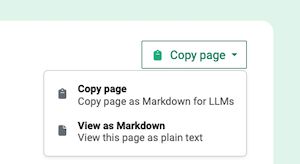
On each page at the top you will find a dropdown with the options to
view or copy the page as markdown for easy pasting into an LLM.
Make sure you have connectivity and can connect to our API.
As a test, you can try making a request to the
/ping
endpoint, for example using curl:
curl https://api.opencagedata.com/ping
You should get the response "pong", as you
can see here.
If not, there is a problem with your connection.
If you aren't getting the response you expected from an API request
please look at the
status
field of the response. It contains two fields:
code
and
message.
Please look at
what the various response codes mean.
We do our best to tell you what the problem is.
Sometimes developers assume the problem is X when really it
is Y.
Are the request parameters what you think they are?
It's best to print out the actual request and make sure each value is what you expected.
Is the API
key
what you expect it to be? Is the
q
value URI encoded?
Often the various pieces of the request are coming from different systems and you
may have an error in how they are being put together.
Please see the documentation regarding
required
and
optional parameters.
Unless you use case is truly exotic, we recommend you use
one of
the many SDKs
to help avoid basic errors (and save your time).
Nevertheless, sometimes an SDK can obscure what is actually happening.
Our demo page
is a good tool for quickly playing with the API and seeing
actual requests and responses.
Please don't hesitate to
get in touch
with questions.
Privacy
In using the OpenCage geocoding API you are sending us location
data.
We have no ability or desire to link locations with individuals.
Nevertheless, any time you are transferring data it makes sense to consider
the privacy implications.
We are a European (German) legal entity, and thus fully bound by
the EU's General Data Protection Regulation (GDPR).
Please find all details of our compliance with GDPR in
our privacy policy.
Likewise, we also have a page
discussing our HIPAA compliance.
As a reassurance for any users of the API with privacy concerns,
we provide the optional
no_record
parameter.
See details.
When this parameter is set we keep no record of your query.
Our geocoding API attempts to geocode to the most precise level possible.
There are use cases where exposing a full address or precise location may
pose a privacy risk. This will necessarily depend on how exactly you are
using location data in your application.
Nevertheless, we provide the following guide to
how to create an imprecise location description to preserve privacy.
Please be responsible in your use of location data.
Free trial accounts are deleted after three months of inactivity,
after which we have no record of the account. You can also delete your
account sooner anytime you like in your account dashboard.
If you have any questions about our approach to privacy or data
protection, please don't hesitate to
get in touch.
Fuzzy matching / Autosuggest
Our geocoding API is designed for geocoding, and does NOT perform
"fuzzy" matching.
As an example, a request with query
par
will NOT return
Paris, France
as a result.
If you want location "autosuggest", "autocomplete" or "type ahead", what
you want is our
geosearch
service.
Many people confuse forward geocoding with geosearch.
Forward geocoding expects an address or placename as an input, and returns
location information (coordinates, etc).
Geosearch takes any string of text as input and tries to expand the string,
and return a list of possible placename matches.
Feel free to cache, or store, results as long as you like, you know your
use case and whether or not it makes sense.
This applies whether you are on our free-trial, or you have become a paying
customer, and even after you stop being a customer. Unlike many geocoding services
we do not have different pricing tiers for "temporary" and "permanent" data
storage. All data returns by the API can be stored permanently.
That said, the world is a constantly changing place and the underlying
datasets, like OpenStreetMap, that we're querying are always evolving, so
it may make sense to refresh your cache regularly.
For ease of caching every response has a
timestamp
section with both a human readable HTTP timestamp - in the
created_http
key, and a Unix timestamp - in the
created_unix
key.
Customers often ask us when it makes sense to cache, and what to use
as the cache key.
For forward geocoding you can use a normalized version of the query.
In the case of reverse though it is not so clear cut.
If two coordinates are the same to X places past the decimal, should
you not bother with a request? This depends of course on what level
of granularity you need in a response. There is almost no reason to go
beyond six or seven places past the decimal as that then gets down to
the precision of a centimeter.
Our experience is that caching can make sense at the device level. For
example if you are doing fleet tracking and the vehicle is parked, there
is no reason to continually request the identical coordinates. So it makes
sense to keep a record of the last 20 or 50 or whatever positions and then
only request if the coordinates have changed. Beyond that caching for
reverse requests is not particularly useful as the number of potential
requests is so massive that direct hits are rare.
Whether or not caching is useful for you largely depends on your specific
use case. You'll have to test and see what works for you.
Caching is only one of several ways to speed things up. Please see our
guide to geocoding more quickly
where we outline strategies to optimize for speed.
Language
Many places have different names in different languages. To tell us you
favour results in a specific language use the optional
language
parameter, otherwise we will default to the language of your browser
or, if no browser language is specified, English.
Please see the
language
parameter documentation
for a detailed explanation of how we determine which language to favour.
We rely on many different datasets. Some, like OpenStreetMap, tend to
have results in many languages. Others tend to have results only in
English. Specifying
language
does not mean we will return results purely in that language, only
that we will do our best to favour such results if we have them.
If you specify
language=native
we will attempt to return results in the local language. As an example,
instead of
Munich
you will receive
München.
Please be aware that the geocoders we build upon typically use the
"official" language of the country, which may not actually be the language
spoken locally.
Also, many countries have multiple "official" languages.
As an example, instead of returning
Belgium
as we would for a request with
language=en
we would return
België / Belgique / Belgien
for a request with
language=native.
Nearest Road / Speed Limit Information
Many of our clients use our service for vehicle or fleet tracking,
and are interested in information about the roads the vehicles are
travelling on.
To simplify this use case we offer the optional parameter
roadinfo.
Setting this optional parameter (adding
roadinfo=1
to your request) has a few implications:
The behaviour of the geocoder changes to try to match the nearest road
rather than the nearest address. This behaviour is often known
as "snap to road".
You will likely get different results if this
parameter is set.
We will add the
roadinfo
annotation to the response, regardless of whether the optional parameter
no_annotations
is set or not. Please see
the roadinfo annotation
documentation for the exact list of fields we attempt to return.
Please note:
Many roads in rural areas don't (yet) have names, or they may not yet be
named in the data sources we have available. In this case we set the name
of the road to be
unnamed road.
Read our blog post about
why a road may not have a name.
The information we return comes from crowdsourced databases like
OpenStreetMap. It should NOT be taken as official governmental data. It
may be out of date or simply wrong.
Road/driving data are provided for informational purposes only and common sense
should always be used.
Always drive safely.
UN/LOCODE
UN/LOCODE (officially the
United Nations Code for Trade and Transport Locations)
is a system of codes developed and maintained by the
United Nations.
The codes are commonly used in logistics.
The codes are five characters in length with the first two characters
corresponding to the ISO 3166-1 alpha-2 code of the country of
the location. For example the code
DEBRV
represents the German port of Bremerhaven.
There are currently over 116,000 UN/LOCODEs (the list is updated
twice a year), and they provide an
unambiguous and simple way for all parties in
the supply chain to refer to locations. Learn more about
UN/LOCODE on Wikipedia.
We provide information about UN/LOCODEs in two ways:
You can search for a specific UN/LOCODE by specifying
the code as a geocoding query, prefixed by "LOCODE:"
For example if you make the request
q=LOCODE:DEBRV.
Please see our
guide to searching for UN/LOCODEs.
We return the information we have
about the requested code in the
UN/LOCODE
annotation, regardless of whether the optional parameter
no_annotations
is set or not.
For geocoding API results that
are near a UN/LOCODE location we return UN/LOCODE
information as an annotation.
Note:
this annotation is only available to paying customers and by request.
So that you can see it before becoming a customer we have turned it on
for everyone for all locations in the country of Luxembourg.
You can test by doing a request for the coordinates
49.4716, 6.3659
which will return information about the code
LUSCH.
If you are a customer, and would like the annotation turned
on please
contact us.
See
the UN/LOCODE annotation
documentation for an example of the exact structure of the information
we return.
Please note one critical caveat: the official UN/LOCODE data is minimal
and the quality of that data is highly variable. In the best case the codes
have only a single coordinate point. About 2% of codes do not have
coordinates at all, and we can not determine a location for them, and thus
we are unable to work with them. A few codes have obviously wrong
coordinates such as
0,0
and thus are also discarded. As always we do the
best we can with the data available to us.
If you prefer to learn by watching a video we have those as well
over on YouTube,
demonstrating how to access the API using our Python
module, but the concepts are the same in all languages.
We are sometimes asked if the geocoding API supports sending more than
one location per request, sometimes referred to as "batch" or "bulk"
geocoding.
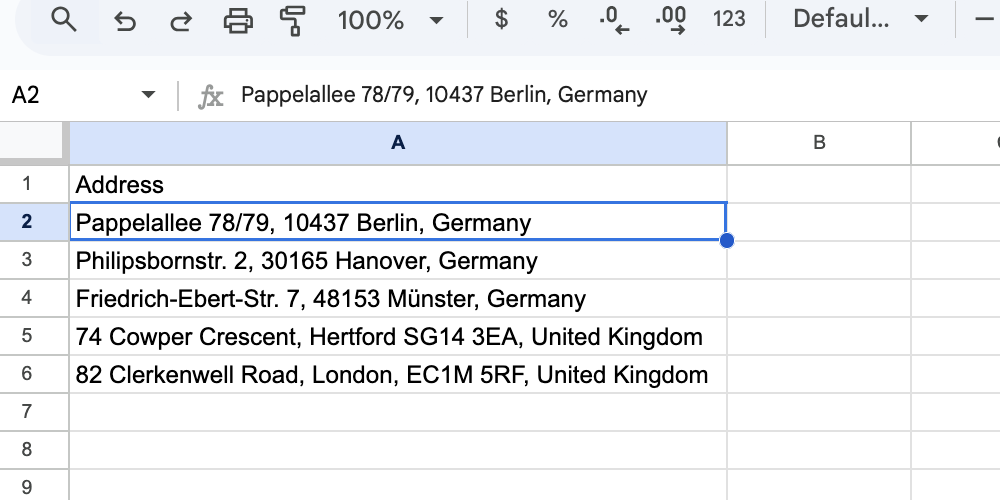
We allow manual
uploading of a spreadsheet
which we geocode row by row, but the API itself
does not allow multiple locations per request.
If you need to geocode many locations quickly the way to do so is by
sending requests in parallel. We have customers making many millions
of API requests per day, it works well.
We intentionally don’t support more than one location per API request
as our
experience is that the conceptually much simpler
"one location, one request"
model is much less likely to lead
to misunderstandings or errors of implementation, thus saving engineering
time, which is the most valuable resource for almost all of our customers.
Don't re-invent the wheel.
Our
Node.js,
PHP,
Python,
and
Ruby
tutorials all have sections with example scripts
showing how to make many requests in parallel.
Free trial users are limited to spreadsheets with
100
rows.
Paying customers can upload much larger files. Each row to be geocoded
is counted as one geocoding API request.
Uploaded spreadsheets or CSV files are automatically deleted after:
3 days for free trial users
30 days for paying customers
IP restriction
Subscription customers can define a list of IP addresses that are allowed
to use their API key. All requests with that API key
that come from non-allowed IP numbers will receive a
403 - IP address rejected
response.
Customers can add or delete IP addresses in their account dashboard
(in the
"Geocoding API" tab
in your account dashboard click on the "settings" button next to the API key).
Changes to API key settings take approximately 10 minutes
to take effect as they are distributed out to all of our servers.
CORS
If you are accessing the geocoding API from client side javascript in
a browser please be aware that by default the OpenCage Geocoding API
allows all origins for Cross-Origin Resource Sharing (CORS).
Geosearch
Please note, if you want location "autosuggest", "autocomplete" or
"type ahead", what you want is our
geosearch
service, not our geocoding API.
By default the geocoding API response includes the HTTP header
access-control-allow-origin: *
which thus allows all cross-origin requests.
If you are a subscription customer, you can change this by defining a
domain per API key in your account dashboard
(in the
"Geocoding API" tab
in your account dashboard click on the "settings" button next to the API key).
Changes to API key settings take approximately 10 minutes
to take effect as they are distributed out to all of our servers.
Once set, we will then return:
access-control-allow-origin: https://some-customer-defined-domain.com
which will thus restrict AJAX requests to the specified domain.
It is important to note this does nothing to prevent someone from making
an API request with your key, it just makes AJAX requests from within
a browser stop working. Please see our detailed
advice on protecting your API key(s)
.
The value you specify should be of the form
second level domain . top level domain
For example:
opencagedata.com
There is no need to specify protocol (https or http),
subdomains, or ports,
we will return the correct access-control-allow-origin header.
We also automatically support all requests with an origin of
localhost.
An example: if you add
opencagedata.com
as your domain, requests with the following origin values will all work
correctly:
http://www.opencagedata.com
https://blog.opencagedata.com
http://localhost:3000
http://dev.opencagedata.com:8080
Additional resources:
If you are sending requests to our API via AJAX you may find
our jQuery tutorial
helpful.
As a convenience we provide a Google compatible response format for
forward geocoding.
Please note:
Support for the
google-v3-json
format may be discontinued in the future as it is not used much. We
strongly recommend migrating to our JSON response format.
Please see
our overview of how our service differs from Google's.
Required Parameters
address
- the query string to be geocoded; this must be URL encoded
key
- your OpenCage geocoding API key, a 32 character long, alphanumeric string
Optional Parameters
bounds
- a viewport, 2 coordinate pairs, e.g.
34.172684,-118.604794|34.236144,-118.500938
region
- a country code, e.g.
es
for Spain
sensor
- required by Google as an indicator of whether the
request comes from a device with a location sensor; this parameter
is ignored by the OpenCage geocoding API.
Google JSON Output
In the following example, a response in Google's JSON
format is requested to get the coordinates of the old OpenCage
office in central London at
82 Clerkenwell Road, London EC1M 5RF, United Kingdom.
Finally, we are sometimes asked if we can locate a mobile phone
simply via the phone number.
No, we can't, and neither can anyone else.
Please
read the details on our blog.
Help Us Improve
If anything in this documentation is unclear,
or you have questions about the geocoding API
please get in touch with us.
Geocoding the world is a tough challenge, we would love your help.
Much of our code
is open source,
feedback or pull requests are always appreciated.
Bugs
Unfortunately, humanity has not always chosen to name places
in a way that is simple for computers to decipher. The task a
geocoder faces is a difficult one.
A geocoder consists of two things, software and the
underlying data. So there are two types of problems that can occur: a
software problem, or data problems (erroneous or missing data). In
both cases we want to solve it, but what needs to be done depends on
the type of problem we're facing. Regardless, we appreciate your feedback
and will work with you to get better.
Security Issues
We make every effort to keep user data secure, please see
our security policy
for details.
If you find a security vulnerability
please report it to security @ opencagedata.com, we will follow up with you
promptly. Please see the details of our
security bounty program.
If you wish to encrypt your report you can find our public key on
our security.txt.
Thank you.