Set up H5P for Drupal 8
Download and install Drupal
Skip this step if you already have a running Drupal 8 installation.
- Download Drupal 8 from drupal.org.
- Follow the usual installation instructions
Install the H5P module
1. Find the latest H5P module from the H5P project page on drupal.org:
2. Install the H5P module as you usually install a Drupal module. If you are new to Drupal modules, you can take a look at Drupal's installing modules guide.
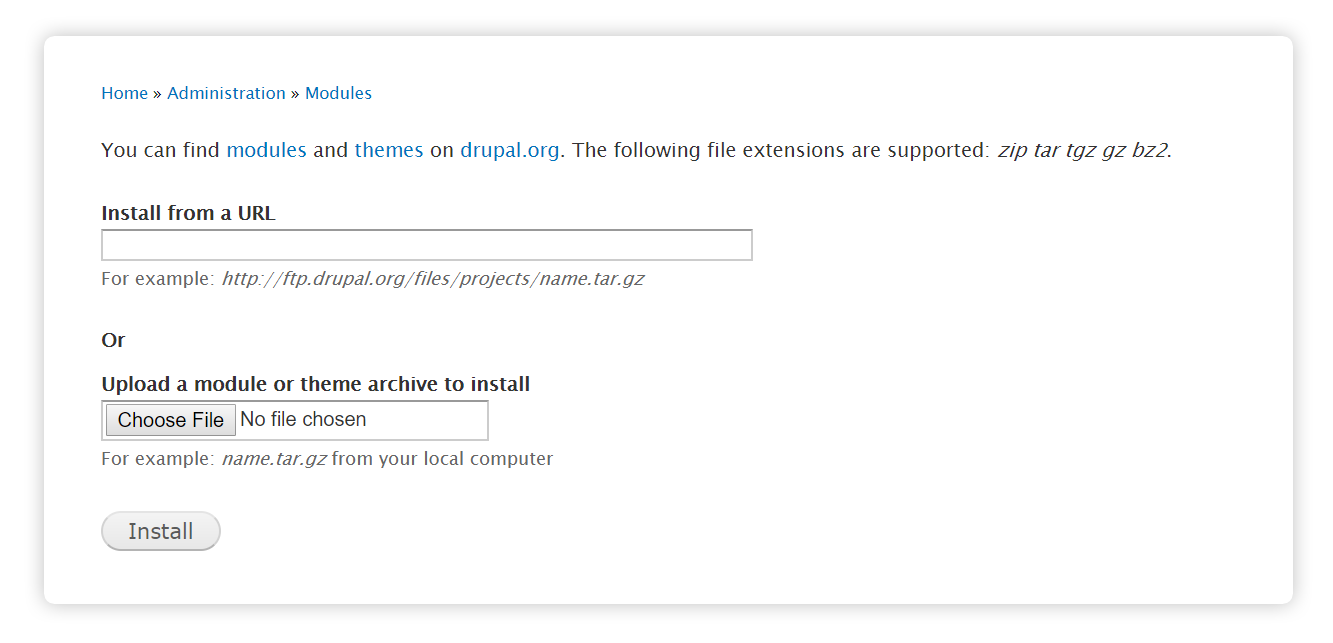
You should see the following message:
3. Navigate to your site's module administration pages under the 'Extend' tab ('/admin/modules/'). Scroll to the section named "H5P" and enable the "H5P" and "H5P Editor" modules:
Add the H5P field to a Content Type
Drupal Content Types should not be confused with H5P Content Types. Drupal Content Types are simply different types of web pages such as articles or blog posts. H5P Content Types refer to the different types of H5P content such as Course Presentation or Memory Game.
You can add H5P content to Drupal Content Types by adding the H5P field. Let's add the H5P field to 'Basic Page', one of Drupal 8's default content types.
1. Navigate to the 'Structure' section ('/admin/structure') then click on 'Content Types':
2. Click on 'Manage Fields' for the 'Basic Page':
3. Then 'Add field':
4. Select H5P from the drop-down menu then press 'Save and continue':
You can specify the number of H5P fields you want to have in a content type. Let's choose 1 for now.
5. Lastly, click on the 'Manage Form display' tab and select 'H5P Editor' from the drop-down menu:
Let's check that the H5P field has been added. Click the 'Content' tab at the top (/admin/content), then the add content button:
Click on 'Basic Page' and you here you should be able to see the H5P Editor:
Install content types
Now your module is set up, and you can start creating H5P Content. After you click on "Add new" The H5P Hub will load - offering you a variety of content types to pick from.
Below you can see how to get new content types from the H5P Hub.
Here you can find Tutorials how to create content using different content types.
Roles and permissions
Depending on the framework used, access to H5P features may be controlled by defining the permissions for roles or users.
In Drupal, H5P has the following permissions available. They should be assigned users/roles as shown.
* The "update h5p libraries" permissions enables the user to upload H5Ps with updated library versions. Whether or not editors should have this access is up to site policy.
Updating old content to new versions can change their appearance and functionality significantly, preserving old content through library upgrades is always one of the main focuses of a library developer. Be aware of possible versioning and content upgrades issues when letting users upload altered H5P libraries.
** The "Create restricted H5P content types" permissions enables the user to create content types that users without this permission aren't allowed to create. Admins can configure what content types are restricted at admin/content/h5p. Who should have this access is up to the site policy.
Enable H5P shortcodes
H5P shortcodes are not yet possible in D8.
Enable result reports
By enabling Drupal's Views module a view will appear as a tab on each H5P node and on each user profile displaying basic result information.
Drupal 8's Views module allows us to display content from our database in a variety of ways. In our case, we are going to show two different displays, one for the results of each user and another for the results of each node.
To upload a pre-built view, click on the 'Configuration' tab then 'Configuration and synchronization'. Click on the 'Import' tab and select 'Single Item'. The full path is '/admin/config/development/configuration/single/import'. Note this sample view expects the H5P Field you created to be called 'H5P' as this will result in the machine name 'field_h5p' which is the machine name the view is seeking to match.
Select 'View' from the 'Configuration Type' dropdown then paste the following code (note that this is in YAML as opposed to HTML):
uuid: 3541d923-54a4-482b-87ac-4ac1d2617792
langcode: en
status: true
dependencies:
 config:
 - core.entity_view_mode.node.teaser
 module:
 - h5p
 - node
 - user
id: h5p_results
label: 'H5P results'
module: views
description: ''
tag: ''
base_table: node_field_data
base_field: nid
core: 8.x
display:
 default:
 display_plugin: default
 id: default
 display_title: Master
 position: 0
 display_options:
 access:
 type: perm
 options:
 perm: 'access content'
 cache:
 type: none
 options: { }
 query:
 type: views_query
 options:
 disable_sql_rewrite: false
 distinct: false
 replica: false
 query_comment: ''
 query_tags: { }
 exposed_form:
 type: basic
 options:
 submit_button: Apply
 reset_button: false
 reset_button_label: Reset
 exposed_sorts_label: 'Sort by'
 expose_sort_order: true
 sort_asc_label: Asc
 sort_desc_label: Desc
 pager:
 type: mini
 options:
 items_per_page: 10
 offset: 0
 id: 0
 total_pages: null
 expose:
 items_per_page: false
 items_per_page_label: 'Items per page'
 items_per_page_options: '5, 10, 25, 50'
 items_per_page_options_all: false
 items_per_page_options_all_label: '- All -'
 offset: false
 offset_label: Offset
 tags:
 previous: ‹‹
 next: ››
 style:
 type: table
 options:
 grouping: { }
 row_class: ''
 default_row_class: true
 override: true
 sticky: false
 caption: ''
 summary: ''
 description: ''
 columns:
 title: title
 info:
 title:
 sortable: false
 default_sort_order: asc
 align: ''
 separator: ''
 empty_column: false
 responsive: ''
 default: '-1'
 empty_table: false
 row:
 type: 'entity:node'
 options:
 view_mode: teaser
 fields:
 title:
 id: title
 table: node_field_data
 field: title
 entity_type: node
 entity_field: title
 label: ''
 alter:
 alter_text: false
 make_link: false
 absolute: false
 trim: false
 word_boundary: false
 ellipsis: false
 strip_tags: false
 html: false
 hide_empty: false
 empty_zero: false
 settings:
 link_to_entity: true
 plugin_id: field
 relationship: none
 group_type: group
 admin_label: ''
 exclude: false
 element_type: ''
 element_class: ''
 element_label_type: ''
 element_label_class: ''
 element_label_colon: true
 element_wrapper_type: ''
 element_wrapper_class: ''
 element_default_classes: true
 empty: ''
 hide_alter_empty: true
 click_sort_column: value
 type: string
 group_column: value
 group_columns: { }
 group_rows: true
 delta_limit: 0
 delta_offset: 0
 delta_reversed: false
 delta_first_last: false
 multi_type: separator
 separator: ', '
 field_api_classes: false
 name:
 id: name
 table: users_field_data
 field: name
 relationship: uid
 group_type: group
 admin_label: ''
 label: Name
 exclude: false
 alter:
 alter_text: false
 text: ''
 make_link: false
 path: ''
 absolute: false
 external: false
 replace_spaces: false
 path_case: none
 trim_whitespace: false
 alt: ''
 rel: ''
 link_class: ''
 prefix: ''
 suffix: ''
 target: ''
 nl2br: false
 max_length: 0
 word_boundary: true
 ellipsis: true
 more_link: false
 more_link_text: ''
 more_link_path: ''
 strip_tags: false
 trim: false
 preserve_tags: ''
 html: false
 element_type: ''
 element_class: ''
 element_label_type: ''
 element_label_class: ''
 element_label_colon: true
 element_wrapper_type: ''
 element_wrapper_class: ''
 element_default_classes: true
 empty: ''
 hide_empty: false
 empty_zero: false
 hide_alter_empty: true
 click_sort_column: value
 type: user_name
 settings:
 link_to_entity: true
 group_column: value
 group_columns: { }
 group_rows: true
 delta_limit: 0
 delta_offset: 0
 delta_reversed: false
 delta_first_last: false
 multi_type: separator
 separator: ', '
 field_api_classes: false
 entity_type: user
 entity_field: name
 plugin_id: field
 started:
 id: started
 table: h5p_points
 field: started
 relationship: field_h5p_h5p_content_id
 group_type: group
 admin_label: ''
 label: Started
 exclude: false
 alter:
 alter_text: false
 text: ''
 make_link: false
 path: ''
 absolute: false
 external: false
 replace_spaces: false
 path_case: none
 trim_whitespace: false
 alt: ''
 rel: ''
 link_class: ''
 prefix: ''
 suffix: ''
 target: ''
 nl2br: false
 max_length: 0
 word_boundary: true
 ellipsis: true
 more_link: false
 more_link_text: ''
 more_link_path: ''
 strip_tags: false
 trim: false
 preserve_tags: ''
 html: false
 element_type: ''
 element_class: ''
 element_label_type: ''
 element_label_class: ''
 element_label_colon: true
 element_wrapper_type: ''
 element_wrapper_class: ''
 element_default_classes: true
 empty: ''
 hide_empty: false
 empty_zero: false
 hide_alter_empty: true
 date_format: fallback
 custom_date_format: ''
 timezone: ''
 plugin_id: date
 finished:
 id: finished
 table: h5p_points
 field: finished
 relationship: field_h5p_h5p_content_id
 group_type: group
 admin_label: ''
 label: Finished
 exclude: false
 alter:
 alter_text: false
 text: ''
 make_link: false
 path: ''
 absolute: false
 external: false
 replace_spaces: false
 path_case: none
 trim_whitespace: false
 alt: ''
 rel: ''
 link_class: ''
 prefix: ''
 suffix: ''
 target: ''
 nl2br: false
 max_length: 0
 word_boundary: true
 ellipsis: true
 more_link: false
 more_link_text: ''
 more_link_path: ''
 strip_tags: false
 trim: false
 preserve_tags: ''
 html: false
 element_type: ''
 element_class: ''
 element_label_type: ''
 element_label_class: ''
 element_label_colon: true
 element_wrapper_type: ''
 element_wrapper_class: ''
 element_default_classes: true
 empty: ''
 hide_empty: false
 empty_zero: false
 hide_alter_empty: true
 date_format: fallback
 custom_date_format: ''
 timezone: ''
 plugin_id: date
 points:
 id: points
 table: h5p_points
 field: points
 relationship: field_h5p_h5p_content_id
 group_type: group
 admin_label: ''
 label: Points
 exclude: false
 alter:
 alter_text: false
 text: ''
 make_link: false
 path: ''
 absolute: false
 external: false
 replace_spaces: false
 path_case: none
 trim_whitespace: false
 alt: ''
 rel: ''
 link_class: ''
 prefix: ''
 suffix: ''
 target: ''
 nl2br: false
 max_length: 0
 word_boundary: true
 ellipsis: true
 more_link: false
 more_link_text: ''
 more_link_path: ''
 strip_tags: false
 trim: false
 preserve_tags: ''
 html: false
 element_type: ''
 element_class: ''
 element_label_type: ''
 element_label_class: ''
 element_label_colon: true
 element_wrapper_type: ''
 element_wrapper_class: ''
 element_default_classes: true
 empty: ''
 hide_empty: false
 empty_zero: false
 hide_alter_empty: true
 set_precision: false
 precision: 0
 decimal: .
 separator: ','
 format_plural: false
 format_plural_string: "1\x03@count"
 prefix: ''
 suffix: ''
 plugin_id: numeric
 max_points:
 id: max_points
 table: h5p_points
 field: max_points
 relationship: field_h5p_h5p_content_id
 group_type: group
 admin_label: ''
 label: 'Max points'
 exclude: false
 alter:
 alter_text: false
 text: ''
 make_link: false
 path: ''
 absolute: false
 external: false
 replace_spaces: false
 path_case: none
 trim_whitespace: false
 alt: ''
 rel: ''
 link_class: ''
 prefix: ''
 suffix: ''
 target: ''
 nl2br: false
 max_length: 0
 word_boundary: true
 ellipsis: true
 more_link: false
 more_link_text: ''
 more_link_path: ''
 strip_tags: false
 trim: false
 preserve_tags: ''
 html: false
 element_type: ''
 element_class: ''
 element_label_type: ''
 element_label_class: ''
 element_label_colon: true
 element_wrapper_type: ''
 element_wrapper_class: ''
 element_default_classes: true
 empty: ''
 hide_empty: false
 empty_zero: false
 hide_alter_empty: true
 set_precision: false
 precision: 0
 decimal: .
 separator: ','
 format_plural: false
 format_plural_string: "1\x03@count"
 prefix: ''
 suffix: ''
 plugin_id: numeric
 filters:
 status:
 value: '1'
 table: node_field_data
 field: status
 plugin_id: boolean
 entity_type: node
 entity_field: status
 id: status
 expose:
 operator: ''
 group: 1
 uid_current:
 id: uid_current
 table: users
 field: uid_current
 entity_type: user
 plugin_id: user_current
 relationship: uid
 sorts:
 created:
 id: created
 table: node_field_data
 field: created
 order: DESC
 entity_type: node
 entity_field: created
 plugin_id: date
 relationship: none
 group_type: group
 admin_label: ''
 exposed: false
 expose:
 label: ''
 granularity: second
 title: 'H5P results'
 header: { }
 footer: { }
 empty: { }
 relationships:
 field_h5p_h5p_content_id:
 id: field_h5p_h5p_content_id
 table: node__field_h5p
 field: field_h5p_h5p_content_id
 relationship: none
 group_type: group
 admin_label: 'H5P from field_h5p'
 required: false
 plugin_id: standard
 uid:
 id: uid
 table: h5p_points
 field: uid
 relationship: field_h5p_h5p_content_id
 group_type: group
 admin_label: 'H5P user points'
 required: false
 plugin_id: standard
 arguments: { }
 display_extenders: { }
 cache_metadata:
 max-age: 0
 contexts:
 - 'languages:language_content'
 - 'languages:language_interface'
 - url.query_args
 - user
 - 'user.node_grants:view'
 - user.permissions
 tags: { }
 page_1:
 display_plugin: page
 id: page_1
 display_title: 'User results'
 position: 1
 display_options:
 display_extenders: { }
 path: user-results
 filters:
 status:
 value: '1'
 table: node_field_data
 field: status
 plugin_id: boolean
 entity_type: node
 entity_field: status
 id: status
 expose:
 operator: ''
 group: 1
 uid_current:
 id: uid_current
 table: users
 field: uid_current
 relationship: uid
 group_type: group
 admin_label: ''
 operator: '='
 value: '1'
 group: 1
 exposed: false
 expose:
 operator_id: ''
 label: ''
 description: ''
 use_operator: false
 operator: ''
 identifier: ''
 required: false
 remember: false
 multiple: false
 remember_roles:
 authenticated: authenticated
 is_grouped: false
 group_info:
 label: ''
 description: ''
 identifier: ''
 optional: true
 widget: select
 multiple: false
 remember: false
 default_group: All
 default_group_multiple: { }
 group_items: { }
 entity_type: user
 plugin_id: user_current
 defaults:
 filters: false
 filter_groups: false
 filter_groups:
 operator: AND
 groups:
 1: AND
 display_description: ''
 cache_metadata:
 max-age: 0
 contexts:
 - 'languages:language_content'
 - 'languages:language_interface'
 - url.query_args
 - user
 - 'user.node_grants:view'
 - user.permissions
 tags: { }
 page_2:
 display_plugin: page
 id: page_2
 display_title: 'Node results'
 position: 2
 display_options:
 display_extenders: { }
 path: node/%node/results
 filters:
 status:
 value: '1'
 table: node_field_data
 field: status
 plugin_id: boolean
 entity_type: node
 entity_field: status
 id: status
 expose:
 operator: ''
 group: 1
 defaults:
 filters: false
 filter_groups: false
 arguments: false
 filter_groups:
 operator: AND
 groups:
 1: AND
 arguments:
 nid:
 id: nid
 table: node_field_data
 field: nid
 relationship: none
 group_type: group
 admin_label: ''
 default_action: default
 exception:
 value: all
 title_enable: false
 title: All
 title_enable: false
 title: ''
 default_argument_type: node
 default_argument_options: { }
 default_argument_skip_url: false
 summary_options:
 base_path: ''
 count: true
 items_per_page: 25
 override: false
 summary:
 sort_order: asc
 number_of_records: 0
 format: default_summary
 specify_validation: false
 validate:
 type: none
 fail: 'not found'
 validate_options: { }
 break_phrase: false
 not: false
 entity_type: node
 entity_field: nid
 plugin_id: node_nid
 display_description: ''
 cache_metadata:
 max-age: 0
 contexts:
 - 'languages:language_content'
 - 'languages:language_interface'
 - url
 - url.query_args
 - 'user.node_grants:view'
 - user.permissions
 tags: { }
Go to 'Structure' then 'Views' to see our newly created 'H5P results' view:
Press 'Edit' to see how the H5P results View is defined.
The sample View comes with two displays, one for User Results and another for Node results. For the purposes of this tutorial, we are just going to show the User results display.
Navigate to the path specified, we will see that the H5P results display is as we expect:
Comments
ArthurMiller
Wed, 08/29/2018 - 04:09
Permalink
Question on getting enable result reports to work
I keep getting the following error when trying to follow this tutorial (the interactive video works fine, but I cannot attain the results it seems):
The website encountered an unexpected error. Please try again later.</br></br><em class="placeholder">Drupal\Core\Database\DatabaseExceptionWrapper</em>: Exception in h5p results[h5p_results]: SQLSTATE[42S22]: Column not found: 1054 Unknown column 'started' in 'field list': SELECT node_field_data.created AS node_field_data_created, node_field_data.nid AS nid, users_field_data_h5p_points.uid AS users_field_data_h5p_points_uid, started AS started, finished AS finished, points AS points, max_points AS max_points FROM {node_field_data} node_field_data LEFT JOIN {users_field_data} users_field_data_h5p_points ON uid = users_field_data_h5p_points.uid INNER JOIN {users} users_field_data_h5p_points__users ON users_field_data_h5p_points.uid = users_field_data_h5p_points__users.uid WHERE (node_field_data.status = :db_condition_placeholder_0) AND (users_field_data_h5p_points__users.uid = :db_condition_placeholder_1) ORDER BY node_field_data_created DESC LIMIT 11 OFFSET 0; Array ( [:db_condition_placeholder_0] => 1 [:db_condition_placeholder_1] => 6 ) in <em class="placeholder">Drupal\views\Plugin\views\query\Sql->execute()</em> (line <em class="placeholder">1528</em> of <em class="placeholder">core/modules/views/src/Plugin/views/query/Sql.php</em>). <pre class="backtrace">Drupal\views\ViewExecutable->execute(NULL) (Line: 1454)fnoks
Wed, 10/03/2018 - 09:58
Permalink
If you open the view in edit
If you open the view in edit mode, do you see "Broken/missing handler" several places?
shelleyn
Fri, 10/19/2018 - 15:42
Permalink
Broken/missing handler
I am seeing the Broken/missing handler in the view "Relationships". What must I do?
BV52
Tue, 10/23/2018 - 01:47
Permalink
Hi shelleyn,I created a
Hi shelleyn,
I created a separate thread for you here.
-BV52
itmanvn07
Tue, 10/30/2018 - 09:42
Permalink
You guys should create a new
You guys should create a new views based on the image above, it is much easier than import the view file
BV52
Wed, 10/31/2018 - 06:09
Permalink
Hi itmanvn07,Which image are
Hi itmanvn07,
Which image are you pertaining to?
-BV52
Jhereck
Wed, 11/07/2018 - 12:06
Permalink
Installation with Composer
Hi,
I tried to install H5P on Drupal 8 using Composer and it did not work.
I used package "h5p/h5p-core" and "h5p/h5p-editor", installation was successfull but the module did not appear on drupal extensions page.
It works with standard installation (like described above).
Any help will be appreciated. Thanks
BV52
Thu, 11/08/2018 - 08:33
Permalink
Hi Jherek,I'm sorry I do not
Hi Jherek,
I'm sorry I do not have any experience with Composer but somebody from the community may have successfully done this and I hope that we can get input from them.
-BV52
Jhereck
Thu, 11/08/2018 - 12:29
Permalink
Thanks for your reply : i
Thanks for your reply : i hope someone will help me !
jeremyRBA
Tue, 12/04/2018 - 20:27
Permalink
Tracking Multiple Quiz Attempt Results
I have a need to allow users to take a quiz multiple times, and I need to track results for each attempt. After using the H5P module, I was successfully able to use the system. It appears that each time a user takes a quiz, it overwrites the existing results for that quiz.
Is there a way to track all attempts for each user for quizzes? It would be great if all results were stored instead of only the most recent.
BV52
Wed, 12/05/2018 - 09:28
Permalink
Hi Jeremy,Currently this is
Hi Jeremy,
Currently this is not possible with the features of H5P. Although this should be possible by adjusting some settings/codes of some LRS, I'm not sure though how to do it. And if someone in the community has implemented something similar feel free to join the discussion.
-BV52
seyfcom
Thu, 01/31/2019 - 09:51
Permalink
Trying to style H5P on Drupal 8!
Hello
I'm trying to style the H5P multichoice quiz on a Drupal 8 site. I need very simple things, like changing a few colors...
I don't see anything working with the Module trick, I'm wondering if it was for D7..?
Any update about that? would be great!! thanks
BV52
Fri, 02/01/2019 - 06:26
Permalink
Hi seyfcom,The easiest way is
Hi seyfcom,
The easiest way is to use a PHP hook, to add your own CSS-file to the content type. Please visit the Visual Changes page for more details.
Please note that creating custom modules for Drupal 8 can be found here.
-BV52
seyfcom
Fri, 02/01/2019 - 09:50
Permalink
Hello,Thanks but as you may
Hello,
Thanks but as you may imagine, I tried it, and I'm not at my first project on Drupal 8. So I don't understand why, but it is not working... Are you sure it works with drupal 8.6 ?
Did I miss a part? I need just to make a new module, I install it, in my mymodule.module file I add the code as shown in the Visual Changes page and then I'm supposed to see my css file on the page... Right?
It doesn't work....
Hope someone can help... just now I hacked the h5p css...
icc
Mon, 04/08/2019 - 15:36
Permalink
Did you use the correct
Did you use the correct module name and remember to clear the cache?
The alter is triggered from src\Plugin\Field\FieldFormatter\H5PDefaultFormatter.php:78
You could try adding some debug code to your function, e.g. print 'hello'; exit;
just to see that it's actually running
seyfcom
Mon, 04/08/2019 - 18:05
Permalink
I found another way around,
I found another way around, but i'll see if I can try again.
I sure cleared the cache and checked the mane of module. thanks
conti
Fri, 02/22/2019 - 22:22
Permalink
Missing h5p content
Did a fresh install for a new site and some of the quiz are missing now. Mutiple choice quizzes and all those that used to be able to fit inside the multiple choice is now missing.
BV52
Mon, 02/25/2019 - 06:50
Permalink
Hi conti,Do you mean that
Hi conti,
Do you mean that they are not on the list of contents to pick from? If so try downloading the sample contents here.
-BV52
papi Jo
Mon, 02/25/2019 - 23:22
Permalink
Missing features in Drupal 8 "libraries" tab
Recently tried to move my H5P files from a drupal 7 to a drupal 8 website.
Most things work as expected, the integration of H5P contents within a "Basic page" content is better than it was in Drupal 7.
However, the new interface is missing some very useful features of Drupal 7 as displayed on the attached screenshots.
1.- Content type cache is missing
2.- View library details is missing. That's a very useful feature. Why has it gone?
[画像:drupal 7 pic #1]
[画像:drupal 7 pic #2]
[画像:drupal 8 pic#1]
papi Jo
Sat, 03/02/2019 - 16:07
Permalink
Issue already reported on Drupal site
Just found out that this issue has been reported on the Drupal site as "No info button in H5P Library Administration view" here: https://www.drupal.org/project/h5p/issues/2982481
papi Jo
Fri, 03/01/2019 - 12:24
Permalink
Some remarks about creating a Drupal page with H5P field(s) in i
The documentation above says:
"You can add H5P content to Drupal Content Types by adding the H5P field. Let's add the H5P field to 'Basic Page', one of Drupal 8's default content types."
I don't think this is a good idea. On a Drupal site, the user may want to add a number of "Basic Page" instances without a H5P content/field. I suggest it's better to create a new Drupal content type as explained below.
1. Navigate to the 'Structure' section ('/admin/structure') then click on 'Content Types':
2. Click on '+ Add content type'
Enter (for example): Name "Page with H5P content(s)"
Description: "A page which contains a body of text and one (or more) H5P content types."
Click 'Save and manage fields' It says 'The content type Page with H5P content(s) has been added.'
Then follow the current description of steps from n° 3: click '+ Add field'.
Note. The doc says "You can specify the number of H5P fields you want to have in a content type. Let's choose 1 for now."
No, once a the number of H5P fields has been entered you cannot modify it later on. If you try you get the error/warning message "There is data for this field in the database. The field settings can no longer be changed."
I recommend setting the number of h5p fields to "Unlimited".
BV52
Mon, 03/04/2019 - 09:15
Permalink
Hi Papi Jo,Thank you for the
Hi Papi Jo,
Thank you for the suggestions and corrections. I created a task for review and you can follow the progress here.
-BV52
papi Jo
Fri, 03/01/2019 - 17:57
Permalink
Suggestions for improving the Drupal 8 interface for H5P content
Suggestion #1
Using a Basic Drupal page with a H5P content/field in it (parametred for an unlimited number of such fields), as explained in my previous post.
When creating a page, the body gets displayed, and one H5P field. And we have the 'Add another item' button available. That's OK. However, when Editing such a page, an extra H5P field is automatically displayed. That seems un-necessary, as we may just want to edit an existing field, and the 'Add another item' button would be enough.
Suggestion #2
When editing a Drupal 8 page containing more than one H5P field, the screen is cluttered. It would be nice to have a Collapse/Expand button to collapse the H5P field(s) that we are not currently editing.
karthikeyan
Tue, 04/09/2019 - 08:23
Permalink
Upload to aws s3
Hi,
How can i upload h5p files to aws s3 or any other cloud in drupal 8?
BV52
Sat, 03/23/2019 - 12:50
Permalink
Hi karthikeyan,I'm afraid
Hi karthikeyan,
I'm afraid this not possible yet.
-BV52
harshal_shah
Thu, 04/25/2019 - 11:53
Permalink
Drupal blog
Hi there,
Awesome post! This is indeed an awesome post regarding Drupal web development. Thanks for sharing this post from which I be able to learn alot. How to setup for Drupal latest version is explained in a very detailed way. Keep posting like this topics, looking forward for more great posts like this.
nschildre
Wed, 03/04/2020 - 17:13
Permalink
Uploading .h5p files to Drupal 8 nodes programmatically
I would like to upload .h5p files to Drupal 8 nodes programmatically, but I can't find any information on this. Have already tried to use the H5P insertContent function and it processes without any errors, but when I look at the new node the h5p activity information from the content.json file is not loaded in the node. I can see that some tables are populated (e.g. h5p_content, h5p_content_libraries). Any help would be appreciated.
Mukeshkbj
Wed, 07/01/2020 - 03:53
Permalink
H5P not support with Drupal 9?
H5P is not support with Drupal 9?
isle13
Wed, 07/22/2020 - 19:39
Permalink
Enable H5P results not fully working
I followed the steps above and when I take the quiz it shows up in the results, but when my dummy student account I created takes the test it is not showing up in the results. Does anyone know what is going on there?
Cloud
Wed, 09/30/2020 - 22:54
Permalink
Drupal 9
Mukeshkbj asked before but get no anser until now. I would like to build a clean installation uf drupal, so I would like to use the newest Version of Drupal. Is Drupal 9 compatible or will it be compatible in near future?
dmoses
Tue, 12/08/2020 - 13:15
Permalink
Drupal 9
Would there be an update/timeline on Drupal 9 support?
Thanks
BV52
Tue, 12/08/2020 - 18:40
Permalink
Hi dmoses,Currently there are
Hi dmoses,
Currently there are no plans from the H5P core team to create an H5P plugin for Drupal 9.
-BV
bhirata
Thu, 04/22/2021 - 02:48
Permalink
I have H5P installed on a
I have H5P installed on a Drupal server. How can I enable LTI function of H5P?
BV52
Thu, 04/22/2021 - 18:12
Permalink
Hi bhirata,The LTI
Hi bhirata,
The LTI integration is only available in using H5P.com. The H5P plugin does not support LTI.
-BV
Zameer Ahmed
Wed, 07/14/2021 - 07:29
Permalink
Quiz Grade details
Hi BV,
Curretnly we are in process of setting up Drupal 8 with H5P integration, however when we are testing with Quiz content type, we have setup the passing percentage 50, however the quiz results are not calculating with 50%, is there a way to retrieve passing grade value for quiz and compare with user score ? please advise.
Wellyna Gonçalves
Thu, 11/16/2023 - 04:10
Permalink
quero baixar
quero baixar
stubot
Tue, 09/03/2024 - 13:51
Permalink
Only 49 content types
Thank you for these instructions, I was able to install H5P (2.0.0-alpha4) on a Drupal 10.3.0 build. The code for the Views also worked.
However, I can only see 49 of 54 content types I normally have. I am missing:
Is this correct, or am I maybe doing something wrong? Thank you for any help.
BV52
Tue, 09/03/2024 - 19:27
Permalink
Hi,If there are missing
Hi,
If there are missing content types in the list their libraries can be installed by downloading the sample content and uploading into Drupal.
https://h5p.org/content-types-and-applications
On the other hand Twitter User Feed does not work anymore because Twitter has stopped supportin the API that H5P uses. Appear.in does not have video conferencing service anymore so this content type will not work as well.
-BV
stubot
Wed, 09/04/2024 - 16:31
Permalink
Required version is 1.26
Thank you BV. I should have added that I did try this, but it fails to add either Course Presentation or Interactive Video. I get this red error message:
Validating h5p package failed.
The system was unable to install the Interactive Video component from the package, it requires a newer version of the H5P plugin. This site is currently running version 1.24, whereas the required version is 1.26 or higher. You should consider upgrading and then try again.
BV52
Wed, 09/04/2024 - 19:58
Permalink
Hi stubot,Now that you
Hi stubot,
Now that you mentioned it, this process will not work since this plugin still uses the old core version.
-BV
stubot
Thu, 09/05/2024 - 16:05
Permalink
thank you
Thank you! This is much appreciated. :-)
stubot
Thu, 12/05/2024 - 15:29
Permalink
Drupal 7 End of Life (EoL)
Drupal 7 security support ends on 5 January 2025. This is the final extension of Drupal 7 end of life – Drupal 7 will not receive security updates after this date.
With the H5P Drupal 8 module still in alpha since 14 November 2013, this effectively means no viable Drupal support.
It would be great to get an update, or even an official response. 400k+ websites use Drupal today and it is very disappointing not to have H5P available on this popular educational platform.