Posted by patalano on April 6, 2015 at 5:06pm
Here's a recap of my presentation at the UMass Amherst Drupal Users Group on 4/2/15:
What Acquia Dev Desktop 2 Includes
- AMP Stack: Apache, MySQL, PHP
- Drupal Distributions that you choose from. (Options include a D8 distro - more at Acquia Dev Desktop 2)
- Drush
My Install of Acquia Dev Desktop 2 on Win 7
I installed acquia dev desktop 2 on windows 7. See Acquia Dev Desktop 2 for details for mac and windows.
- www.acquia.com/downloads > Win Download
- Downloaded / ran AcquiaDevDekstop-2.exe.
- Accepted defaults.
- Clicked Finish
- Next Screen asks you to: Select a Distribution
- I selected the Drupal core v.7.35 distribution
- Followed prompts
- When done, my new local site was automatically created
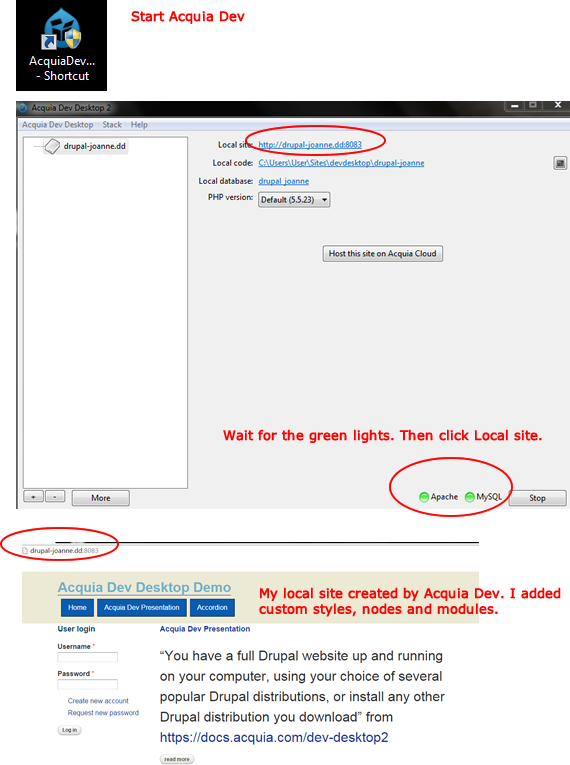
Starting and Stopping Acquia Dev
Acquia Dev is started when installation is complete. You can start and stop it in the Acquia Dev Desktop console. Acquia Dev Desktop needs to be started in order to access your site.
- Start Acquia Dev. Click the icon.
- Wait for the green lights indicating it started.
- Click your local site link.
Acquia screenshots
Drush and Acquia Dev Desktop 2
- Drush 7.0.0 rc-1 is included with Acquia Dev Desktop 2
- Drush on Win 7 and WAMP Issues
| Attachment | Size |
|---|---|
| patalano-acquia-screenshot.png | 285.33 KB |
Categories: Tutorial