Posted by AZaz09 on June 27, 2013 at 3:58pm
At http://products.phase2technology.com/content/placing-content-section-fronts
================================================
Choose a category.
We recommend using the Boxes category to add boxes to your regions. You may also use the Boxes for Views Box category but changing a view from this category will change the view sitewide.
Choose either "Add a Custom box" or "Add custom view box"
"Add a Custom box" allows you to add a Block with a title and content using plain text or HTML
"Add Custom View Box" allows you to create a custom block with existing views
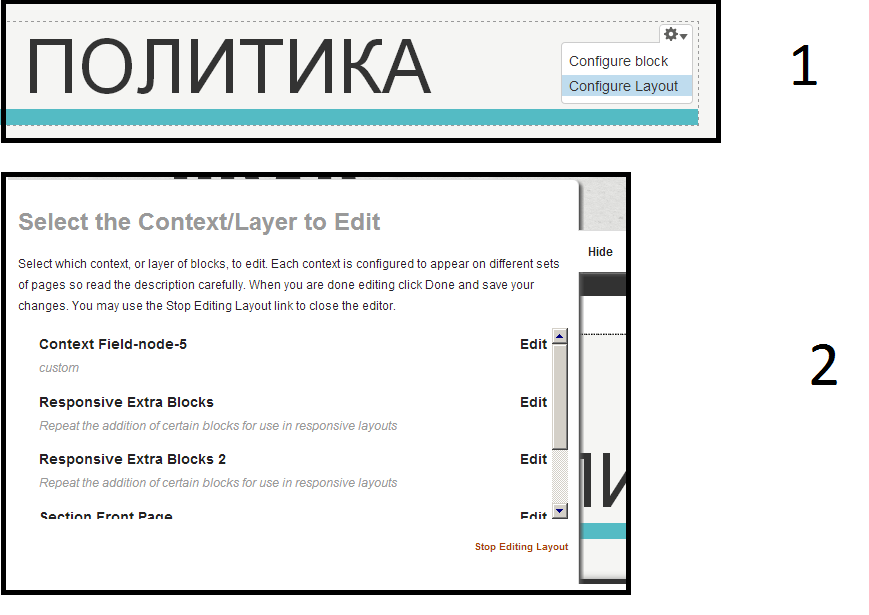
I am choose a "Configure Layout", but "Add a Custom box" or "Add custom view box" unavailable (please image).
Please, what should I do?
| Attachment | Size |
|---|---|
| Configure Layout.png | 32.87 KB |
Categories: Install Profile
Comments
Click Configure Layout and
Click Configure Layout and then Context Field-node-5 (It's your section front) and you need use HIDE button. Then you will able to add block into this section. Just overlay your pointer mouse to add new box and then click ADD A BLOCK HERE