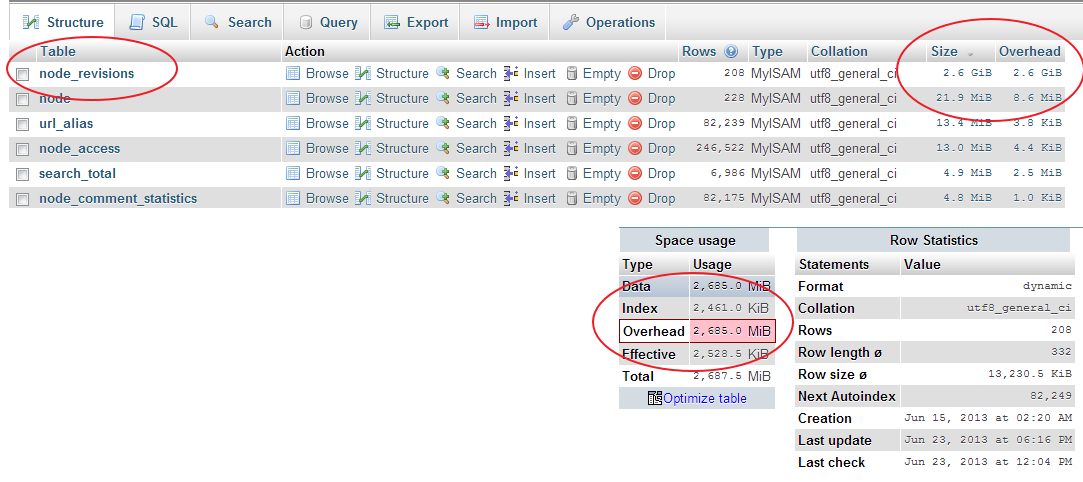
The node_revisions table in my D6 database is too huge (2.6gb). I don't use node revisions and have turn off node revision per content type. This has resulted to shouting my website down because the database is over its allocated size. Below is the email I just received. I tried deleting old notes using the below query but 0 record deleted
DELETE FROM {node_revisions} nr WHERE nr.vid NOT IN (SELECT n.vid FROM (node) n)');
It has come to our attention that your site is using an excessive amount of MySQL resources on your Bluehost account. This is causing performance problems not only on your own website, but for other customers that are on this same server. When left unchecked, it can potentially cause crashes or service interruptions and lead to additional downtime.
Our research shows that server performance degrades when the MySQL usage is over 1000 tables and/or 3 GB on a single account or 1000 tables and/or 2 GB on a single database. In order to ensure optimal performance for your account and the others in your shared hosting environment, we request that you reduce the MySQL usage on your account to under these limits by 07/01/2013.
Your account information:
Total MySQL Database Size: 3835.83 MB
Total MySQL Tables: 244
Largest MySQL Database Size: 3825.03 MB
Largest MySQL Table Count: 170
| Attachment | Size |
|---|---|
| 2013年06月23日 20 19 11.png | 91.49 KB |
Comments
There is always one record in
There is always one record in node_revision associated for each record in node even when you have disabled revisioning. If you enable revisions, then there will be multiple records in node_revision.
See this code bit in D6 node_save()
// Generate the node table query and the node_revisions table query.
if ($node->is_new) {
_node_save_revision($node, $user->uid);
drupal_write_record('node', $node);
db_query('UPDATE {node_revisions} SET nid = %d WHERE vid = %d', $node->nid, $node->vid);
$op = 'insert';
}
Running a
select count(nid) from node
and
select count(nid) from node_revisions
should give you the same result.
My advice would be to consider moving to a different hosting package or hoster if the DB size causes an issue.
Thanks for your reply.
Thanks for your reply. mikeytown2 comment solved my problem.
OPTIMIZE TABLE
Run "OPTIMIZE TABLE" on it. 2.6GB of Overhead on 208 rows is saying that table needs to be optimized. http://stackoverflow.com/questions/565997/in-mysql-what-does-overhead-me...
Thanks a lot. That solved my
Thanks a lot. That solved my problem. Now my database size is 96.23 MB
For drupal 7
Could be possible to use something similar in drupal 7?
Ivan Mejia
www.medioyforma.info
www.drupalmexico.com
sure you can and you can also
sure you can and you can also do a mysqlcheck (if you have access to the command line). anyway if tables getting fragmentation this definitely has a reason, e.g. data is getting inserted and deleted again or been updated pretty often.
Check this here, might help https://drupal.org/project/db_maintenance
I try to do a optimize
and send me this message;
Table does not support optimize, doing recreate + analyze instead
Ivan Mejia
www.medioyforma.info
www.drupalmexico.com
InnoDB
This is what MySQL says when the engine used is InnoDB. AFAIK it works as well as in the other cases.