Bilibili subtitle collection, LLM-powered knowledge extraction, and traceable notes
Quick start · Configuration · Usage · Troubleshooting · Development
English · 简体中文
Warning
NoteForge is still under active development and has many incomplete or unpolished areas. Use it with caution. The author assumes no responsibility for any loss or damage resulting from its use.
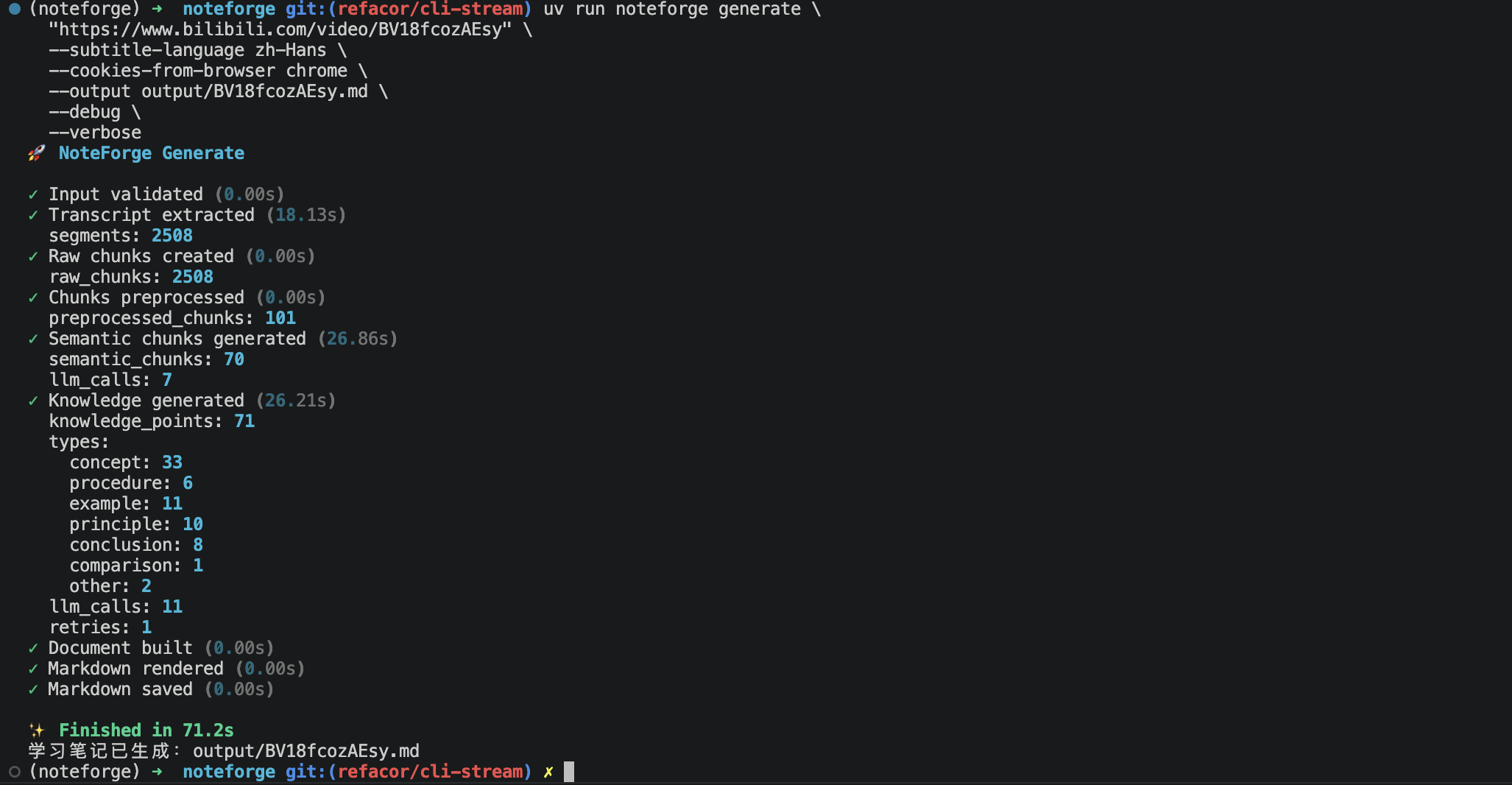
Long course videos are useful, but turning them into reviewable notes takes time. NoteForge collects a video's available subtitles, identifies semantic sections, extracts key concepts with an LLM, and writes a structured Markdown document with source timestamps.
Bilibili URL
 ↓
Subtitle discovery, selection, download, and normalization
 ↓
Transcript chunking and semantic analysis
 ↓
Knowledge-point extraction
 ↓
Structured Markdown notes with timestamps
NoteForge downloads subtitles only. It does not download the video or audio.
noteforge.media.MediaService is the sole media boundary for YouTube and
Bilibili. It exposes metadata, formats, playlists, subtitles, audio, and video
without leaking yt-dlp options. yt-dlp runs in isolated worker processes, while
downloaded assets live in expiring leases and are removed when MediaAsset is
closed. Persistence requires an explicit export_to() call.
Browser credentials are handled by AuthManager. It validates encrypted stored
cookies and can refresh them from Chrome, Edge, Brave, Arc, Chromium, Firefox,
or Safari. Authentication failures are refreshed and retried at most once. Each
task receives a private 0600 Cookie lease that is deleted immediately after
use; retained credentials are AEAD-encrypted with a key stored in the operating
system keyring. Run noteforge auth --help for browser, JSON, stdin, and
interactive login options.
| Capability | What it does |
|---|---|
| Source inspection | Normalizes a URL and shows video, subtitle, and transcript metadata |
| Subtitle selection | Prefers a requested language, then supported Chinese and English tracks |
| LLM analysis | Supports OpenAI-compatible, Anthropic Messages, and Ollama API formats |
| Note generation | Creates organized Markdown notes with concepts, explanations, and timestamps |
| Multi-part videos | Handles the p parameter in Bilibili multi-part video URLs |
Current scope: end-to-end note generation supports standard Bilibili video URLs with an available VTT or SRT subtitle track.
- Python 3.11 or newer
uv- Network access to Bilibili and the selected model endpoint
- A supported subtitle track on the target video
- For restricted videos: a locally installed, signed-in browser
Ollama users also need a running Ollama installation and a local model that follows JSON-output instructions reliably.
uv tool install noteforge-cli
Confirm the CLI is ready:
noteforge --version
noteforge --help
If your shell cannot find the command after installation, run
uv tool update-shell, restart the terminal, and try again.
Start the interactive setup:
noteforge configure
For a first-run check, verify the configured model and optionally inspect whether a video needs browser cookies and has supported subtitles:
noteforge doctor \
 "https://www.bilibili.com/video/BVxxxxxxxxxx"
For the default local Ollama setup, accept ollama, then prepare the suggested
model:
ollama pull qwen2.5:7b
The wizard stores the settings in a local .env file with user-only permissions.
NoteForge loads this file automatically. The default setup expects Ollama at
http://localhost:11434; keep ollama serve running if your installation does
not start it automatically.
For an OpenAI-compatible or Anthropic Messages endpoint, choose its API format in the wizard. API-key input is
hidden. You may also copy and edit .env.example; see
LLM configuration.
noteforge inspect \
 "https://www.bilibili.com/video/BVxxxxxxxxxx" \
 --cookies-from-browser chrome
Check that the JSON output contains a non-null selected_subtitle and
transcript, and that segment_count is greater than zero.
noteforge generate \
 "https://www.bilibili.com/video/BVxxxxxxxxxx" \
 --output output/note.md \
 --cookies-from-browser chrome
The completed note is written to output/note.md. Parent directories are created
automatically.
NoteForge reads configuration from a .env file in the current directory and
from process environment variables. Values explicitly exported in the shell take
precedence over .env.
NOTEFORGE_LLM_PROVIDERis a legacy-compatible 0.1 name. Its value selects the API wire format, not the company operating the model endpoint. For example, a compatible DeepSeek endpoint uses theopenaiformat with its ownBASE_URL.
Run the setup again whenever you want to change API formats, endpoints, or models:
noteforge configure
When generate detects missing configuration in an interactive terminal, it
offers to start the same wizard automatically. In scripts and CI it exits with a
clear instruction instead of waiting for input.
| Variable | Required | Description |
|---|---|---|
NOTEFORGE_LLM_PROVIDER |
Yes | API format identifier: ollama, openai, or anthropic; the legacy variable name is retained for 0.1 compatibility |
NOTEFORGE_LLM_MODEL |
Yes | Model identifier accepted by the target endpoint |
NOTEFORGE_LLM_API_KEY |
OpenAI-compatible/Anthropic Messages | Target endpoint API key; not needed by Ollama |
NOTEFORGE_LLM_BASE_URL |
No | Model endpoint; each API format has an official default and can target compatible services |
NOTEFORGE_LLM_TIMEOUT_SECONDS |
No | Request timeout in seconds; default: 60 |
NOTEFORGE_LLM_PROVIDER=ollama
NOTEFORGE_LLM_MODEL=qwen2.5:7b
NOTEFORGE_LLM_BASE_URL=http://localhost:11434
NOTEFORGE_LLM_TIMEOUT_SECONDS=120
NOTEFORGE_LLM_PROVIDER=openai
NOTEFORGE_LLM_MODEL=<an-available-chat-completions-model>
NOTEFORGE_LLM_API_KEY=<your-api-key>
NOTEFORGE_LLM_TIMEOUT_SECONDS=120
This format uses the OpenAI Chat Completions request and response schema. Its default
endpoint is https://api.openai.com/v1; set NOTEFORGE_LLM_BASE_URL to use DeepSeek
or another compatible endpoint. Selecting openai does not require OpenAI to be the provider.
NOTEFORGE_LLM_PROVIDER=anthropic
NOTEFORGE_LLM_MODEL=<an-available-anthropic-model>
NOTEFORGE_LLM_API_KEY=<your-api-key>
NOTEFORGE_LLM_TIMEOUT_SECONDS=120
This format uses the Anthropic Messages request and response schema. Its default endpoint
is https://api.anthropic.com/v1; compatible endpoints can be configured as well.
Never commit .env or a real API key. .env is ignored by Git.
Use inspect to validate collection and subtitle access without calling an LLM:
noteforge inspect VIDEO_URL [OPTIONS]
Useful options:
--cookies-from-browser TEXT Browser used for cookies: chrome, edge, firefox, safari
--subtitle-language TEXT Preferred language, for example zh-Hans, zh-CN, or en
--subtitle-output-dir PATH Subtitle cache root
To try a public video without browser cookies:
noteforge inspect VIDEO_URL --cookies-from-browser ""noteforge generate VIDEO_URL [OPTIONS]
Examples:
# Prefer Simplified Chinese subtitles
noteforge generate VIDEO_URL \
 --subtitle-language zh-Hans \
 --output output/course-note.md
# Generate notes for part 2 of a multi-part video
noteforge generate \
 "https://www.bilibili.com/video/BVxxxxxxxxxx?p=2" \
 --output output/part-2.md
# Do not read browser cookies
noteforge generate VIDEO_URL \
 --cookies-from-browser "" \
 --output output/note.md
Run noteforge COMMAND --help for the complete option reference.
Every generate invocation creates .noteforge/runs/<run-id>/. Successful,
failed, and cancelled runs are all retained with a manifest, JSONL event stream,
stage artifacts, final-note copy, and structured error details. Use
--run-dir PATH to choose another records root.
Run records never persist API keys, cookies, or Authorization headers. Model endpoints are stored only as origins with credentials, paths, and query strings removed.
Run the interactive configuration:
noteforge configure
Use the name of a browser installed on this machine and make sure it has a signed-in Bilibili session:
noteforge inspect VIDEO_URL --cookies-from-browser firefox
For a public video, retry without cookies:
noteforge inspect VIDEO_URL --cookies-from-browser ""Close the browser temporarily if its cookie database is locked.
Use cookies from a signed-in browser, avoid repeated rapid requests, and retry later. Platform-side risk control cannot be eliminated by NoteForge.
Confirm the video exposes a subtitle track in Bilibili, try a preferred language
with --subtitle-language, and inspect the subtitle_tracks output. NoteForge
currently parses VTT and SRT tracks; it does not transcribe audio.
Use a model with strong instruction-following and structured-output ability. For a small local model, try a larger model or increase the timeout. The partial output is not written as a completed note.
Check the provider URL and API key, then increase:
NOTEFORGE_LLM_TIMEOUT_SECONDS=180
git clone https://github.com/ztygod/NoteForge.git
cd NoteForge
uv sync --group dev
uv run pytest -q
uv build
Release installation, upgrade, and removal:
uv tool install noteforge-cli
uv tool upgrade noteforge-cli
uv tool uninstall noteforge-cli
The noteforge name is already owned by another project on PyPI. This project is
therefore distributed as noteforge-cli while continuing to expose the
noteforge terminal command.
Before the first release, register a pending Trusted Publisher on PyPI with:
PyPI project name: noteforge-cli
GitHub owner: ztygod
GitHub repository: NoteForge
Workflow: publish.yml
Environment: pypi
Create a protected pypi environment in the GitHub repository and require manual
approval. Then publish a version by updating the version and pushing a matching
tag:
uv version 0.1.0
git add pyproject.toml uv.lock
git commit -m "release: v0.1.0"
git tag v0.1.0
git push origin main v0.1.0
The workflow builds and validates both distributions before publishing through PyPI Trusted Publishing; no long-lived PyPI token is stored in GitHub.
Project structure:
noteforge/
├── src/noteforge/
│ ├── cli/ # Typer commands
│ ├── media/ # Unified media, Cookie, platform, and worker service
│ ├── knowledge/ # Chunking, semantic analysis, and extraction
│ ├── llm/ # OpenAI-compatible, Anthropic Messages, and Ollama adapters
│ ├── document/ # Learning-document construction and Markdown rendering
│ └── core/ # End-to-end pipeline
├── tests/
├── .github/workflows/publish.yml
├── .env.example
├── pyproject.toml
└── uv.lock
From a long video to notes you can actually review.