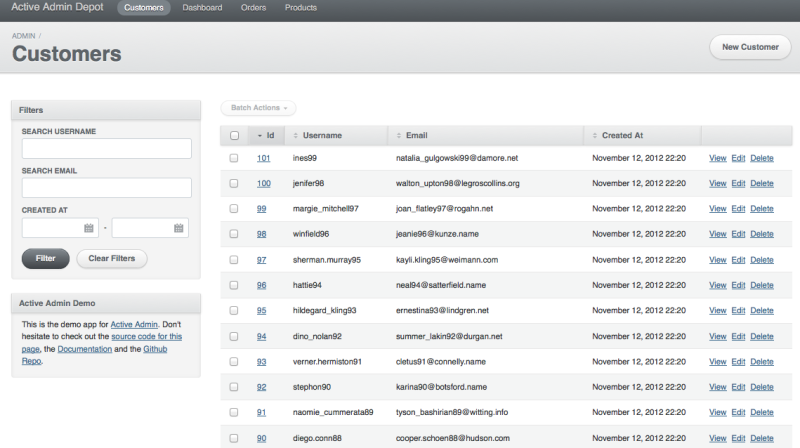
Provides ability to manipulate sidebar position for ActiveAdmin (tested with ActiveAdmin ~> 1.0.0)
gem 'active_admin_sidebar'
# or latest from GitHub
gem 'active_admin_sidebar', git: 'https://github.com/activeadmin-plugins/active_admin_sidebar.git'
Add including of CSS file
@import "active_admin_sidebar";
to the
app/assets/stylesheets/active_admin.css.scss
And including of coffee file (optional, need only for collapsed sidebar)
#= require active_admin_sidebarto the
app/assets/javascripts/active_admin.jsChanging sidebar position dynamically with before_action
 # app/admin/posts.rb
 ActiveAdmin.register Post do
 before_action :left_sidebar!, only: [:show]
 end
 # app/admin/comments.rb
 ActiveAdmin.register Comment do
 before_action :right_sidebar!
 end
Moving sidebar to the left within all resource. Set configuration in config/initializers/active_admin.rb
 # == Controller before-actions
 #
 # You can add before, after and around actions to all of your resources
 ActiveAdmin.setup do |config|
 config.before_action do
 left_sidebar! if respond_to?(:left_sidebar!)
 end
 end
You can use sidebar collapsing. It will add "hide/show" button. Shown/Hidden state is persisted across all pages.
left_sidebar!(collapsed: true)
You can override button color according to your color theme. For example:
 body.active_admin {
 #active_admin_content.left_sidebar, #active_admin_content.collapsed_sidebar {
 .collapse_btn, .uncollapse_btn {
 background-color: #767270;
 }
 }
 }
Example