UnderAutomation Universal Robots communication SDK
NuGet .NET Framework .NET Standard .NET Core .NET Versions
The Universal Robots SDK enables seamless integration with Universal Robots for automation, data exchange, and remote control. Ideal for industrial automation, research, and advanced robotics applications.
🔗 More Information: https://underautomation.com/universal-robots
🔗 Also available for 🟨 LabVIEW & 🐍 Python & 🧊 Unity
👁️ Watch to be notified of latest updates !
✔️ Full RTDE Support – Read & write at up to 500Hz
✔️ Send URScript Commands – Control robots in real-time
✔️ Dashboard Server + REST API – Manage power, programs, and states
✔️ Secure Connections – SSH & SFTP support
✔️ Forward & Inverse kinematics
✔️ Multi-Platform – Works on Windows, Linux, and macOS
✔️ Commercial License – Deploy with no royalties
📹 Watch Introduction Video
Universal.Robots.communication.SDK.mp4
Explore the Universal Robots SDK with fully functional example applications and precompiled binaries for various platforms. See Github releases
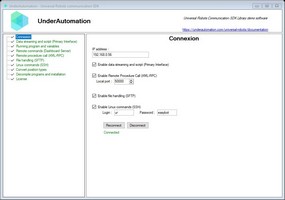
A Windows Forms application demonstrating all the features of the library.
📌 Download: 📥 UnderAutomation.UniversalRobots.Showcase.Forms.exe
UnderAutomation.UniversalRobots.Showcase.Console
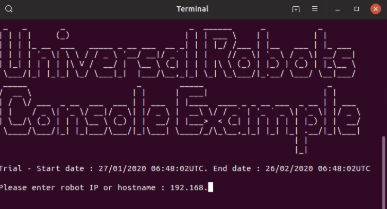
Precompiled console applications showcasing compilation for multiple operating systems.
📌 Downloads:
UnderAutomation.UniversalRobots.Showcase.Console
| OS | Architecture | Download |
|---|---|---|
| 🐧 Linux | ARM | 📥 Download |
| 🐧 Linux | x64 | 📥 Download |
| 🍏 macOS | ARM64 | 📥 Download |
| 🍏 macOS | x64 | 📥 Download |
| 🖥 Windows | x64 | 📥 Download |
| 🖥 Windows | x86 | 📥 Download |
Communicate with your robot at 500Hz, read live data, and control its behavior.
var robot = new UR();
var param = new ConnectParameters("192.168.0.1");
// Enable RTDE
param.Rtde.Enable = true;
// Exchange data at 500Hz
param.Rtde.Frequency = 500;
// Select data you want to write in robot controller
param.Rtde.InputSetup.Add(RtdeInputData.StandardAnalogOutput0);
param.Rtde.InputSetup.Add(RtdeInputData.InputIntRegisters, 0);
// Select data you want the robot to send
param.Rtde.OutputSetup.Add(RtdeOutputData.ActualTcpPose);
param.Rtde.OutputSetup.Add(RtdeOutputData.ToolOutputVoltage);
param.Rtde.OutputSetup.Add(RtdeOutputData.OutputDoubleRegisters, 10);
// Connect to robot
robot.Connect(param);
// Be notified at 500Hz when data is received
robot.Rtde.OutputDataReceived += Rtde_OutputDataReceived;
// Write input values in robot
var inputValues = new RtdeInputValues();
inputValues.StandardAnalogOutput0 = 0.2;
inputValues.InputIntRegisters.X0 = 12;
robot.Rtde.WriteInputs(inputValues);
Send URScript commands and monitor robot state at 10Hz.
// Send script
robot.PrimaryInterface.Script.Send("movej([-1.5,-1.5,-2,-0.5,1.8,0], a=1.4, v=1.05)");
// Get data
double x = robot.PrimaryInterface.CartesianInfo.TCPOffsetX;
double shoulderSpeed = robot.PrimaryInterface.JointData.Shoulder.ActualSpeed;
// Read program variables
GlobalVariable myVar = robot.PrimaryInterface.GlobalVariables.GetByName("myVar");
GlobalVariable[] variables = robot.PrimaryInterface.GlobalVariables.GetAll();
Manage power, brakes, program execution, and more.
// For cobots with Polyscope
robot.Dashboard.PowerOn();
robot.Dashboard.ReleaseBrake();
robot.Dashboard.LoadProgram("prg1.urp");
robot.Dashboard.Play();
// For robots with Polyscope X
robot.Rest.PowerOn();
robot.Rest.ReleaseBrake();
robot.Rest.LoadProgram("prg1.urp");
robot.Rest.Play();
Calculates joint positions corresponding to a cartesian position and vice versa. Uses a purely algebraic and optimized algorithm.
// Get default DH parameters for UR3e robot model2
IUrDhParameters dhParameters = KinematicsUtils.GetDhParametersFromModel(RobotModelsExtended.UR3e);
// Calculate forward kinematics for given joint angles in radians
KinematicsResult fkResult = KinematicsUtils.ForwardKinematics(new double[] { 0, -1.57, 1.57, 0, 0, 0 }, dhParameters);
// Calculate inverse kinematics for given cartesian pose
var matrix = vectorPose.FromRotationVectorTo4x4Matrix();
double[][] ikSolutions = KinematicsUtils.InverseKinematics(matrix, dhParameters);
Enable remote function calls from your robot program.
rpc := rpc_factory("xmlrpc", "http://192.168.0.10:50000")
answer := rpc.GetPose(100)
// Answer sent to the robot
robot.XmlRpc.XmlRpcServerRequest += (o, request) =>
 {
 if(request.MethodName == "GetPose") request.Answer = new Pose(request.Arguments[0], 200, 100, 0, 0, 0);
 };
Allow robots to send and receive custom data via sockets.
robot.SocketCommunication.SocketWrite("Hello, Robot!");
robot.SocketCommunication.SocketRequest += (sender, e) => Console.WriteLine(e.Message);
Upload, download, and manage files securely on your robot.
robot.Sftp.UploadFile(content, "/home/ur/ursim/programs/my-program.urp");
robot.Sftp.Delete("/home/ur/ursim/programs/old-program.urp");
Execute shell commands remotely.
robot.Ssh.RunCommand("echo 'Hello' > /home/ur/Desktop/NewFile.txt");
Choose the installation method that works best for you:
| Method | NuGet (Recommended) | Direct Download |
|---|---|---|
| How to Install | Install via NuGet. See on Nuget | Download and reference the DLL manually |
dotnet add package UnderAutomation.UniversalRobots |
📥 Download ZIP |
using UnderAutomation.UniversalRobots;
var robot = new UR();
robot.Connect(new ConnectParameters("192.168.0.1"));
✅ Supported Robots: UR3, UR5, UR10, UR16, UR20, UR30, CB-Series, e-Series, Polyscope, Polyscope X
✅ Operating Systems: Windows, Linux, macOS
✅ .NET Versions: .NET Framework (≥3.5), .NET Standard, .NET Core, .NET 5/6/8/9
We welcome contributions! Feel free to:
- Report issues via GitHub Issues
- Submit pull requests with improvements
- Share feedback & feature requests
🔗 Learn more: UnderAutomation Licensing
If you have any questions or need support:
- 📖 Check the Docs: Documentation
- 📩 Contact Us: Support