Hotel Booking AI
Your Personal AI Hotel Search & Booking Assistant
Find a better stay. Compare live prices. Book with confidence.
Turn your AI agent into a personal hotel booking assistant. Hotel Booking AI searches hotels worldwide, compares live room prices from leading OTAs and hotel suppliers, shows photos and cancellation terms, verifies the final rate, and helps you complete booking, payment, cancellation, and order lookup in one conversation.
Hotel search, room details, live rates, and availability checks are public—no account or sign-in is required until you are ready to book.

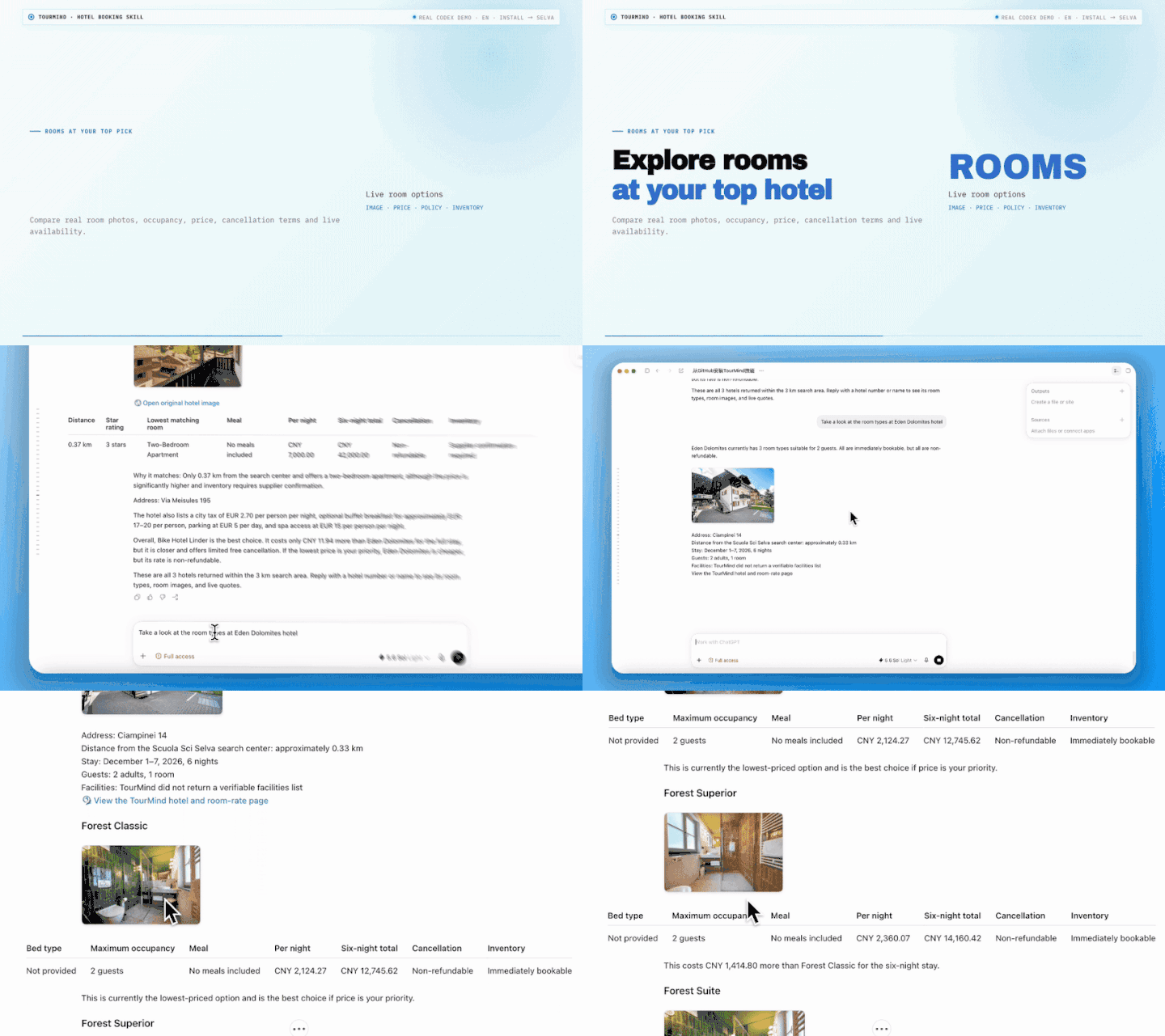
- Search by city, hotel, landmark, station, address, ski area, or other point of interest without guessed coordinates.
- Compare up to 20 hotel candidates and receive the five best options backed by matching live room products.
- See real nightly and stay-total prices, room and hotel photos, bed types, meals, taxes, cancellation policies, and inventory status.
- Filter for the details that matter to you, such as budget, distance, star rating, breakfast, facilities, room type, or free cancellation.
- Understand why each hotel matches your trip instead of receiving generic recommendations.
- Recheck the exact room price and availability before confirming your booking.
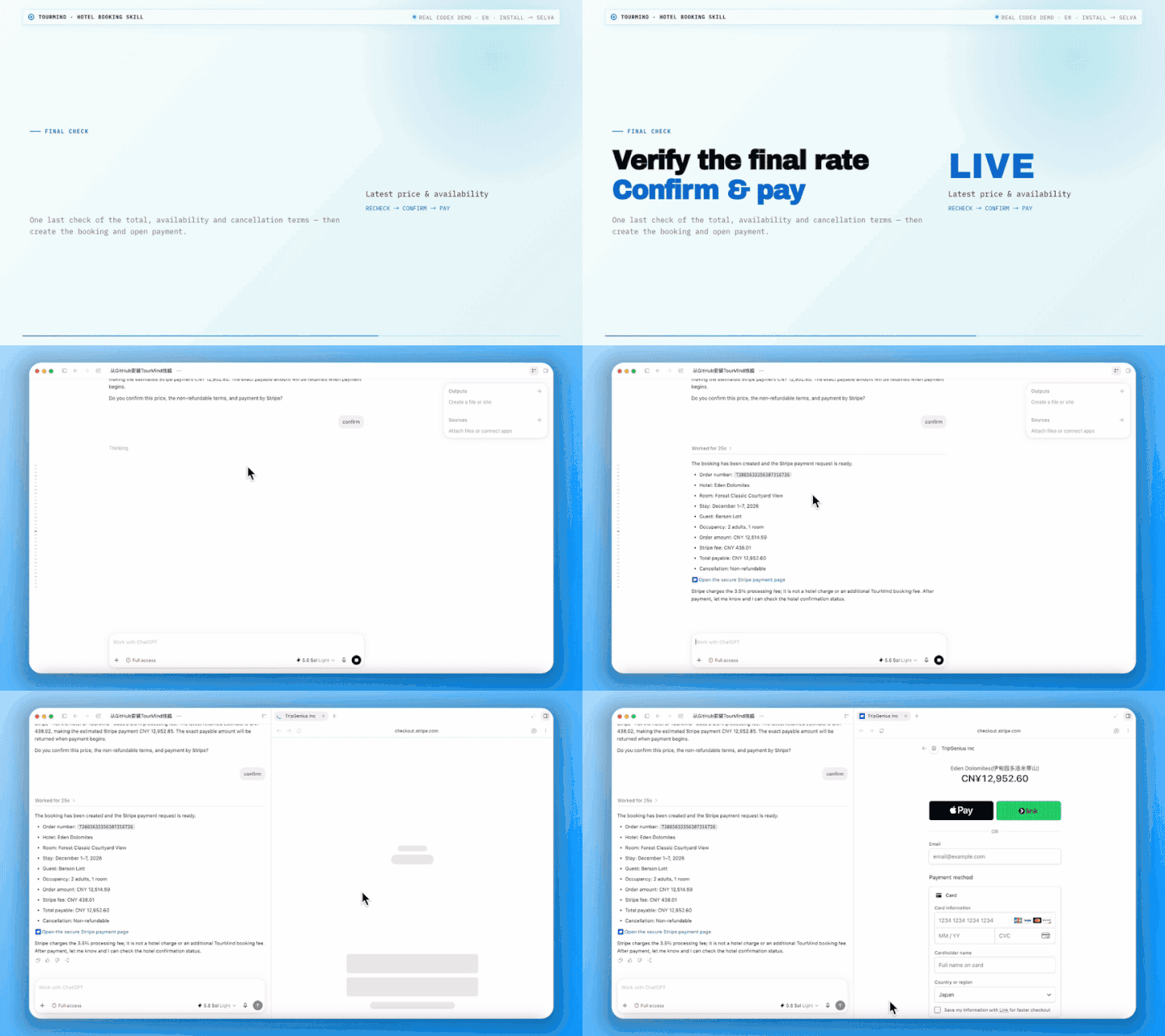
- Book a room, pay with Stripe, WeChat Pay, or Alipay, look up an order, or cancel an eligible reservation through the same conversation.
| Client | How to use Hotel Booking AI |
|---|---|
| OpenClaw | Install directly from ClawHub or clone this repository into your personal Skills directory |
| WorkBuddy | Install or import this repository as a user Skill |
| OpenAI Codex | Install from the Skills interface or a supported local Skills directory |
| Claude Code | Install as a personal Skill under ~/.claude/skills |
| Agent Skills-compatible clients | Use any client that can load a root SKILL.md and make outbound HTTPS POST requests |
| MCP-capable AI clients | Use the companion Hotel Booking AI MCP package |
openclaw skills install @tourmind/hotel-booking-ai
openclaw gateway restart
In your AI client's Skills interface, install or import this repository:
https://github.com/tourmind-com/Hotel-Booking-AI.git
If your client installs Skills from the filesystem, clone the repository into its personal Skills directory:
CLIENT_SKILLS_DIR="<your-client-skills-directory>"
mkdir -p "$CLIENT_SKILLS_DIR"
git clone https://github.com/tourmind-com/Hotel-Booking-AI.git "$CLIENT_SKILLS_DIR/hotel-booking-ai"
Common personal Skill locations:
| Client | Directory |
|---|---|
| OpenClaw | ~/.openclaw/skills |
| WorkBuddy | ~/.workbuddy/skills |
| OpenAI Codex | Use the Skills interface or the local directory supported by your Codex version |
| Claude Code | ~/.claude/skills |
Reload Skills or restart your AI client, then ask for a hotel. No local MCP server is required; Hotel Booking AI calls the TourMind API directly over HTTPS.
You can search hotels, inspect hotel and room details, compare live rates, and verify availability without a user_key.
When you are ready to create, view, cancel, or pay for a booking:
-
Sign in with Google at auth.journione.ai.
-
Copy your
user_keyand save it asuser_key.txtin the installedhotel-booking-aifolder. Your AI agent can also guide you through this step when you start an order operation. -
On macOS or Linux, restrict access to the file:
chmod 600 user_key.txt
Never commit user_key.txt. It is excluded by .gitignore and should stay only on your device.
Use natural language—the more you share about your trip, the more precisely your AI agent can compare verified hotel options.
I’m taking my family of four to Tokyo from April 3 to April 7, 2027. Find one room near a station with easy access to Tokyo Disneyland, breakfast, free cancellation, and a total price under JPY 120,000. Compare the five best available hotels with photos, room type, bed setup, nightly and total price, travel trade-offs, and cancellation deadlines. Do not book yet.
Find a beachfront hotel in Phuket for two adults from November 12 to November 16, 2026. Keep the average price under THB 6,000 per night. I prefer a pool, breakfast, a king bed, and free cancellation. Show only options with matching live rooms, explain what each hotel does and does not meet, and rank them by overall fit.
Show me the available rooms at the second hotel. Include room photos, bed type, meals, cancellation policy, nightly price, stay total, and whether each room is immediately bookable. Recommend the best-value option, but wait for me to choose.
Use the king room with breakfast. Recheck its exact price, availability, taxes, cancellation terms, and any fees collected at the hotel. Show me the final booking summary and wait for my explicit confirmation before creating the booking or starting payment.
Look up my booking using agent reference ID <AGENT_REF_ID>. Explain its current booking and payment status. If it can be cancelled, show the deadline, penalty, and expected refundable amount, then wait for my confirmation before cancelling anything.
Your destination, dates, and guests
 → resolve the city, hotel, or point of interest
 → search up to 20 hotel candidates
 → query matching live room products
 → rank and present the five best verified hotels
 → show hotel details, room photos, and current quotes
 → recheck the selected room's price and availability
 → create the booking only after your explicit confirmation
 → pay, query, or cancel the order when requested
The price shown during the initial hotel search is only a candidate signal. Prices presented for comparison come from matching live room products, and the final booking uses the latest rate returned by the availability check.
- Public hotel discovery and live-rate comparison do not require a sign-in.
- Order operations use the
user_keystored locally inuser_key.txt; keep it out of prompts, screenshots, logs, URLs, commits, and issue reports. - Hotel Booking AI asks for the guest's full legal name and a contact email only when a confirmed booking is about to be created. It does not collect a phone number.
- Booking, cancellation, and payment are explicit actions. The agent must show the relevant details and wait for your confirmation before proceeding.
- TourMind room prices include taxes. A small number of destinations may require the hotel to collect a city or tourism tax at check-in; any returned mandatory fee is shown separately.
- Stripe adds a 3.5% payment-processing fee when selected. WeChat Pay and Alipay are also supported.
- Read-only hotel-result links can display hotel and room information but cannot book, pay, cancel, or access account and finance pages.
- If a stored key becomes invalid, remove
user_key.txt, sign in again, and save the new key locally.
| Audience | Integration | Authentication model | Product and repository |
|---|---|---|---|
| Consumer / ToC | Direct HTTP Skill | Public search and availability; user_key only for order operations |
Hotel-booking-ai |
| Business / ToB | Direct HTTP Skill | Skill Token required for every API call | Tourmind-booking-skill |
| Consumer / ToC | MCP package + companion Skill | Public MCP connection; user_key only for order operations |
Hotel Booking AI MCP |
| Business / ToB | MCP package + companion Skill | Bearer-authenticated MCP connection | TourMind Booking MCP |
API base URL: https://api.tourmind.com
| Endpoint | Purpose | Sign-in required |
|---|---|---|
POST /skill/toc/check_skill_update |
Check for a Skill update | No |
POST /skill/toc/search_location |
Resolve a region, point of interest, or hotel | No |
POST /skill/toc/search_hotels |
Search hotel candidates | No |
POST /skill/toc/get_hotel_detail |
Get hotel details and images | No |
POST /skill/toc/query_room_rates |
Get live rooms and rates | No |
POST /skill/toc/check_room_availability |
Recheck the selected rate and inventory | No |
POST /skill/toc/create_booking |
Create a booking after confirmation | Yes |
POST /skill/toc/query_booking |
Query an order | Yes |
POST /skill/toc/cancel_booking |
Cancel an eligible order after confirmation | Yes |
POST /skill/toc/pay_order |
Start payment after confirmation | Yes |
- Request fields, response contracts, ranking, images, taxes, and booking rules: references/parameter_guide.md
- Install from ClawHub: Hotel Booking AI
- GitHub support: open an issue
- TourMind customer service:
+86-755 3665 4666 - Hotel support:
hotel@tourmind.com - AI product cooperation:
ai@tourmind.com
MIT © 2026 TourMind