

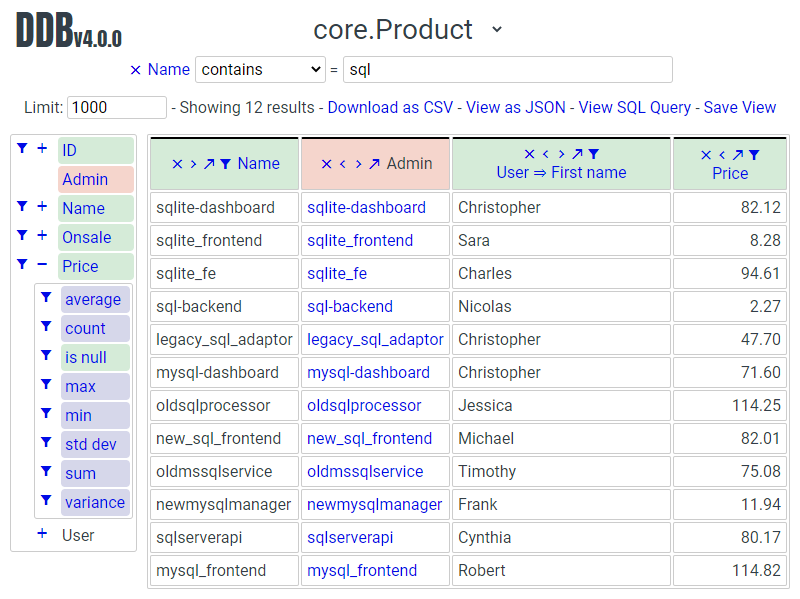
Interactive, user-friendly database explorer.
Contents
There is a live demo site available here https://data-browser-demo.herokuapp.com/data-browser/.
Because it's hosted on Heroku free tier it might take a while to respond to the first page load.
The Django project is a small e-commerce site selling microservices.
Source: https://github.com/tolomea/data-browser-demo.
Admin: https://data-browser-demo.herokuapp.com/admin/.
- Zero config, if it's in the admin it's in the browser.
- Select fields (including calculated fields), aggregate, filter, sort and pivot.
- Automatically follow OneToOneFields and ForeignKeys.
- Respects per user admin permissions.
- Share views simply by sharing URLs.
- Save views and optionally make them available to services like Google sheets.
- Download views as CSV or JSON.
The Data Browser is currently tested on:
- Django 4.2 - 6.2
- Python 3.10 - 3.14
- MySQL, PostgreSQL, SQLite
We highly recommend and only officially support the latest patch release of each Python and Django series.
- Run
pip install django-data-browser. - Add
"data_browser"to installed_apps. - Add
path("data-browser/", include("data_browser.urls"))to your urls. - Run
python manage.py migrate. - If you have queryset annotations in your admin or are interested in exposing calculated values see the Calculated and Annotated fields section.
| Name | Default | Docs Section | Function |
|---|---|---|---|
DATA_BROWSER_ADMIN_FIELD_NAME |
admin |
Set the name for the "open in Django admin" field. | |
DATA_BROWSER_ALLOW_PUBLIC |
False |
Security | Allow selected saved views to be accessed without admin login in limited circumstances. |
DATA_BROWSER_AUTH_USER_COMPAT |
True |
Performance | When calling get_fieldsets on a UserAdmin always pass an instance of the associated model. |
DATA_BROWSER_DEFAULT_ROW_LIMIT |
1000 |
The default value for the row limit selector in the UI. | |
DATA_BROWSER_DEV |
False |
CONTRIBUTING.rst | Enable proxying frontend to JS dev server. |
DATA_BROWSER_FE_DSN |
None |
Sentry | The DSN the frontend sentry should report to, disabled by default. |
DATA_BROWSER_USING_DB |
"default" |
Performance | Specify a database alias to use by default on all database queries. |
DATA_BROWSER_ADMIN_OPTIONS |
{} |
Specifying models and fields | Set admin specific configuration options. |
DATA_BROWSER_APPS_EXPANDED |
True |
Are the app sections of the homepage model list expanded by default. | |
DATA_BROWSER_ADMIN_SITE |
admin.site |
Admin Site | Specify an admin.AdminSite to use, or a dotted path string to one. |
DATA_BROWSER_ACTIONS_ENABLED |
True |
Admin Actions | Enable Django admin actions in the data browser. |
data_browser.make_view_public
Security
Can make a saved view publicly available.
data_browser.share_view
Can share a saved view with other users.
Most of the Django views in the Data Browser can only be accessed by Django "staff members". These views support general querying of the database, checked against the admin permissions of the logged in user.
The only exception to this is "Public Saved Views" these are views which have been saved and marked as public. They can be accessed by anyone without needing a login but they can only be used to access a query that has been saved and made public and they have long random URL's.
You can use the admin permission data_browser | view | Can make a saved view publically available to restrict who can make views public. To be public the view must be marked as public and owned by someone who has the permission.
Additionally the entire public views system is gated by the Django settings value DATA_BROWSER_ALLOW_PUBLIC.
The frontend code has builtin Sentry support, it is disabled by default. To enable it set the Django settings value DATA_BROWSER_FE_DSN, for example to set it to the Data Browser project Sentry use:
DATA_BROWSER_FE_DSN = "https://af64f22b81994a0e93b82a32add8cb2b@o390136.ingest.sentry.io/5231151"
The home page URL of the Data Browser is given by reverse("data_browser:home").
Additionally if you are using data_browser.helpers.AdminMixin then in Admin list views the URL of the Data Browser page for the same model is available as the template context variable ddb_url.
One convenient way of utilizing this is to create the file templates/admin/change_list_object_tools.html and populate it with:
{% extends "admin/change_list_object_tools.html" %}
{% block object-tools-items %}
 {{ block.super }}
 {% if ddb_url %}
 <li><a href="{{ ddb_url }}" class="viewlink">Data Browser</a></li>
 {% endif %}
{% endblock %}
This will place a "Data Browser" button on the list view of every admin that inherits from the mixin. Note: to do this at the top level, the app you put the template in must be before contrib.admin in INSTALLED_APPS.
By default the Data Browser has access to all models and fields that the current user can see anywhere in the Admin site.
However if necessary this can be tweaked using the following class level properties and functions on ModelAdmins and Inlines.
| Name | Format | Purpose |
|---|---|---|
ddb_ignoreget_ddb_ignore(request) |
bool |
Ignore this Admin / Inline entirely, will still show fields from other Inlines / Admins on the same model. |
ddb_hide_fieldsget_ddb_hide_fields(request) |
[field_name] |
Explicitly hide the specified fields. |
ddb_extra_fieldsget_ddb_extra_fields(request) |
[field_name] |
Add additional fields that are not mentioned in fields, fieldsets or list_display. |
ddb_json_fieldsget_ddb_json_fields(request) |
{field_name: {json_field_name: type}} |
Expose fields within JSON data for access in the Data Browser. Type can be "string", "number" or "boolean". |
ddb_default_filtersget_ddb_default_filters() |
[(path, lookup, value)] |
Default filters to be added when opening this model.
E.G. to add
client__name__equals=Test use [("client__name", "equals", "Test")]. |
ddb_action_urlget_ddb_action_url(request) |
str |
The url to post admin actions to, usually the changelist view. See Admin Actions |
These can also be set via the settings entry DATA_BROWSER_ADMIN_OPTIONS, this is useful if you wish to change an option on a third party admin.
The format for this is {'my_package.MyAdmin': {'option': value}}, for example to remove Django Q's Task and Fail admins entirely you would use:
DATA_BROWSER_ADMIN_OPTIONS = {
 'django_q.admin.TaskAdmin': {'ignore': True},
 'django_q.admin.FailAdmin': {'ignore': True},
}
Finally, per the below sections, calculated fields and actions can be hidden by setting the ddb_hide attribute and annotated fields are always visible unless explicitly hidden.
Calculated fields are fields on the ModelAdmin whose value comes from a function on the ModelAdmin or a function or property on the Model itself, as described at the bottom of the Django admin list display docs.
Being arbitrary Python code calculated fields are opaque to the Data Browser. It can fetch their values but can't sort or filter etc on them. For pivoting they are treated as equivalent to the pk on the same model.
Additionally calculated fields can be hidden from the Data Browser by setting the attribute ddb_hide to True. The data_browser.helpers.attributes decorator can make this a little tidier.
@attributes(ddb_hide=True)
def my_calculated_field(self, obj):
 return ...
The Data Browser has additional support for annotated fields. Normally you would expose these as calculated fields. The module data_browser.helpers contains helpers which will make exposing annotated fields simpler, more performant and expose them to the Data Browser so it can do arbitrary manipulation with them.
Exposing an annotated field in this way requires two changes.
- Mix
data_browser.helpers.AdminMixininto your ModelAdmin. - Add a function decorated with
data_browser.helpers.annotationthat takes and updates a queryset.
from data_browser.helpers import AdminMixin, annotation
@admin.register(MyModel)
class MyAdmin(AdminMixin, ModelAdmin):
 fields = ["my_field"]
 @annotation
 def my_field(self, request, qs):
 return qs.annotate(my_field=Cast(..., output_field=IntegerField()))
WARNING: annotated aggregations will produce misleading results when further aggregated in the Data Browser.
It is important that the decorated annotation function name and the annotated queryset field name match.
Sometimes it is necessary for the top level of the annotation to have output_field set so the Data Browser can tell what type of data it will produce. When this is necessary you will get an error to that effect.
The helpers will automatically deal with the admin_order_field and boolean properties and readonly_fields, reducing the boiler plate involved in using annotations in the admin.
Additionally the annotation will only be applied to the list view when it's mentioned in list_display this allows you to use annotations extensively on your detail views without hurting the performance of your list views.
And finally even if not mentioned in fields, fieldsets or list_display, the annotation will still be visible in the Data Browser unless it is explicitly mentioned in ddb_hide_fields.
The Data Browser does it's fetching in two stages.
First it does a single DB query to get the majority of the data. To construct the queryset for this it will call get_queryset() on the ModelAdmin of the current Model. It uses .values() to fetch only the data it needs from the database and it will inline all referenced models to ensure it doesn't do multiple queries.
At this stage annotated fields on related models are attached with subquery annotations, the data browser will call get_queryset() on the relevant ModelAdmins in order to generate these subquery annotations.
Secondly for any calculated fields it will then fetch the complete objects that are needed for those calculated fields. To construct the querysets for these it will call get_queryset() on their associated ModelAdmins. These calls are aggregated so it will only make one per model.
As a simple example, if you did a query against the Book model for the fields:
book.namebook.author.namebook.author.agebook.author.number_of_booksbook.publisher.name
Where the author.age is actually a property on the Author model, and author.number_of_books is an @annotation on the Author ModelAdmin, then it would do something like the following two queries:
BookAdmin.get_queryset().annotate(
 author__number_of_books=Subquery(
 AuthorAdmin.get_queryset()
 .filter(pk=OuterRef("author__id"))
 .values("number_of_books")[:1]
 )
).values(
 "name",
 "author__name",
 "author__id",
 "author__number_of_books",
 "publisher__name",
)
AuthorAdmin.get_queryset().in_bulk(pks=...)
Where the pks passed to in_bulk in the second query came from author__id in the first.
You can view an approximation of the main queryset by changing the .html in the URL to .qs. In a similar manner .sql, .explain and .analyze are also available.
When the Data Browser calls the admin get_queryset() functions it will put some context in request.data_browser. This allows you to test to see if the Data Browser is making the call as follows:
if hasattr(request, "data_browser"):
 # Data Browser specific customization
This is particularly useful if you want to route the Data Browser to a DB replica for a particular model (n.b. if you want to do this for all models see QuerySet.using() below.).
The context also includes a fields member that lists all the fields the Data Browser plans to access. You can use this to do conditional prefetching or annotating to support those fields like this:
if (
 not hasattr(request, "data_browser")
 or "my_field" in request.data_browser["fields"]
):
 # do prefetching and annotating associated with my_field
The AdminMixin described in the Calculated and Annotated fields section is doing this internally for @annotation fields.
The setting DATA_BROWSER_USING_DB can be used to direct Data Browser initiated database queries to a replica. Underneath the value of this is passed into QuerySet.using().
The Data Browser also calls get_fieldsets to find out what fields the current user can access.
As with get_queryset the Data Browser will set request.data_browser when calling get_fieldsets and you can test this to detect it and make Data Browser specific customizations.
The Django User Admin has code to change the fieldsets when adding a new user. To compensate for this, when calling get_fieldsets on a subclass of django.contrib.auth.admin.UserAdmin the Data Browser will pass a newly constructed instance of the relevant model. This behavior can be disabled by setting settings.DATA_BROWSER_AUTH_USER_COMPAT to False.
Django's Admin actions are exposed by right clicking on ID (or other appropriate pk field) column headers.
Due to the way these are implemented in Django there are some additional technical considerations.
The actions are posted to the Admin changelist URL. Once this post happens the Data Browser is no longer involved and so can't set request.data_browser like it normally would. Instead it will set the post argument data_browser.
When the Data Browser triggers actions default Admin filtering is applied. If you have Admin filters that hide rows by default then actions triggered from the Data Browser will not be able to access those rows. To work around this you can specify get_ddb_action_url to override the URL the actions are posted to. By default it returns the changelist URL so you can append any arguments needed to set filters to not filter.
You can override the data_browser/index.html template per Django’s template overriding docs, and replace the extrahead block.
(Ensure "data_browser" is after your app in INSTALLED_APPS.)
This will let you inject custom CSS and stylesheets.
However note that because of how the normal CSS is injected any custom CSS will be before the normal CSS so you will need to use more specific selectors or !important.
It is possible to register additional functions and aggregations with the Data Browser, including custom ones.
Functions and Aggregations are attached to the Data Browsers core types, these are in data_browser.types.
This functionality is provisional and not subject to normal backward compatible guarantees.
The function registry is in data_browser.orm_functions.TYPE_FUNCTIONS this has type dict[BaseType, dict[str, data_browser.orm_functions.Func]]. It is safe to insert new entries into this at runtime.
For example to add the MD5 function to string fields you could do the following:
from django.db.models.functions import MD5
from data_browser.types import StringType
from data_browser.orm_functions import Func, TYPE_FUNCTIONS
TYPE_FUNCTIONS[StringType]["md5"] = Func(MD5, StringType)
This functionality is provisional and not subject to normal backward compatible guarantees.
The aggregate registry is in data_browser.orm_aggregates.TYPE_AGGREGATES this has type dict[BaseType, dict[str, data_browser.orm_aggregates.Agg]]. It is safe to insert new entries into this at runtime.
For example to add a count that does not apply distinct to number fields you could do the following:
from django.db.models import Count
from data_browser.types import NumberType
from data_browser.orm_aggregates import Agg, TYPE_AGGREGATES
TYPE_AGGREGATES[NumberType]["full_count"] = Agg(
 lambda x: Count(x, distinct=False), NumberType
)
For a larger example imagine you wanted to use Postgres's percentile_cont functionality to add a p95 aggregate to duration fields, perhaps for some kind of application performance monitoring usecase.
First we need to explain percentile_cont to Django.
from django.db.models import Aggregate
class Percentile(Aggregate):
 arity = 1
 function = "percentile_cont"
 template = "%(function)s(%(percentile)s) WITHIN GROUP (ORDER BY %(expressions)s)"
 name = "Percentile"
 def __init__(self, percentile, expressions, **extra):
 super().__init__(expressions, percentile=percentile, **extra)
Then we need to tell the Data Browser we want p95 on duration fields.
from data_browser.orm_aggregates import TYPE_AGGREGATES, Agg
from data_browser.types import DurationType
TYPE_AGGREGATES[DurationType]["p95"] = Agg(
 lambda x: Percentile(0.95, x), DurationType
)
By default the Data Browser uses Django's default admin site. You can point it at a custom admin.AdminSite (see Django's docs) in two ways.
Single site — set DATA_BROWSER_ADMIN_SITE in settings.py to either the site object or a dotted path string:
# object form
from myapp.admin_sites import my_site
DATA_BROWSER_ADMIN_SITE = my_site
# dotted path form (avoids importing at settings load time)
DATA_BROWSER_ADMIN_SITE = "myapp.admin_sites.my_site"
The Data Browser URL conf (data_browser.urls) will automatically use the configured site. Per-instance settings can be overridden via settings.py using the DATA_BROWSER_* settings.
Multiple sites — use get_urls(admin_site) directly in your URL conf instead of data_browser.urls:
import data_browser
from myapp.admin_sites import my_site
urlpatterns = [
 path("admin/", admin.site.urls),
 path("my-admin/", my_site.urls),
 path("data-browser/", include("data_browser.urls")), # uses default admin
 path("my-data-browser/", data_browser.get_urls(my_site)), # uses my_site
]
Per-instance settings can be overridden as keyword arguments to get_urls():
data_browser.get_urls(my_site, allow_public=True, default_row_limit=500)
The keyword argument names are the DATA_BROWSER_* setting names in snake case.
The Data Browser uses the standard Major.Minor.Patch version numbering scheme.
Patch versions may include bug fixes and minor features.
Minor versions are for significant new features.
Major versions are for major features, significant changes to existing functionality and breaking changes.
Patch and Minor versions should never contain breaking changes and should always be backward compatible. A breaking change is a change that makes backward incompatible changes to one or more of the following:
- The query URL format.
- The json, csv etc data formats, this does not include the Data Browsers internal API's, only the data export formats.
- The format of the
request.data_browserpassed toget_fieldsetsandget_queryset. - Existing saved views.
- The URL's of public saved views.
For alpha and beta releases absolutely anything may change / break.
| Version | Date | Summary |
|---|---|---|
| 4.2.14 | 2026年06月07日 | Fix migration when using DATA_BROWSER_ADMIN_SITE with a dotted string. |
| 4.2.13 | 2026年06月01日 | Add
get_urls(admin_site) for mounting multiple Data Browser instances on different admin sites.Fix DATA_BROWSER_ADMIN_SITE not being respected for permissions, open-in-admin links and action URLs.
Add DATA_BROWSER_ACTIONS_ENABLED setting to allow disabling admin actions.
DATA_BROWSER_ADMIN_SITE now also accepts a dotted path string.
|
| 4.2.12 | 2026年05月30日 | Use AdminSite.has_permission instead of staff_member_required. Contributed by #j-osephlong
Make it possible to reorder filters.
|
| 4.2.11 | 2026年02月23日 | Add support for Python 3.13 and 3.14 and Django 5.1, 5.2 and 6.0
Remove support for Python 3.8 and 3.9 and Django 3.2, 4.0 and 4.1
|
| 4.2.10 | 2024年04月08日 | Fix Z fighting issue with the field filter.
Refactor JS for greater speed.
Fix a regex escaping issue in the field filter.
|
| 4.2.9 | 2024年04月02日 | Make field filter matching more permissive.
Add a distinct (cyan) color for annotated fields.
|
| 4.2.8 | 2024年02月11日 | Improve field filter matching.
Add sticky headers to the field list.
|
| 4.2.7 | 2024年02月04日 | Add a text filter to the top of the field list. |
| 4.2.6 | 2024年02月04日 | Support custom admin sites. Contributed by #aboutofpluto
Fix date expression in a filter on a datetime field not anchoring to midnight.
Use verbose names for apps and models.
Add support for Python 3.12 and Django 5.0, drop support for Python 3.7.
|
| 4.2.5 | 2023年07月20日 | Fix parsing of date/datetime strings like
mon-1.Add support for DB query analyze via
.analyze url, similar to the existing .explain. |
| 4.2.4 | 2023年07月02日 | Provisional support for adding custom functions and aggregations.
Fix
all aggregate on booleans and durations. (Postgres only) |
| 4.2.3 | 2023年06月15日 | Fix ASGI compatibility issue. |
| 4.2.2 | 2023年06月08日 | Fix various issues around saved view validity. |
| 4.2.1 | 2023年05月21日 | BREAKING: In JSON format move
parsed and fitlerErrors onto the filters.Display invalid fields (previously they were ignored).
Fix small bug when removing filters with errors.
|
| 4.1.1 | 2023年05月07日 | Fix bug with shared views when using multiple authentication backends. |
| 4.1.0 | 2023年05月01日 | Support sharing of saved views between users.
Allow mixing of folders and views in the saved views section.
Fix bug where an invalid filter causes the query page to fail to render.
|
| 4.0.17 | 2023年04月25日 | Fix bug with admin actions only working on the first column (introduced in 4.0.14). |
| 4.0.16 | 2023年04月16日 | Group homepage model list into collapsible sections by app.
Allow grouping saved views into collapsible folders.
|
| 4.0.15 | 2023年04月11日 | Clear confirm prompts after a short delay.
Remember the current saved view and allow updating it.
|
| 4.0.14 | 2023年04月05日 | Fix bug with admin actions not respecting ordering when the number of results exceeds the limit.
Add support for Django 4.2 and Python 3.11 drop support for Django 2.2, 3.0 and 3.1.
Make "to many" support generally available.
|
| 4.0.13 | 2023年03月06日 | Add support for Django 4.1.
Work with CSRF_COOKIE_HTTPONLY which is enabled by cookiecutter-django.
|
| 4.0.12 | 2022年05月03日 | Allow setting the per admin options via DATA_BROWSER_ADMIN_OPTIONS. |
| 4.0.11 | 2022年04月12日 | Fix bug when DATA_BROWSER_ADMIN_FIELD_NAME contains spaces. |
| 4.0.10 | 2022年04月10日 | Make results stable by always sorting all fields.
Fix an issue with few to no results when pivoted and the headers exceed the result limit.
Add support for Postgres's array length function.
Allow overriding the "open in Django admin" field name with
DATA_BROWSER_ADMIN_FIELD_NAME.Add an AppConfig and declare the
default_auto_field.Expose access to
QuerySet.using() via a new DATA_BROWSER_USING_DB setting. |
| 4.0.9 | 2022年01月04日 | Fix contains filter not working on files and URLs.
Allow combining literal date time values with relative clauses.
Expose Postgres's
ArrayAgg as an all aggregate.Add mouse over text for the "to many" icon.
Fix issue when
related_name is different from related_query_nameCSS tweaks.
Change calculated field red to grey.
Add support for Django 4.0 and Python 3.10 drop support for Python 3.6.
|
| 4.0.8 | 2021年12月12日 | Fix formatting of
F expressions when using .qs.Make the field list and filter list collapsible.
CSS tweaks.
Add public view info to
request.data_browser.Fix crash when length filtering arrays of choice fields.
|
| 4.0.7 | 2021年08月16日 | Add support for django-hashid-field.
Fix a crash bug when aggregating fields with names starting with
_. |
| 4.0.6 | 2021年08月10日 | Fix spelling mistake. |
| 4.0.5 | 2021年08月09日 | Don't override right click context menu for HTML values (e.g. "Admin" columns).
Fix "bad lookup" when excluding
IsNull/NotNull values.Fix pressing enter clearing all filters.
Fix exceptions when using
.qs.Fix view link on Saved View admin page not preserving
limit.Improve placement of context menus.
|
| 4.0.4 | 2021年07月04日 | Add
.qs format support to see the main Django Queryset.Support
weeks in date and datetime filters.Fix bug filtering functions on annotations e.g.
__my_annotation__is_null=IsNull.Add admin actions to the admin column in addition to the id column.
Add exclude option to right click menus.
|
| 4.0.3 | 2021年06月18日 | Test on Django 3.2. |
| 4.0.2 | 2021年04月12日 | URL, image and file fields filter like strings and render as strings in CSV and JSON. |
| 4.0.1 | 2021年04月11日 | URLFields display as links.
Change pivot icon.
Automatically include the other side of OneToOne fields.
Disable custom context menus when right clicking inside a text selection.
Fix rare issue with helpers.AdminMixin and MRO ordering of child classes.
|
| 4.0.0 | 2021年03月13日 | In the JSON output aggregate fields are now always in the body.
The CSV format has changed so aggregate fields are always to the right of other fields.
In the UI aggregate fields are now always to the right of other fields.
Fields are colored by type, green: normal, blue: aggregates, red: can't sort or filter.
The right click drill down action now only adds filters where the row/column has multiple values.
|
| 3.3.0 | 2021年02月19日 | Drop support for Django 2.0 and 2.1
Rework Admin action integration.
|
| 3.2.5 | 2021年02月07日 | Date filter values formated as
2020年1月2日 are now considered ISO ordered and no longer ambiguous.Rework @annotation and AdminMixin so @annotation can be used on mixins.
|
| 3.2.4 | 2021年02月02日 | Fix
equals and not equals not working for array fields.Improve date and datetime filter errors.
Improve and contrast display of null and empty string.
Various fixes for models where the primary key is not
id.Empty but non null file fields render as empty string instead of null.
Fix
is null not working with the year function.The field list is now sorted by display name (except for the primary key and admin link).
Fix
not equals excluding nulls with functions and aggregates, e.g. year, min etc.Right click filter and drill down now correctly handle null values.
Prevent exception when a saved views name gets too long.
|
| 3.2.3 | 2021年01月11日 | Fix issue when using a filter with a different type from the field, e.g. is null. |
| 3.2.2 | 2020年12月30日 | Fix
id field missing from some models.Per Django, Django 2.0 & 2.1 are not supported on Py3.8 and 3.9.
|
| 3.2.1 | 2020年12月30日 | Protect model admin class option values from accidental modification. |
| 3.2.0 | 2020年12月30日 | Support for invoking admin actions by right clicking on
id column headers.Fix various filter issues.
Don't show
id on models that don't have an id field.Show "less than", "greater than" etc as "<", ">", etc.
Mouse hover tooltip help for date and datetime filter values.
Filters with bad fields and lookups are reported as errors rather than being ignored.
Bad filters on public saved View's now result in a 400 when loading the public URL.
Fix issue filtering on aggregated annotations.
|
| 3.1.4 | 2020年12月19日 | Fix UUID's not being filterable.
Fix right click drill and filter trying to filter unfilterable fields.
Fix spurious
0 appearing below numeric 0 filter values.Add an
extrahead block to the template and documentation for overriding CSS. |
| 3.1.3 | 2020年12月13日 | Relative time support in date and time filters.
Show parsed dates and datetimes next to filters.
Add view SQL link on front page. Contributed by #xinye1
|
| 3.1.2 | 2020年12月09日 | Remove length function from UUID's.
FK's with no admin are exposed as just the FK field.
|
| 3.1.1 | 2020年12月01日 | Don't run the 3.0.0 data migration when there are no saved views. |
| 3.1.0 | 2020年11月29日 | Add right click menu with filter and drill down options. |
| 3.0.4 | 2020年11月28日 | Ignore admins for things that are not Models. |
| 3.0.3 | 2020年11月22日 | Fix exception when filtering to out of bounds year values. |
| 3.0.2 | 2020年11月18日 | Fix bug with aggregating around
is null values on Django 3.1.Fix
is null returning None for missing fields in JsonFields. |
| 3.0.1 | 2020年11月12日 | Add
get_* functions for the ddb_* admin options.Add length function to string fields.
Add support for DB query explain via
.explain url.Prevent exception when getting SQL view of pure aggregates.
Fix incorrect handling of ISO dates whose day portion is less than 13.
Python 3.9 support.
|
| 3.0.0 | 2020年11月09日 | The format of ddb_default_filters has changed.
Path and prettyPath have been removed from fields and filters on JSON responses.
Choice and
is null fields use human readable values in filters.Choice fields have a raw sub field for accessing the underlying values.
Starts with, regex, etc have been removed form choice fields, equivalents are on raw.
Verbose_names and short_descriptions are used for display in the web frontend and CSV.
Equals and not equals for JSON and arrays.
JSON field filter supports lists and objects.
Array values are now JSON encoded across the board.
Backfill saved views for above changes to filter formats.
Pickup calculated fields on inlines when there is no actual admin.
Fix bug where ID's and annotations on inlines were visible to users without perms.
Support for aggregation and functions on annotated fields.
Annotations now respect ddb_hide.
Admin links to the Data Browser respect ddb_ignore.
|
| 2.2.21 | 2020年11月02日 | Reject ambiguous date and datetime values in filters. |
| 2.2.20 | 2020年10月22日 | Fix bug with ArrayField on Django>=3.0 |
| 2.2.19 | 2020年10月19日 | Support for annotations on inlines. |
| 2.2.18 | 2020年10月18日 | Support for profiling CSV etc output. See CONTRIBUTING.rst
Performance improvements for large result sets.
|
| 2.2.17 | 2020年10月15日 | Performance improvements for large result sets.
Fix error when choices field has an unexpected value.
|
| 2.2.16 | 2020年09月28日 | Fix being unable to reorder aggregates when there is no pivot.
Fix back button sometimes not remembering column reorderings.
Fix reordering columns while a long reload is in progress causes an error.
|
| 2.2.15 | 2020年09月27日 | Handle callables in ModelAdmin.list_display.
Add
data_browser.helpers.attributes.Deprecated
@ddb_hide in favor of @attributes(ddb_hide=True).Render safestrings returned by calculated fields as HTML.
Respect the
boolean attribute on calculated fields.Aside from declared booleans, calculated fields now always format as strings.
|
| 2.2.14 | 2020年09月20日 | Saved view style tweaks.
Only reload on field delete when it might change the results.
Add UI controls for reordering fields.
|
| 2.2.13 | 2020年09月13日 | Add
.sql format to show raw SQL query.Min and max for date and datetime fields.
Add ddb_default_filters.
Integrated cProfile support via
.profile and .pstats. |
| 2.2.12 | 2020年09月09日 | DurationField support.
Sort newly added date (etc) fields by default.
Fix JSONField support when psycopg2 is not installed.
Fix bug with number formatting and pivoted data.
Fix error with multiple non adjacent filters on the same field.
Fix error with naive DateTimeFields.
|
| 2.2.11 | 2020年08月31日 | Minor enhancements and some small fixes. |
| 2.2.10 | 2020年08月31日 | Minor enhancements. |
| 2.2.9 | 2020年08月25日 | Small fixes. |
| 2.2.8 | 2020年08月23日 | Small fixes. |
| 2.2.7 | 2020年08月22日 | Small fixes. |
| 2.2.6 | 2020年08月16日 | Basic JSONField support. |
| 2.2.5 | 2020年08月01日 | Bug fix. |
| 2.2.4 | 2020年08月01日 | Additional field support.
Minor features and bug fixes.
|
| 2.2.3 | 2020年07月31日 | File and Image field support |
| 2.2.2 | 2020年07月26日 | Better support for choice fields. |
| 2.2.1 | 2020年07月25日 | Performance tweaks. |
| 2.2.0 | 2020年07月21日 | Sort and filter annotated fields. |
| 2.1.2 | 2020年07月11日 | Minor bug fixes. |
| 2.1.1 | 2020年07月06日 | Bug fixes.
The representation of empty pivot cells has changed in the JSON.
|
| 2.1.0 | 2020年07月06日 | Bring views into the JS frontend.
Implement row limits on results.
All existing saved views will be limited to 1000 rows.
Better loading and error status indication.
Lock column headers.
|
| 2.0.5 | 2020年06月20日 | Bug fixes. |
| 2.0.4 | 2020年06月18日 | Fix Py3.6 support. |
| 2.0.3 | 2020年06月14日 | Improve filtering on aggregates when pivoted. |
| 2.0.2 | 2020年06月14日 | Improve fonts and symbols. |
| 2.0.1 | 2020年06月14日 | Improve sorting when pivoted. |
| 2.0.0 | 2020年06月14日 | Pivot tables.
All public view URL's have changed.
The JSON data format has changed.
|
| 1.2.6 | 2020年06月08日 | Bug fixes. |
| 1.2.5 | 2020年06月08日 | Bug fixes. |
| 1.2.4 | 2020年06月03日 | Calculated fields interact better with aggregation. |
| 1.2.3 | 2020年06月02日 | JS error handling tweaks. |
| 1.2.2 | 2020年06月01日 | Minor fix. |
| 1.2.1 | 2020年05月31日 | Improved date handling. |
| 1.2.0 | 2020年05月31日 | Support for date functions "year", "month" etc and filtering based on "now". |
| 1.1.6 | 2020年05月24日 | Stronger sanitizing of URL strings. |
| 1.1.5 | 2020年05月23日 | Fix bug aggregating time fields. |
| 1.1.4 | 2020年05月23日 | Fix breaking bug with GenericInlineModelAdmin. |
| 1.1.3 | 2020年05月23日 | Cosmetic fixes. |
| 1.1.2 | 2020年05月22日 | Cosmetic fixes. |
| 1.1.1 | 2020年05月20日 | Cosmetic fixes. |
| 1.1.0 | 2020年05月20日 | Aggregate support. |
| 1.0.2 | 2020年05月17日 | Py3.6 support. |
| 1.0.1 | 2020年05月17日 | Small fixes. |
| 1.0.0 | 2020年05月17日 | Initial version. |