Test npm version npm downloads Ask DeepWiki
A lightweight and more JavaScript logger for NodeJS and browsers.
node-color-log is a logger package for NodeJS and browsers. It provides more functions than the origin console.log. You can log text with colorful fonts and colorful backgrounds. Also, it has 4 levels log, including debug, info, warn and error. Give you a much better experience while developing JavaScript projects.
Winston and Pino are famous loggers for JavaScript, but they are too heavy and fancy. Sometimes we just want to have a simple logger, and don't want to spend time learning a fancy library. Then, node-color-log is your best choice.


Install package in your project:
npm install node-color-log@latest --save
Put the following code in your js in which you want to log.
const logger = require('node-color-log');
Logger level can be set like this. Logs belongs to this level and above that level will be printed.
logger.setLevel("error"); // it can be any log level.
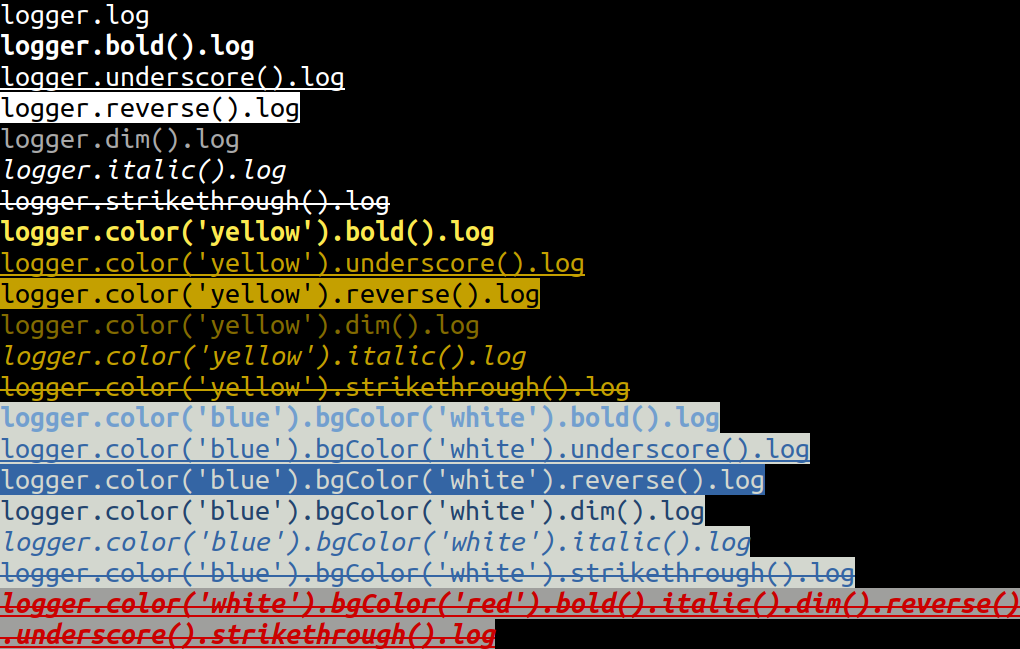
log with attributes, the order of setters can change.
NOTE: log() need to put behind of attribute setter(at the end).
append() can appends the contents in one line. (Note: old joint is now deprecated.)
color() and bgColor() includes: black, red, green, yellow, blue, magenta, cyan, white.
reset() can clear the previous attributes in the same line.
Usage:
// normal log
logger.log(message)
// Attribute log
logger.color('red').bgColor('blue')
 .bold().italic().dim().reverse().underscore().strikethrough()
 .log(message);
// use `append` to joint contents, and use `log` to print out at the end
logger.color('red').bold().append('message_style_1')
 .bgColor('white').italic().append('message_style_2')
 .strikethrough().log('message_style_3');
// use `reset` to clean the attributes
logger.bgColor('red').append('background red color message')
 .reset() // by calling this, background is reset
 .log('default background color message');
// log multiple arguments
logger.log(obj1, arr2, str3);
You can redirect the logs to the stream.
For example, you can write the log into the file:
fileStream = fs.createWriteStream('test.log'),
logger.setLogStream(fileStream)
logger.log("hi");
logger.error("hello", "world");
fileStream.close()
You can use less -R test.log to see the result.
Print the filename and line information in the logs. Note that this may increase a little performance overhead.
logger.enableFileAndLine(true /* enable */);
logger.debug('This log should include file and line information.');
// 2025年07月23日T18:43:27.199Z[/Users/tigercosmos/node-color-log/index.js:157] [DEBUG] This log should include file and line information.
logger.enableFileAndLine(true /* enable */, true /* short file name */);
logger.debug('This log should include file and line information.');
// 2025年07月23日T18:43:27.200Z[index.js:157] [DEBUG] This log should include file and line information.
-
messagehere must be a string. -
Color includes:
black,red,green,yellow,blue,magenta,cyan,white. -
settingis optional. Keys insettingneed to be boolean, and all arefalseby default.
Parameters:
const color = 'red';
const message = 'any string you will put into console.log';
const setting = {
 bold: true,
 dim: true,
 underscore: true,
 reverse: true,
 italic: true,
 strikethrough: true
}
Usage:
// only set font color
logger.fontColorLog('red', message, setting);
// only set background color
logger.bgColorLog('yellow', message, setting);
// set font and background color
logger.colorLog({
 font: 'black',
 bg: 'yellow'
}, message, setting);
With prefix that has background color
Usage:
// Success level, with prefix "[SUCCESS]"
logger.success(message);
// debug level, with prefix "[DEBUG]"
logger.debug(message);
// Info level, with prefix "[INFO]"
logger.info(message);
// Warn level, with prefix "[WARN]"
logger.warn(message);
// Error level, with prefix "[ERROR]"
logger.error(message);
// Level logs enable multiple arguments
logger.debug(obj1, arr2, str3);
The output looks like:
2018年08月14日T18:23:09.836Z [SUCCESS] This is success mode
2018年08月14日T18:23:09.837Z [DEBUG] This is debug mode
2018年08月14日T18:23:09.838Z [INFO] This is info mode
2018年08月14日T18:23:09.838Z [WARN] This is warn mode
2018年08月14日T18:23:09.839Z [ERROR] This is error mode
If you want to set mask for levels, simply add the line at the front. Levels below the setting level will all be hidden. There are four levels, which are success, debug, info, warn, error, or disable in lower-case.
logger.setLevel("info"); // success < debug < info < warn < error < disable
logger.debug("This `debug` will be hidden");
logger.error("This `error` will be shown");
logger.setLevel("disable"); // hide every logs
Or, you can set the environment variable LOGGER, such as LOGGER=info npm start, where it's equal to setLevel("info").
Level logs print in colors as a default.
You can set setLevelNoColor() to turn off the setting, and use setLevelColor() to reverse it.
None color mode is helpful for text files or browser environments.
logger.setLevelNoColor();
The default time format is toISOString, but you can change it by using setDate(callback)
logger.setDate(() => (new Date()).toLocaleTimeString())
logger.info("This is an info message") // 5:17:59 pm [INFO] This is an info message
You can create a named logger by calling createNamedLogger()
logger1 = logger.createNamedLogger("Test 1");
logger2 = logger.createNamedLogger("Test 2");
logger1.info('something happened'); // 2022年08月20日T04:56:17.834Z [Test 1] [INFO] something happened
logger2.info('something happened'); // 2022年08月20日T04:56:17.835Z [Test 2] [INFO] something happened
Any issues and PRs are very welcome!
MIT