Build Dirac Live target curves from research-grounded recipes.
Shipped target curves overview
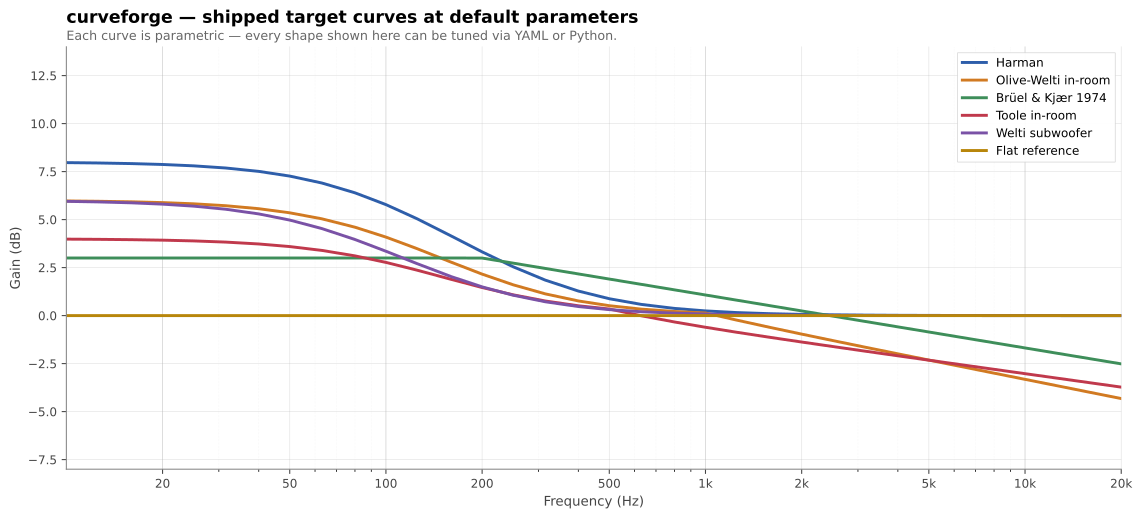
curveforge is a small CLI that turns a YAML recipe into a .targetcurve
file ready to load into Dirac Live 2/3. It ships with a curated library of
in-room target curves (Harman, Olive-Welti, B&K, Toole, Welti-sub, flat) —
each parameterised so you can sweep, compare, and tune them rather than
being stuck with whatever shelf level a preset shipped with.
pip install curveforge # or: uvx curveforge
pip install 'curveforge[plot]' # adds matplotlib for the `plot` command
Requires Python ≥ 3.11.
A recipe is a YAML file describing a base curve, an ordered list of transforms, and where to write the result.
# my-living-room.yml
output:
 path: living-room.targetcurve
 device_name: Living Room
 low_limit_hz: 10
 high_limit_hz: 24000
base:
 type: harman
 params:
 shelf_level: 8
transforms:
 - peq: { freq: 22, gain_db: 4, q: 1.5 }
 - rolloff: { freq: 15, order: 2 }
curveforge build my-living-room.yml
# wrote living-room.targetcurve
Drop the file into Dirac Live → Custom Target Curve → load.
Worked recipes for common situations. Each one builds cleanly with
curveforge build <yaml>; the full versions live in
gallery/.
A lean, balanced Harman shelf for accurate mixing-style playback. Light bass weight — the right baseline if you want clarity over physical impact.
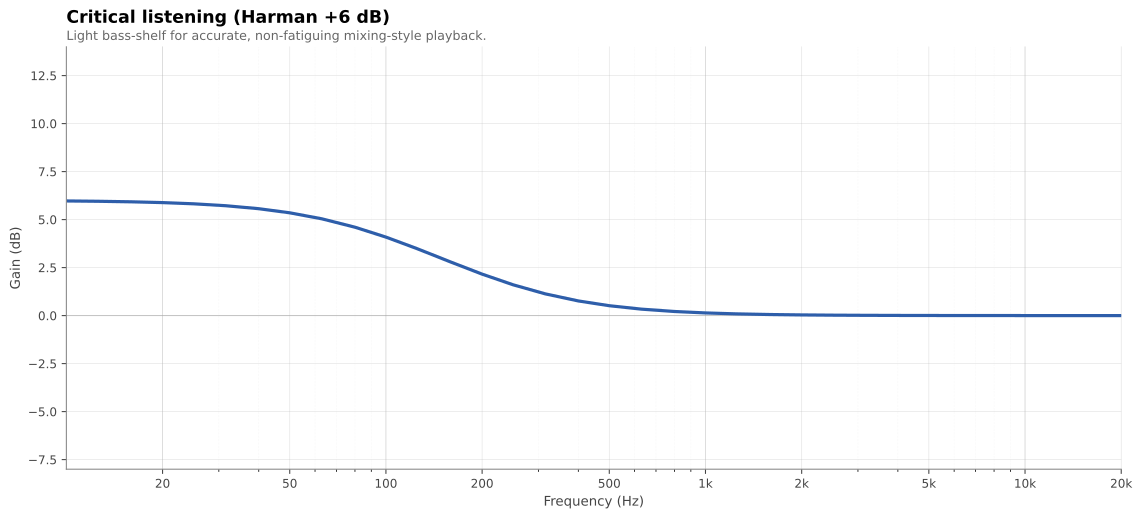
base:
 type: harman
 params: { shelf_level: 6 }
Harman +10 with the shelf extended into mid-bass (shelf_corner: 150),
plus a +4 dB peak at 25 Hz for visceral sub impact. Compensates for the
steepening equal-loudness contours at low listening levels.
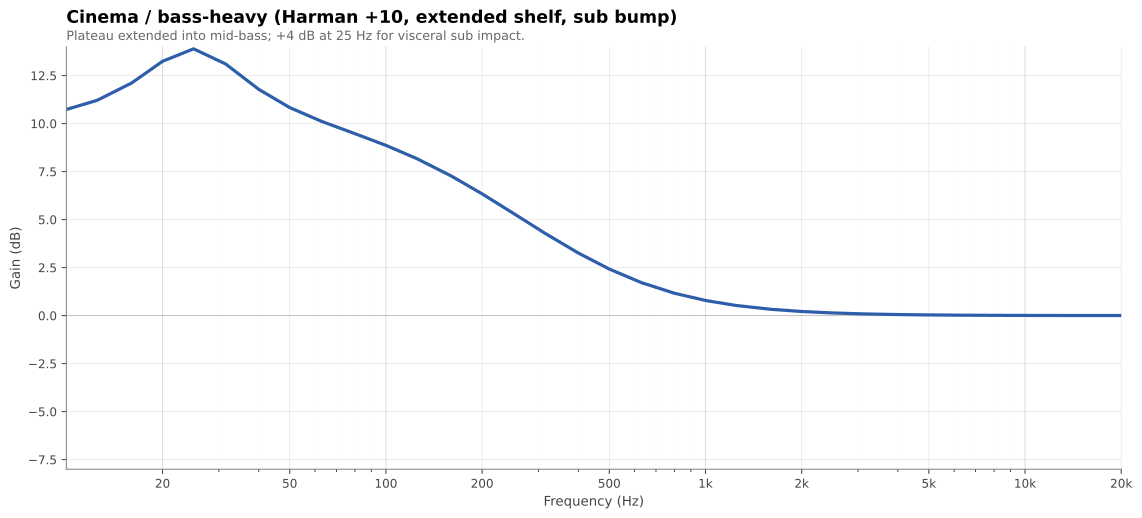
base:
 type: harman
 params: { shelf_level: 10, shelf_corner: 150 }
transforms:
 - peq: { freq: 25, gain_db: 4, q: 1.0 }
Modest bass plateau, smooth 0.83 dB/oct treble taper. Anchored without being bloated; smooth without being dark. The closest thing to a "natural room" target.
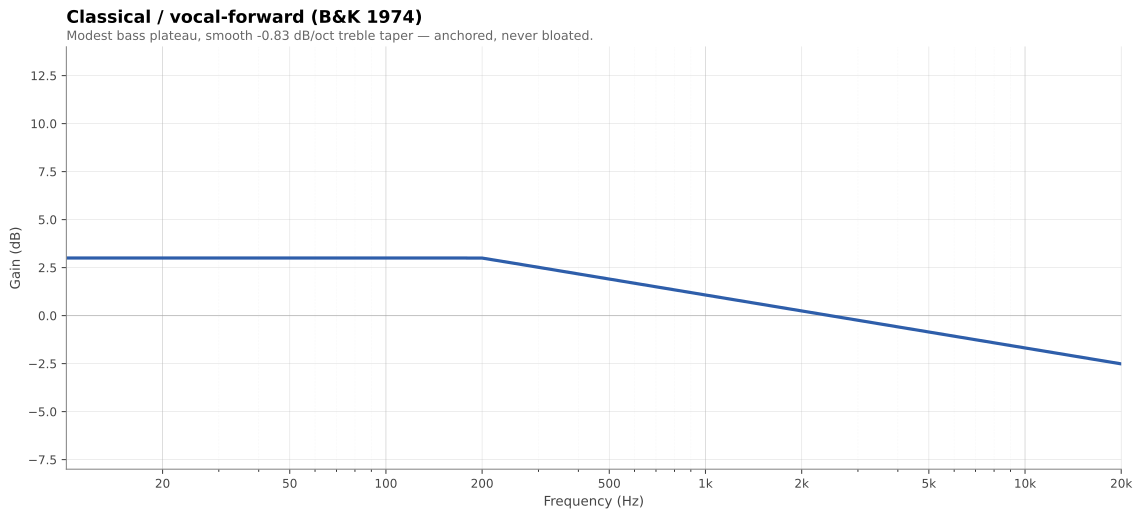
base:
 type: b_and_k
 params: { bass_level: 3, bass_corner: 200, treble_slope: -0.83 }
Low-shelf with corner at the sub-to-mains crossover. Use this for
independent sub-channel correction in Dirac; set Dirac's HIGHLIMITHZ to
match the crossover_hz value.
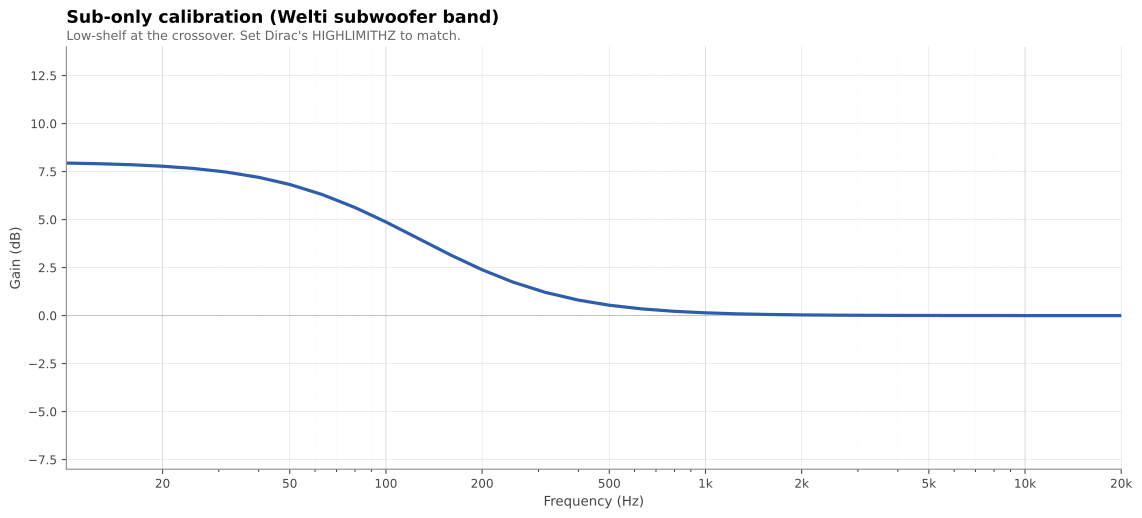
base:
 type: welti_sub
 params: { shelf_level: 8, crossover_hz: 80 }
One YAML knob sweeps Harman from lean to cinema — curveforge plot
overlays several recipes side-by-side so you can see exactly what each
parameter does.
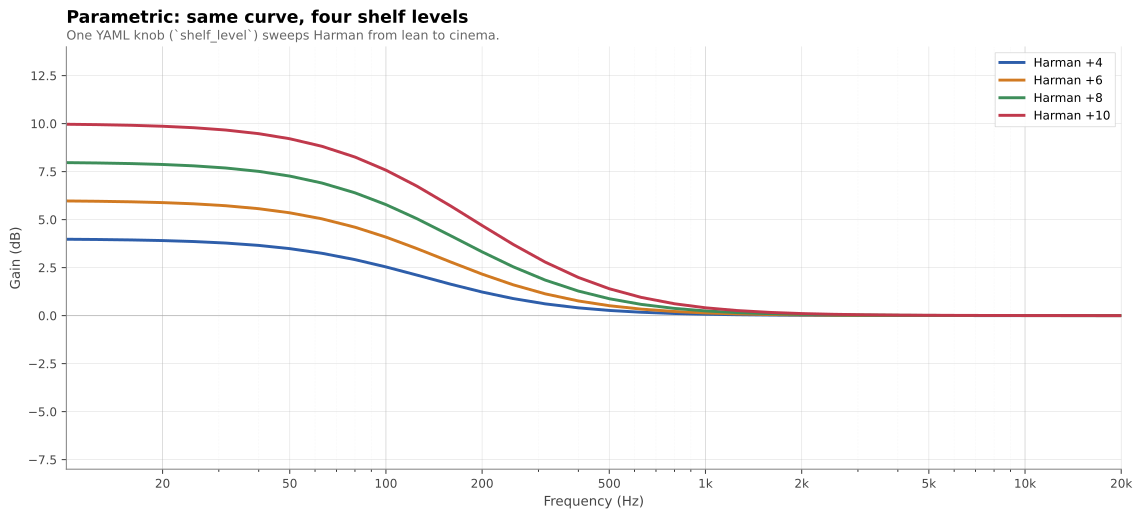
curveforge plot harman-4.yml harman-6.yml harman-8.yml harman-10.yml \
 -o comparison.svg
Want to see how to use these tools to actually voice a system? The Triangle BR09 + SVS SB-2000 case study walks through ~10 listening iterations: each one frames a complaint as a frequency band, diagnoses speaker-voicing-vs-room with the Dirac L+R overlay, applies a targeted recipe change, and reflects on what worked. The point isn't to copy the curve — it's to copy the process.
| Name | Shape | Best for |
|---|---|---|
harman |
First-order bass shelf, flat treble | Music; the community default. shelf_level 4–14 sweeps from lean to cinema. |
olive_welti_inroom |
Bass shelf + downward treble tilt | Bright rooms, near-field, or "finished mix" sound. |
b_and_k |
Modest bass plateau + linear treble taper | Classical, jazz, vocals. Smooth, natural-room character. |
toole_inroom |
Flat below 500 Hz + gentle tilt above | Directionally well-behaved speakers in treated rooms. The "preserve what good speakers do" target. |
welti_sub |
Sub-band low-shelf at the crossover | Sub-only calibration runs (mains corrected separately). |
flat |
0 dB everywhere | Baseline before transforms; measurement reference. |
breakpoints |
User-supplied (Hz, dB) pairs | Hand-drawn curves; imports from other tools. |
curveforge list curves and curveforge info <name> print parameters and
citations from the CLI. Detailed background on each curve is in the
References section at the bottom.
| Name | What it does |
|---|---|
gain |
Boost or cut a frequency band by a fixed dB, with cosine-tapered edges |
peq |
Parametric peaking EQ (RBJ analog biquad — freq + gain + Q) |
shelf |
First-order low- or high-shelf added on top of the current curve |
rolloff |
Butterworth high-pass attenuation (Nth-order) for sub protection |
tilt |
Linear dB/octave slope across the spectrum, anchored to a chosen Hz |
Transforms apply in the order they appear in the recipe.
from curveforge import build_curve, write_targetcurve
curve = build_curve(
 base="harman",
 base_params={"shelf_level": 8, "shelf_corner": 105},
 transforms=[
 ("peq", {"freq": 25, "gain_db": 4, "q": 1.0}),
 ("rolloff", {"freq": 15, "order": 2}),
 ],
)
write_targetcurve(
 path="living-room.targetcurve",
 curve=curve,
 name="My target",
 device_name="Living Room",
 low_limit_hz=10,
 high_limit_hz=24000,
)
Useful for batch jobs, notebooks, or wrapping curveforge in your own tools.
curveforge list curves|transforms|all
curveforge info <curve_or_transform_name>
curveforge validate path/to/file.targetcurve
curveforge diff a.targetcurve b.targetcurve
curveforge render recipe.yml --stdout --format csv
curveforge plot recipe.yml [-o curve.svg] # needs [plot] extra; format inferred from extension
curveforge plot a.yml b.yml -o overlay.svg # overlay multiple recipes
curveforge tweak input.targetcurve tweak.yml # apply transforms to an existing curve
Existing Dirac target-curve resources (the GUI editor, hand-curated target-curve files shared on audio forums) force you to choose between a small set of fixed shapes or hand-edit breakpoints. curveforge gives you the parametric model behind each research target, so you can:
- Sweep a Harman shelf from +4 to +14 dB by changing one number
- Layer a sub-bass peak or a protective rolloff on top of any base curve
- Compare scientific targets at equivalent settings (e.g. Harman vs B&K vs Toole at +6 dB bass)
- Treat target curves as code: version-controlled, diffable, reproducible
A target curve tells Dirac Live what frequency response you want from your speakers in your room. Dirac measures your actual in-room response, then computes correction filters that shape it toward the target. A flat target rarely sounds good — bass loses its weight and the highs feel sharp. The standard recommendations (Harman, Olive-Welti, Brüel & Kjær, Toole) all build in a deliberate bass shelf and a gentle treble tilt because listeners consistently prefer that shape over flat in blind preference tests.
Quick orientation, by listening goal:
- Harman — community-standard, gentle bass shelf around 100 Hz, treble close to flat. Safe default for music; nothing surprising.
- Olive-Welti in-room — slightly more aggressive bass and a steeper treble tilt than Harman. The current Harman research target; often preferred in blind preference studies.
- Brüel & Kjær 1974 — flatter mid/high, more "studio monitor" character. Use when you want a reference, not a flavored sound.
- Toole in-room — gentle downward slope across the whole band, no shelf. Good when your room already loads up the bass on its own.
- Welti subwoofer — sub-only curve; pair with one of the above for the rest of the band.
Try a couple — curveforge makes overlay comparison cheap
(curveforge plot a.yml b.yml -o overlay.svg).
REW (Room EQ Wizard) and the Dirac Live app let you edit target curves visually, breakpoint by breakpoint. That works once. If you want to try +0.5 dB on the bass shelf, you redraw the curve.
curveforge inverts the workflow: your target is a recipe — a few parameters or a YAML file. Editing means changing a number. Result: reproducible (lives in git), parametric (sweep and overlay), composable (stack transforms — peaking EQ, shelves, tilts — on any base). REW and the Dirac Live app are still the right tools for measuring and applying correction; curveforge is for designing the target that goes into them.
No. curveforge produces target curves — what you want your room to sound
like. Dirac Live (the desktop app) takes the measurements and computes the
correction filters to hit that target. You hand Dirac the .targetcurve
file curveforge generates. The two tools sit on either side of the
measurement step.
Yes. The .targetcurve format is shared between Dirac Live 2 and Dirac
Live 3, and curveforge writes the format both versions consume. Tested
against Dirac Live 3 on macOS and Windows; should work identically on the
embedded Dirac builds shipped with miniDSP, NAD, Storm Audio, and similar
hardware.
Each curve module ships with full citations accessible via
curveforge info <name>. The condensed sources:
harman— Olive, S. E. & Welti, T. — multiple AES papers on listener preference for in-room loudspeaker response (Harman International). See also Toole, F. E., Sound Reproduction (3rd ed., 2017), Routledge / AES Presents.olive_welti_inroom— Olive, S. E., Welti, T., & McMullin, E. (2013). "Listener Preferences for In-Room Loudspeaker and Headphone Target Responses." AES 135th Convention, paper 8994. (See also paper 8867 at the 134th Convention, which introduces the RR1_G reference curve.)b_and_k— Brüel & Kjær Application Note 17-197 (1974), "Relevant loudspeaker tests in studios, in Hi-Fi dealers' demo rooms, in the home, etc., using 1/3 octave, pink-weighted, random noise."toole_inroom— Toole, F. E. (2017). Sound Reproduction: The Acoustics and Psychoacoustics of Loudspeakers and Rooms (3rd ed.). Routledge / AES Presents.welti_sub— Welti, T. & Devantier, A. (2006). "Low-Frequency Optimization Using Multiple Subwoofers." J. AES 54(5), pp. 347–364. See also Welti, Subwoofers: Optimum Number and Locations (Harman).
MIT