
📦 Archived - This repository is archived and preserved for reference only. No updates, issues, or pull requests will be accepted. If you have questions, please reach out to our support team.
Part 1: Running a scalable & reliable GraphQL endpoint with Serverless
Part 2: AppSync Backend: AWS Managed GraphQL Service
Part 3: AppSync Frontend: AWS Managed GraphQL Service
This starter kit is an opinionated set of tools combined to help you get started building a Serverless application with a GraphQL endpoint and deploy them to production in minutes.
This example uses the following technologies:
-
Frontend
-
Backend
- Serverless
- AWS AppSync DynamoDB, Elasticsearch and Lambda Integrations
- AWS Lambda & AWS API Gateway
- Apollo Server Lambda 2.0
- DynamoDB
- RDS (MySQL, PostGres and Aurora)
- REST API
- Plugins
-
Other Utilities and Integrations
serverless application architecture v2
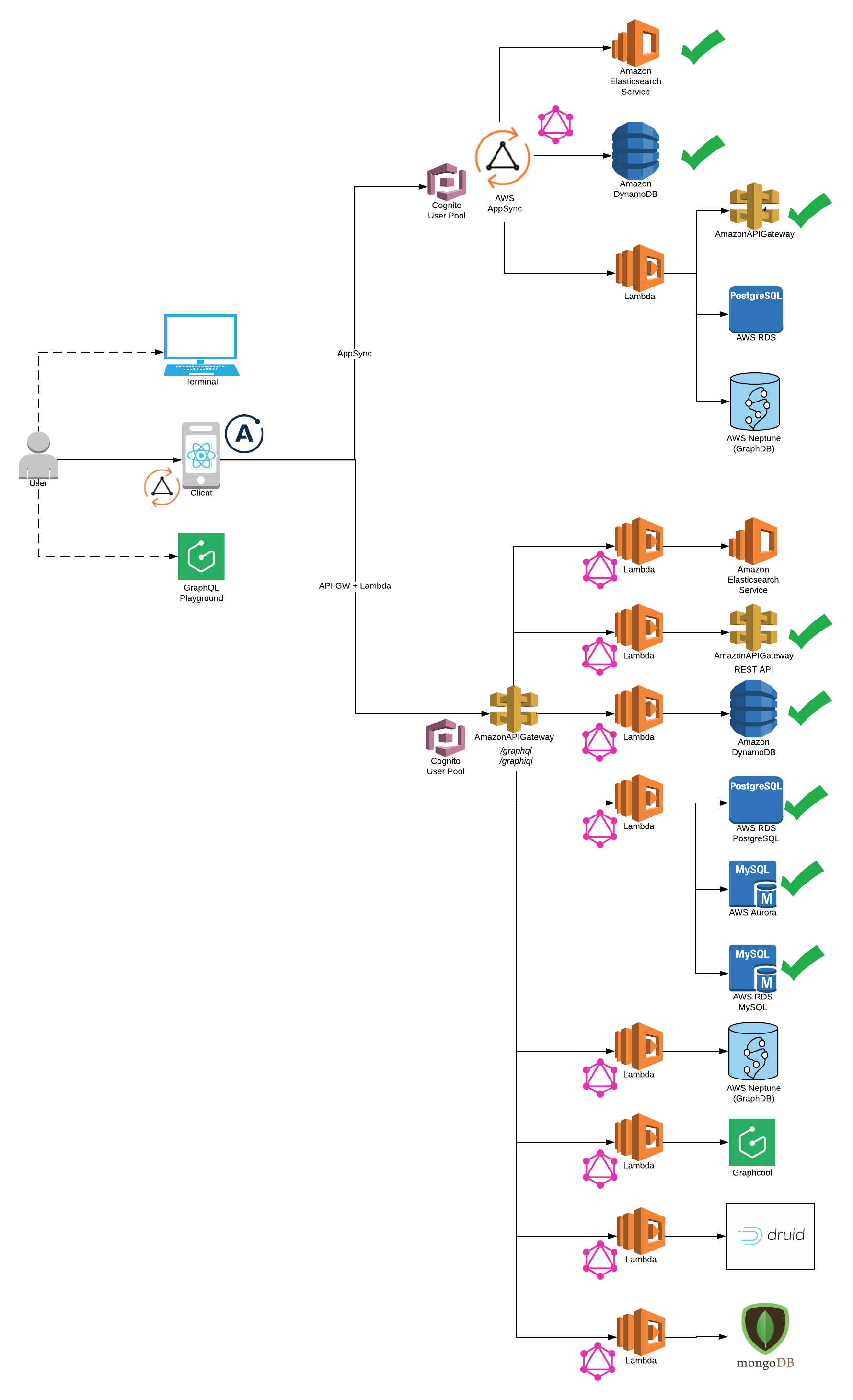
You need to have Node 6 or higher installed.
npm install -g serverless
npm install -g yarn
npm install -g netlify-cli
Install Dependencies.
yarn install
Please note: AWS CLI is required to be installed on your system
- Select Backend
-
AWS Appsync (Serverless Offline does not support Appsync at this point)
- AWS DynamoDB
- AWS ElasticSearch
- AWS Lambda
-
Lambda Backend (Serverless Offline Supported)
- Twitter Rest API
cd app-backend/rest-api
yarn start
Generate your Consumer Key and Secret Key for a Twitter App and update config
-
DynamoDB
cd app-backend/dynamodb yarn start -
RDS
cd app-backend/rds
yarn start
- Twitter Rest API
- Start FrontEnd (Apollo Client or Appsync Client)
-
For Appsync Backend please select Appsync Client Integration:
cd app-client/appsync-client/ yarn start -
For Lambda Backend please select Apollo Client Integration:
cd app-client/apollo-client/
yarn start
Also, please make sure GraphQL endpoint is configured correctly in config/security.env.local to run client on local.
- Start GraphiQL
http://localhost:4000/graphiql
- Start GraphQL Playground (GraphiQL replacement - coming soon)
http://localhost:4000/playground
rest-api and dynamodb backends route GET and POST to the same /graphql endpoint handler
http://localhost:4000/graphql
- Sample Query for GraphiQL, Playground or GraphQL
{
 getUserInfo(handle: "Madalyn61") {
 name
 tweets {
 items {
 retweeted
 retweet_count
 favorited
 tweet
 }
 }
 topTweet {
 retweeted
 retweet_count
 favorited
 }
 }
}
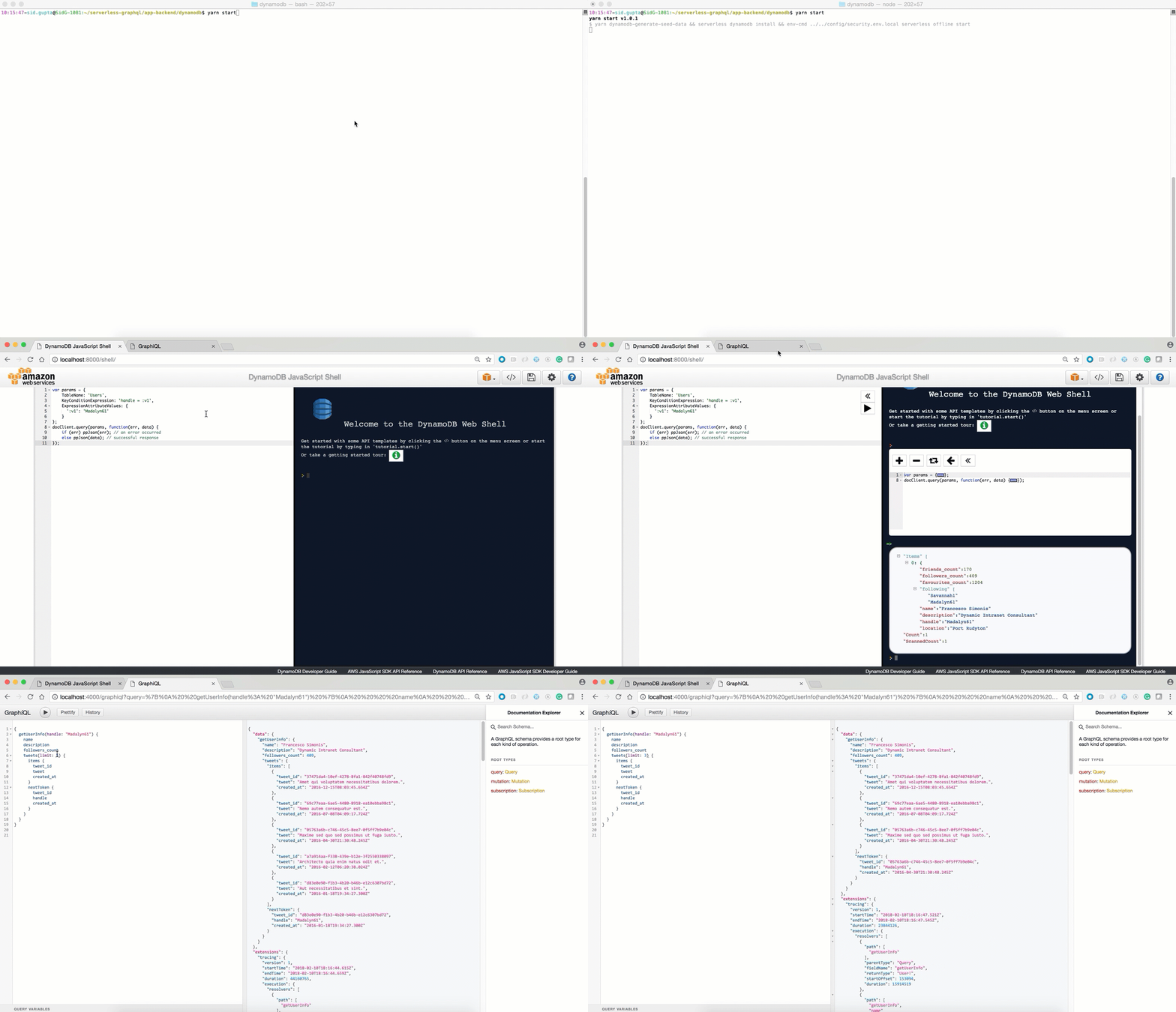
If you've followed me this far, DynamoDB will now be available and running on your local machine at http://localhost:8000/shell:
Configure your AWS keys. Here you can find a 2min walkthrough how to do retrieve the keys.
sls config credentials --provider aws --key <your_aws_access_key> --secret <your_aws_secret_key>

You need to make sure you have access to your deployed lambda functions.
- Select Backend
- AWS Appsync (Supported by Serverless-AppSync-Plugin)
Note Please make sure latest serverless package is installed npm install -g serverless@latest
To use aws appsync you will need to create cognito user pool to authenticate the API Reference
- AWS DynamoDB
 cd app-backend/appsync/dynamodb
 yarn deploy-prod
 yarn deploy-appsync

- AWS ElasticSearch

 cd app-backend/appsync/dynamo-elasticsearch-lambda
 yarn deploy-prod
 yarn deploy-appsync

- AWS Lambda

 cd app-backend/appsync/lambda
 yarn deploy-prod
 yarn deploy-appsync
-
Lambda Backend (Serverless Offline Supported)
-
Twitter Rest API
cd app-backend/rest-api yarn deploy-prod -
DynamoDB
cd app-backend/dynamodb yarn deploy-prod -
RDS
-
Create RDS Instance. For example - PostGres Tutorial
-
Please make sure connectivity to production RDS instance works (For example: test via razersql)
-
Edit the
config/security.env.prodfile and replace theDATABASE_URLvariable with your amazon rds endpoint (eg: postgres://${username}:{password}@${endpoint):5432/${dbName}). -
Run the deployment command
cd app-backend/rds
yarn deploy-prod
-
-
- Config: Get your /graphql POST endpoint as shown below and use it in config/security.env.prod NOTE Please remove all quotes and <> and place only your POST endpoint url otherwise you will get 405 method not allowed error on POST to your endpoint

- Select Frontend (apollo-client or appsync-client)
-
Note:
- For lambda please use apollo-client
- For appsync backend please use appsync-client
- Please note that backend is deployed before deploying frontend.
- You can deploy the client on AWS S3 or Netlify.
-
AWS S3
-
First you will need to choose custom s3 bucket name for client. For ex: s3-firstname-serverless-graphql. Please note that bucket name must be unique across all aws buckets.
-
Now, in
app-client/<client-name>/serverless.ymledit thecustom.client.bucketNameproperty and replace it the bucket name above. -
Now, in
app-client/<client-name>/package.jsonedit thehomepageproperty withhttps://${yourBucketName}.s3-website-us-east-1.amazonaws.com. For ex: https://s3-bucketname-serverless-graphql.s3-website-us-east-1.amazonaws.com -
Run the deployment command
cd app-client/<client-name>/ yarn deploy-s3 # Your deployment url will be printed on the console -
Your deployment url will be : https://s3.amazonaws.com/[bucket-name]/index.html
-
-
Netlify
-
First you will need to create a new account. Please see https://www.netlify.com/docs/cli/ for details.
-
Remove homepage property in
app-client/<client-name>/package.json. This property is not required while deploying to netlify but is required for aws s3 deployment. -
The first time you use the cli tool, you’ll be asked to authenticate through the browser. After you authenticate netlify will store an access token in a global ~/.netlify/config
-
Run deployment command
cd app-client/<client-name>/ yarn deploy-netlify- ? No site id specified, create a new site (Y/n) Y
- ? Path to deploy? (current dir) build
-
Your deployment url will be printed on the console
-
- GraphQL Schema:
type Mutation {
	# Create a tweet for a user
	# consumer keys and tokens are not required for dynamo integration
	createTweet(
		tweet: String!,
		consumer_key: String,
		consumer_secret: String,
		access_token_key: String,
		access_token_secret: String,
		created_at: String!
	): Tweet!
	# Delete User Tweet
	deleteTweet(
	 tweet_id: String!,
	 consumer_key: String,
 consumer_secret: String,
 access_token_key: String,
 access_token_secret: String
 ): Tweet!
	# Retweet existing Tweet
	reTweet(
	 tweet_id: String!,
	 consumer_key: String,
 consumer_secret: String,
 access_token_key: String,
 access_token_secret: String
 ): Tweet!
	# Update existing Tweet
	updateTweet(tweet_id: String!, tweet: String!): Tweet!
 # Create user info is available in dynamo integration
	updateUserInfo(
		location: String!,
		description: String!,
		name: String!,
		followers_count: Int!,
		friends_count: Int!,
		favourites_count: Int!,
		followers: [String!]!
	): User!
}
type Query {
	meInfo(consumer_key: String, consumer_secret: String): User!
	getUserInfo(handle: String!, consumer_key: String, consumer_secret: String): User!
	# search functionality is available in elasticsearch integration
	searchAllTweetsByKeyword(keyword: String!): TweetConnection
}
type Subscription {
	addTweet: Tweet
		@aws_subscribe(mutations: ["createTweet"])
}
type Tweet {
	tweet_id: String!
	tweet: String!
	retweeted: Boolean
	retweet_count: Int
	favorited: Boolean
	created_at: String!
}
type TweetConnection {
	items: [Tweet!]!
	nextToken: String
}
type User {
	name: String!
	handle: String!
	location: String!
	description: String!
	followers_count: Int!
	friends_count: Int!
	favourites_count: Int!
	followers: [String!]!
	topTweet: Tweet
	tweets(limit: Int!, nextToken: String): TweetConnection
	# search functionality is available in elasticsearch integration
 searchTweetsByKeyword(keyword: String!): TweetConnection
}
schema {
	query: Query
	mutation: Mutation
	subscription: Subscription
}
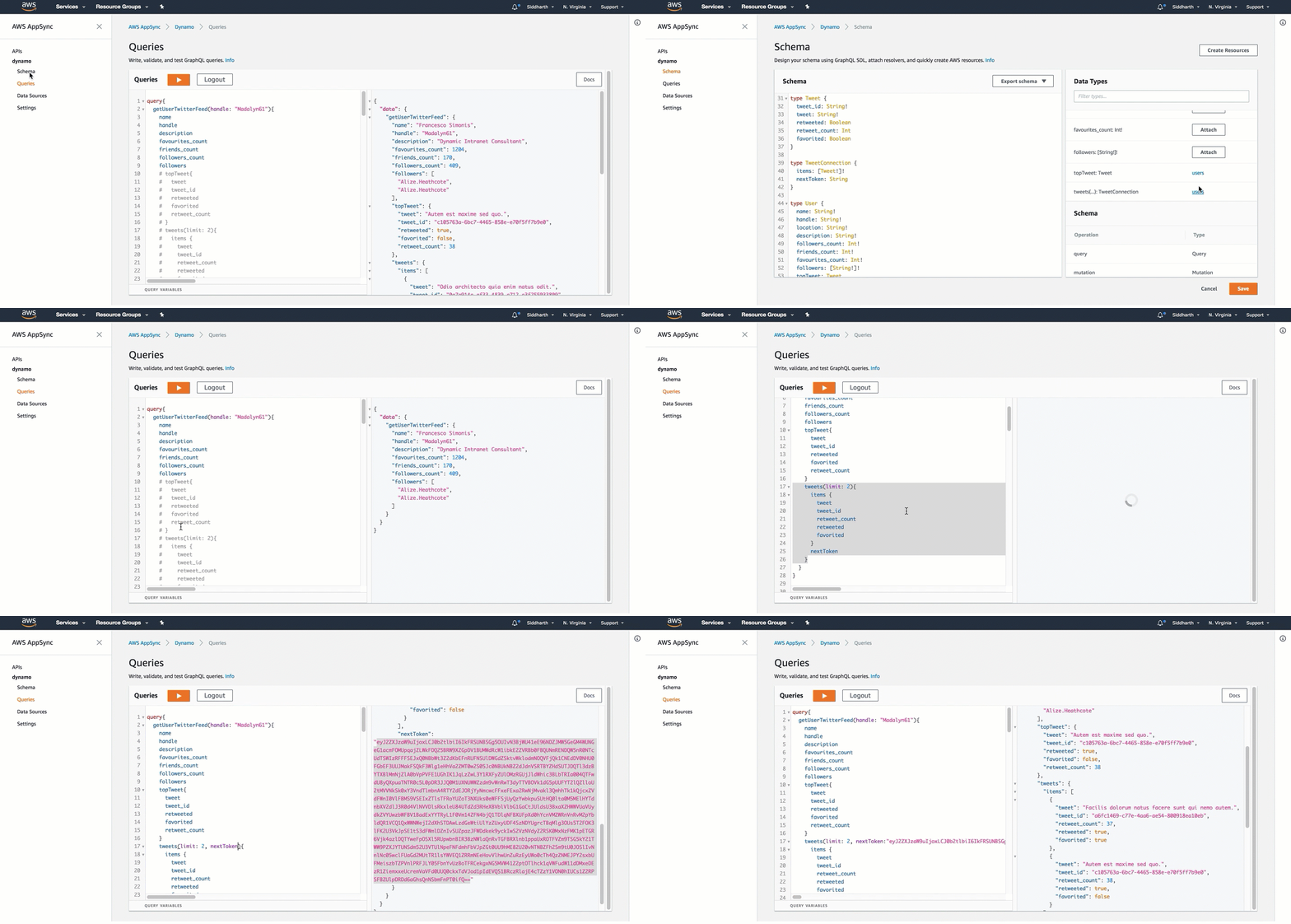
- GraphQL Query:
.
├── /app-client/ # React JS Client Integrations
│ ├── /appsync-client # Appsync Client Itegrations
│ │ ├── /public/ # front End Utils
│ │ │ ├── /index.html # main html file to render react app
│ │ │ ├── /... # front end metadata
│ │ ├── /src/ # react app code logic
│ │ │ ├── /components/ # react components
│ │ │ ├── /App.js # react application logic
│ │ │ ├── /index.js # react dom render
│ │ │ ├── /aws-exports.js # AWS Authentication
│ │ │ ├── /... # etc.
│ │ ├── /package.json # react app dependencies
│ │ ├── /serverless.yml # Serverless yaml for AWS deployment
│ ├── /apollo-client # Apollo Client Itegrations
│ │ ├── /public/ # front End Utils
│ │ │ ├── /index.html # main html file to render react app
│ │ │ ├── /... # front end metadata
│ │ ├── /src/ # react app code logic
│ │ │ ├── /components/ # react components
│ │ │ ├── /App.js # react application logic
│ │ │ ├── /index.js # react dom render
│ │ │ ├── /... # etc.
│ │ ├── /package.json # react app dependencies
│ │ ├── /serverless.yml # Serverless yaml for AWS deployment
├── /app-backend/ # Server Backend Integrations
├ ├── /appsync/ # AWS Appsync Integrations
├ ├ ├── /dynamodb/* # AWS Appsync Dynamodb
├ ├ ├── /elasticsearch/* # AWS Appsync Elasticsearch
├ ├ ├── /lambda/ # AWS Appsync Lambda
│ ├── /dynamodb # Integration with DynamodDB Backend
│ │ ├── /seed-data/ # seed test data
│ │ │ ├── /create_seed_data.js # Create Seed data to be inserted in dynamodb local and remote
│ │ │ ├── /insert_seed_data_prod.js # Insert seed data in aws dynamodb (serverless)
│ │ │ ├── /sample-query.txt # Test Query on DynamoDB Local Client http://localhost:8000
│ │ ├── /handler.js # AWS Lambda - Apollo Lambda Server
│ │ ├── /package.js # server side dependencies
│ │ ├── /resolvers.js # graphql resolvers
│ │ ├── /schema.js # graphql schema
│ │ ├── /serverless.yml # Serverless yaml for AWS deployment
│ │ ├── /webpack.config.js # Webpack server side code with ES6
│ ├── /rest-api # Integration with REST API Backend
│ │ ├── /handler.js # AWS Lambda - Apollo Lambda Server
│ │ ├── /package.js # server side dependencies
│ │ ├── /resolvers.js # graphql resolvers
│ │ ├── /schema.js # graphql schema
│ │ ├── /serverless.yml # Serverless yaml for AWS deployment
│ │ ├── /webpack.config.js # Webpack server side code with ES6
│ ├── /rds # Integrations for PostGres, MySQL and Aurora Backend
│ │ ├── /seed-data/ # seed test data
│ │ │ ├── /create_seed_data.js # Create Seed data to be inserted in dynamodb local and remote
│ │ │ ├── /seed_local.js # Insert seed data in aws dynamodb (serverless)
│ │ │ ├── /seed_prod.js # Test Query on DynamoDB Local Client http://localhost:8000
│ │ ├── /migrations/ # Create DDL statements
│ │ ├── /knexfile.js # Database Configurations
│ │ ├── /handler.js # AWS Lambda - Apollo Lambda Server
│ │ ├── /package.js # server side dependencies
│ │ ├── /resolvers.js # graphql resolvers
│ │ ├── /schema.js # graphql schema
│ │ ├── /serverless.yml # Serverless yaml for AWS deployment
│ │ ├── /webpack.config.js # Webpack server side code with ES6
├── /config/ # Configuration files
│ ├── /security.env.local # local config
│ ├── /security.env.prod # production config
- Schema Stitching
- Lambda Backend: GraphCool, Druid
- Aggregations at Scale - Druid
- Lambda Backend: Authentication and Authorization
- Lambda Backend: Pagination
- Swagger Integration
- Integration with Azure, IBM and Google Coud
As the Serverless GraphQL Apollo community grows, we'd like to keep track of who is using the platform. Please send a PR with your company name and @githubhandle if you may.
Currently officially using Serverless GraphQL Apollo :