Feel free to ask questions add issues. If I don't respond to an issue or PR, feel free to ping me or send me DM on twitter @thealeksandr.
- Fix support for Android < M
- Minor fixes and Improvements
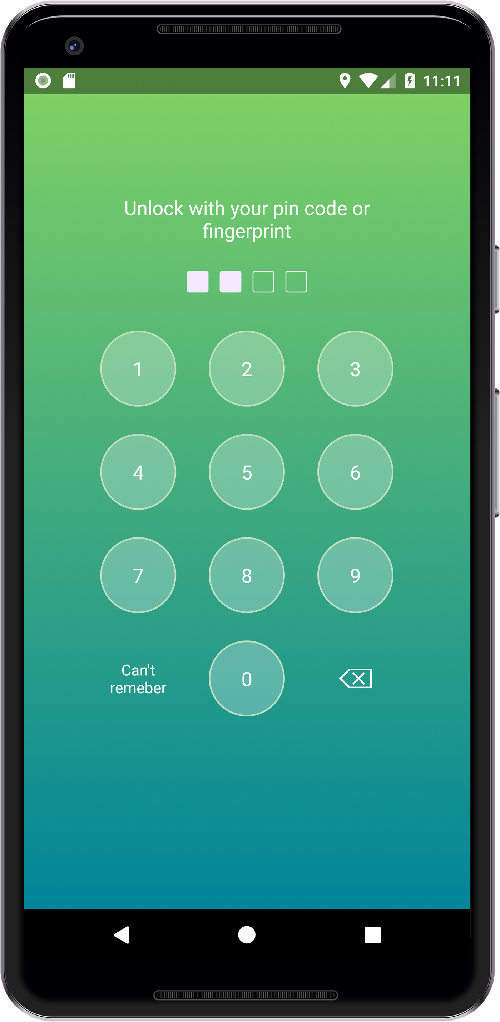
PFLockScreen - Lock Screen Library for Android Application. Library support pin code and fingerprint authorization for API level 23+.


allprojects {
	repositories {
		...
		maven { url 'https://jitpack.io' }
	}
}
dependencies {
	compile 'com.github.thealeksandr:PFLockScreen-Android:1.0.0-beta2'
}
Creating lock screen fragment in create mode.
PFLockScreenFragment fragment = new PFLockScreenFragment();
PFFLockScreenConfiguration.Builder builder = new PFFLockScreenConfiguration.Builder(this)
				.setMode(PFFLockScreenConfiguration.MODE_CREATE);
fragment.setConfiguration(builder.build());
fragment.setCodeCreateListener(new PFLockScreenFragment.OnPFLockScreenCodeCreateListener() {
	@Override
 public void onCodeCreated(String encodedCode) {
		//TODO: save somewhere;
	}
});
//TODO: show fragment;
After user created pin code. The library will encode it using Android Key Store and return an encoded string in PFLockScreenFragment.OnPFLockScreenCodeCreateListener. All you have to do is save encoded string somewhere - database, SharedPreferences, Android Account etc.
Creating lock screen fragment in authorization mode is same as in creation mode, but instead of MODE_CREATE use MODE_AUTH.
PFFLockScreenConfiguration.Builder(this).setMode(PFFLockScreenConfiguration.MODE_AUTH);
PFFLockScreenConfiguration.Builder builder = new PFFLockScreenConfiguration.Builder(this)
 .setTitle("Unlock")
 .setUseFingerprint(true).
 .setMode(PFFLockScreenConfiguration.MODE_AUTH)
 .setCodeLength(6)
 .setLeftButton("Can't remeber",
			 new View.OnClickListener() {
		 @Override
 public void onClick(View v) {
 }
 });
setTitle(String) - set custom string on the top of the screen. setUseFingerprint(boolean) - by default fingerprint button will be shown for all device 23+ with a fingerprint sensor. If you don't want use fingerprint at all set false. setMode(PFLockScreenMode) - MODE_CREATE or MODE_AUTH. See details above. setCodeLength(int) - set the length of the pin code. By default, length is 4. Minimum length is 4. setLeftButton(String, View.OnClickListener) - set string for the left button and ClickListener.
boolean isExist = PFFingerprintPinCodeHelper.getInstance().isPinCodeExist();
An encryption key is needed to encode/decode pin code and stored in Android KeyStore.
You need to delete encryption key if you delete/reset pin code.
PFFingerprintPinCodeHelper.getInstance().delete();
You can customize buttons, backgrounds, etc. To do that, use attributes in your activity theme:
pf_key_button - style object for key buttons (0-9) pf_lock_screen - style object for the background. Use it to set custom background. pf_fingerprint_button - style object for fingerprint button. You can set custom drawable, paddings, etc. pf_delete_button - style object for delete/backspace button. You can set custom drawable, paddings, etc. pf_code_view - style object to customize code view. (The view from the top of the screen). The view itself is set of check boxes. To customize it use a custom selector with checked states.
Examples:
 <style name="AppTheme" parent="Theme.AppCompat.Light.NoActionBar">
 <!-- Some of your styles. -->
 <item name="pf_key_button">@style/MyLockScreenButtonStyle</item>
 <item name="pf_fingerprint_button">@style/MyLockScreenFingerprintButtonStyle</item>
 <item name="pf_delete_button">@style/MyLockScreenDeleteButtonStyle</item>
 <item name="pf_lock_screen">@style/MyLockScreenStyle</item>
 <item name="pf_code_view">@style/MyLockScreenCodeStyle</item>
</style>
 <style name="MyLockScreenStyle">
 <item name="android:background">@drawable/screen_background</item>
</style>
<style name="MyLockScreenButtonStyle">
 <item name="android:textColor">@android:color/white</item>
 <item name="android:textSize">18dp</item>
 <item name="android:foreground">@drawable/key_foreground</item>
</style>
<style name="MyLockScreenFingerprintButtonStyle">
 <item name="android:src">@drawable/fingerprint_icon</item>
</style>
<style name="MyLockScreenDeleteButtonStyle">
 <item name="android:src">@drawable/delete_lockscreen</item>
</style>
<style name="MyLockScreenCodeStyle">
 <item name="android:button">@drawable/code_selector</item>
</style>
The only important thing you can't change right now is the size of keys. But it's coming.
Feel free to ask questions add issues. If I don't respond to an issue or PR, feel free to ping me or send me DM on twitter @thealeksandr.