Telemetry Racing Analytics & Comparative Engine
CI PyPI Python versions Downloads License: MIT Last commit
A live telemetry dashboard, lap analyst, and race analyst for Gran Turismo 7 — reads the UDP telemetry stream straight off your PS4/PS5 over your local network. No mods, no jailbreak, just the game's own broadcast data, wrapped in three desktop tools you can install with one pip install.
Also published on PyPI as gt7tracetelem · Site: gt7trace.netlify.app
Community tool — not affiliated with, endorsed by, or connected to Polyphony Digital or Sony Interactive Entertainment.
Project status: feature-complete as of this release. From here on it's maintenance only — bug fixes, and car/track database refreshes as ddm999's gt7info updates. No further new features are planned.
- Screenshots
- What's in the box
- Install
- Quick start
- How it works
- Public data API
- Privacy & analytics
- Troubleshooting
- Contributing
- Credits
- License
- Support
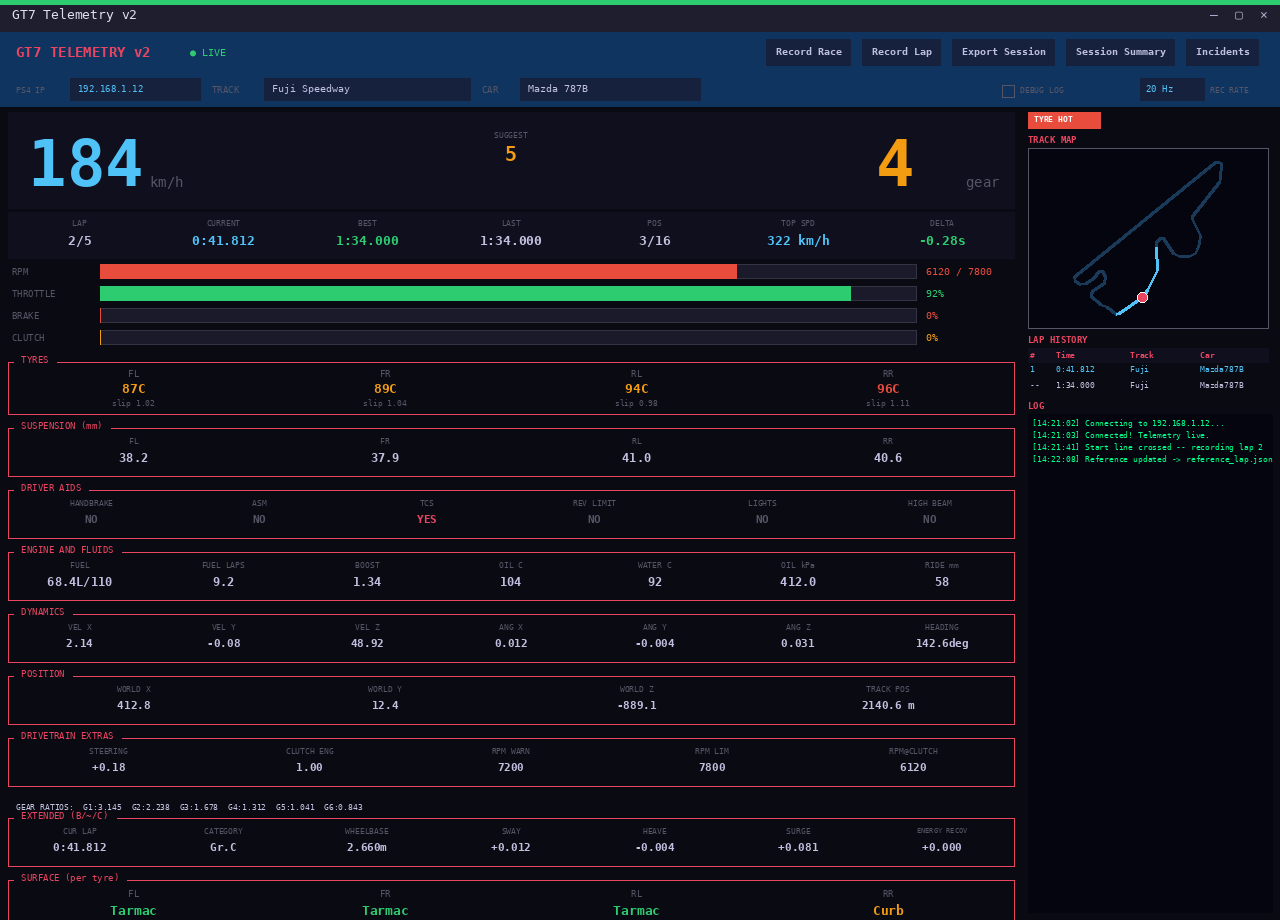
- Real-time speed, RPM, gear, throttle/brake, tyre temps & slip
- Mini track map with live position
- Configurable recording sample rate (10/20/30/60 Hz)
- Live delta vs. a reference lap
- Connection diagnostics — heartbeats, packet loss, decrypt/parse failures, actionable error messages
- Remembers known-good PS4/PS5 IPs (up to 3, most recent first)
- Incident timeline
- Lap history table with alerts
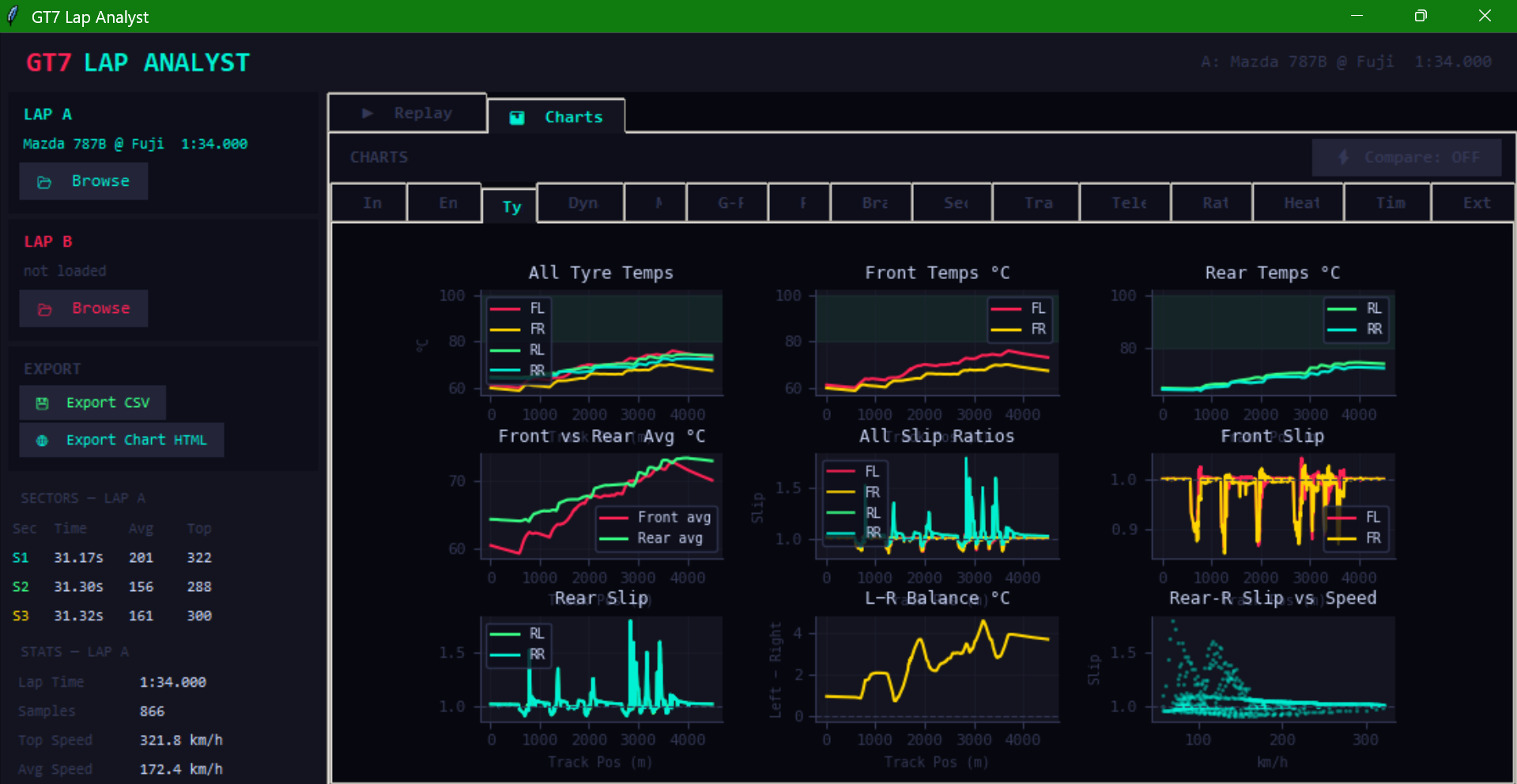
- 16 chart groups: Inputs, Engine, Tyres, Dynamics, Maps, G-Force, Fuel, Braking, Sectors, Traction, Tele Diff, Ratings, Heat Maps, Timeline, Extended, Consensus
- A/B lap comparison across every chart group
- Dual replay — synced and realtime
- Driver ratings radar
- Track-map heatmaps across 9 metrics (speed, throttle, brake, lateral/longitudinal/total G, tyre temp, RPM, steering)
- CSV and HTML chart export
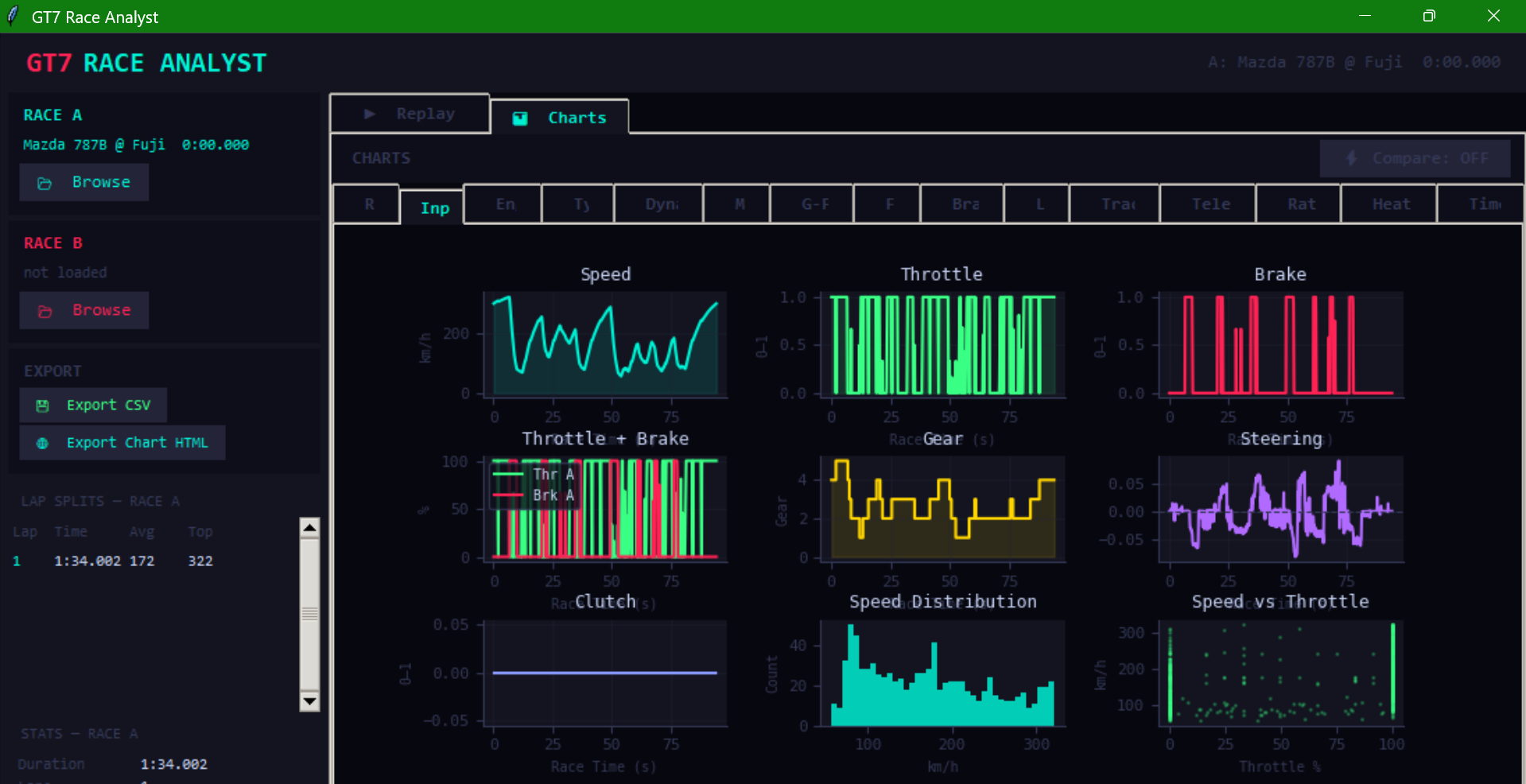
- Same chart-group depth as Lap Analyst (15 groups, race-oriented: Race overview + Laps in place of Sectors + Extended)
- Race timeline, minimap heatmap, replay with speed control up to ×ばつ
gt7telem-add-car/gt7telem-add-track— add a missing car/track ID to the local database from the terminal (also runnable aspython -m gt7telem.add_car/python -m gt7telem.add_track)- Ships with 580+ cars and 120+ tracks pre-resolved out of the box; the car database is refreshed every time 10 or more new cars have been added since the last update
- Submit any recorded lap to a public per-car, per-track leaderboard with one click; live Top-10 panel in the sidebar
- Server-side anti-cheat — physically-impossible times are rejected outright, times beating the record by more than 20% are held for manual review
- Ghost lap download — pull any Top-10 lap straight into the A/B compare view as Lap B
- Consensus racing line — overlay a community-average speed/throttle/brake line, bucketed from the current top 10 laps for your car and track
- Optional free account (display name only, no email or password) so a submission ties to something real; entirely skippable — viewing the leaderboard, ghost downloads, and the consensus line all work without one
pip install gt7tracetelem
The importable module is gt7telem (not gt7tracetelem) — the PyPI distribution name and the import name are different:
import gt7telem
gt7telem.get_snapshot()
Or just run gt7telem from a terminal to launch the GUI menu.
If you already have an unrelated package that installs a top-level
gt7telemmodule, the two will conflict. Check first withpip show gt7telem.
Works on Windows, macOS, or Linux with Python 3.10+.
git clone https://github.com/ransh2014/gt7telemtrace.git
cd gt7telemtrace
pip install -e .
gt7telem
No Python required — grab a prebuilt Windows .exe, Linux binary, or macOS .app from gt7trace.netlify.app/setup.html . The macOS build is produced automatically on a GitHub-hosted Apple Silicon runner (see build-macos.yml) — on an older Intel Mac, use Option 1 or 2 instead.
- In GT7, make sure telemetry broadcasting is available (it's on by default while a session/menu is active — no separate settings toggle needed).
- Launch
gt7telem(or run the source/binary). - Pick Live Dashboard, Lap Analyst, or Race Analyst from the menu.
- Enter your console's IP in the Dashboard field and hit Enter — it's remembered for next time.
- Recorded laps save to
~/TRACE/laps(pip/source installs) or alaps/folder next to the executable (standalone .exe/.app builds, which are portable). To move it, editLAPS_FOLDERinsettings.json— there's no in-app control for it.
Find your console's IP: Settings → Network → View Connection Status on your PS4/PS5. Your PC and console need to be on the same local network.
TRACE talks directly to the console for all core telemetry — no server, no browser, no cloud involved in reading your live data:
- A UDP heartbeat (
"C") is sent to<console IP>:33739roughly once a second, requesting GT7's fullest telemetry packet (the "extended" B + ~ + C fields — motion data, filtered inputs, and energy recovery all in one). - GT7 streams packets back to your PC on port
33740. - Each packet is decrypted with Salsa20 and unpacked into a
Telemetrysnapshot — the protocol details this library relies on were reverse-engineered by Bornhall (see Credits). - Because TRACE always requests the extended packet, you get motion/sway/heave/surge and filtered-input data automatically — there's no separate "heartbeat type" setting to configure.
- Settings (last-used IP, sample rate, known-good IPs, analytics opt-out) persist to a
settings.json, so there's nothing to reconfigure between sessions. Standalone .exe/.app builds keep it next to the executable so the app stays portable; pip and from-source installs use~/.gt7telem/instead, which survivespip install --upgrade.
The one exception is the optional leaderboard: submitting, browsing the Top-10, downloading a ghost lap, or loading the consensus line talks to a Supabase backend over HTTPS. Nothing about your live session is ever sent unless you press "Submit to Leaderboard."
TRACE sends a small anonymous usage ping (which tool launched, TRACE version, OS, a timestamp — five fields, nothing else) each time you open Live Dashboard, Lap Analyst, or Race Analyst. It's on by default and helps decide where to spend limited development time; it never includes telemetry content, lap data, PSN name, or IP.
Turn it off any time: Live Dashboard → SHARE USAGE DATA checkbox (next to DEBUG LOG in the header) — the setting applies to all three tools since they share the same settings.json.
Submitting a lap to the leaderboard is a separate, always-explicit opt-in (a button you press), and the optional free account only ever stores a display name and an anonymous ID — no email, no password.
Full disclosure of exactly what's sent for both: gt7trace.netlify.app/privacy.html
import gt7telem
gt7telem.set_ip("192.168.1.X")
gt7telem.wait_for_connection()
snap = gt7telem.get_snapshot()
print(gt7telem.get_car_name(snap))
print(gt7telem.get_diagnostics()) # heartbeat / packet-loss / decrypt status as a human-readable string
See gt7telem.__all__ for the full list of exported functions (get_snapshot, set_car, set_track, get_diagnostics, get_car_name, get_track_name, all_track_names, settings persistence, and more). The GUI apps (dashboard, lap_analyst, race_analyst) are available as submodules for anyone building on top of TRACE directly:
from gt7telem import dashboard
dashboard.App().mainloop()
| Symptom | Likely cause |
|---|---|
"Can't send heartbeat to <ip>:33739" |
Wrong console IP, or PC/console aren't on the same network |
| Heartbeats sending but nothing comes back | Firewall is blocking inbound UDP on port 33740 — allow it for Python/the TRACE executable |
| Packets arriving but not decrypting | Something else is bound to port 33740, an unexpected console/game version, or a mid-stream corrupt packet (usually self-resolves) |
A module named gt7telem already exists |
You (or another package) installed an unrelated gt7telem; run pip show gt7telem to check before installing |
| Car/track shows as a blank name | The ID isn't in the local database yet — run gt7telem-add-car / gt7telem-add-track, or wait for the next scheduled DB refresh |
Live connection diagnostics (heartbeat count, packet loss, last error) are always visible in the Dashboard, and available programmatically via gt7telem.get_diagnostics().
Issues and PRs are welcome — see CONTRIBUTING.md for the quick version (dev setup, where the GUI code lives, and how the car/track databases get refreshed).
TRACE stands on the shoulders of people who did the hard, unglamorous work this project depends on:
- Bornhall — reverse-engineered GT7's UDP telemetry protocol, including the Salsa20 decryption key and full packet byte structure. Every telemetry value TRACE reads comes from this work.
- ddm999 — maintains gt7info, the community car and track database that resolves every car/track ID to a real name shown anywhere in TRACE.
- MacManley and Nenkai — the community packet documentation
udp.pycross-references for the per-version packet lengths (A/B/~/C) and the extended-field byte offsets.
Full writeup and credits: gt7trace.netlify.app/about.html .
MIT — see LICENSE.
TRACE is free and always will be. If it's improved your GT7 sessions, a coffee is appreciated: ko-fi.com/ransh .