

Underlined matching brackets and more for Visual Studio Code.
Subtle Brackets @ Visual Studio Marketplace
Subtle Brackets allows custom styling of matching brackets as VSCode currently boxes them, impairing visibility. By default, it applies a subtle light/dark underline to the bracket next to the cursor and its matching pair:
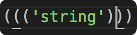
You can also customize the style applied to matching brackets.
| Setting | Default | Description |
|---|---|---|
| subtleBrackets.disableNative | true |
Subtle Brackets permanently disables the native matchBrackets by default. Turn to false to prevent this behavior. |
| subtleBrackets.parse | true |
If true, documents will be properly parsed via Prism, whenever possible, so brackets within strings and comments don't trigger the decoration. There are some edge cases. |
| subtleBrackets.style | { "borderWidth": "1px", "borderStyle": "none none solid none" } |
Change the default style applied to matching brackets. The default is a light/dark underline (depending on your current theme). |
| subtleBrackets.pairs | [{ "open": "(", "close": ")" }, { "open": "[", "close": "]" }, { "open": "{", "close": "}" }] |
An array of objects defining the bracket pairs to match. They can also define specific styles and whether to take parsing into account for each specific pair. |
Each pair definitition must have the open and close keys, and can optionally take custom style and parse keys for the pair.
As an example, here's how you would disable parsing for the () bracket pair, and set a red underline for {}.
"subtleBrackets.pairs" : [
 {
 "open": "(",
 "close": ")",
 "parse": false
 },
 {
 "open": "[",
 "close": "]"
 },
 {
 "open": "{",
 "close": "}",
 "style": { "borderColor": "red" }
 }
]
If you wish, you can change the default style applied to matching brackets by modifying the subtleBrackets.style property. For a list of allowed styles check DecorationRenderOptions.
As an example, here's how you would set a 2px blue underline default style:
"subtleBrackets.style": {
 "borderColor": "blue",
 "borderWidth": "2px"
}
You can also target a specific bracket pair by setting a style key within its definition. As an example, here's how we'd assign a white font over red a background to the "[]" pair.
"subtleBrackets.pairs" : [
 {
 "open": "(",
 "close": ")"
 },
 {
 "open": "[",
 "close": "]",
 "style": {
 "color": "white",
 "backgroundColor": "red",
 "borderStyle": "none"
 }
 },
 {
 "open": "{",
 "close": "}"
 }
]