
이미지에서 프롬프트 정보를 자동으로 추출하는 ComfyUI 노드입니다.
This is a ComfyUI node that automatically extracts prompt information from images.
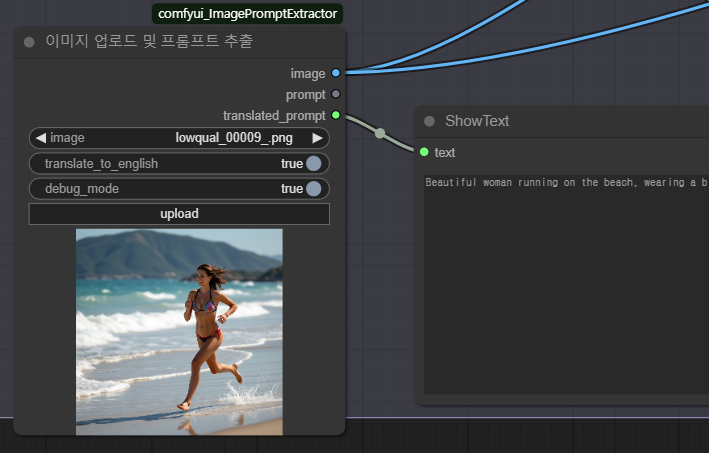
ComfyUI Manager를 통해 "ImagePromptExtractor"를 검색하여 설치할 수 있습니다.
You can install by searching for "ImagePromptExtractor" through the ComfyUI Manager.
ComfyUI의 custom_nodes 폴더에 이 저장소를 복제합니다:
Clone this repository into the custom_nodes folder of ComfyUI:
cd ComfyUI/custom_nodes
git clone https://github.com/purestory/comfyui_ImagePromptExtractor.git-
표준 ComfyUI 이미지 업로드 인터페이스 사용
-
이미지에서 메타데이터 기반 프롬프트 자동 추출
-
ComfyUI 호환 이미지 출력 및 프롬프트 텍스트 출력
-
다양한 형식의 메타데이터 지원 (ComfyUI 워크플로우, 일반 파라미터, EXIF 등)
-
유니코드 한글 텍스트 자동 감지 및 변환
-
Standard ComfyUI image upload interface
-
Automatic extraction of metadata-based prompts from images
-
ComfyUI-compatible image output and prompt text output
-
Support for various metadata formats (ComfyUI workflows, general parameters, EXIF, etc.)
-
Automatic detection and conversion of Unicode Korean text
-
ComfyUI 워크플로우에 "이미지 업로드 및 프롬프트 추출" 노드를 추가합니다.
-
노드의 이미지 선택기를 통해 이미지를 업로드합니다.
-
노드가 이미지와 추출된 프롬프트를 함께 출력합니다.
-
이미지 출력은 다른 ComfyUI 노드(업스케일러, VAE 등)와 연결할 수 있습니다.
-
프롬프트 출력은 텍스트 표시 노드나 다른 텍스트 처리 노드와 연결할 수 있습니다.
-
Add the "Image Upload and Prompt Extractor" node to your ComfyUI workflow.
-
Upload an image through the node's image selector.
-
The node will output both the image and the extracted prompt.
-
The image output can be connected to other ComfyUI nodes (upscalers, VAE, etc.).
-
The prompt output can be connected to text display nodes or other text processing nodes.
-
ComfyUI 워크플로우 메타데이터
- DeepTranslatorTextNode
- CLIPTextEncode
- 기타 텍스트 관련 노드
-
일반 이미지 메타데이터
- "parameters" 필드
- "Comment" 필드
- EXIF 메타데이터
-
ComfyUI workflow metadata
- DeepTranslatorTextNode
- CLIPTextEncode
- Other text-related nodes
-
General image metadata
- "parameters" field
- "Comment" field
- EXIF metadata
-
PNG 이미지 형식이 가장 많은 메타데이터를 보존합니다.
-
일부 이미지는 메타데이터가 없거나 프롬프트 정보가 포함되어 있지 않을 수 있습니다.
-
한글 유니코드 텍스트는 자동으로 감지되고 변환됩니다.
-
PNG image format preserves the most metadata.
-
Some images may not contain metadata or prompt information.
-
Korean Unicode text is automatically detected and converted.
MIT
이슈와 PR은 환영합니다: https://github.com/purestory/comfyui_ImagePromptExtractor
Issues and PRs are welcome: https://github.com/purestory/comfyui_ImagePromptExtractor