

Looking for a theme that fits your vibe? Whether you're into dark mode, light mode, or something in between, this NekoNight has got you covered. Written in Lua for snappy performance, it's a buffet of color schemes for every taste and mood. 🍭 Want to boost your productivity and look good while coding? We've got countless options to keep you inspired and in the zone. 🚀✨ If you love it (and we know you will), hit that ⭐ on our official repo. Your support means the world! 🌍
Note
This theme is a fork of folke/tokyonight.nvim all rights reserved

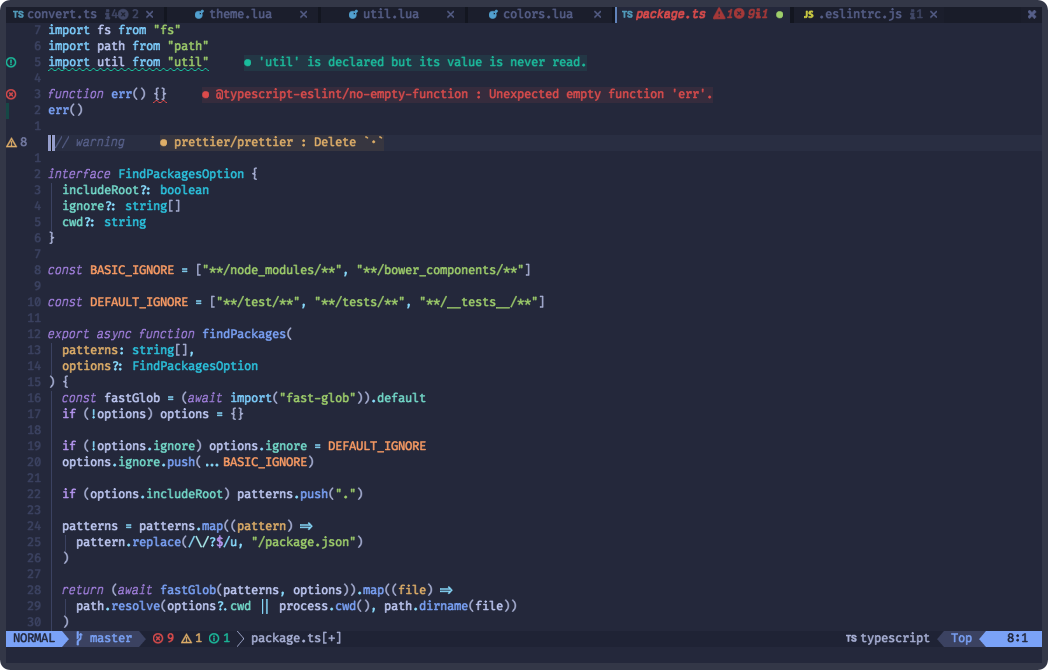


- Supports the latest Neovim 0.9.0 features.
- Terminal colors.
- Supports all major plugins.
- Provides NekoNight extras for numerous other applications.
🎨 Supported Plugins
🍭 Extras
Install the theme with your preferred package manager, such as folke/lazy.nvim:
{
 "neko-night/nvim",
 lazy = false,
 priority = 1000,
 opts = {},
}
using packer.nvim
return require('packer').startup(function(use)
 -- Other packages can be listed here...
 -- NekoNight Theme
 use 'neko-night/nvim'
end)
vim.cmd[[colorscheme nekonight]]
colorscheme nekonight
" There are also colorschemes for the different styles.
colorscheme nekonight-night
colorscheme nekonight-storm
colorscheme nekonight-day
colorscheme nekonight-moon
Some plugins need extra configuration to work with NekoNight.
Click here for more details
-- Lua
require('barbecue').setup {
 -- ... your barbecue config
 theme = 'nekonight',
 -- ... your barbecue config
}
-- Lua
require('lualine').setup {
 options = {
 -- ... your lualine config
 theme = 'nekonight'
 -- ... your lualine config
 }
}
" Vim Script
let g:lightline = {'colorscheme': 'nekonight'}
Important
Set the configuration BEFORE loading the color scheme with colorscheme nekonight.
The theme offers four styles: storm, moon, night, and day.
The day style is used when { style = "day" } is passed to
setup(options) or when vim.o.background = "light".
nekonight uses the default options,
unless setup is explicitly called.
Default Options
---@class nekonight.Config
---@field on_colors fun(colors: ColorScheme)
---@field on_highlights fun(highlights: nekonight.Highlights, colors: ColorScheme)
M.defaults = {
 style = "moon", -- The theme comes in three styles, `storm`, a darker variant `night` and `day`
 light_style = "day", -- The theme is used when the background is set to light
 transparent = false, -- Enable this to disable setting the background color
 terminal_colors = true, -- Configure the colors used when opening a `:terminal` in Neovim
 styles = {
 -- Style to be applied to different syntax groups
 -- Value is any valid attr-list value for `:help nvim_set_hl`
 comments = { italic = true },
 keywords = { italic = true },
 functions = {},
 variables = {},
 -- Background styles. Can be "dark", "transparent" or "normal"
 sidebars = "dark", -- style for sidebars, see below
 floats = "dark", -- style for floating windows
 },
 day_brightness = 0.3, -- Adjusts the brightness of the colors of the **Day** style. Number between 0 and 1, from dull to vibrant colors
 dim_inactive = false, -- dims inactive windows
 lualine_bold = false, -- When `true`, section headers in the lualine theme will be bold
 --- You can override specific color groups to use other groups or a hex color
 --- function will be called with a ColorScheme table
 ---@param colors ColorScheme
 on_colors = function(colors) end,
 --- You can override specific highlights to use other groups or a hex color
 --- function will be called with a Highlights and ColorScheme table
 ---@param highlights nekonight.Highlights
 ---@param colors ColorScheme
 on_highlights = function(highlights, colors) end,
 cache = true, -- When set to true, the theme will be cached for better performance
 ---@type table<string, boolean|{enabled:boolean}>
 plugins = {
 -- enable all plugins when not using lazy.nvim
 -- set to false to manually enable/disable plugins
 all = package.loaded.lazy == nil,
 -- uses your plugin manager to automatically enable needed plugins
 -- currently only lazy.nvim is supported
 auto = true,
 -- add any plugins here that you want to enable
 -- for all possible plugins, see:
 -- * https://github.com/BrunoCiccarino/nekonight/tree/main/lua/nekonight/groups
 -- telescope = true,
 },
}
How the highlight groups are calculated:
colorsare determined based on your configuration, with the ability to override them usingconfig.on_colors(colors).- These
colorsare utilized to generate the highlight groups. config.on_highlights(highlights, colors)can be used to override highlight groups.
For default values of colors and highlights, please consult the
storm,
moon,
night, and
day themes.
Settings & Changing Colors
require("nekonight").setup({
 -- use the night style
 style = "night",
 -- disable italic for functions
 styles = {
 functions = {}
 },
 -- Change the "hint" color to the "orange" color, and make the "error" color bright red
 on_colors = function(colors)
 colors.hint = colors.orange
 colors.error = "#ff0000"
 end
})
Borderless Telescope
require("nekonight").setup({
 on_highlights = function(hl, c)
 local prompt = "#2d3149"
 hl.TelescopeNormal = {
 bg = c.bg_dark,
 fg = c.fg_dark,
 }
 hl.TelescopeBorder = {
 bg = c.bg_dark,
 fg = c.bg_dark,
 }
 hl.TelescopePromptNormal = {
 bg = prompt,
 }
 hl.TelescopePromptBorder = {
 bg = prompt,
 fg = prompt,
 }
 hl.TelescopePromptTitle = {
 bg = prompt,
 fg = prompt,
 }
 hl.TelescopePreviewTitle = {
 bg = c.bg_dark,
 fg = c.bg_dark,
 }
 hl.TelescopeResultsTitle = {
 bg = c.bg_dark,
 fg = c.bg_dark,
 }
 end,
})
Fix undercurls in Tmux
To have undercurls show up and in color, add the following to your Tmux configuration file:
# Undercurl
set -g default-terminal "${TERM}"
set -as terminal-overrides ',*:Smulx=\E[4::%p1%dm' # undercurl support
set -as terminal-overrides ',*:Setulc=\E[58::2::::%p1%{65536}%/%d::%p1%{256}%/%{255}%&%d::%p1%{255}%&%d%;m' # underscore colours - needs tmux-3.0
Pull requests are welcome.
That said, there's a bunch of ways you can contribute to this project, like by:
- ⭐ Giving a star on this repository (this is very important and costs nothing)
- 🪲 Reporting a bug
- 📄 Improving this documentation
- 🚨 Sharing this project and recommending it to your friends
- 💻 Submitting a pull request to the official repository
For the extras, we use a simple template system that can be used to generate themes for the different styles.
How to add a new extra template:
-
Create a file like
lua/nekonight/extra/cool-app.lua. -
Add the name and output file extension to the
extrastable inlua/nekonight/extra/init.lua. -
Run the following command to generate new extra themes from the nekonight plugin directory:
./scripts/build
-
Check the newly created themes in the
extra/directory. Please DO NOT commit them, as they are already automatically built by the CI.