WebGL using threejs JavaScript Node Docker MIT License
Roborun was created motivated by a Chrome dinosaur game.
The Chrome dinosaur game was a game that could be enjoyed easily by men and women of all ages, but users quickly got tired of 2D and simple motion. So we wanted to take easy operation, which is an advantage of the Chrome dinosaur game, and develop a more interesting game by changing the 2D features into 3D.
We used Three.js to draw 3D objects and organize games. Three.js is a library that helps you draw 3D objects easily based on javascript language.
The aim of the project is to create an easy to use, lightweight, 3D library with a default WebGL renderer. The library also provides Canvas 2D, SVG and CSS3D renderers in the examples.
For more information on Three.js, please refer to the official Three.js document.
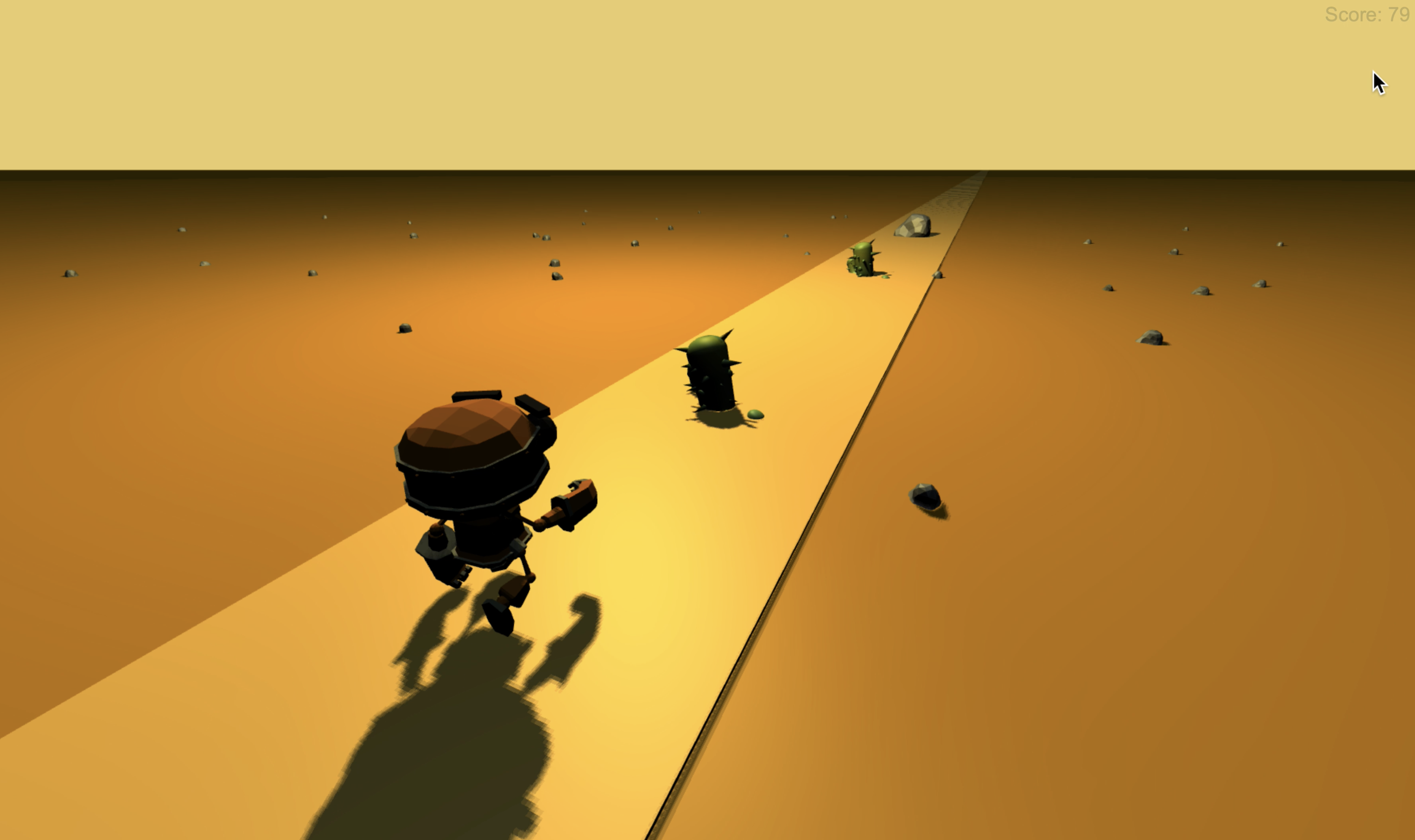
Roborun expressed 2D objects in the existing Chrome dinosaur games as 3D objects.
As the name Roborun suggests, we used robot characters, not dinosaur characters.
In addition, cactus, which used to be existing obstacles, was diversified into 3D stone and cactus to form obstacles randomly.
The background is also composed of 3D in the existing 2D configuration, expressing the robot character running.
When the game starts for the first time, it starts by clicking on the keyboard.
When you enter the game, you can make the robot jump through the space bar, which avoids obstacles.
When the game starts, the score continues to increase in proportion to time.
If the robot fails to avoid obstacles, the game is over and the score increase stops, resulting in the final score being printed.
If you want to install and run this project locally, there are two ways.
It is a method that downloads projects through Github and executes them through http-server.
To install http-server:
npm install http-server -g
To run (from Roborun directory):
http-server . -p 8000
If you connect to 127.0.0.1:8000, you can play Roborun game.
The Roborun project is implemented as a web project using express.js and distributed as a docker file.
To get docker image:
docker pull tree9295/roborun
To run:
docker run -p 8000:3000 -d tree9295/roborun
If you connect to 127.0.0.1:8000, you can play Roborun game.
MIT License
Copyright (c) 2020 roborun
Permission is hereby granted, free of charge, to any person obtaining a copy
of this software and associated documentation files (the "Software"), to deal
in the Software without restriction, including without limitation the rights
to use, copy, modify, merge, publish, distribute, sublicense, and/or sell
copies of the Software, and to permit persons to whom the Software is
furnished to do so, subject to the following conditions:
The above copyright notice and this permission notice shall be included in all
copies or substantial portions of the Software.
THE SOFTWARE IS PROVIDED "AS IS", WITHOUT WARRANTY OF ANY KIND, EXPRESS OR
IMPLIED, INCLUDING BUT NOT LIMITED TO THE WARRANTIES OF MERCHANTABILITY,
FITNESS FOR A PARTICULAR PURPOSE AND NONINFRINGEMENT. IN NO EVENT SHALL THE
AUTHORS OR COPYRIGHT HOLDERS BE LIABLE FOR ANY CLAIM, DAMAGES OR OTHER
LIABILITY, WHETHER IN AN ACTION OF CONTRACT, TORT OR OTHERWISE, ARISING FROM,
OUT OF OR IN CONNECTION WITH THE SOFTWARE OR THE USE OR OTHER DEALINGS IN THE
SOFTWARE.